1. Safety Information
Please read this entire manual before assembling or using the HOMCOM Recumbent Exercise Bike. Keep this manual for future reference. Failure to follow these instructions can result in serious injury or damage to the product.
- Maximum User Weight: Do not exceed the maximum weight capacity of 110 kg (242 lbs).
- Adult Use Only: This exercise bike is designed for adult use. Keep children and pets away from the equipment during operation.
- Stable Surface: Always place the exercise bike on a flat, stable surface. Ensure adequate clear space around the equipment.
- Pre-Use Check: Before each use, inspect the equipment for loose parts, wear, or damage. Do not use if any components are compromised.
- Proper Attire: Wear appropriate exercise clothing and athletic shoes. Avoid loose clothing that could get caught in moving parts.
- Medical Advice: Consult a physician before starting any exercise program, especially if you have pre-existing health conditions. Stop exercising immediately if you feel faint, dizzy, or experience pain.
- Assembly: Ensure all bolts, nuts, and other connections are securely tightened before use.
- Moving Parts: Keep hands, feet, and clothing clear of all moving parts.
2. Package Contents
Carefully unpack all components and verify that you have received all items listed below. If any parts are missing or damaged, contact HOMCOM customer service immediately.
- Main Frame Assembly
- Seat and Backrest
- Pedals (Left and Right)
- LCD Monitor
- Handlebars with Resistance Bands
- Stabilizer Bars (Front and Rear)
- Assembly Hardware (bolts, washers, nuts, tools)
- User Manual

Image: Fully assembled HOMCOM Recumbent Exercise Bike, showing its complete structure and design.
3. Assembly Instructions
Follow these steps carefully to assemble your exercise bike. It is recommended to have two people for assembly.
- Attach Stabilizer Bars: Secure the front and rear stabilizer bars to the main frame using the provided bolts and washers. Ensure they are tightly fastened for stability.
- Install Pedals: Identify the left (L) and right (R) pedals. The left pedal screws counter-clockwise, and the right pedal screws clockwise. Ensure they are securely tightened to prevent loosening during use.
- Mount Seat and Backrest: Attach the seat and backrest to the seat post assembly. Then, connect the seat post assembly to the main frame. Ensure the adjustment mechanism is functional and secure.
- Install Handlebars and Console: Attach the handlebars to the front post. Mount the LCD monitor onto the console bracket and connect the sensor wires.
- Connect Resistance Bands: If applicable, attach the resistance bands to their designated points on the front post.
- Final Check: Before first use, double-check all bolts, nuts, and connections to ensure they are secure.

Image: Diagram showing the dimensions of the exercise bike, useful for planning placement and understanding its size.
Video: This video demonstrates the assembly process and key features of the HOMCOM Recumbent Exercise Bike, including seat adjustment and resistance band usage. (Note: Placeholder URL used as no direct m3u8 link was provided in the JSON data.)
4. Operating Instructions
4.1. Adjusting the Seat
The seat is designed for optimal comfort and can be adjusted horizontally to accommodate different user heights. The backrest also offers 2 levels of adjustment.
- Locate the adjustment knob or lever beneath the seat.
- Pull or loosen the knob/lever to unlock the seat.
- Slide the seat forward or backward until your legs have a slight bend at the knee when the pedal is at its furthest point.
- Securely tighten the knob/lever to lock the seat in position.
- Adjust the backrest to one of the two available positions for optimal lumbar support.

Image: Close-up view of the adjustable seat, highlighting the horizontal adjustment mechanism and the two-level backrest adjustment.
4.2. Using the Magnetic Resistance
The exercise bike features 8 levels of magnetic resistance, allowing you to customize your workout intensity.
- Locate the tension control knob, usually found on the front post of the bike.
- Turn the knob clockwise to increase resistance (higher numbers for more challenging workouts).
- Turn the knob counter-clockwise to decrease resistance (lower numbers for easier workouts).
- Adjust resistance as needed during your workout to maintain your desired intensity.
4.3. LCD Monitor Functions
The multi-function LCD monitor displays your workout data. It requires 2 AAA batteries (not included).

Image: Detailed view of the LCD monitor, showing the display and control buttons (RESET, MODE, SET).
- SCAN: Automatically cycles through TIME, SPEED, DISTANCE, CALORIES, and ODO displays.
- TIME: Displays the duration of your current workout.
- SPEED: Shows your current cycling speed.
- DISTANCE: Displays the distance covered during your current workout.
- CALORIES: Estimates the calories burned during your current workout.
- ODO (Odometer): Displays the total accumulated distance.
- MODE Button: Press to select a specific display function or to activate SCAN mode.
- RESET Button: Press and hold to clear current workout data (TIME, SPEED, DISTANCE, CALORIES). ODO cannot be reset.
- SET Button: Used for setting target values (e.g., target time, distance, calories) if supported by the monitor.
4.4. Using Resistance Bands
The integrated resistance bands allow for upper body workouts while cycling, providing a more comprehensive fitness routine.
- Sit comfortably on the bike and grasp the handles of the resistance bands.
- Perform various arm exercises such as bicep curls, tricep extensions, or rowing motions while pedaling.
- Maintain a controlled movement and avoid sudden jerks.
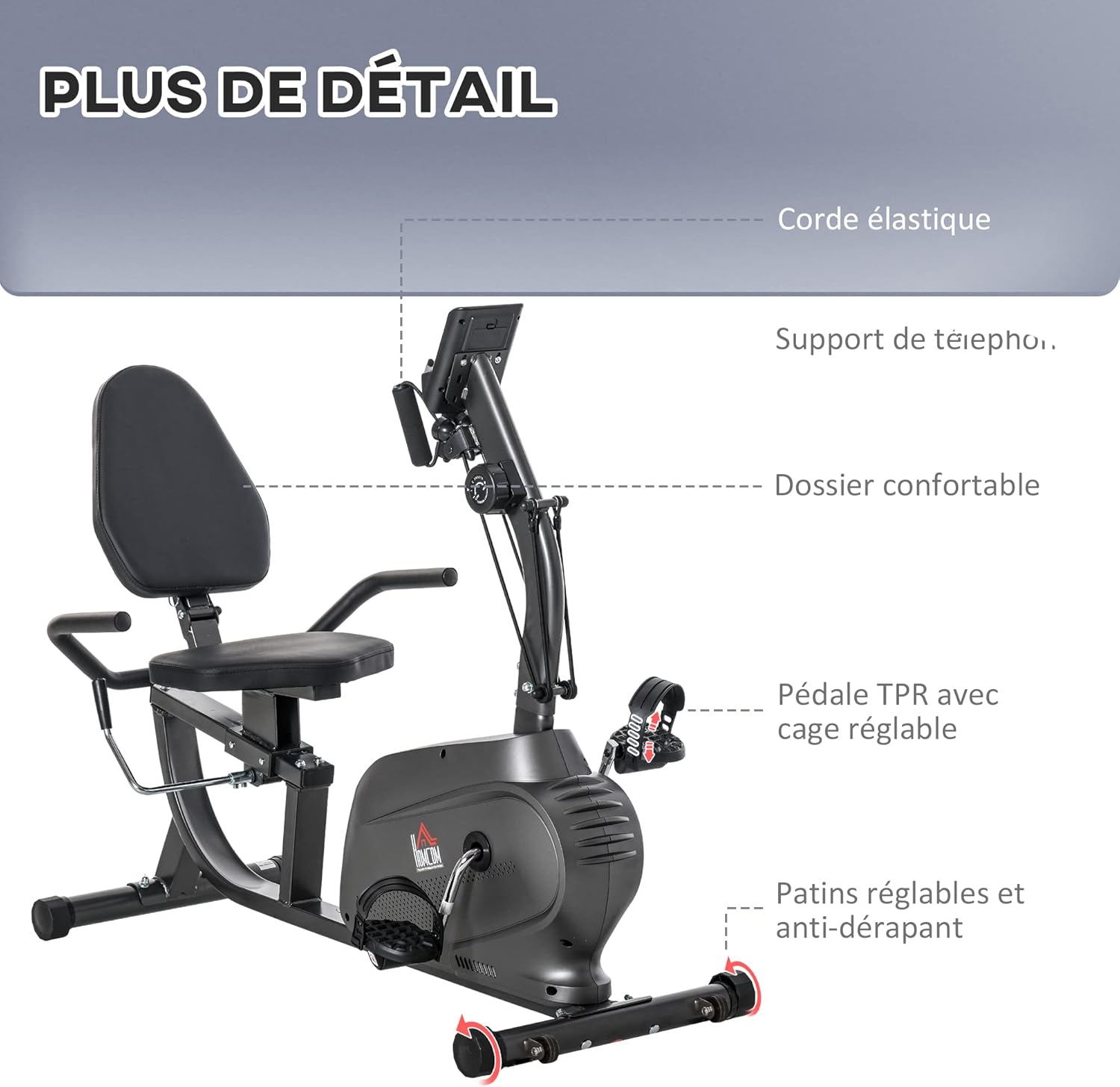
Image: Detailed view of the exercise bike, highlighting the resistance bands attached to the front post and the integrated tablet/smartphone holder.
5. Maintenance
Regular maintenance ensures the longevity and safe operation of your HOMCOM Recumbent Exercise Bike.
- Cleaning: Wipe down the bike with a damp cloth after each use to remove sweat and dust. Avoid abrasive cleaners or solvents.
- Inspection: Periodically check all bolts, nuts, and moving parts for tightness and wear. Tighten any loose fasteners.
- Lubrication: Moving parts may require occasional lubrication. Refer to the specific instructions for any parts that require it.
- Storage: When not in use, store the bike in a clean, dry environment. The integrated transport wheels allow for easy relocation.
- Battery Replacement: Replace the AAA batteries in the LCD monitor when the display becomes dim or stops functioning.
6. Troubleshooting
If you encounter any issues with your exercise bike, refer to the following common problems and solutions:
| Problem | Possible Cause | Solution |
|---|---|---|
| LCD display not working | Dead batteries; Loose sensor connection | Replace AAA batteries; Check and secure all sensor cables. |
| No resistance or inconsistent resistance | Resistance knob not adjusted; Internal mechanism issue | Ensure the resistance knob is turned to a desired level; Contact customer support if the issue persists. |
| Unusual noises during operation | Loose bolts; Parts rubbing | Check and tighten all assembly bolts; Inspect for any parts that may be rubbing and adjust if possible. |
| Bike is unstable | Uneven surface; Loose stabilizer feet | Ensure the bike is on a flat surface; Adjust the anti-slip feet on the stabilizer bars. |
7. Specifications
| Feature | Detail |
|---|---|
| Model Number | A90-2310531 |
| Brand | HOMCOM |
| Type | Recumbent Exercise Bike |
| Color | Black |
| Overall Dimensions (L x W x H) | 142 x 62 x 101 cm (55.9 x 24.4 x 39.8 inches) |
| Adjustable Length | 121-142 cm (47.6-55.9 inches) |
| Product Weight | 26.3 kg (58 lbs) |
| Maximum Weight Capacity | 110 kg (242 lbs) |
| Resistance System | Magnetic (8 levels) |
| Material | Steel, Foam, PU |
| Power Source (Monitor) | Battery Powered (2 x AAA, not included) |
| Special Features | Adjustable Seat, Resistance Bands, LCD Monitor, Transport Wheels, Tablet/Phone Holder |
8. Warranty and Support
For warranty information, technical support, or to order replacement parts, please contact HOMCOM customer service. Keep your purchase receipt and model number (A90-2310531) handy when contacting support.
You can typically find contact information on the HOMCOM official website or through your retailer.


