
1. Introduction
This manual provides detailed instructions for the safe installation, operation, and maintenance of your HOMEYLUX 6x Smart Naples LED Recessed Spotlights. Please read this manual thoroughly before installation and keep it for future reference. These smart recessed spotlights are designed for both indoor and outdoor use, including bathrooms, thanks to their IP65 rating and durable construction.
2. Safety Information
- Electrical Safety: Installation must be performed by a qualified electrician in accordance with local wiring regulations. Ensure the power supply is disconnected before installation or maintenance.
- Voltage: These spotlights operate directly on 230V. No transformer or separate driver is required for installation.
- IP65 Rating: The IP65 rating ensures protection against dust and water jets, making them suitable for damp environments like bathrooms and outdoor covered areas. However, do not submerge the product in water.
- Heat: LED lights generate heat. Ensure adequate ventilation around the fixture. Do not cover the spotlight with insulating material unless specifically designed for it.
- Damage: Do not use the product if any part is damaged. Contact customer support for replacement parts.
- Cleaning: Disconnect power before cleaning. Use a soft, dry cloth. Do not use abrasive cleaners or solvents.
3. Product Features
The HOMEYLUX Smart Naples LED Recessed Spotlights offer advanced lighting capabilities and smart home integration:
- Smart Connectivity: Integrated WiFi and Bluetooth for easy and stable connection to your home network. Control from anywhere via mobile network.
- RGBWW Lighting: Enjoy 16.5 million colors and adjustable warm white light (RGBWW) to create any desired ambiance.
- Dimmable: Smooth dimming functionality from 100% down to 10%.
- Tiltable Light Source: Fully articulated design allows for a 360° tiltable light source, enabling directional lighting.
- Durable Construction: Made from maintenance-free aluminum with an AKZO-Nobel powder coating, preventing rust and paint chipping in humid conditions.
- Ultra-Flat Design: With an installation depth of only 39mm, these spotlights fit easily into shallow ceilings.
- Smart Home Integration: Compatible with Google Home and Amazon Alexa for voice control and advanced smart functions like scheduling, geofencing, grouping, and reacting to weather conditions.
- Long Lifespan: Designed for a lifespan of 50,000 hours.
- IP65 Rated: Suitable for use in bathrooms and outdoor covered areas.
4. Installation
Follow these steps for proper installation. Installation materials are included.
4.1 Pre-Installation Checks
- Ensure the power supply is turned off at the main circuit breaker.
- Verify that the installation location is suitable and meets local electrical codes.
- Confirm ceiling thickness is appropriate for the 39mm installation depth.
4.2 Dimensions and Cut-out Size
The spotlights require a specific cut-out size for proper fitting.
- Saw Size (Cut-out Diameter): Ø 83-85 mm
- Overall Diameter: Ø 95 mm
- Installation Depth: 39 mm
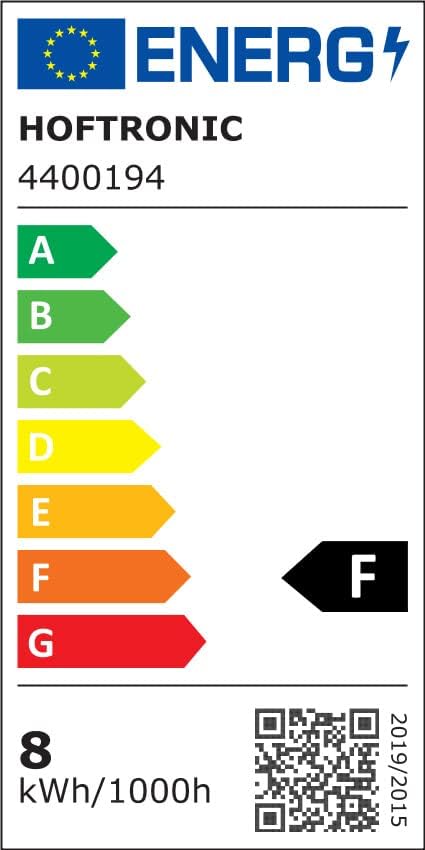
Image: Technical drawing illustrating the dimensions of the spotlight (Ø 95mm overall, Ø 83-85mm cut-out, 39mm depth) and the LED driver (136mm length, 58mm width, 27mm height) with a 120mm cable length, connecting to 230V power.
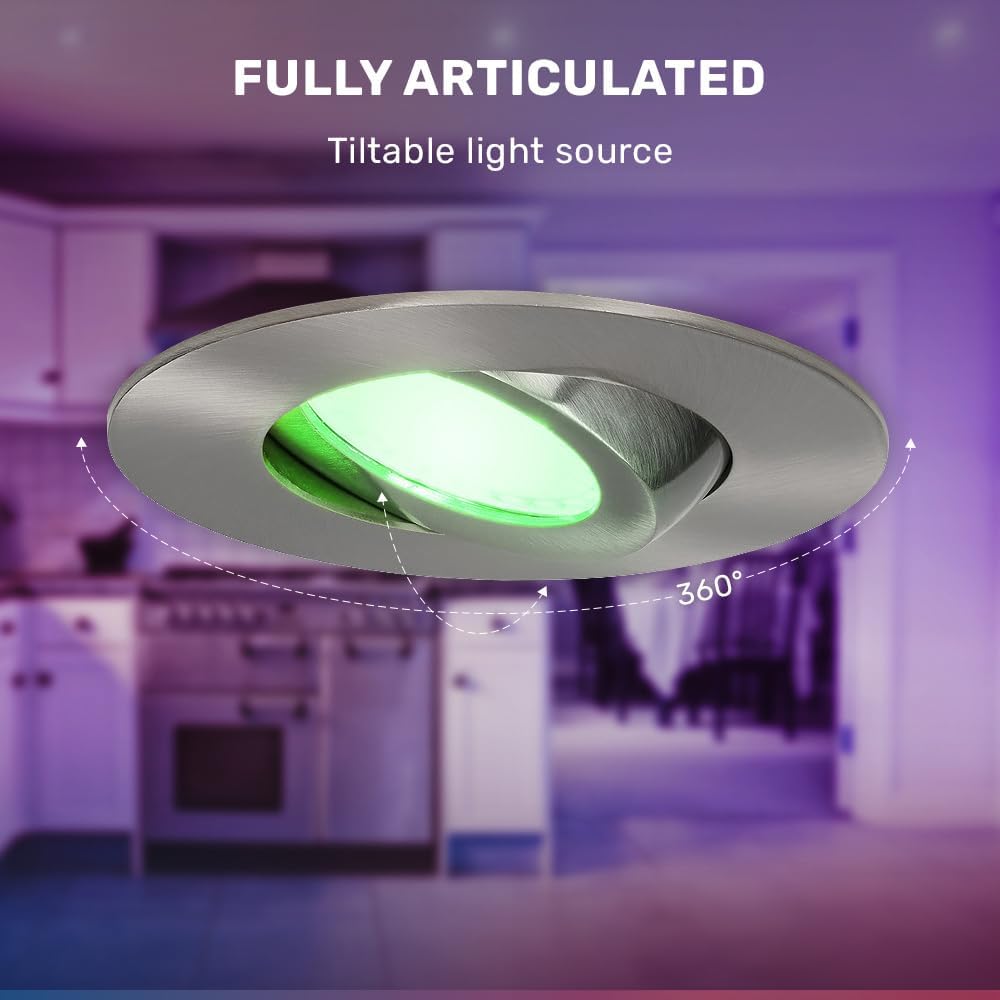
Image: A side view of the recessed spotlight installed in a ceiling, highlighting its ultra-flat design with an installation depth of 39mm. The image emphasizes "Easy Installation" and "Installation materials included."
4.3 Wiring Instructions
- Cut a circular hole in the ceiling with a diameter of 83-85 mm.
- Connect the LED driver to the 230V mains supply. The driver has terminals marked 'N' (Neutral) and 'L' (Live). Ensure correct polarity.
- Connect the spotlight cable to the LED driver. This connection is typically plug-and-play.
- Gently push the spring clips on the sides of the spotlight upwards and insert the spotlight into the cut-out hole. The clips will secure the spotlight in place.
- Ensure the spotlight is flush with the ceiling surface.
- Restore power at the main circuit breaker.

Image: A close-up of the LED driver unit connected to the recessed spotlight, illustrating the compact design and indicating a 5-year warranty and 50,000 hours lifespan.
5. Operating Instructions
5.1 Initial Power On
After installation and restoring power, the spotlights should turn on. They will typically be in a default white light mode.
5.2 Smart App Integration
To unlock the full potential of your Smart Naples spotlights, download the HOFTRONIC Smart App (or a compatible smart home app like Tuya Smart or Smart Life) from your device's app store. The app is available on Google Play and the App Store.

Image: A smartphone screen displaying the HOFTRONIC Smart App interface, highlighting features such as Geofencing, Countdown & Timers, Music Sync, Grouping, Easy Pairing, and Smart Scenes. Links to Google Play and App Store are also visible.
- Download the App: Search for "HOFTRONIC Smart" or a compatible smart home app in your app store.
- Register/Log In: Create an account or log in if you already have one.
- Add Device: Follow the in-app instructions to add a new device. The spotlights use both WiFi and Bluetooth for easy pairing. Ensure your phone's Bluetooth is enabled during the pairing process.
- Connect to Wi-Fi: Select your 2.4GHz Wi-Fi network and enter the password.
- Control: Once connected, you can control individual spotlights or groups of spotlights.
5.3 Smart Functions
- Color and Brightness Adjustment: Use the app to select from 16.5 million colors or adjust the warm white light. Dim the brightness from 100% to 10%.
- Grouping: Group multiple spotlights together to control them simultaneously.
- Scheduling: Set schedules for your lights to turn on/off or change color at specific times.
- Geofencing: Configure lights to react based on your location (e.g., turn on when you arrive home).
- Voice Control: Integrate with Google Home or Amazon Alexa for hands-free control.
- Music Sync: Some apps offer features to sync lighting effects with music.

Image: A visual representation of the spotlight's capabilities, showing the RGBWW color spectrum with 16.5 million colors and three dimming levels (100%, 50%, 10%) for adjustable brightness.

Image: The recessed spotlight demonstrating its "Fully Articulated" feature, with the light source tilted and a 360° rotation indicated by arrows, allowing for adjustable light direction.

Image: The recessed spotlight being splashed with water, illustrating its IP65 rating and resistance to water and dust, making it suitable for wet environments.
6. Maintenance
- Cleaning: Disconnect power before cleaning. Wipe the surface of the spotlight with a soft, dry, or slightly damp cloth. Do not use harsh chemicals or abrasive materials.
- No User-Serviceable Parts: The LED light source is integrated and not user-replaceable. Do not attempt to open or repair the fixture.
- Software Updates: Keep your smart home app updated to ensure optimal performance and access to new features.
7. Troubleshooting
| Problem | Possible Cause | Solution |
|---|---|---|
| Spotlight does not turn on. | No power supply; loose wiring; faulty unit. | Check circuit breaker. Verify wiring connections. If problem persists, contact customer support. |
| Cannot connect to Wi-Fi/Bluetooth. | Incorrect Wi-Fi password; 5GHz Wi-Fi network; Bluetooth off; too far from router. | Ensure correct 2.4GHz Wi-Fi network. Enable Bluetooth. Move closer to router. Reset spotlight (refer to app for reset procedure). |
| Spotlight flickers or dims unexpectedly. | Unstable power supply; interference; faulty unit. | Check power supply stability. Ensure no strong electromagnetic interference. Contact customer support if issue continues. |
| Voice control not working. | Incorrect smart assistant setup; microphone issues; app not linked. | Verify smart assistant (Google Home/Alexa) is correctly linked to the HOFTRONIC Smart App. Check microphone on your smart device. |
8. Specifications
| Feature | Detail |
|---|---|
| Brand | HOFTRONIC (Product line: HOMEYLUX) |
| Model Number | 4407780 |
| Product Dimensions (L x W x H) | 9.6 x 9.6 x 6.5 cm (Overall); 9.5L x 9.5W x 3.9H cm (Recessed part) |
| Cut-out Diameter | 83-85 mm |
| Installation Depth | 39 mm |
| Material | Aluminum with AKZO-Nobel powder coating |
| Color | Stainless Steel finish |
| Light Type | LED (Integrated) |
| Wattage | 8 Watts |
| Luminous Flux | 600 Lumens |
| Voltage | 230 Volts |
| Color Temperature | RGBWW (16.5 million colors + 3000 Kelvin warm white) |
| Incandescent Equivalent | 50 Watts |
| IP Rating | IP65 |
| Special Features | WiFi + Bluetooth, Dimmable, Tiltable (360°), Smart Home compatible (Google Home, Amazon Alexa), Geofencing, Scheduling, Grouping. |
| Lifespan | 50,000 hours |
| Energy Label | G (as per 2019/2015 regulation) |

Image: EU Energy Label for HOFTRONIC model 4407780, indicating an energy efficiency class G and energy consumption of 8 kWh per 1000 hours. Click the image to view the official EPREL product page.
9. Warranty and Support
HOFTRONIC provides a 5-year warranty on these HOMEYLUX Smart Naples LED Recessed Spotlights, ensuring high quality and reliability.
- For technical support, troubleshooting assistance, or warranty claims, please contact HOFTRONIC customer service.
- Keep your purchase receipt as proof of purchase for warranty purposes.
- Software updates for the smart features are provided through the HOFTRONIC Smart App.