
BABY born 515 830192
BABY born City RC Glam Scooter Instruction Manual
Model: 515 830192
Introduction
This manual provides essential information for the safe and proper use of your BABY born City RC Glam Scooter. Designed for interactive play with BABY born dolls, this remote-controlled scooter offers dynamic movement and engaging features. Please read this manual thoroughly before initial use and retain it for future reference.

Image: The complete BABY born City RC Glam Scooter set, including the pink and white scooter, white remote control with pink buttons, a sheet of glitter stickers, and the product packaging.
Safety Information
Important Safety Guidelines:
- Remove all packaging materials, including tags and plastic fasteners, before giving this item to a child.
- Product design and color may vary slightly from images shown.
- Keep this instruction manual and the product packaging, as they contain important information.
- This product is recommended for children aged 36 months to 10 years.
- Adult supervision is recommended during play.
Setup
1. Unboxing and Inspection
Carefully remove all components from the packaging. Inspect the scooter and remote control for any visible damage. Ensure all parts listed in the package contents are present.
2. Battery Installation
The BABY born City RC Glam Scooter requires batteries for operation (not included). It is recommended to use alkaline manganese (alkali) batteries for optimal performance, higher capacity, and lower self-discharge. Rechargeable batteries (1.2V) can also be used, though they have a lower voltage than standard batteries (1.5V).
- Locate the battery compartment on both the scooter and the remote control.
- Using a small screwdriver, open the battery compartment cover.
- Insert the required number and type of batteries, ensuring correct polarity (+/-).
- Securely close the battery compartment cover.
3. Applying Stickers
Personalize your scooter with the included glitter stickers. Carefully peel off the desired stickers and apply them to the scooter's surface as desired.

Image: A hand carefully placing a glitter sticker onto the front panel of the pink scooter, demonstrating the customization process.
Operating Instructions
1. Remote Control Functions
The scooter is controlled via the wireless remote control. Familiarize yourself with the buttons:
- Forward/Backward: Use the designated buttons to move the scooter forward or backward.
- Left/Right: Use the designated buttons to steer the scooter left or right. When turning, the side indicators on the scooter will flash.

Image: A pair of hands holding the compact white remote control, highlighting its pink directional buttons.
2. Placing the Doll on the Scooter
The scooter is designed for BABY born dolls (43 cm). Ensure the doll is seated securely on the scooter's seat. The hand straps on the handlebars provide a secure grip for the doll.

Image: A BABY born doll, wearing a helmet, positioned on the pink RC Glam Scooter, ready for play.
3. Using the Pannier Rack
The scooter features a pannier rack at the rear, offering space for small accessories or shopping bags for your doll.
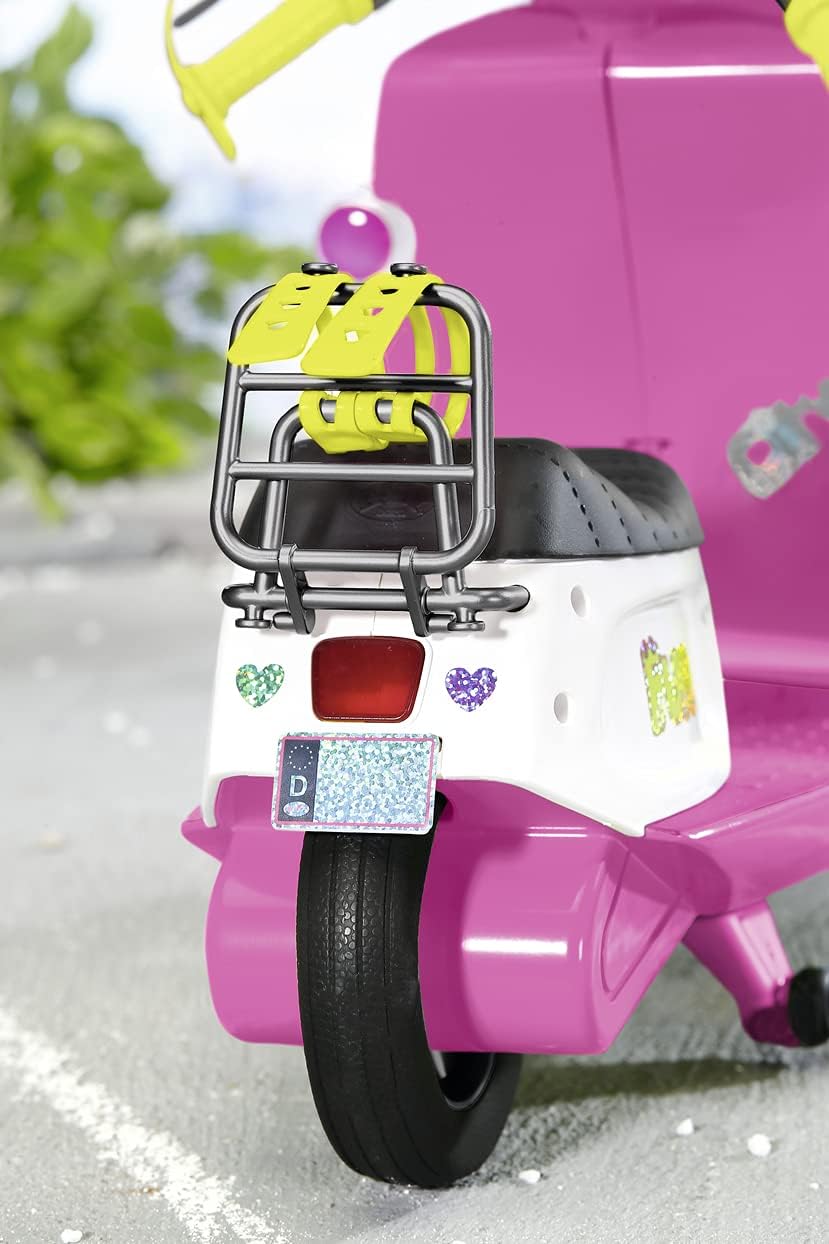
Image: A detailed view of the rear of the scooter, showing the functional pannier rack designed for carrying doll accessories.
Maintenance
1. Cleaning
To clean the scooter and remote control, wipe them with a soft, damp cloth. Do not immerse in water or use harsh cleaning agents.
2. Battery Care
- Always remove batteries from the scooter and remote control if they will not be used for an extended period.
- Do not mix old and new batteries, or different types of batteries.
- Dispose of used batteries responsibly according to local regulations.
Troubleshooting
| Problem | Possible Cause | Solution |
|---|---|---|
| Scooter does not respond to remote control. |
|
|
| Scooter moves erratically or uncontrollably. |
|
|
| Indicators do not flash when turning. |
|
|
Specifications
| Feature | Detail |
|---|---|
| Model Number | 515 830192 |
| Brand | BABY born |
| Product Dimensions | 37 x 18 x 30 cm (L x W x H) |
| Item Weight | 1.68 Kilograms |
| Color | Pink |
| Recommended Age | 36 months - 10 years |
| Batteries Required | Yes (not included) |
| Assembly Required | No |
| Included Components | BABY born City RC Scooter, Remote Control, Sticker Sheet |
Warranty and Support
For warranty information, technical support, or replacement parts, please refer to the contact details provided on the product packaging or visit the official BABY born website. Keep your proof of purchase for any warranty claims.
No official product videos were available for inclusion in this manual.
Ask a question about this manual
Ask about setup, troubleshooting, compatibility, parts, safety, or missing instructions. Manuals+ will review the question and use this page’s manual context to help answer it.