
1. Introduction
Thank you for choosing the ENFITNIX XlitET Smart Bike Tail Light. This manual provides essential information for the proper installation, operation, and maintenance of your new tail light. Please read it thoroughly before use to ensure optimal performance and safety.
The XlitET is designed to enhance your cycling visibility with advanced features such as intelligent brake sensing, automatic light adjustment, and a durable, waterproof construction.

Image: The ENFITNIX XlitET Smart Tail Light, showcasing its compact design and key features like brake sensing, auto brightness, auto start/stop, IPX5 waterproof rating, lightweight design, 500mAh Li-ion battery, USB Type-C, enhanced visibility, and CNC chassis.
2. Product Features
- Durable Alloy Shell: Constructed from 6061 Aluminum alloy for robust protection. Features COB LED and a specialized lens for high visibility without glare.
- Intelligent Light Sensing: The tail light automatically turns off in daylight and activates at night. It also turns off after 30 seconds of strong light exposure (e.g., car headlights) and automatically reactivates with movement. If no movement is detected for 10 seconds, it will automatically turn off.
- Advanced Brake Sensor: An integrated accelerometer ensures accurate brake detection. Upon braking, the light automatically illuminates at ultra-bright intensity to signal deceleration.
- IPX5 Waterproof: Designed to withstand various weather conditions, ensuring reliable performance even in rain.
- Easy Installation: Includes both saddle mounting and seat post mounting options, compatible with most road bikes. Supplied with a saddle mounting bracket and an adjustable silicone strap for quick installation or detachment.

Image: Illustration of the self-adapting brightness feature, detailing the integrated light sensor and high-power LED for optimal visibility.
3. Package Contents
Verify that all items are present in the package:
- ENFITNIX XlitET Smart Bike Tail Light
- USB Type-C Charging Cable
- Saddle Mounting Bracket
- Seatpost Mounting Strap
- Zip-Ties (x4)
- User Manual
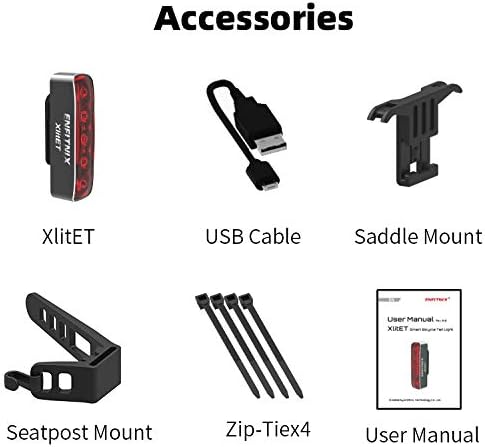
Image: All included accessories: XlitET light, USB cable, saddle mount, seatpost mount, zip-ties, and user manual.
4. Installation
The XlitET tail light offers versatile mounting options for your convenience.
4.1. Seatpost Mounting
- Attach the silicone strap to the back of the XlitET light.
- Wrap the silicone strap around your bicycle's seatpost and secure it. Ensure the light is facing directly backward.

Image: Step-by-step visual guide for attaching the XlitET tail light to a bicycle seatpost using the provided strap.
4.2. Saddle Mounting
- Secure the saddle mounting bracket to the rails under your bicycle saddle using the provided zip-ties. Ensure it is firmly attached.
- Slide the XlitET tail light onto the bracket until it clicks into place.

Image: Visual demonstration of installing the XlitET tail light using the saddle mounting bracket and zip-ties.
4.3. Other Mounting Options
The XlitET can also be attached to seatpacks or backpacks for additional versatility.

Image: The XlitET tail light mounted on a bicycle seatpack.

Image: The XlitET tail light attached to a backpack for personal visibility.
5. Operating Instructions
5.1. Power On/Off
- Power On: Press and hold the function key (located on the side) for 2 seconds.
- Power Off: Press and hold the function key for 2 seconds.
5.2. Mode Switching
The XlitET features 6 flash patterns. Short press the function key to cycle through the available light modes.
5.3. Auto Mode vs. Manual Mode
The tail light supports two operating modes: Manual Mode and Auto Mode.
- Switching Modes: Double-click the function key to toggle between Manual Mode and Auto Mode.
- Manual Mode: The light remains ON until manually turned off.
- Auto Mode: The light utilizes its intelligent sensors for automatic operation.

Image: Visual guide on switching between Manual and Auto modes by double-clicking the function button.
5.4. Intelligent Light Sensing (Auto Mode)
- The light automatically turns ON when movement is detected in low light conditions.
- The light automatically turns OFF if no movement is detected for 10 seconds.
- The light automatically turns OFF in bright daylight.
5.5. Brake Sensing
When braking, the integrated accelerometer detects deceleration, and the light will automatically switch to an ultra-bright mode to alert others.

Image: Operational conditions of the light, including behavior during movement, inactivity, braking, and low battery status.
Video: Demonstrates the ENFITNIX XlitET Smart Bike Light's features, including brake sensing and auto on/off functionality during a bike ride.
6. Charging
The XlitET is equipped with a 500mAh rechargeable Li-ion battery and charges via a Type-C USB port.
- Charging: Connect the provided USB Type-C cable to the light's charging port and to a standard USB power source (e.g., computer, wall adapter).
- Charging Indicator: The charge indicator LED will show charging status.
- Low Battery Indication: When the battery is low, the middle LED will illuminate to indicate approximately one hour of remaining runtime.

Image: Information on the 500mAh rechargeable Li-ion battery, including runtime for various flash modes and the low battery indicator.
7. Specifications
| Feature | Detail |
|---|---|
| Model Name | XlitET |
| Brand | ENFITNIX |
| Material | 6061 Aluminum Alloy |
| Power Source | Battery Powered (500mAh Li-ion) |
| Water Resistance Level | IPX5 (Waterproof) |
| Item Weight | 30.5 Grams |
| Mounting Type | Seat Mount, Seatpost Mount |
| Number of Settings | 6 Flash Modes |
| Light Output Maximum | 50 Lumens |
| Auto Part Position | Rear |

Image: A table summarizing the product specifications including dimensions, battery, material, flash modes, weight, runtime, and waterproof rating.
8. Maintenance
- Cleaning: Wipe the light with a soft, damp cloth. Do not use abrasive cleaners or solvents.
- Charging: Charge the battery regularly, even if not in frequent use, to maintain battery health. Avoid fully discharging the battery for extended periods.
- Storage: Store the light in a cool, dry place when not in use.
- Water Resistance: While IPX5 waterproof, avoid prolonged submersion in water. Ensure the USB port cover is securely closed.
9. Troubleshooting
- Light Not Turning On: Ensure the battery is charged. Press and hold the function key for 2 seconds to power on.
- Auto Mode Not Working: Double-check that the light is in Auto Mode (double-click the function key to switch). Ensure there is sufficient darkness for the light sensor to activate.
- Brake Sensing Not Activating: Ensure the light is securely mounted and not loose, as this can affect accelerometer accuracy.
- Charging Issues: Try a different USB cable or power source. Ensure the charging port is clean and free of debris.
10. Warranty and Support
ENFITNIX products are manufactured to high-quality standards. For warranty information or technical support, please refer to the contact details provided with your purchase or visit the official ENFITNIX website.

