
1. Introduction
Thank you for choosing the HOMCOM Electric Lift Recliner Chair. This manual provides essential information for the safe and efficient use, assembly, and maintenance of your new recliner. Please read these instructions carefully before use and retain them for future reference.
This electric lift recliner is designed to offer comfort and assistance, particularly for individuals who may have difficulty sitting down or standing up from a seated position. It features a smooth electric recline function and an integrated footrest for optimal relaxation.
2. Safety Instructions
- Ensure all parts are present and undamaged before assembly. Do not use if any parts are missing or broken.
- Keep children and pets away from the chair during operation to prevent injury.
- Do not allow children to play with the remote control or operate the chair unsupervised.
- Place the chair on a level, stable surface.
- Ensure there is sufficient clear space around the chair for reclining and lifting functions.
- Do not place hands or feet near moving parts during operation.
- Avoid spilling liquids on the remote control or electrical components.
- Unplug the chair from the power outlet before cleaning or maintenance.
- Do not attempt to repair the electrical components yourself. Contact qualified service personnel.
- The maximum weight capacity for this chair is 150 kg (330 lbs). Do not exceed this limit.
- This chair is for indoor use only.
3. Package Contents
Please check the package to ensure all components are included:
- Electric Lift Recliner Chair (main body)
- Backrest
- Remote Control
- Power Adapter
- Instruction Manual
The chair is delivered in one box.
4. Setup and Assembly
Assembly is required for this product. Follow these general steps. Refer to the detailed assembly diagram included in your package for specific instructions.
- Unpack all components and lay them out on a clean, soft surface to prevent scratches.
- Attach the backrest to the main seat frame. Ensure it clicks securely into place.
- Connect any necessary electrical cables between the backrest and the seat, if applicable.
- Connect the power adapter to the chair's power input and then plug it into a wall outlet.
- Test all functions using the remote control before full use.

5. Operating Instructions
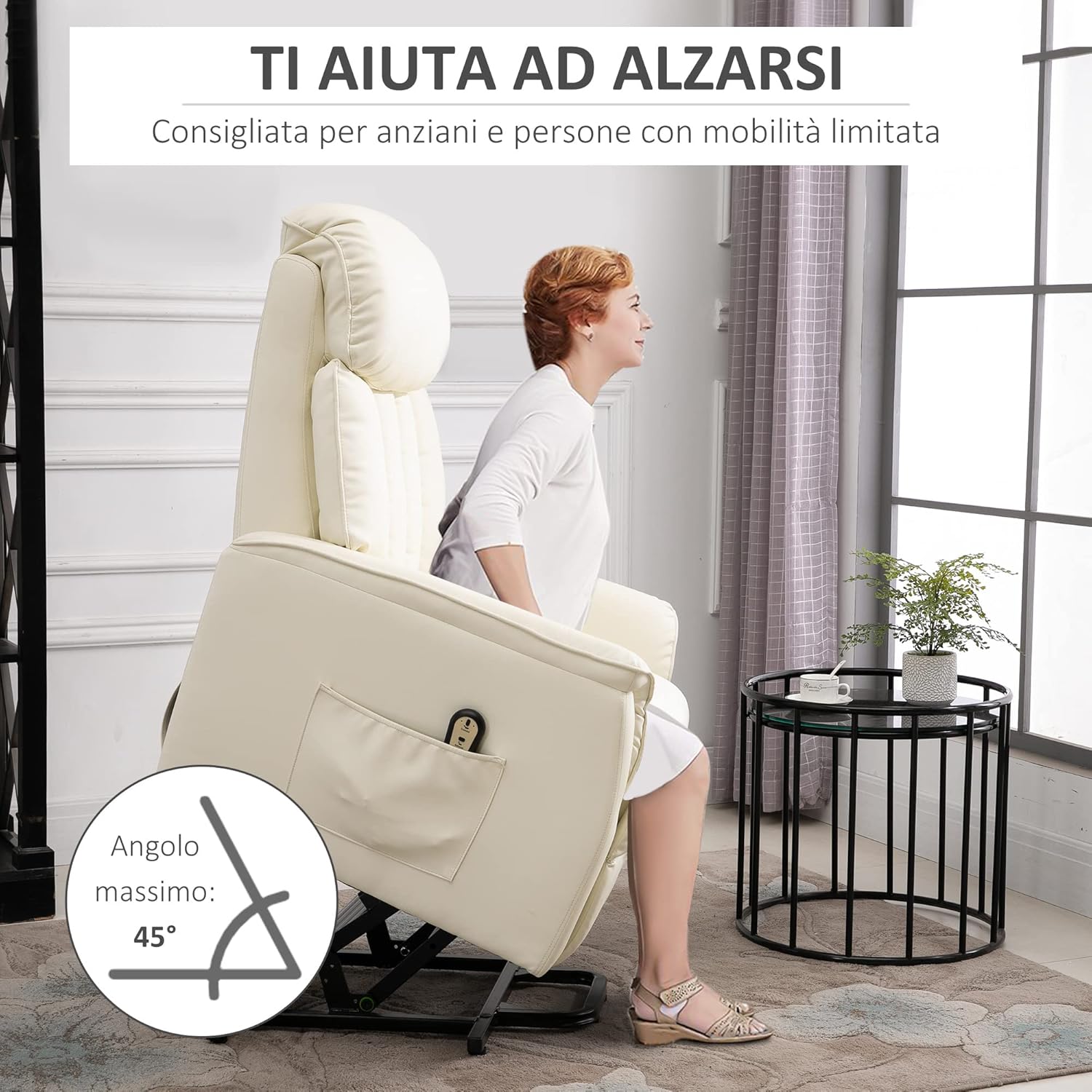
The HOMCOM Electric Lift Recliner Chair is operated using a wired remote control, conveniently stored in a side pocket.

5.1. Sitting Down
Ensure the chair is in the upright position. If it is in the lift position, use the remote control to lower it gently until it is fully seated on its base. Carefully sit down in the chair.
5.2. Reclining
To recline the chair, press and hold the appropriate button on the remote control. The chair will smoothly recline up to 145 degrees, and the integrated footrest will extend. Release the button when you reach your desired position. You can use this function for reading, watching TV, or taking a nap.

5.3. Lifting to Stand
To assist with standing, press and hold the lift button on the remote control. The chair will gently tilt forward, lifting you to an almost standing position (up to a 45-degree angle), reducing strain on your back and knees. Once you are comfortably standing, release the button.
5.4. Remote Control
The remote control has intuitive buttons for operating the lift and recline functions. Familiarize yourself with the buttons before use. Always keep the remote control in the side pocket when not in use to prevent misplacement.
Video 1: HOMCOM Electric Lift Recliner Demonstration. This video demonstrates the electric lift and recline functions of the cream-colored chair, showing how a user can easily sit, recline, and stand up with the remote control.
6. Maintenance
Proper maintenance will extend the life of your recliner.
- Cleaning: The faux leather upholstery can be easily cleaned from stains with a damp cloth. Avoid using harsh chemicals or abrasive cleaners.
- Regular Inspection: Periodically check all screws and connections to ensure they are tight.
- Electrical Components: Keep the power cord and remote control free from damage. Do not bend or pinch the cables.
- Moving Parts: The mechanical parts are designed for smooth operation. Avoid forcing the chair into positions.

7. Troubleshooting
| Problem | Possible Cause | Solution |
|---|---|---|
| Chair does not operate. | Power cord unplugged; power outlet not working; remote control damaged. | Check if the power cord is securely plugged into both the chair and the wall outlet. Test the outlet with another device. Inspect the remote control for damage. |
| Chair moves slowly or with difficulty. | Obstruction in mechanism; weight limit exceeded. | Check for any objects obstructing the moving parts. Ensure the user's weight does not exceed 150 kg. |
| Unusual noises during operation. | Loose components; foreign object. | Inspect the chair for any loose screws or components. Check for foreign objects caught in the mechanism. If the noise persists, discontinue use and contact customer support. |
8. Specifications
| Feature | Detail |
|---|---|
| Model Number | 713-067V91CW |
| Color | Cream |
| Material | PU Leather (Faux Leather), Steel Alloy |
| Overall Dimensions (Sitting) | 80L x 94D x 104H cm |
| Reclined Dimensions | 80L x 156D x 86H cm |
| Lifted Dimensions | 80L x 82D x 138H cm |
| Seat Dimensions | 52L x 55D x 46H cm |
| Max. Weight Capacity | 150 kg |
| Recline Angle | Up to 145° |
| Lift Angle | Up to 45° |
| Assembly Required | Yes |
| Care Instructions | Wipe clean with a damp cloth |
9. Warranty and Support
For warranty information or technical support, please refer to the contact details provided with your purchase documentation or visit the official HOMCOM website. Keep your proof of purchase for any warranty claims.
For further assistance, you may contact HOMCOM customer service through their official channels.
Manufacturer: Aosom Italy
Brand: HOMCOM