
ZDTECH ZD-IPM-ANT-5G
Contents
ZDTECH Indoor Wall Mount Panel Antenna User Manual
Model: ZD-IPM-ANT-5G
Brand: ZDTECH
1. Introduction
This manual provides essential instructions for the proper installation, operation, and maintenance of your ZDTECH Indoor Wall Mount Panel Antenna (Model: ZD-IPM-ANT-5G). This antenna is designed to enhance indoor cellular signal reception for 2G, 3G, 4G, and 5G networks (698-4000 MHz) when used as part of a complete cellular signal booster system. Please note: This antenna does not generate signals on its own and must be connected to a compatible signal booster.
2. Safety Information
- Ensure all connections are secure to prevent signal loss or damage.
- Do not expose the antenna to extreme moisture or temperatures outside its operating range (-40°C to +65°C).
- This antenna is for indoor use only.
- Always disconnect power from the signal booster before making or changing antenna connections.
3. Package Contents
Upon unpacking, please verify that all items are present and undamaged:
- ZDTECH Indoor Wall Mount Panel Antenna (with integrated cable and N-Female connector)
- Wall mounting bracket
- Plastic expansion bolts (x4)
- Tapping screws (x4)

Figure 3.1: ZDTECH Indoor Wall Mount Panel Antenna with mounting accessories.
4. Specifications
4.1. Electrical Specifications
| Parameter | Value |
|---|---|
| Frequency Range | 698-4000 MHz |
| Connector Type | N-Female |
| Gain | 6 dBi, 8 dBi, 9.5 dBi (depending on frequency band) |
| VSWR | ≤1.8, ≤1.5, ≤1.5 (depending on frequency band) |
| Polarization | Vertical |
| Horizontal Beamwidth | 98°, 85°, 65° (depending on frequency band) |
| Vertical Beamwidth | 85°, 60°, 45° (depending on frequency band) |
| Input Impedance | 50 Ω |
| Max. Power | 50 W |
4.2. Mechanical Specifications
| Parameter | Value |
|---|---|
| Dimensions (L x W x H) | 6.5 x 6.1 x 1.77 inches (165 x 155 x 50 mm) |
| Weight | 0.25 kg (approx. 10.8 ounces) |
| Cover Material | ABS |
| Operating Temperature | -40°C to +65°C |

Figure 4.1: Detailed dimensions and specifications.
5. Setup and Installation
This indoor panel antenna is designed for wall mounting. Proper placement and orientation are crucial for optimal performance within your signal booster system.
- Select a Location: Choose an indoor location where improved signal is desired. The antenna should be mounted on a wall, ideally facing the area where you need the strongest signal. Ensure there is sufficient space for the antenna and its cable.
- Mount the Fixing Plate:
- Hold the mounting bracket against the wall at your desired installation height.
- Mark the positions for the four screw holes.
- Drill pilot holes at the marked positions. Insert the plastic expansion bolts into the drilled holes.
- Secure the mounting bracket to the wall using the tapping screws.
- Attach the Antenna: Slide the antenna onto the fixed mounting plate. The antenna has a hanging plate on its back that will engage with the bracket. Ensure it is securely seated.
- Connect to Signal Booster: Connect the N-Female connector of the antenna's integrated cable to the "Indoor Antenna" or "Mobile" port on your cellular signal booster. Ensure the connection is hand-tight.
- Antenna Orientation: For optimal performance, ensure that the indoor panel antenna is not pointed directly at the outdoor antenna. They should be oriented in opposite directions to prevent oscillation and maximize signal isolation.

Figure 5.1: Wall mounting installation steps.
6. Operating Instructions
The ZDTECH Indoor Wall Mount Panel Antenna functions as a crucial component within a cellular signal booster system. It receives the amplified signal from your booster and broadcasts it into your indoor space, and conversely, collects signals from your mobile devices to send back to the booster.
- System Integration: Ensure your indoor antenna is correctly connected to the indoor port of your signal amplifier (booster). An outdoor antenna should also be connected to the outdoor port of the amplifier.
- Power On Booster: Once all antenna connections (outdoor and indoor) are secure, power on your signal booster according to its specific instructions.
- Signal Distribution: The indoor panel antenna will then distribute the boosted cellular signal throughout the designated indoor area. The directional nature of this panel antenna means it will project the signal most effectively in the direction it is facing.
- Optimize Placement: If signal improvement is not as expected, consider slightly adjusting the angle or position of the indoor antenna to better cover the weak signal area.
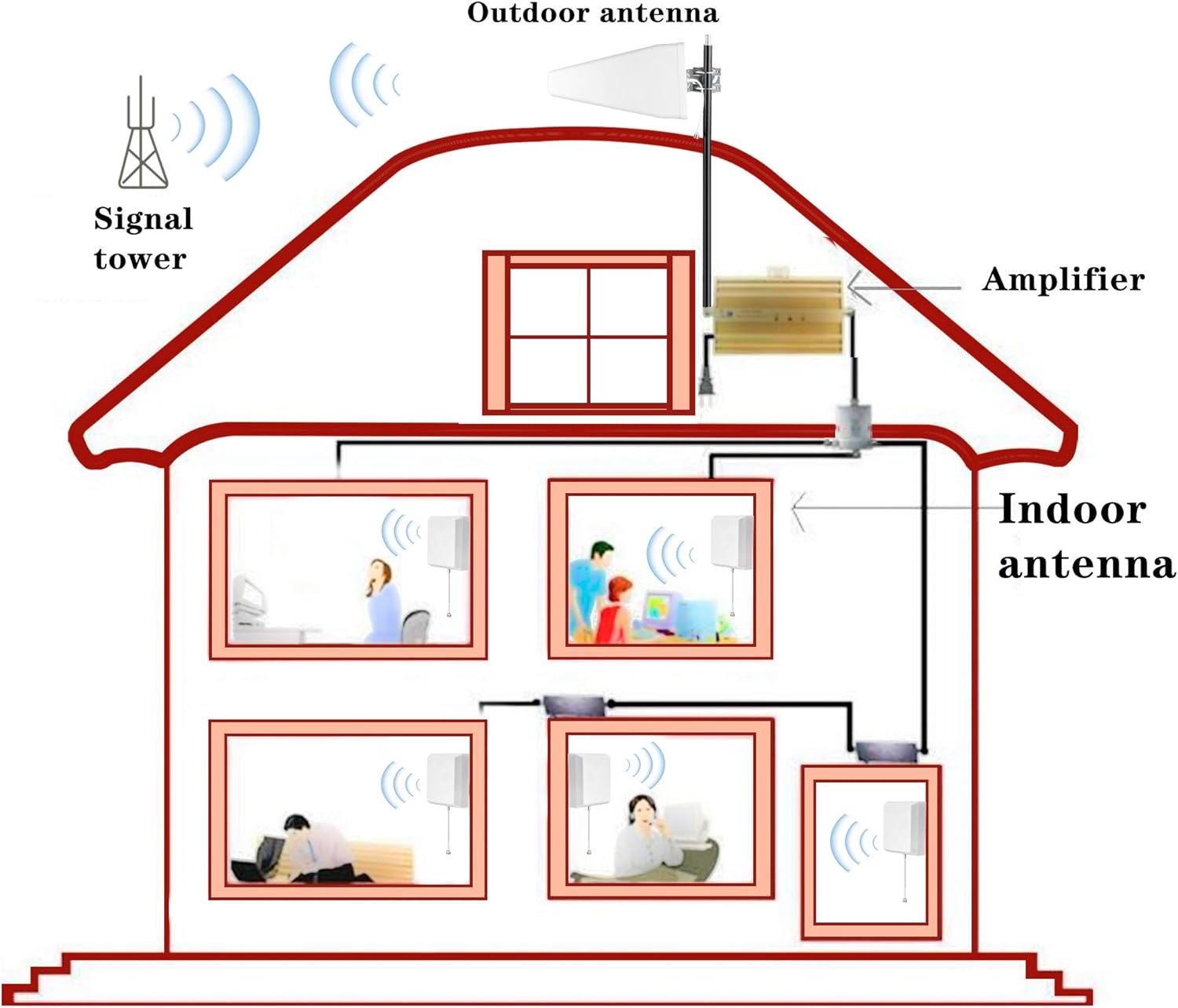
Figure 6.1: Typical cellular signal booster system setup.
7. Maintenance
The ZDTECH Indoor Wall Mount Panel Antenna requires minimal maintenance to ensure continued performance.
- Cleaning: Periodically wipe the antenna's surface with a soft, dry cloth to remove dust. Do not use harsh chemicals or abrasive cleaners.
- Connection Check: Occasionally check the N-Female connector to ensure it remains securely tightened to the signal booster.
- Environmental Conditions: Ensure the antenna remains in a dry, indoor environment within its specified operating temperature range.
8. Troubleshooting
If you experience issues with your signal booster system, consider the following troubleshooting steps related to the indoor panel antenna:
- No Signal Improvement:
- Verify that the indoor antenna is securely connected to the "Indoor" or "Mobile" port of your signal booster.
- Ensure the signal booster is powered on and functioning correctly (refer to your booster's manual).
- Check the orientation of the indoor antenna. It should be directed towards the area needing signal improvement.
- Confirm that the indoor and outdoor antennas are sufficiently isolated from each other (not pointing at each other) to prevent oscillation.
- Weak Signal in Specific Areas:
- Adjust the angle or position of the indoor panel antenna to better cover the weak signal area.
- Consider if additional indoor antennas are needed for larger or more complex spaces (requires a signal splitter and additional cables, not included).
- Intermittent Signal:
- Inspect all cable connections for looseness or damage.
- Ensure there are no new obstructions between the indoor antenna and your mobile devices.
9. Warranty and Support
For warranty information and technical support, please refer to the documentation provided with your complete signal booster kit or contact ZDTECH customer service directly. You can typically find contact information on the manufacturer's website or through your point of purchase.
Manufacturer: ZDTECH
Model Number: ZD-IPM-ANT-5G
Ask a question about this manual
Ask about setup, troubleshooting, compatibility, parts, safety, or missing instructions. Manuals+ will review the question and use this page’s manual context to help answer it.