
Introduction
This instruction manual provides detailed guidance for the BRIO Smart Tech Sound Action Tunnel Deluxe Set, model 63397700. This interactive wooden train toy is designed to enhance cognitive development through engaging play. It features classic BRIO magnetic couplings and is made from FSC-certified wood. Please read this manual thoroughly before assembly and operation to ensure proper use and enjoyment of the product.
Safety Information
WARNING: Not for children under 3 years.
This product contains small parts which may pose a choking hazard. Adult supervision is recommended during play. Ensure all components are securely assembled before use.
Package Contents
The BRIO Smart Tech Sound Action Tunnel Deluxe Set includes a variety of components for building an interactive train world. Please verify that all items are present upon opening the package.

Image: The BRIO Smart Tech Sound Action Tunnel Deluxe Set in its packaging, showing two orange storage bins containing the various components.
- Smart Tech Sound Train Engine
- Various Wooden Track Pieces (straight, curved, ascending/descending)
- Smart Tech Sound Tunnels (e.g., Action Tunnel, Sound Tunnel)
- Train Wash Station
- Bridge Elements
- Figures and Accessories (e.g., trees, signs, characters)
- Storage Bins
- Instruction Manual (this document)
Setup and Assembly
1. Battery Installation
The Smart Tech Sound Train Engine requires 2 LR44 batteries (not included). To install:
- Locate the battery compartment on the underside of the train engine.
- Using a small screwdriver, open the battery compartment cover.
- Insert 2 LR44 batteries, ensuring correct polarity (+/-).
- Replace the cover and secure it with the screw.
2. Track Layout Assembly
The set includes various wooden track pieces that connect using a simple interlocking system. You can create numerous layouts. Refer to the included layout suggestions or design your own.

Image: A fully assembled BRIO Smart Tech Sound Action Tunnel Deluxe Set, showcasing a complex track layout with tunnels, bridges, and various accessories.
- Connect straight and curved track pieces to form your desired path.
- Integrate ascending and descending tracks to create elevation changes.
- Place bridges and supports where needed for elevated sections.
3. Integrating Smart Tech Sound Elements
Position the Smart Tech Sound tunnels and the train wash station along your track layout. These elements contain sensors that interact with the Smart Tech Sound Train Engine.
- Ensure Smart Tech elements are placed on flat, stable surfaces.
- Connect track pieces directly to the entry and exit points of the tunnels and stations.
Operating Instructions
1. Powering On the Train Engine
To turn on the Smart Tech Sound Train Engine, press and hold the power button located on the top of the engine for a few seconds until you hear a sound or see an indicator light.
2. Smart Tech Sound Interactions
The train engine interacts with the Smart Tech Sound tunnels and stations, triggering various sounds and actions as it passes through them.
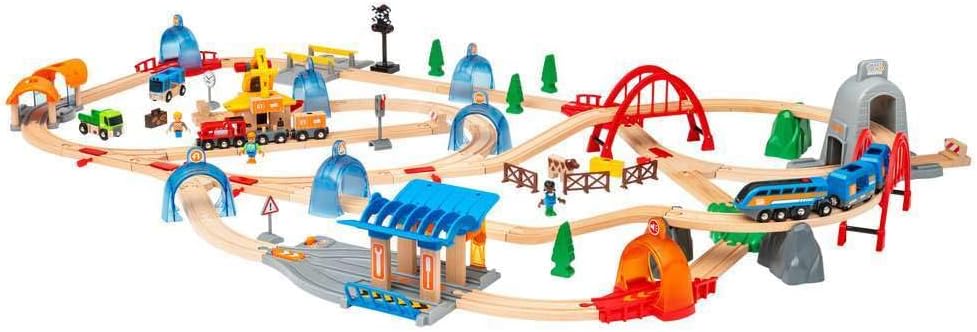
Image: A hand pressing a button on the Smart Tech Sound train, followed by the train entering an orange tunnel, triggering a "CHOO CHOO!" sound effect.
- Action Tunnels: When the train passes through an Action Tunnel, it will trigger specific sounds or actions, such as horn blowing or light flashing.
- Train Wash Station: Driving the train through the Train Wash Station will activate washing sounds and visual effects.

Image: The Smart Tech Sound train positioned within the blue and orange train wash station, with icons indicating sound and light effects.

Image: The Smart Tech Sound train emerging from a grey tunnel, accompanied by playful sound effects like "WHOOHOO!", "HAHAHA!", and "WIAAA!".
3. Magnetic Couplings
All BRIO trains, engines, wagons, and carriages feature classic magnetic couplings, allowing for easy connection and expansion of your BRIO World.
4. App Control (Optional)
The Smart Tech Sound Train Engine can be controlled via a dedicated app on a smart device. This allows for additional functionalities such as speed control, light adjustments, and custom sound recording. Refer to the app's instructions for pairing and usage.
Maintenance
Cleaning
To clean the wooden and plastic components of the set, wipe them with a damp cloth. Avoid using harsh chemicals or abrasive cleaners, as these may damage the materials or finishes. Ensure all parts are dry before storage.
Storage
Store the set in a dry place away from direct sunlight and extreme temperatures. The included storage bins are ideal for organizing and protecting the components when not in use.
Battery Care
- Remove batteries from the train engine if it will not be used for an extended period to prevent leakage.
- Dispose of used batteries responsibly according to local regulations.
Troubleshooting
| Problem | Possible Cause | Solution |
|---|---|---|
| Train engine does not move or turn on. |
|
|
| Smart Tech Sound elements (tunnels, train wash) do not trigger sounds/actions. |
|
|
| Train does not couple with other wagons. | Magnetic couplings are misaligned or damaged. | Ensure the magnetic couplings are clean and properly aligned. If damaged, the component may need replacement. |
Specifications
- Brand: BRIO
- Model Number: 63397700
- Product Dimensions: 1 x 1 x 1 inches (approximate, as listed)
- Item Weight: 13.46 pounds
- Recommended Age: 3 years and up
- Batteries Required: 2 LR44 batteries (for train engine)
- Material: FSC-certified wood, plastic
- Release Date: October 1, 2021
Warranty and Support
For warranty information, product support, or to inquire about replacement parts, please contact BRIO customer service directly. Details can typically be found on the BRIO official website or on the product packaging.
Online Resources: Visit the official BRIO website for FAQs, additional product information, and contact options.
Official Product Videos
No official product videos from the seller were found in the provided data that meet the embedding criteria (e.g., 'creator_type':'Seller').


