1. Introduction
Welcome to your new SoFlow SO4 Pro Gen 2 Electric Scooter. This manual provides essential information for safe operation, maintenance, and troubleshooting. Please read it thoroughly before using your scooter to ensure a safe and enjoyable experience.
2. Safety Instructions
Your safety is paramount. Always adhere to the following guidelines:
- Always wear a helmet and appropriate protective gear (knee pads, elbow pads) when riding.
- Check the brakes, tire pressure, and overall condition of the scooter before each ride.
- Obey all local traffic laws and regulations.
- Do not ride in wet conditions, heavy rain, or through puddles.
- The maximum load capacity is 150 kg. Do not exceed this limit.
- Utilize the integrated turn signals for enhanced visibility when changing direction.
- The contactless anti-theft feature with the integrated NFC chip provides additional security.
- Avoid riding on uneven surfaces, steep slopes (over 18%), or in crowded areas.
3. Package Contents
Upon opening your package, ensure all the following items are present:
- SoFlow SO4 Pro Gen 2 Electric Scooter (1 piece)
- Lithium Battery (pre-installed or separate)
- Battery Charger
- User Manual
4. Product Overview
Familiarize yourself with the main components of your SoFlow SO4 Pro Gen 2 Electric Scooter.

Figure 4.1: Front view of the SoFlow SO4 Pro Gen 2 Electric Scooter, highlighting the handlebars, front wheel, and deck.
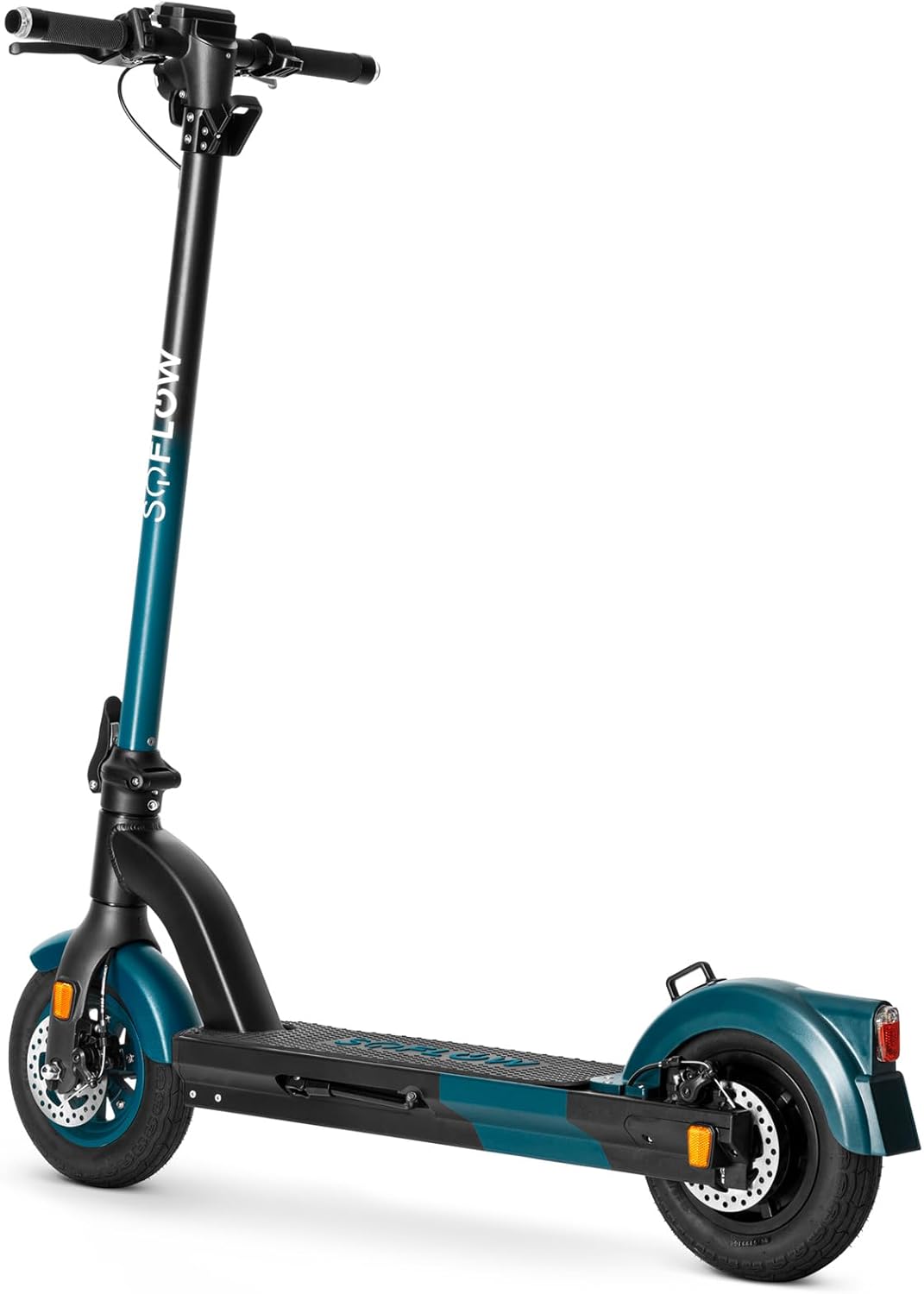
Figure 4.2: Front-side view of the SoFlow SO4 Pro Gen 2 Electric Scooter, showing the front disc brake and tire.
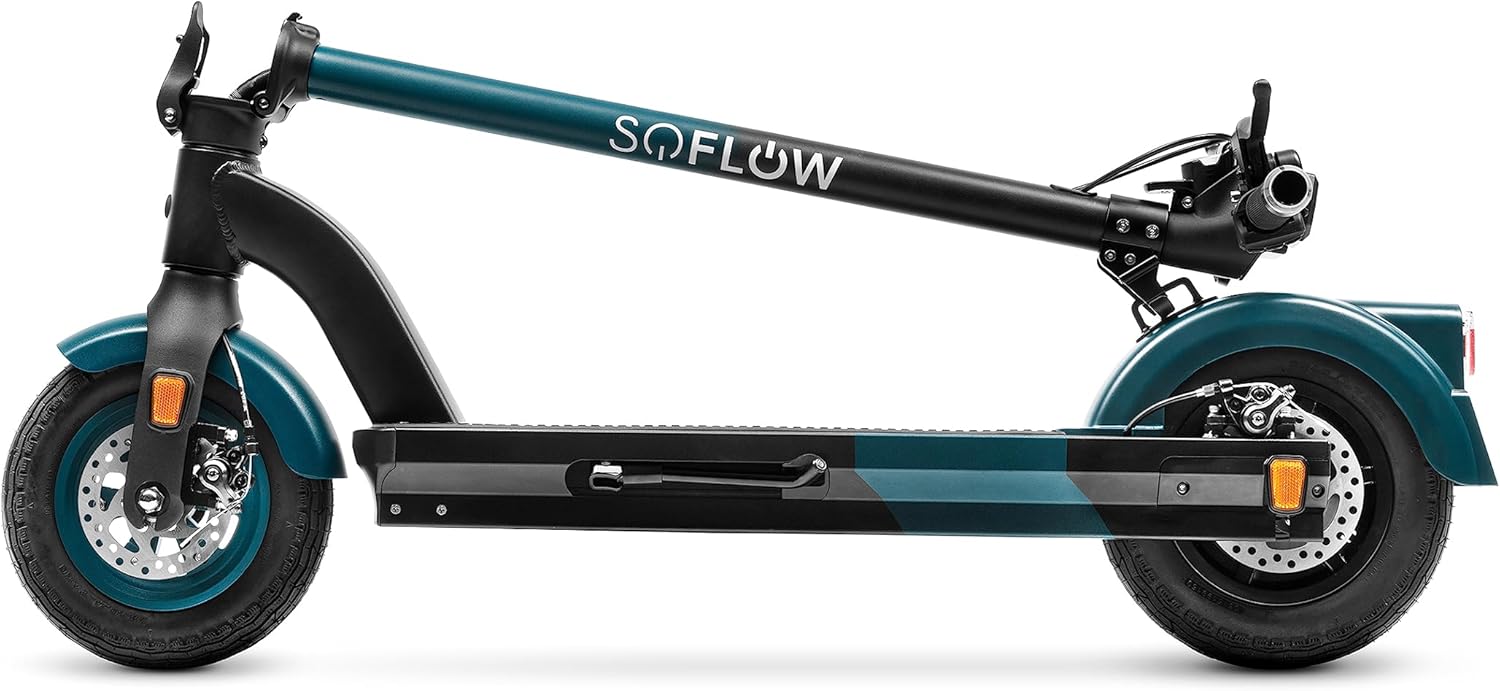
Figure 4.3: Side view of the SoFlow SO4 Pro Gen 2 Electric Scooter, illustrating the overall profile and rear wheel.

Figure 4.4: Rear view of the SoFlow SO4 Pro Gen 2 Electric Scooter, showing the rear fender, brake light, and disc brake.

Figure 4.5: The SoFlow SO4 Pro Gen 2 Electric Scooter in its folded position, demonstrating its compact design for transport.

Figure 4.6: A hand removing the lithium battery from the scooter's deck compartment, illustrating the removable battery feature.
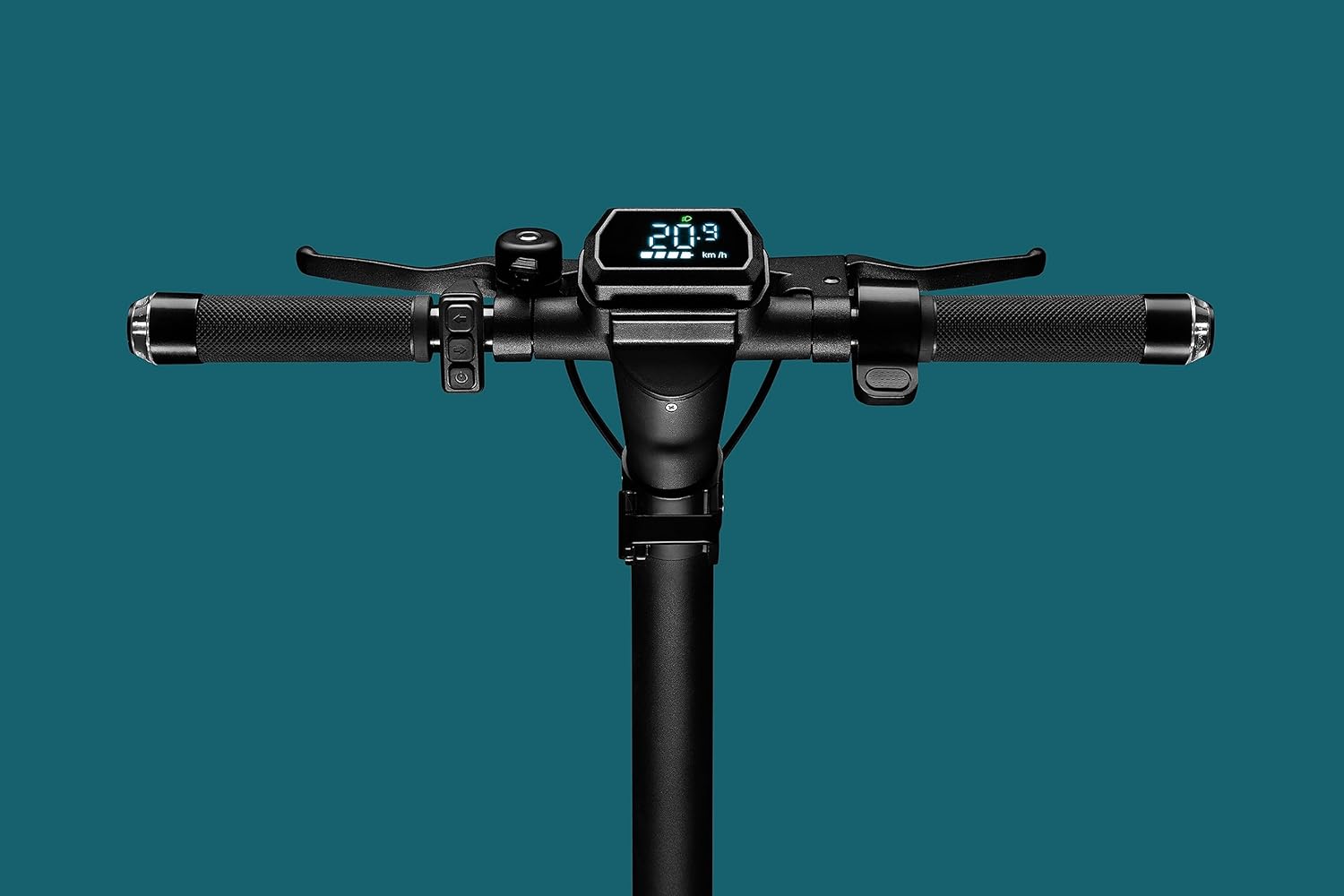
Figure 4.7: Close-up of the handlebar display, showing the digital screen with speed and battery indicators, along with controls.

Figure 4.8: The scooter's headlight illuminated, with integrated turn signals on the handlebars also lit, emphasizing visibility features.

Figure 4.9: Detailed view of the front wheel and disc brake assembly.

Figure 4.10: Detailed view of the rear wheel and disc brake assembly.
5. Setup
5.1 Unfolding the Scooter
- Place the scooter on a flat surface.
- Release the folding mechanism latch, usually located near the base of the handlebar stem.
- Carefully lift the handlebar stem until it locks securely into the upright position. Ensure the locking mechanism is fully engaged.
- Adjust the handlebars to your desired height if adjustable, and tighten any quick-release clamps.
5.2 Charging the Battery
The SoFlow SO4 Pro Gen 2 is equipped with a Lithium battery. For optimal performance and battery longevity, follow these charging instructions:
- Locate the charging port on the scooter.
- Connect the charger to the charging port, then plug the charger into a standard power outlet.
- The charging indicator on the charger will show the charging status (e.g., red for charging, green for fully charged).
- A full charge takes approximately 3 hours and 50 minutes with the special "fast charge" charger.
- Always ensure the battery is fully charged before your first ride and after each use for maximum range.
6. Operating Instructions
6.1 Powering On/Off
- To Power On: Press and hold the power button on the handlebar display until the screen illuminates.
- To Power Off: Press and hold the power button again until the display turns off.
6.2 Riding the Scooter
- Place one foot firmly on the deck and push off with the other foot to gain initial momentum.
- Once moving, place your second foot on the deck.
- Gently press the accelerator lever (throttle) to engage the motor.
- The 500-watt motor provides ample power for speeds up to 25 km/h and inclines up to 18%.
- Use the integrated turn signals on the handlebars to indicate your direction changes.
6.3 Braking
The scooter is equipped with front and rear disc brakes for precise and controlled stopping.
- To slow down or stop, gently squeeze the brake levers on the handlebars.
- Apply both brakes simultaneously for more effective stopping power.
- Avoid sudden or harsh braking, especially at high speeds, to prevent loss of control.
6.4 Using the SoFlow App
Enhance your riding experience by connecting your scooter to the intuitive SoFlow application:
- Download the SoFlow app from your smartphone's app store.
- Enable Bluetooth on your smartphone and open the SoFlow app.
- Follow the in-app instructions to pair your scooter.
- The app provides important details such as battery capacity, current speed, Bluetooth status, and light indicators.
- You can also track your completed journeys and electronically lock the scooter for added security.
7. Maintenance
Regular maintenance ensures the longevity and optimal performance of your SoFlow SO4 Pro Gen 2 Electric Scooter.
- Cleaning: Wipe down the scooter with a damp cloth after each use. Avoid using high-pressure water or harsh chemicals.
- Tire Pressure: Regularly check the tire pressure of the 10-inch pneumatic tires. Maintain recommended pressure for optimal ride quality and range.
- Brake Inspection: Periodically inspect the front and rear disc brakes for wear and proper function. Adjust or replace brake pads as needed.
- Battery Care: Charge the battery regularly, even if the scooter is not in use for extended periods, to maintain battery health. Store the scooter in a cool, dry place.
- General Check: Routinely check all screws, bolts, and connections to ensure they are tight and secure.
8. Troubleshooting
This section addresses common issues you might encounter with your scooter.
| Problem | Possible Cause | Solution |
|---|---|---|
| Scooter does not power on | Low or depleted battery; Loose battery connection; Power button malfunction | Charge the battery fully; Ensure battery is securely seated; Contact support if issue persists |
| Reduced range/autonomy | Under-inflated tires; Heavy load; Riding uphill frequently; Cold weather | Check and inflate tires to recommended pressure; Reduce load; Adjust riding style; Battery performance may be reduced in cold temperatures |
| Brakes feel weak | Worn brake pads; Loose brake cable; Disc brake misalignment | Inspect brake pads and replace if worn; Adjust brake cable tension; Consult a technician for disc brake alignment |
| Unusual noises during operation | Loose components; Debris in wheels/brakes; Motor issue | Check all fasteners; Clean wheels and brakes; If noise persists, contact customer support |
9. Technical Specifications
Detailed specifications for the SoFlow SO4 Pro Gen 2 Electric Scooter:
| Feature | Specification |
|---|---|
| Brand | SoFlow |
| Model Name | SO4 PRO Gen2 |
| Item Model Number | 300.450.01 |
| Product Dimensions (L x W x H) | 109.1 x 46.6 x 114.5 cm |
| Weight | 17.50 kg |
| Maximum Weight Capacity | 150 Kilograms |
| Motor Power | 500W |
| Battery Type | Lithium-ion |
| Charging Time | Approx. 3 hours 50 minutes |
| Maximum Speed | 25 KM/H |
| Range (Autonomy) | Approx. 40 KM |
| Maximum Incline | 18% |
| Wheel Size | 10 Inches |
| Brakes | Front and Rear Disc Brakes, Regenerative Braking |
| Frame Material | Aluminum |
| Special Features | NFC Anti-theft, Integrated Turn Signals, SoFlow App Connectivity, Foldable |
10. Warranty and Support
Your SoFlow SO4 Pro Gen 2 Electric Scooter comes with a standard manufacturer's warranty covering defects in materials and workmanship under normal use. Please refer to the warranty card included in your package for specific terms and conditions, including the warranty period and coverage details.
For technical support, warranty claims, or any questions regarding your scooter, please contact SoFlow customer service through their official website or the contact information provided in your purchase documentation.


