
FoMaKo FMK30SDI
FoMaKo HDMI PTZ Camera User Manual
Model: FMK30SDI Pro Black
Introduction
The FoMaKo HDMI PTZ Camera is a versatile and advanced solution designed for professional video production and live streaming. Featuring 30x optical zoom and third-generation AI auto-tracking, it delivers high-definition 1080p video with true-to-life colors. This camera supports simultaneous 3G-SDI, IP, USB, and HDMI outputs, making it suitable for various applications including church services, educational events, conferences, and eSports. Power over Ethernet (PoE) support simplifies installation, requiring only a single cable for power, control, and video transmission.

Figure 1: FoMaKo HDMI PTZ Camera with included accessories.
What's in the Box
Upon unboxing your FoMaKo HDMI PTZ Camera, please ensure all the following items are present:
- FoMaKo AI Tracking PTZ Camera (30x optical zoom)
- IR Remote Controller
- Wall Mount Bracket
- Ceiling Bracket
- USB Cable
- Power Adapter 12V 2A
- User Manual
Video 1: FoMaKo SDI PTZ Camera Quick Start. This video demonstrates the unboxing and initial setup of the camera.
Physical Installation
The FoMaKo PTZ Camera supports multiple installation methods: Desktop, Tripod mounting, Wall mounting, and Ceiling mounting. The package includes both wall mount and ceiling brackets for flexible placement.

Figure 2: Example of wall-mounted installation in a church.
Video 2: How to install FoMaKo PTZ Camera. This video provides a step-by-step guide for physical installation.
Connectivity & Setup
The camera offers multiple connectivity options including LAN, HDMI, 3G-SDI, and USB3.0. It supports PoE for simplified cabling. The LCD screen on the camera displays the IP address and video resolution, making initial setup straightforward.

Figure 3: Rear panel of the camera with various connectivity ports.
System Connection
For a complete live streaming system, connect the camera(s) to a PoE network router/switch. An IP PTZ Camera Controller and a Video Mixer Switcher (like FoMaKo KC601 Pro) can be integrated for advanced control and multi-camera production.
Video 3: FoMaKo PTZ Camera Live Streaming System Connection. This video illustrates how to set up a multi-camera live streaming system.
Controller Setup
The camera can be controlled via the included IR remote controller, a dedicated FoMaKo PTZ controller, or through a web browser. The remote allows for setting up to 10 presets, while the RS232/RS485 control and web interface support up to 255 presets.
Video 4: FoMaKo PTZ Camera Remote Controller. This video details the functions of the included IR remote control.
Video 5: FoMaKo PTZ Controller PoE NDI Camera Controller KC608 Pro. This video demonstrates advanced control using a dedicated PTZ controller.
Webpage Login & Configuration
The camera's web interface allows for detailed configuration. Default DHCP is enabled, and the IP address is shown on the LCD. Access the web browser by entering the camera's IP address (default username: admin, password: admin).
Video 6: Two Efficient Ways to Set Up Your Fomako PTZ Camera. This video covers both remote and web-based setup methods.
Operation
AI Auto-Tracking (Gen 3)
The third-generation AI Tracking offers customized tracking features. Users can adjust tracking modes, sensitivity, figure size, and switch tracking targets by pressing F2 for auto-tracking and F4 to switch targets on the remote control.
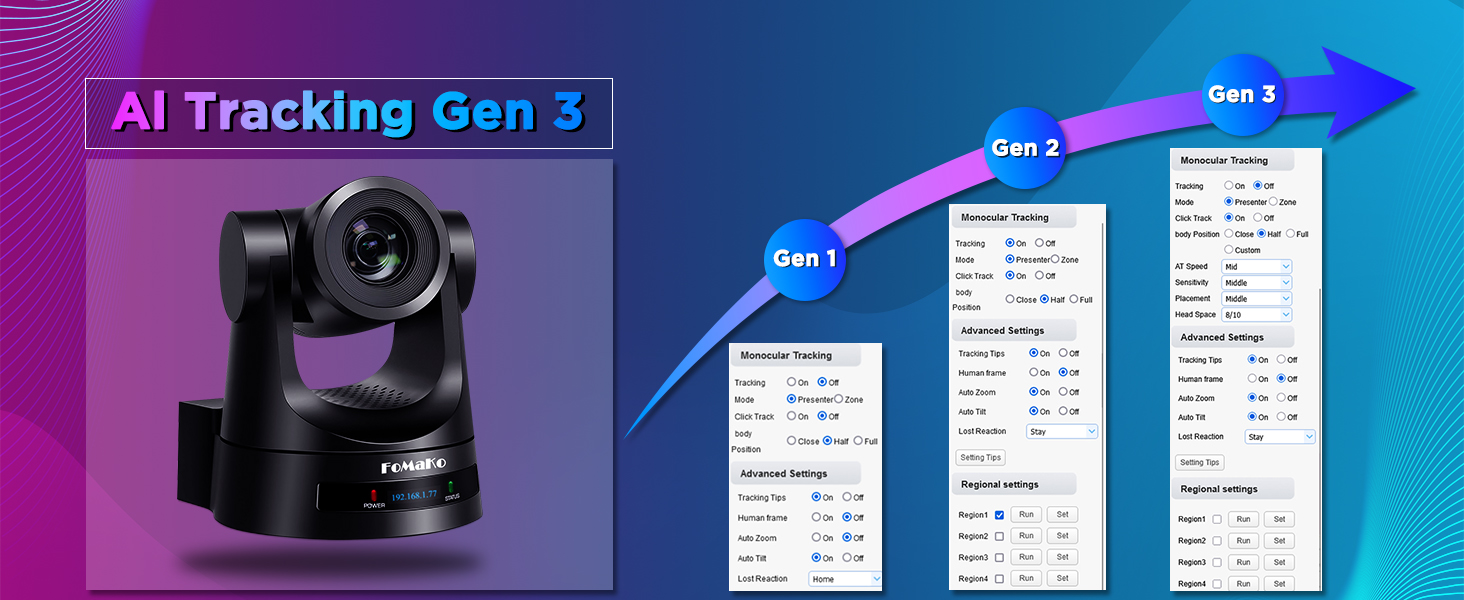
Figure 4: AI Tracking Gen 3 user interface for advanced settings.
Optical Zoom & Image Quality
The camera features a 30x optical zoom, delivering HD 1080p video with rich formats (1080P60/50, 1080P30/25, 720P60/50, 720P30/25). H.264/H.265 encoding ensures fluid motion video even under low bandwidth. Adjusting PTZ speed and preset speed to 1 can achieve smooth, high-definition image quality.

Figure 5: Demonstration of 30x optical zoom capability.
Video 7: FoMaKo 20X/30X optical zoom IP Live Streaming Camera. This video showcases the camera's zoom capabilities.
Auto-Focus (AF) Technology
The camera incorporates fast, accurate, and stable Auto-Focus (AF) technology. It supports Auto/Manual/One Push Focus modes. The FoMaKo PTZ camera maintains clear HD images during movement and zoom operations.
Application Scenarios
Designed for professional AV live streaming and broadcasting, the FoMaKo PTZ Camera is ideal for various settings including church worship services, studios, universities, factories, sports clubs, eSports, training classrooms, large conferences, and theater/concert live streaming.

Figure 6: Diverse application scenarios for the PTZ camera.
Video 8: The main application scenarios and software of FoMaKo PTZ cameras. This video highlights various uses and compatible software.
Maintenance
To ensure optimal performance and access to the latest features, regularly check for and apply firmware updates via the camera's web interface. Remote boot and shutdown of FoMaKo PTZ cameras can also be supported through VISA commands for web page communication.

Figure 7: Confirmation of successful update.
Troubleshooting
If you encounter any issues with your FoMaKo PTZ Camera, please refer to the detailed user manual (PDF) available for download or contact customer support. Common issues can often be resolved by checking cable connections, power supply, network settings (DHCP, IP address), and ensuring the latest firmware is installed.
Specifications
| Attribute | Value |
|---|---|
| Brand Name | FoMaKo |
| Item Weight | 2.84 pounds |
| Product Dimensions | 5.63 x 6.93 x 6.69 inches |
| Country of Origin | China |
| Item model number | FMK30SDI |
| Color Name | Black |
| Special Features | AI tracking PTZ Camera |
| Photo Sensor Technology | CMOS |
| Video Capture Resolution | 1080p |
| Maximum Focal Length | 148.4 Millimeters |
| Maximum Aperture | 4.8 f |
| Flash Memory Type | SD |
| Video Capture Format | MP4 |
| Supported Audio Format | AAC, MP3, G.711A |
| Screen Size | 2 Inches |
| Connectivity Technology | LAN HDMI 3G-SDI USB3.0 |
Warranty & Support
The FoMaKo HDMI PTZ Camera comes with a 3-Year Limited Warranty and a 30-Day No-Questions-Asked Money-Back Guarantee for a risk-free purchase. Free Online Training is available to help you get started easily. For any inquiries or assistance, 24/7 Expert Assistance is provided with responses typically within 24 hours (please include your Order ID). Remote assistance for setup can also be provided if necessary. Enjoy lifetime customer technical support, as your satisfaction is our priority.
Related documentsFMK30SDI


Ask a question about this manual
Ask about setup, troubleshooting, compatibility, parts, safety, or missing instructions. Manuals+ will review the question and use this page’s manual context to help answer it.