
ANRAN K04W6684

ANRAN 3MP Outdoor Surveillance Camera Kit
User Manual
1. Introduction
Thank you for choosing the ANRAN 3MP Outdoor Surveillance Camera Kit. This comprehensive security system provides reliable monitoring for your home or business, featuring high-resolution cameras, advanced motion detection, two-way audio, and remote access capabilities. This manual will guide you through the setup, operation, and maintenance of your new surveillance system.
Key Features:
- 3MP High-Resolution Cameras: Capture clear and detailed footage day and night.
- 5MP 8-Channel 1TB NVR: Centralized recording and management with ample storage.
- Wireless Connectivity: WiFi IP cameras for flexible placement.
- Remote Access: Monitor your property from anywhere using the free mobile application.
- Two-Way Audio: Communicate with visitors or deter intruders directly through the camera.
- Motion Detection: Receive instant alerts via app or email upon detecting movement.
- 30M Night Vision: Clear surveillance even in complete darkness.
- IP66 Waterproof: Durable cameras designed to withstand various weather conditions (-20°C to 50°C).
- Expandable System: Supports up to 8 cameras for extended coverage.
2. Package Contents
Please verify that all items listed below are included in your package. If any items are missing or damaged, please contact ANRAN customer support.
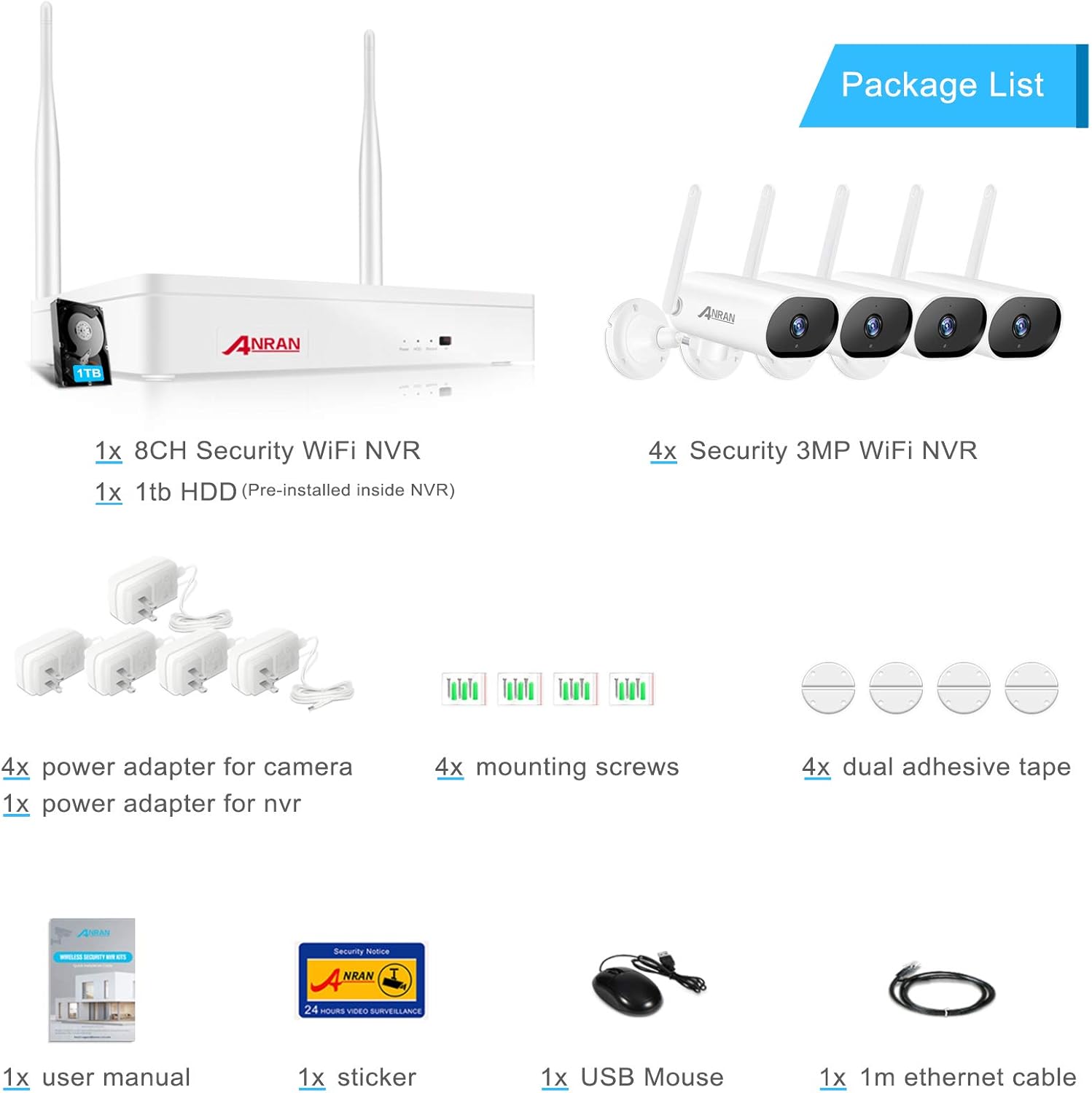
Image: Overview of the ANRAN surveillance kit package contents, including NVR, cameras, power adapters, and accessories.
- 1x 8CH Security WiFi NVR (with 1TB HDD pre-installed)
- 4x 3MP Security WiFi IP Cameras
- 4x Power Adapters for Cameras
- 1x Power Adapter for NVR
- 4x Mounting Screws
- 4x Dual Adhesive Tape
- 1x User Manual
- 1x Security Sticker
- 1x USB Mouse
- 1x 1m Ethernet Cable
3. Setup Guide
3.1 NVR Setup
- Connect the NVR:
- Connect the NVR to a monitor using an HDMI or VGA cable.
- Connect the USB mouse to the NVR's USB port.
- Connect the NVR to your router using the provided Ethernet cable for internet access.
- Connect the NVR power adapter and plug it into an electrical outlet. The NVR will power on automatically.
- Initial Configuration: Follow the on-screen prompts to set up the NVR, including language, date/time, and network settings.

Image: The ANRAN NVR connected to a monitor, displaying live camera feeds.
3.2 Camera Installation
- Power On Cameras: Connect each camera to its respective power adapter and plug into an electrical outlet. The cameras will automatically pair with the NVR.
- Mounting Location: Choose strategic locations for your cameras, ensuring good WiFi signal strength (up to 30m from NVR under normal circumstances) and clear views of desired areas. Consider areas prone to intrusion, entry points, and blind spots.
- Mounting the Cameras:
- Use the provided mounting screws to secure the camera base to a wall or ceiling.
- Adjust the camera angle for optimal coverage.

Image: An ANRAN camera mounted on an exterior wall, demonstrating typical installation.

Image: An ANRAN camera shown in a snowy environment, highlighting its cold resistance from -20°C to 50°C.

Image: A person interacting with a delivery driver via the ANRAN camera's two-way audio feature.
3.3 Mobile App Setup
- Download the App: Search for the "ANRAN" app (or specified app name in the NVR interface) on your mobile device's app store (iOS or Android).
- Register Account: Create a new account and log in.
- Add Device: Scan the QR code displayed on your NVR's monitor (usually found in the network settings or device info) to add your surveillance system to the app.
- Live View: Once added, you can view live feeds from your cameras, access recorded footage, and configure settings remotely.
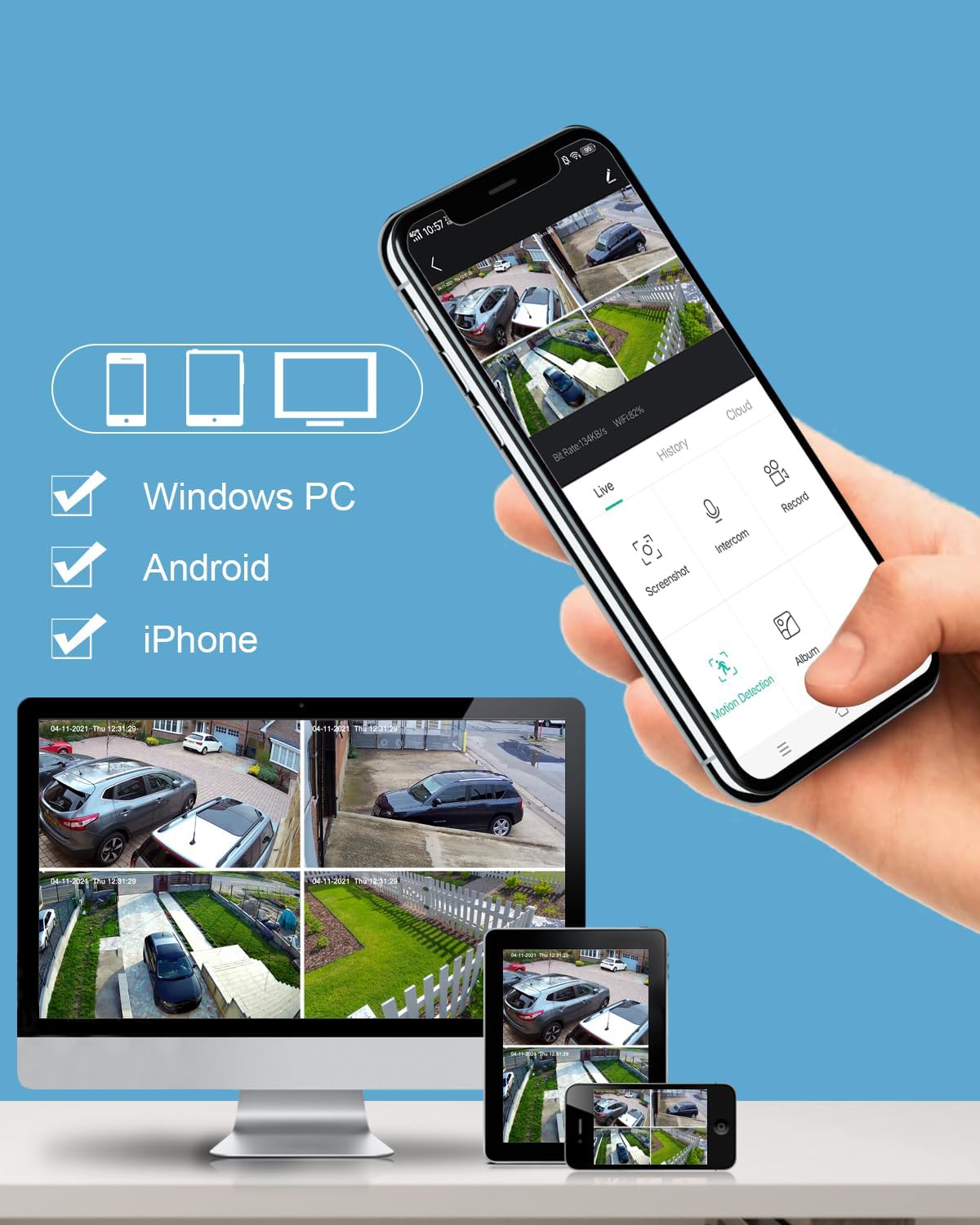
Image: A smartphone displaying the ANRAN mobile app interface with multiple camera views, alongside a tablet and desktop showing the same feeds.
4. Operating Your System
4.1 Live View and Playback
- NVR Monitor: Use the USB mouse to navigate the NVR interface. Double-click a camera feed to view it in full screen.
- Mobile App: Select a camera from the device list to view its live feed. Use the playback function to review recorded footage by selecting a date and time.

Image: A comparison showing the clear 3MP resolution of the ANRAN camera during the day and its effective night vision capabilities.
4.2 Motion Detection and Alerts
The system can be configured to detect motion and send alerts:
- Configuration: Access the motion detection settings via the NVR interface or mobile app. You can define detection zones, sensitivity levels, and schedules.
- Alerts: When motion is detected, the system can send push notifications to your mobile app and/or email alerts.
- Recording: Motion-triggered recording saves storage space and makes it easier to find important events.
4.3 Two-Way Audio
Each camera is equipped with a microphone and speaker, allowing for two-way communication:
- Activate: In the mobile app's live view, locate the microphone icon to speak through the camera's speaker. The camera's microphone will pick up audio from the monitored area.
- Applications: Useful for communicating with delivery personnel, family members, or deterring unwanted visitors.
5. Maintenance
- Cleaning: Periodically clean the camera lenses with a soft, damp cloth to ensure clear image quality. Avoid harsh chemicals.
- Firmware Updates: Check the NVR settings or mobile app regularly for available firmware updates to ensure optimal performance and security.
- Hard Drive Management: The 1TB HDD provides ample storage. The system typically overwrites the oldest footage when the disk is full. You can configure recording modes (continuous, motion-triggered, scheduled) to optimize storage usage.
- Environmental Considerations: While the cameras are IP66 waterproof and operate between -20°C and 50°C, avoid direct exposure to extreme conditions or prolonged submersion.
6. Troubleshooting
| Problem | Possible Cause | Solution |
|---|---|---|
| No image on monitor/app | Power issue, loose cable, NVR/camera not powered on. | Check all power connections. Ensure NVR and cameras are powered. Verify HDMI/VGA cable connection to monitor. |
| Cameras not pairing with NVR | Out of range, interference, pairing issue. | Move cameras closer to NVR. Reduce interference from other wireless devices. Refer to manual for manual pairing instructions if automatic pairing fails. |
| No remote access via app | NVR not connected to internet, incorrect app settings, firewall issues. | Ensure NVR is connected to your router and has internet access. Verify app settings and QR code scan. Check router firewall settings. |
| Motion detection not working | Settings incorrect, sensitivity too low, detection zone not set. | Review motion detection settings in NVR/app. Adjust sensitivity and ensure detection zones are properly configured. |
| Poor image quality | Dirty lens, low light, network bandwidth. | Clean camera lens. Ensure adequate lighting for optimal day vision. Check network connection for bandwidth issues. |
7. Specifications
| Feature | Detail |
|---|---|
| Brand | ANRAN |
| Model Number | K04W6684 |
| Manufacturer | ANRAN |
| Package Dimensions | 33 x 24.1 x 16.6 cm; 3.03 kilograms |
| Color | White, Black |
| Voltage | 12 Volts |
| Mounting Type | Wall Mount |
| Special Features | Solid, Waterproof |
| Battery(ies) / Cell(s) required | No |
| Connectivity Technology | Wireless |
| Video Recording Resolution | 1536p, 1920p (3MP) |
| Number of Channels | 8 |
| Memory Storage Capacity | 1 TB |
| Operating System | [Proprietary or Embedded Operating System] |
| Recommended Uses | Surveillance |
| Compatible Devices | Camera |
8. Warranty and Support
ANRAN products are designed for reliability and performance. For specific warranty details, please refer to the warranty card included with your product or visit the official ANRAN website.
If you encounter any issues or have questions regarding your ANRAN surveillance system, please contact our customer support team:
- Online Support: Visit the ANRAN official website for FAQs, troubleshooting guides, and contact forms.
- Email Support: Refer to your product packaging or the ANRAN website for the dedicated support email address.
- Brand Store: You can also find more information and related products on the ANRAN Amazon Brand Store.
Please retain your purchase receipt for warranty claims.
Ask a question about this manual
Ask about setup, troubleshooting, compatibility, parts, safety, or missing instructions. Manuals+ will review the question and use this page’s manual context to help answer it.