Introduction
This manual provides detailed instructions for the assembly, operation, and maintenance of your Merax Double Workstation Desk, model WF196483. Designed for two users, this desk offers a spacious tabletop and integrated storage shelves, making it ideal for home offices, study areas, or shared workspaces. Please read this manual thoroughly before assembly and use to ensure safe and proper operation.

Image: Merax Double Workstation Desk, showcasing its two-person design and integrated shelving.
Safety Information
- Read all instructions: Before assembly and use, carefully read and understand all instructions provided in this manual and any included assembly guide.
- Keep children away: Keep children and pets away from the assembly area. Small parts can be a choking hazard.
- Use correct tools: Ensure you have all necessary tools as specified in the assembly guide.
- Assemble on a soft surface: Assemble the desk on a soft, clean surface (e.g., carpet or cardboard) to prevent scratching or damage to the product or your floor.
- Tighten all fasteners: Ensure all screws, bolts, and connectors are securely tightened before using the desk. Periodically check and re-tighten as needed.
- Do not overload: Do not exceed the maximum weight capacity of the desk (up to 300 lbs). Distribute weight evenly.
- Avoid climbing: Do not climb or stand on the desk or shelves.
- Level surface: Place the desk on a level surface to prevent instability. Use the adjustable leg pads to stabilize if necessary.
Package Contents
Before beginning assembly, verify that all parts and hardware are present. Refer to the separate assembly instruction sheet included in your product packaging for a complete list of components. If any parts are missing or damaged, please contact customer support.
- Desk panels (tabletop, shelves)
- Metal frame components (legs, supports)
- Hardware pack (screws, bolts, Allen wrench, adjustable leg pads)
- Assembly instruction manual
Assembly Instructions
Assembly of the Merax Double Workstation Desk requires following the step-by-step instructions provided in the dedicated assembly manual included with your purchase. The process typically involves attaching the metal frame components, securing the desk panels, and installing the storage shelves.
- Unpack and Identify: Carefully unpack all components and lay them out on a clean, soft surface. Identify each part by comparing it to the parts list in your assembly manual.
- Assemble Frame: Begin by assembling the main metal frame structure according to the diagrams. Ensure all connections are finger-tightened initially.
- Attach Desk Panels: Secure the main tabletop panels to the assembled frame.
- Install Shelves: Attach the two-layer storage shelves and the upper bookshelf components.
- Final Tightening: Once all parts are in place, systematically tighten all screws and bolts using the provided Allen wrench. Do not overtighten.
- Adjust Leveling Feet: Place the desk in its desired location. Adjust the leg pads at the bottom of the metal legs to ensure the desk is stable and level on uneven floors.
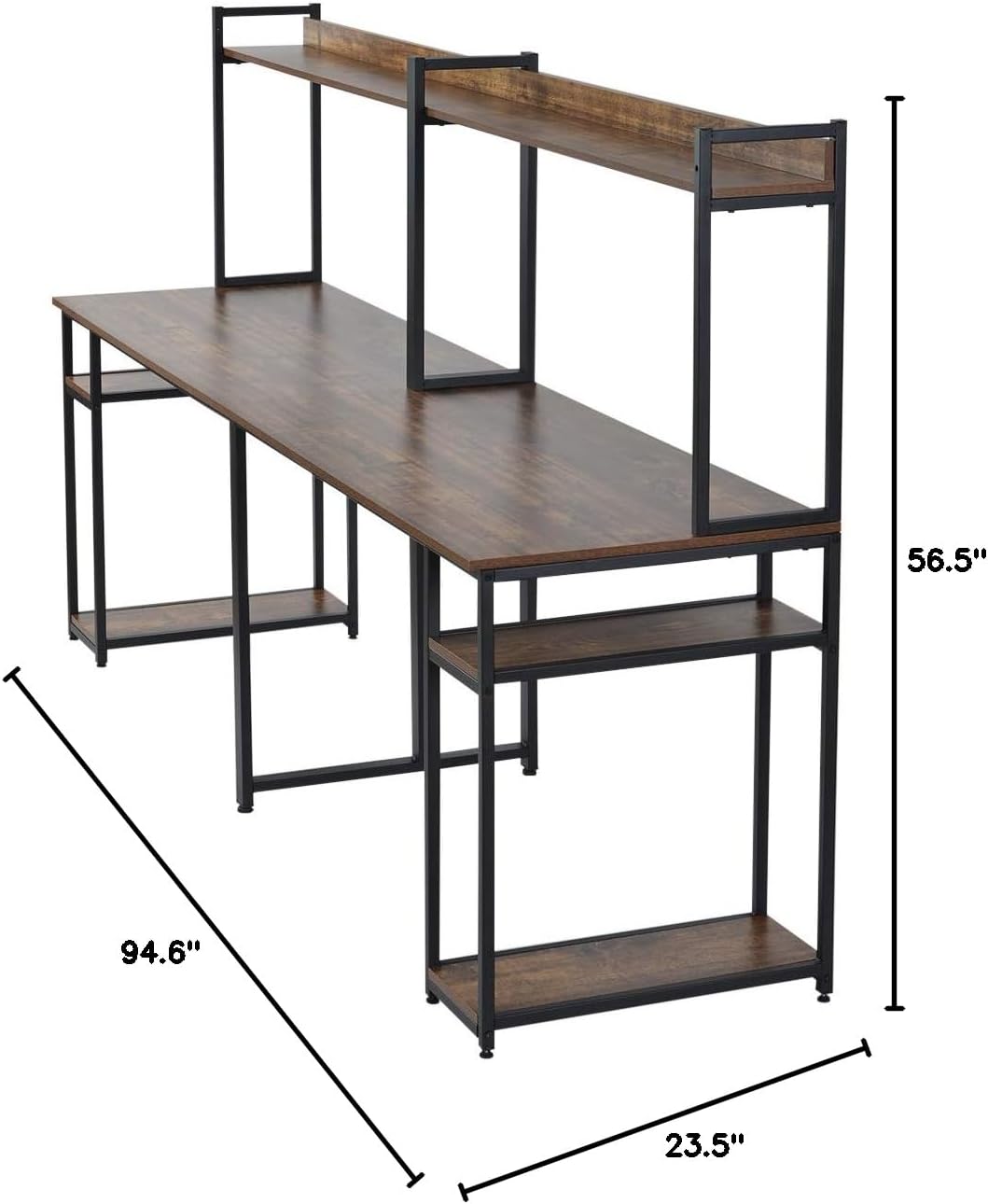
Image: Detailed dimensions diagram of the Merax Double Workstation Desk, useful for assembly and space planning.
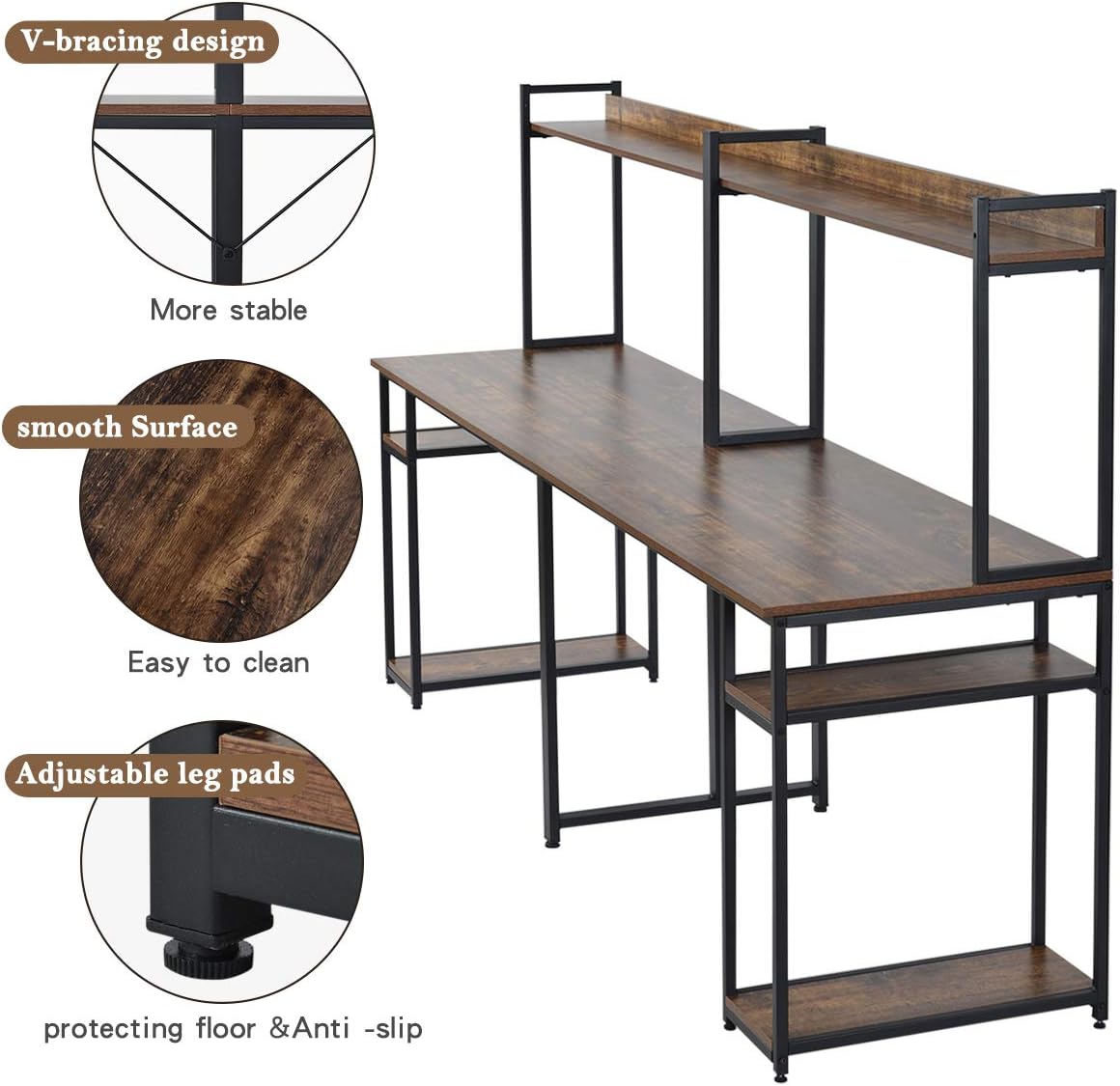
Image: Close-up view highlighting the V-bracing for stability, the smooth surface, and the adjustable leg pads for leveling.
Operating Instructions
The Merax Double Workstation Desk is designed for versatile use by two individuals simultaneously.
- Dual Workspace: Utilize the spacious tabletop for two separate workstations, accommodating computers, monitors, and other office essentials for two users.
- Storage Shelves: The two-layer storage shelves on both sides and the upper bookshelf provide ample space for books, computer hosts, game consoles, office supplies, and decorative items. Distribute items evenly to maintain stability.
- Weight Capacity: The desk is constructed with heavy-duty powder-coated steel and can support up to 300 lbs. Avoid concentrating heavy loads in one small area.

Image: The desk configured for two users, demonstrating the upper bookshelf and side storage shelves in use.
Maintenance
- Cleaning: Wipe the desk surfaces with a soft, damp cloth. Avoid harsh chemicals or abrasive cleaners, which can damage the finish.
- Spills: Clean up spills immediately to prevent staining or damage to the engineered wood surface.
- Fastener Check: Periodically check all screws and bolts to ensure they remain tight. Re-tighten as necessary to maintain structural integrity.
- Avoid Extreme Conditions: Do not expose the desk to extreme temperatures, humidity, or direct sunlight for prolonged periods, as this may cause warping or discoloration.
Troubleshooting
| Problem | Possible Cause | Solution |
|---|---|---|
| Desk is wobbly or unstable. | Uneven floor; loose fasteners. | Adjust the leveling feet on the bottom of the legs. Ensure all screws and bolts are securely tightened. |
| Missing parts or hardware. | Packaging error; parts lost during unpacking. | Carefully check all packaging materials. If parts are genuinely missing, contact Merax customer support with your model number and a description of the missing items. |
| Difficulty during assembly. | Incorrect step sequence; misaligned parts. | Refer to the detailed assembly manual. Ensure parts are oriented correctly before tightening. Do not force components together. |
| Surface scratches or damage. | Improper handling; abrasive cleaning. | Handle desk components carefully during assembly. Use only soft cloths and mild cleaners for maintenance. |
Specifications
| Model Number | WF196483 |
| Brand | Merax |
| Type | Double Workstation Desk / Two Person Computer Desk |
| Dimensions (L x W x H) | 78.3" L x 23.2" W x 53.1" H (Overall) |
| Product Dimensions (D x W x H) | 23.5"D x 94.6"W x 56.5"H (from specifications) |
| Material Type | Engineered Wood (Tabletop), Alloy Steel (Base/Frame) |
| Finish Type | Powder Coated (Frame) |
| Weight Capacity | Up to 300 lbs |
| Item Weight | 62.8 Pounds |
| Special Features | Adjustable Leg Pads, Two-layer Storage Shelf, Upper Bookshelf, V-bracing design |

Image: Full view of the Merax Double Workstation Desk, highlighting its overall structure and design.
Warranty Information
Merax products typically come with a limited manufacturer's warranty covering defects in materials and workmanship. The specific terms and duration of the warranty may vary. Please refer to the warranty card included with your product or visit the official Merax website for detailed warranty information. Keep your proof of purchase for any warranty claims.
Customer Support
If you have any questions, require assistance with assembly, or need to report missing/damaged parts, please contact Merax customer support.
- Brand: Merax
- Website: Visit the Merax Store on Amazon (for general product information)
- For direct support, please refer to the contact information provided in your product packaging or on the official Merax website.