
1. Introduction
The ChunHee Wireless Caregiver Pager System is designed to provide a reliable and convenient way for individuals needing assistance to alert their caregivers. This system is ideal for home use, assisting the elderly, patients, pregnant women, children, and individuals with disabilities. It ensures that help can be summoned quickly and discreetly, offering peace of mind for both the user and the caregiver.

Image: The ChunHee Wireless Caregiver Pager System shown in various application scenarios, including use by patients, pregnant women, children, elderly individuals, and disabled people.
2. Package Contents
Verify that all items are present in your package:
- 1 x Call Button (Transmitter)
- 1 x Portable Vibration Receiver
- 1 x Lanyard
- Accessories (e.g., adhesive tape, mounting screws)
3. Product Overview
The system consists of two main components: the Call Button (Transmitter) and the Portable Vibration Receiver.
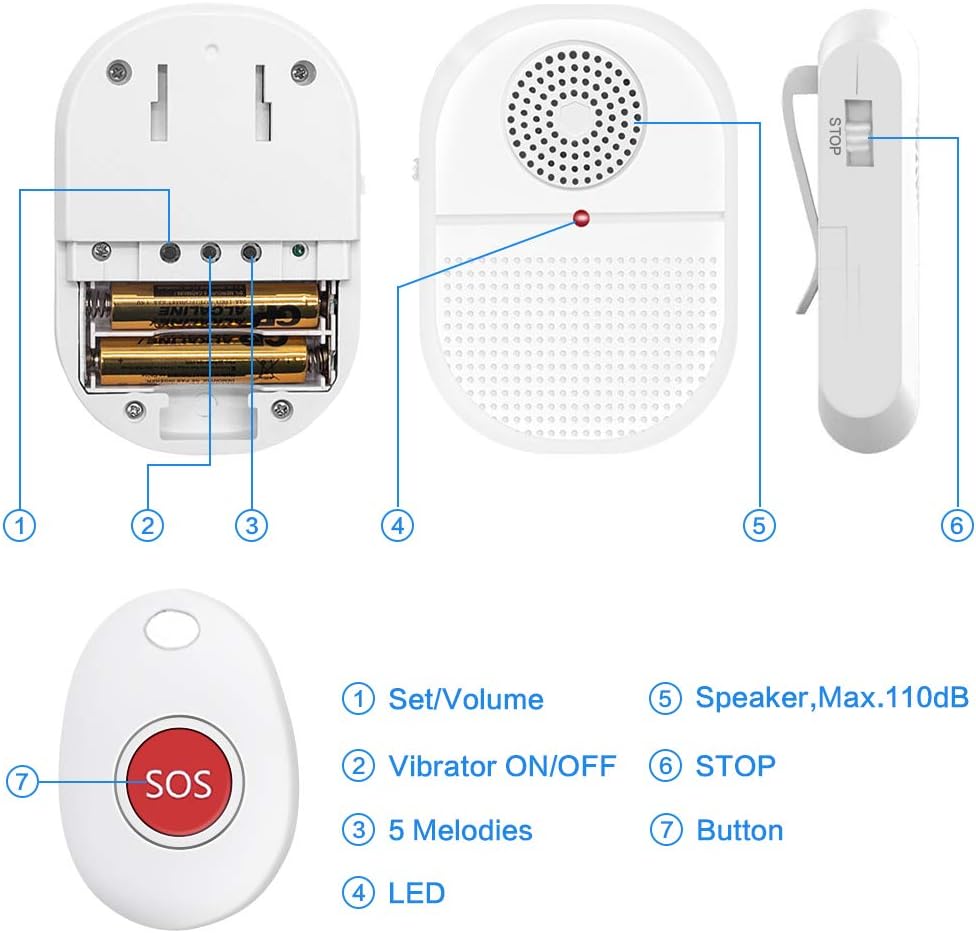
Image: A detailed diagram illustrating the components of the receiver and call button. The receiver features a Set/Volume button, Vibrator ON/OFF switch, 5 Melodies selector, LED indicator, Speaker (Max. 110dB), and a STOP switch. The call button has a single SOS button.
Receiver Features:
- Set/Volume Button: Adjusts volume levels and enters pairing mode.
- Vibrator ON/OFF: Toggles vibration function.
- Melody Selector: Choose from 15 available melodies.
- LED Indicator: Flashes during alerts and pairing.
- Speaker: Produces audible alerts up to 110dB.
- STOP Switch: Silences an active alert.
Call Button Features:
- SOS Button: Activates the alert when pressed.
- IP65 Waterproof: Resistant to splashes, suitable for bathrooms and kitchens.
4. Setup Instructions
4.1. Receiver Battery Installation
- Open the back cover of the receiver.
- Insert 2 AAA batteries (not included) into the battery compartment, ensuring correct polarity.
- Close the back cover securely.
4.2. Pairing Transmitters
Follow these steps to pair the call button with the receiver:

Image: A four-step visual guide demonstrating the pairing process for the caregiver pager system. Step 1: Turn on the receiver and open the back cover. Step 2: Press and hold the set/volume button until a 'di-di' sound is heard and the indicator flashes. Step 3: Quickly press the call button, which will trigger a 'di-di' sound and a receiver indicator flash. Step 4: Press the call button again to confirm successful pairing.
- Ensure the receiver is powered on.
- Press and hold the Set/Volume button on the receiver until it emits a "di-di" sound and the receiver indicator light flashes. This indicates pairing mode.
- Quickly press the SOS button on the call button. The receiver will emit another "di-di" sound, and its indicator will flash, confirming successful pairing.
- Press the SOS button on the call button again to confirm that the receiver sounds an alert.
4.3. Mounting and Placement
The call button can be worn around the neck using the included lanyard or placed in a pocket. The receiver is portable and can be carried in a pocket, clipped to a belt, or placed on a table.

Image: A visual representation of the pager system's flexibility, showing the receiver on a desk, vibrating, clipped to a belt, and mounted on a wall in a bathroom, while the call button is worn around the neck.
5. Operating Instructions
5.1. Activating an Alert
To call for assistance, simply press the SOS button on the call button. The receiver will then activate its alert (sound, vibration, and flashing LED).
5.2. Adjusting Volume and Melodies
The receiver offers 5 adjustable volume levels (from 25dB to 110dB) and 15 melodies.
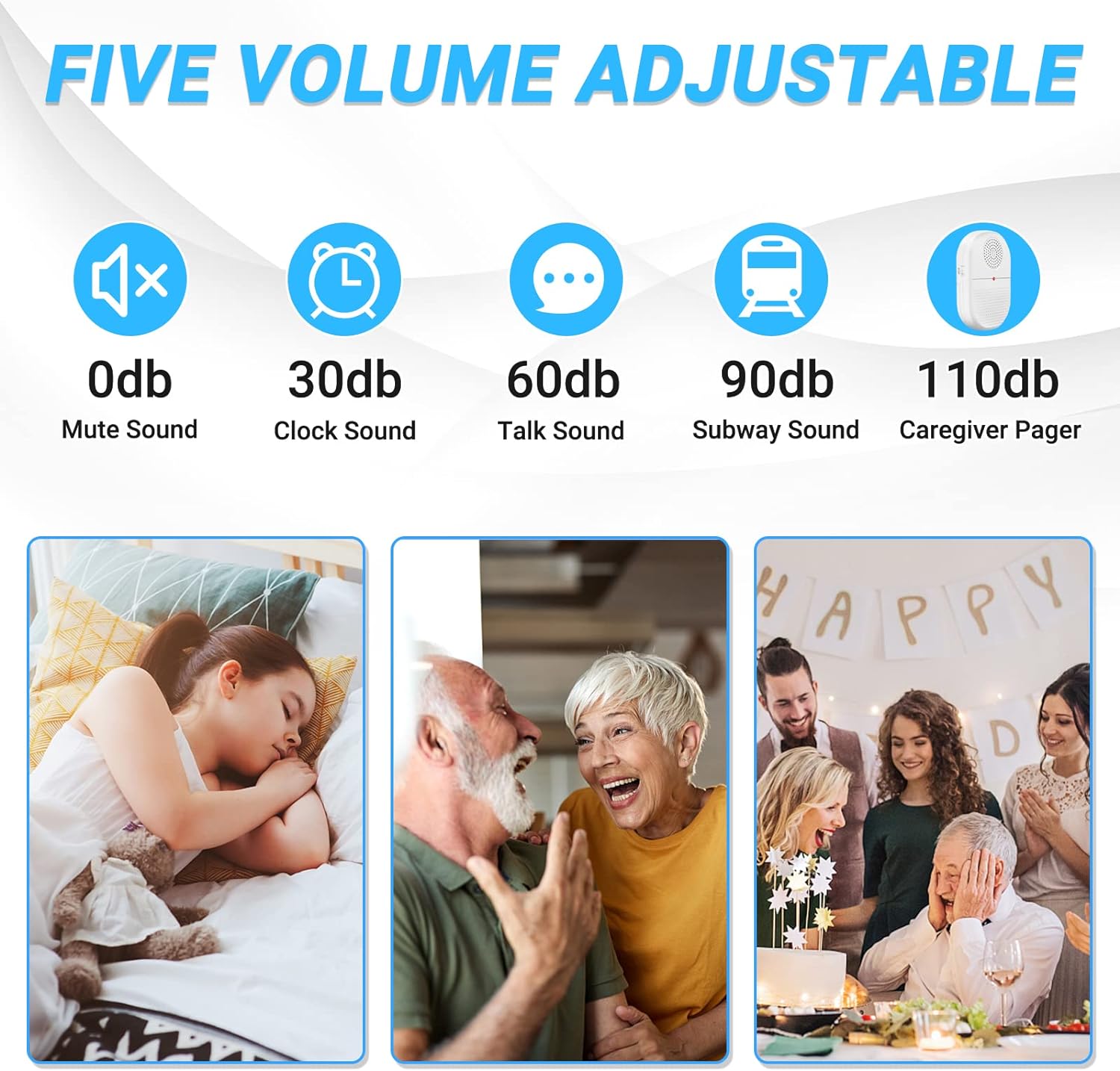
Image: An illustration depicting five adjustable volume levels for the caregiver pager, ranging from 0dB (mute) to 110dB (caregiver pager sound), with intermediate levels like 30dB (clock sound), 60dB (talk sound), and 90dB (subway sound).
- Volume Adjustment: Briefly press the Set/Volume button to cycle through the volume levels.
- Melody Selection: Press the Melody Selector button (if available, or cycle through with Set/Volume if combined) to choose your preferred alert sound.
5.3. Vibration Mode
To enable or disable vibration, use the Vibrator ON/OFF switch on the receiver. This is useful for silent alerts, such as during nighttime.
5.4. Stopping an Alert
To stop an active alert, slide the STOP switch on the side of the receiver.
6. Features
- Long Operating Range: The system operates effectively over 800+ feet in open areas, allowing for use across different rooms or even outdoors within range.
- IP65 Waterproof Call Button: The call button is designed to withstand splashes of water, making it suitable for use in environments like kitchens and bathrooms.
- Expandable System: Each receiver can be paired with up to 50 call buttons, and each transmitter can pair with up to 50 receivers.
- Low Battery Reminder: The pager system includes a low battery reminder feature for timely battery replacement.

Image: An illustration demonstrating the 800ft wireless range of the caregiver pager system, showing the call button and receiver communicating across a large house.

Image: The call button is shown with water splashing, illustrating its IP65 waterproof feature, suitable for kitchen, shower room, and poolside use.
7. Maintenance
- Cleaning: Wipe the devices with a soft, dry cloth. Do not use abrasive cleaners or immerse the receiver in water.
- Battery Replacement: Replace batteries in the receiver when the low battery indicator activates or performance diminishes. Ensure to use 2 AAA batteries.
- Storage: Store the system in a cool, dry place away from direct sunlight and extreme temperatures when not in use for extended periods.
8. Troubleshooting
- Problem: Receiver does not sound an alert when the call button is pressed.
- Solution:
- Check if the receiver batteries are correctly installed and not depleted.
- Ensure the receiver is powered on.
- Verify that the call button and receiver are properly paired (refer to Section 4.2).
- Check if the receiver's volume is not set to mute (0dB).
- Ensure the devices are within the effective operating range. Walls and other obstacles can reduce range.
- Problem: Receiver sounds an alert but does not vibrate.
- Solution:
- Check the Vibrator ON/OFF switch on the receiver to ensure it is in the ON position.
- Problem: Short operating range.
- Solution:
- Ensure there are no significant obstructions (e.g., thick walls, metal objects) between the call button and the receiver.
- Replace batteries in both units if they are low.
- Avoid placing the receiver near other electronic devices that might cause interference.
9. Specifications
| Model Number | TY |
| Brand | ChunHee |
| Operating Range | 800+ feet (open area) |
| Receiver Power Source | 2 x AAA Batteries (Alkaline recommended) |
| Call Button Waterproof Rating | IP65 |
| Volume Levels | 4 levels (25dB-110dB) |
| Melodies | 15 |
| Product Dimensions | Receiver: 4.72 x 5.91 x 3.94 inches (approximate) |
| Item Weight | 5 ounces (approximate) |
| UPC | 791783697067 |
10. Warranty and Support
For warranty information or technical support, please refer to the contact details provided with your purchase or visit the official ChunHee website. Keep your purchase receipt for warranty claims.

