
BAOFENG GT 5R
BAOFENG GT-5R Ham Radio Handheld Instruction Manual
Model: GT-5R
1. Introduction
The BAOFENG GT-5R is a compact, FCC compliant dual-band two-way radio designed for reliable communication. It operates on both VHF (144-148MHz) and UHF (420-450MHz) frequencies, making it suitable for various applications including amateur radio, emergency preparedness, and outdoor activities. This manual provides detailed instructions for setting up, operating, and maintaining your GT-5R radios.
2. What's in the Box
- 6 x BAOFENG GT-5R Radio Units
- 6 x 7.4V 1800mAh Li-ion Battery Packs
- 6 x Antennas
- 6 x Belt Clips
- 6 x Earpieces
- 1 x Six-way Multi-unit Charger
- 1 x Power Adapter for Charger
- 1 x Programming Cable
3. Product Overview
The BAOFENG GT-5R radio is designed for ease of use while offering robust features for effective communication.
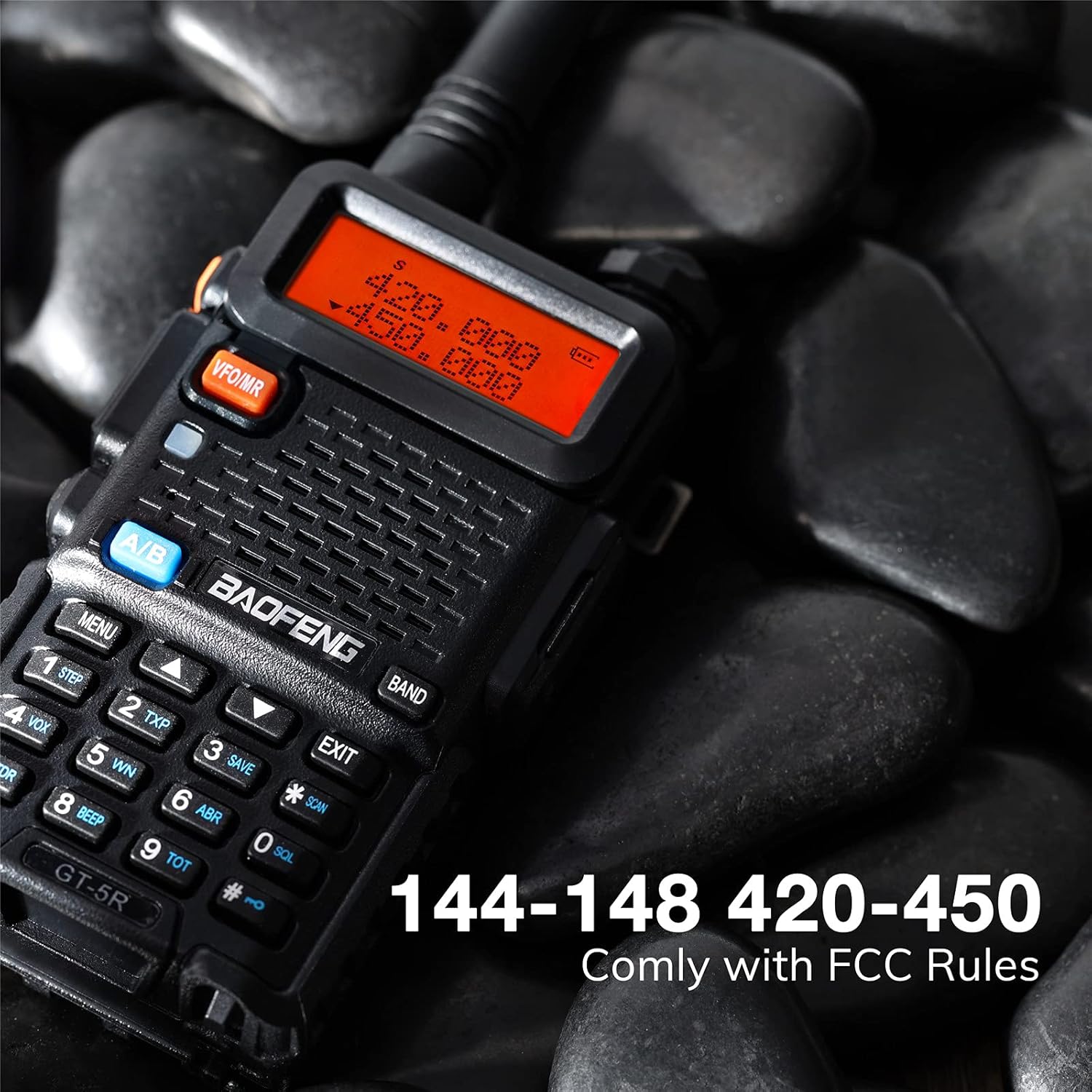
Figure 3.1: Front view of the BAOFENG GT-5R radio, highlighting its FCC compliant dual-band frequency range (144-148 MHz and 420-450 MHz).

Figure 3.2: The radio unit showcasing key functions such as Monitor (MONI), Scan (SCAN), and Voice Operated Transmit (VOX).

Figure 3.3: Detailed dimensions of the BAOFENG GT-5R radio and its antenna, providing physical specifications for reference.
4. Setup
- Battery Installation: Align the battery pack with the grooves on the back of the radio unit and slide it upwards until it clicks into place. To remove, press the release latch and slide the battery downwards.
- Antenna Attachment: Screw the antenna clockwise onto the connector at the top of the radio until it is finger-tight. Do not overtighten.
- Charging the Batteries:
- Connect the power adapter to the six-way multi-unit charger and plug it into a power outlet.
- Place the radios (with batteries installed) into the charging slots. The LED indicator on each slot will show the charging status (typically red for charging, green for fully charged).
- Allow approximately 4-5 hours for a full charge.

Figure 4.1: The six-way multi-unit charger, featuring built-in protections against overheating, high voltage, and overcharging.
- Attaching the Belt Clip: Use the provided screws to attach the belt clip to the designated area on the back of the radio.
5. Operating Instructions
Familiarize yourself with the radio's controls and functions for optimal performance.
5.1 Basic Operation
- Power On/Off: Rotate the volume knob clockwise to turn the radio on. Rotate counter-clockwise until a click is heard to turn it off.
- Volume Adjustment: Rotate the volume knob to adjust the audio level.
- Channel/Frequency Selection: Use the UP/DOWN arrow keys to navigate through channels or frequencies.
- Transmit (PTT): Press and hold the Push-to-Talk (PTT) button on the left side of the radio to transmit. Release to receive.
- VFO/MR Mode: Press the VFO/MR button to switch between Frequency Mode (VFO) for direct frequency input and Channel Mode (MR) for stored channels.
- A/B Band Selection: Press the A/B button to switch between the upper (A) and lower (B) frequency displays.
5.2 Advanced Functions
- VOX (Voice Operated Transmit): Activates transmission automatically when your voice is detected. Press MENU, navigate to VOX setting, select desired sensitivity, and press MENU again to confirm.
- Scan: Initiates scanning of active frequencies or channels. Press the SCAN button (key 6) to start/stop scanning.
- Monitor (MONI): Opens the squelch to listen for weak signals or to check for activity on a channel. Press and hold the MONI button (side button, typically below PTT).
5.3 Programming the Radio
The BAOFENG GT-5R can be programmed manually via the keypad or using a computer with the provided programming cable and CHIRP software.
5.3.1 Manual Programming (Example: Setting a Repeater Frequency)
- Switch to VFO mode (VFO/MR button).
- Enter the desired receive frequency using the keypad.
- Set the transmit offset direction (e.g., positive or negative) and value (e.g., 0.6 MHz for 2m band).
- Set the CTCSS/DCS tone if required by the repeater.
- Save the frequency and settings to a memory channel.
Video 5.1: A detailed demonstration on how to program a Baofeng radio for repeater operation, including setting offsets and saving to memory channels.
5.3.2 PC Programming with CHIRP
Using CHIRP software simplifies programming multiple channels and advanced settings.
- Install CHIRP software on your computer (download from official sources).
- Connect the programming cable to your computer's USB port and the radio's audio jack.
- Turn on the radio.
- Open CHIRP, select your radio model and COM port.
- Download data from the radio, make desired changes (frequencies, tones, settings), and then upload the modified data back to the radio.
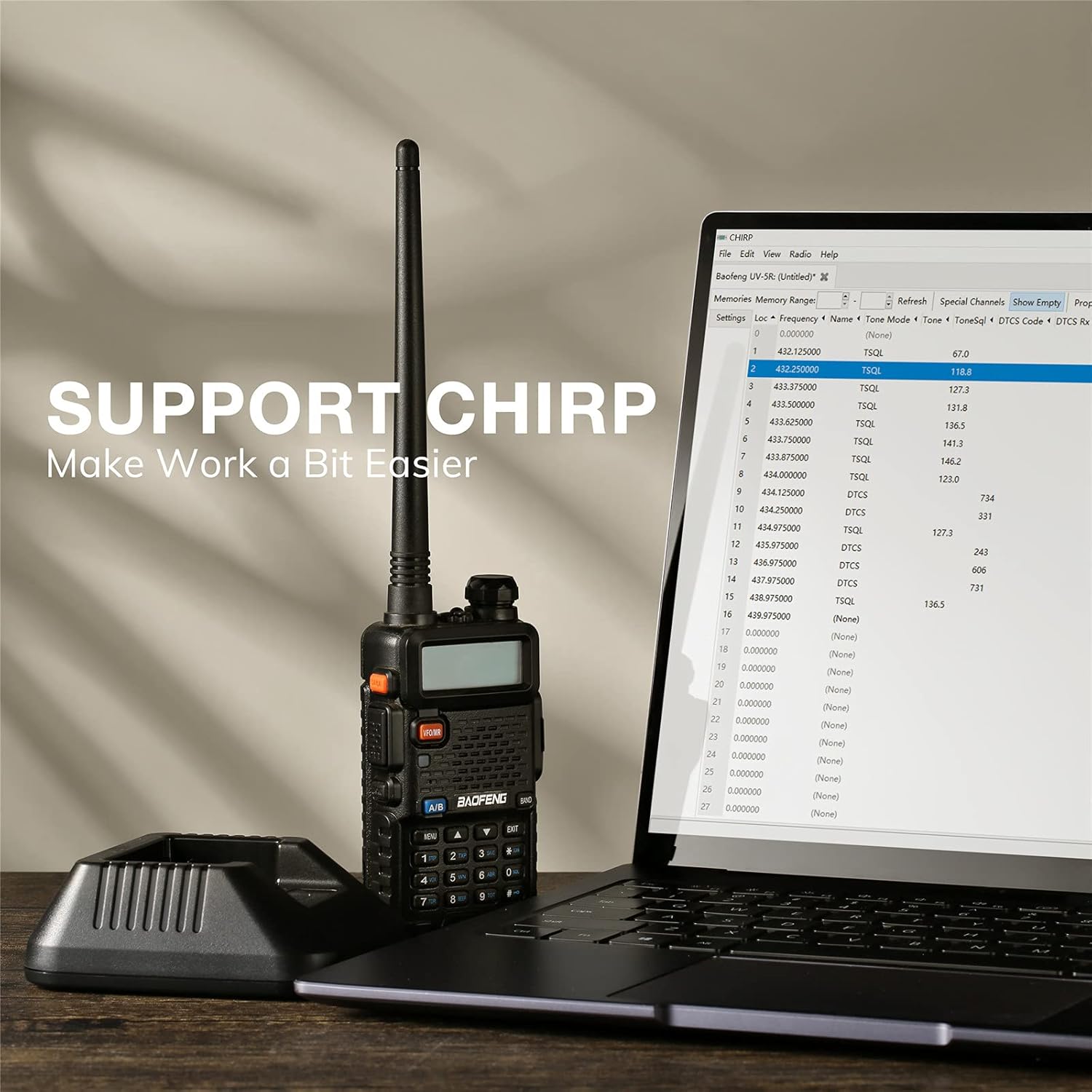
Figure 5.1: The BAOFENG GT-5R radio connected to a laptop, illustrating the use of CHIRP software for simplified programming.
6. Maintenance
- Cleaning: Use a soft, damp cloth to clean the radio's exterior. Do not use harsh chemicals or abrasive cleaners.
- Battery Care: To prolong battery life, avoid overcharging and fully discharging the battery regularly. Store batteries in a cool, dry place when not in use.
- Storage: Store the radio in a dry, dust-free environment away from extreme temperatures.
7. Troubleshooting
| Problem | Possible Cause | Solution |
|---|---|---|
| Radio does not power on. | Low or dead battery; improperly installed battery. | Charge the battery; ensure battery is correctly installed. |
| Cannot transmit or receive. | Incorrect frequency/channel; squelch too high; antenna not connected. | Verify frequency/channel; adjust squelch level; check antenna connection. |
| Poor audio quality. | Low battery; weak signal; incorrect CTCSS/DCS tone. | Charge battery; move closer to transmitting station; verify tone settings. |
| Radio not responding to programming software. | Incorrect cable drivers; wrong COM port selected; radio off. | Install correct drivers; select correct COM port in software; ensure radio is on. |
8. Specifications
| Feature | Detail |
|---|---|
| Model Number | GT 5R |
| Frequency Range | 144-148MHz, 420-450MHz |
| Number of Channels | 128 |
| Battery Type | 7.4V 1800mAh Lithium Ion |
| Display Type | LCD |
| Talking Range Maximum | 8 Miles (approximate, varies by terrain) |
| Product Dimensions | 13.58 x 12.01 x 4.53 inches (package dimensions) |
| Item Weight | 5.94 pounds (package weight) |
| Special Features | Dual Band, Lightweight, Long Range, Rechargeable, Voice Operated Transmission (VOX) |
| Water Resistance Level | Not Water Resistant |
9. Warranty & Support
Your BAOFENG GT-5R Ham Radio Handheld comes with an 18-month warranty from the date of purchase. Additionally, BAOFENG provides lifetime support for this product.
For technical assistance, troubleshooting, or warranty claims, please contact BAOFENG customer support through their official channels or the retailer from whom you purchased the product.
Ask a question about this manual
Ask about setup, troubleshooting, compatibility, parts, safety, or missing instructions. Manuals+ will review the question and use this page’s manual context to help answer it.