
1. Introduction
Thank you for choosing the Dekain ELP-LP48 projector lamp. This manual provides essential information for the safe and effective installation, operation, and maintenance of your new projector lamp. Please read these instructions carefully before proceeding with installation to ensure optimal performance and longevity of the product.
2. Safety Information
- High Temperature: Projector lamps operate at very high temperatures. Always allow the projector and the lamp to cool down completely (at least 30 minutes) before handling.
- Electrical Hazard: Disconnect the projector from the power outlet before attempting any installation or maintenance.
- Eye Protection: Never look directly into the lamp or projector lens when the lamp is on, as it can cause severe eye damage.
- Fragile Component: The lamp bulb is made of glass and can break if dropped or mishandled. Handle with care.
- Disposal: Dispose of old lamps according to local environmental regulations. Lamps may contain mercury.
3. Product Overview
The Dekain ELP-LP48 projector lamp is a high-quality replacement module designed for specific Epson projector models. It features an original Philips bulb, ensuring reliable performance and a long lifespan. The lamp module includes a durable, compatible housing for a precise fit and easy installation.
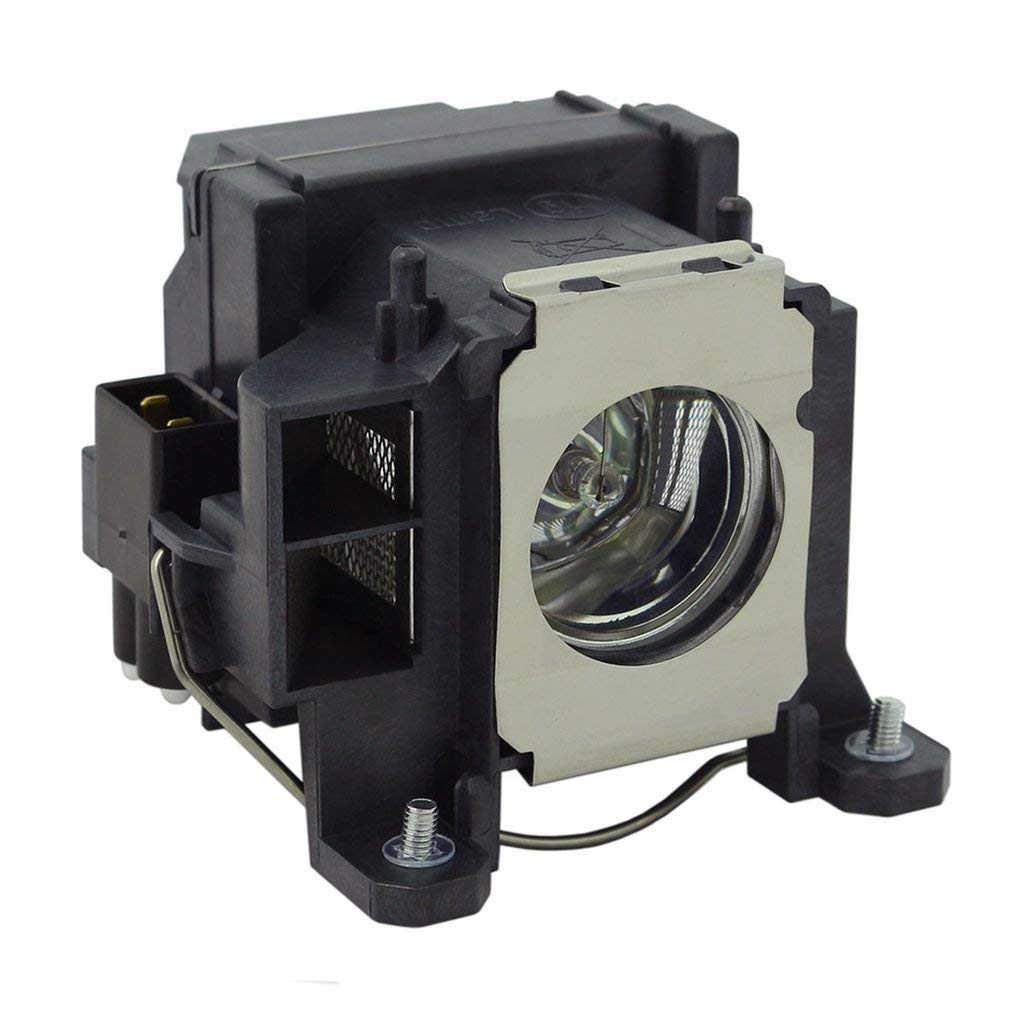
Image 3.1: Dekain ELP-LP48 Projector Lamp. This image shows the complete lamp module, including the original Philips bulb encased within its compatible housing, ready for installation.
4. Setup and Installation
Follow these steps to safely install your new Dekain projector lamp:
- Power Down: Ensure the projector is completely shut down and disconnected from the main power supply.
- Cool Down: Allow the projector and the old lamp to cool down for at least 30 minutes. The lamp can be extremely hot immediately after use.
- Locate Lamp Compartment: Refer to your projector's original manual to locate and open the lamp compartment cover. This usually involves unscrewing a few screws.
- Remove Old Lamp: Carefully loosen the screws securing the old lamp module. Gently pull the handle of the old lamp module to slide it out of the projector. Avoid touching the glass part of the old lamp.
- Insert New Lamp: Unpack the new Dekain ELP-LP48 lamp module. Hold it by its housing and carefully slide it into the projector's lamp slot until it is firmly seated.
- Secure Lamp: Tighten the screws to secure the new lamp module in place. Ensure the connection is firm and stable.
- Close Compartment: Replace the lamp compartment cover and secure it with its screws.
- Reconnect Power: Plug the projector back into the power outlet.
- Reset Lamp Timer: Turn on the projector. Navigate to the projector's menu settings and locate the option to reset the lamp timer. This is crucial for accurate lamp life tracking. Refer to your projector's manual for specific instructions on resetting the lamp timer.
5. Operating Instructions
Once the lamp is installed and the timer is reset, operate your projector as usual. The new lamp will provide optimal brightness and color performance. Always allow the projector to complete its cool-down cycle after use before disconnecting power to maximize lamp life.
6. Maintenance
- Cleaning: Periodically clean the projector's air filters to ensure proper ventilation and prevent overheating, which can shorten lamp life. Do not attempt to clean the lamp bulb itself.
- Handling: When handling a new lamp, avoid touching the glass bulb directly with bare hands. Oils from your skin can create hot spots and reduce lamp life. Use gloves or hold by the housing.
- Storage: Store spare lamps in their original packaging in a cool, dry place away from direct sunlight and extreme temperatures.
7. Troubleshooting
If you encounter issues after installing the new lamp, consider the following:
- Lamp Not Turning On:
- Ensure the lamp module is fully seated and secured with its screws.
- Verify the lamp compartment cover is correctly closed and secured.
- Check if the projector is receiving power.
- Confirm the lamp timer was reset. Some projectors will not power on a new lamp if the timer is not reset.
- Dim Image or Poor Color:
- Ensure the projector's display settings (brightness, contrast, color mode) are correctly configured.
- Check if the projector's air filters are clean, as overheating can affect lamp performance.
- Lamp Warning Indicator:
- If the lamp warning light persists after installation, ensure the lamp timer was properly reset.
If problems persist, consult your projector's original user manual or contact Dekain customer support.
8. Specifications
| Feature | Specification |
|---|---|
| Brand | Dekain |
| Model Number | ELP-LP48 |
| Compatible Projectors | Epson H268A, H268C, H268F |
| Light Type | Metal Halide (Original Philips Bulb) |
| Wattage | 170 watts |
| Bulb Shape Size | MR20 |
| Bulb Base | Prong |
| Item Weight | 14.4 ounces |
| Package Dimensions | 6 x 6 x 5 inches |
| UPC | 770343899530 |
9. Warranty and Support
Dekain projector lamps are manufactured to high-quality standards. For specific warranty details, please refer to the product packaging or contact your retailer. For technical support or inquiries, please reach out to Dekain customer service through the contact information provided with your purchase or on the official Dekain website.