Introduction
This manual provides essential information for the installation, operation, and maintenance of your Ideal Standard Sensorflow Infrared Faucet, model A7559AA. This touchless faucet is designed to enhance hygiene and conserve water through its infrared sensor technology.

Figure 1: Ideal Standard Sensorflow Infrared Faucet, showcasing its sleek chrome design.
Setup and Installation
The Ideal Standard Sensorflow faucet is designed for straightforward installation, suitable for single-hole mounting. While the Easy Fix system simplifies the process, professional installation is recommended to ensure proper function and compliance with local plumbing codes.
Components Included:
- 1 x Sensorflow Faucet with integrated battery
- Hot and cold water supply hoses (G3/8, 35 cm length)
- Installation manual
Installation Steps:
- Ensure the water supply is turned off before beginning installation.
- Mount the faucet onto the sink or countertop using the single-hole Easy Fix system. The pre-assembled components and brass bolt facilitate centering and securing the faucet.
- Connect the G3/8 supply hoses to the hot and cold water lines.
- Verify all connections are secure and watertight.
- Turn on the water supply and check for leaks.
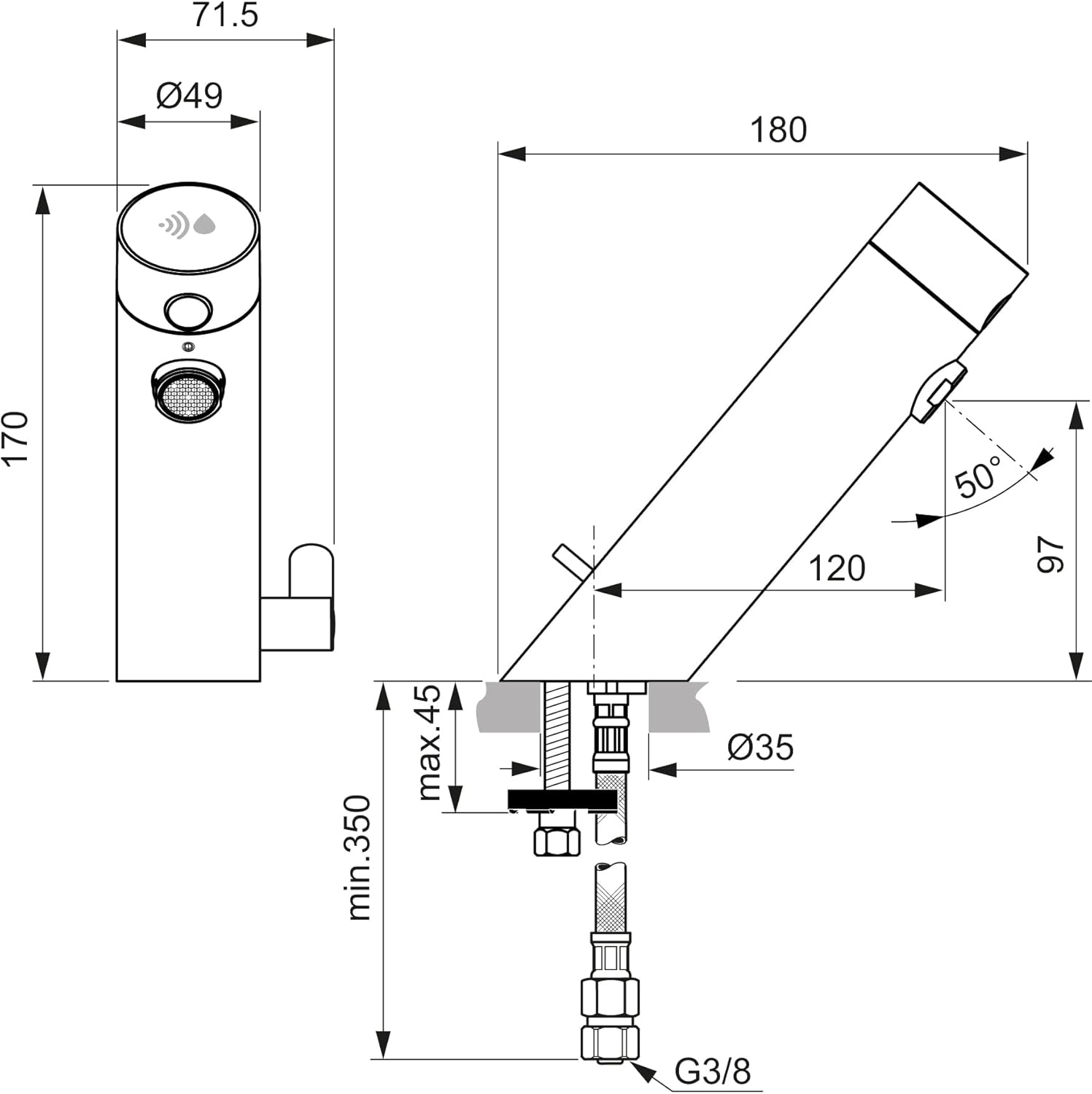
Figure 2: Technical drawing illustrating the dimensions and installation points of the Sensorflow faucet.
Operating Instructions
The Sensorflow faucet provides touchless water delivery for enhanced hygiene and convenience.
Automatic Water Flow:
- Place your hands within the detection range of the infrared sensor located at the end of the spout.
- Water will begin to flow automatically.
- Remove your hands from the sensor's field, and the water flow will stop automatically.
- For safety, the water flow will automatically cut off after 55 seconds of continuous use.
Temperature Adjustment:
This model allows for mixed hot and cold water. Adjust the water temperature using the small lever located at the base of the faucet. Rotate the lever to achieve the desired temperature.

Figure 3: The Sensorflow faucet in operation, providing touchless water for handwashing.
Maintenance
Regular maintenance ensures the longevity and optimal performance of your Sensorflow faucet.
Cleaning:
- Clean the faucet's chrome surface with a soft cloth and mild, non-abrasive cleaner.
- The inclined surface and smooth body design prevent water stagnation, simplifying cleaning.
- Avoid harsh chemicals or abrasive pads that can damage the finish.
Battery Replacement:
- The faucet operates on a 6V lithium battery, designed for 300,000 cycles (3 to 5 years of use).
- A flashing alert will indicate a low battery.
- Battery replacement can be performed from the top of the faucet without needing to shut off the water supply or disassemble the unit. Refer to the detailed installation guide for specific steps.
Automatic Rinsing Cycle:
The faucet features a programmable 120-second automatic rinsing cycle to prevent water stagnation within the system. Consult the full installation manual for instructions on activating or adjusting this feature.
Troubleshooting
If you encounter issues with your Sensorflow faucet, refer to the following common problems and solutions:
| Problem | Possible Cause | Solution |
|---|---|---|
| No water flow when hands are detected | Low battery; obstructed sensor; water supply off; solenoid valve issue. | Check for low battery alert and replace battery if necessary. Ensure sensor is clean and unobstructed. Verify water supply is on. If issue persists, contact support. |
| Sensor not detecting hands reliably | Sensor sensitivity; reflective surfaces; dirty sensor lens. | Clean the sensor lens. Ensure there are no highly reflective objects directly in front of the sensor. Refer to the full manual for sensor sensitivity adjustment if available. |
| Water is too cold or too hot | Temperature lever not adjusted correctly; hot/cold water supply issues. | Adjust the temperature mixing lever at the base of the faucet. Verify hot and cold water supplies are functioning correctly. |
| Faucet is dripping | Internal valve seal wear or damage. | This typically requires professional service. The valve seal (often beige with a filter) connected to the solenoid valve may need inspection or replacement. |
| Flashing light indicator | Low battery. | Replace the 6V lithium battery. |
Specifications
| Feature | Detail |
|---|---|
| Model Number | A7559AA |
| Dimensions (L x W x H) | 7.1 x 18 x 17 cm |
| Weight | 1.68 Kilograms |
| Material | Chrome-plated Brass |
| Color | Chrome |
| Power Source | 1 Lithium-ion battery (6V) - included |
| Installation Type | Single-hole, Deck Mount |
| Spout Height | 97 mm |
| Spout Reach | 120 mm |
| Maximum Flow Rate | 5 Litres per minute (3.78 L/min with pre-mounted aerator) |
| Special Feature | Touchless Infrared Sensor, Temperature Limiter (43°C) |
| Country of Origin | France |
Warranty and Support
Warranty:
The Ideal Standard Sensorflow Infrared Faucet A7559AA comes with a 2-year manufacturer's warranty, ensuring quality and reliability.
Support:
For further assistance, technical support, or warranty claims, please contact Ideal Standard customer service. Refer to the packaging or the official Ideal Standard website for contact information specific to your region.