
1. Product Overview
The Luminous NXI 150 is a 5KW Solar Grid Tie Inverter designed to convert direct current (DC) electricity generated by solar panels into alternating current (AC) electricity for direct use or feeding into the utility grid. This inverter features a transformer-less design for high efficiency and includes advanced functionalities like Dual MPPT for optimized solar power extraction and IP65 protection for outdoor installation. It is equipped with anti-islanding protection to ensure safety during grid outages.
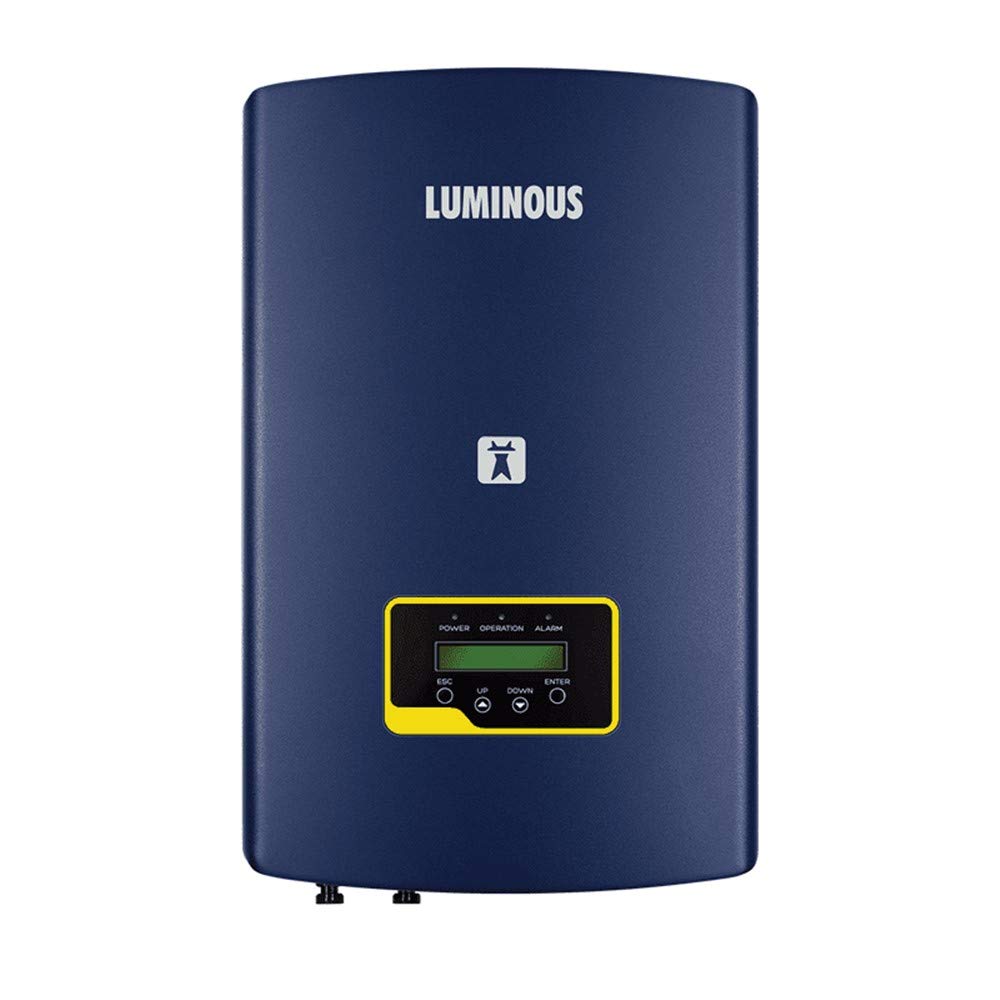
Figure 1: Front view of the Luminous NXI 150 Solar Grid Tie Inverter, showing the display and control buttons.
2. Important Safety Instructions
Please read and understand all safety instructions before installing, operating, or maintaining the Luminous NXI 150 inverter. Failure to follow these instructions may result in electric shock, fire, serious injury, or death.
- Qualified Personnel Only: Installation and maintenance must be performed by qualified and trained personnel.
- Electrical Hazard: The inverter operates with high voltages and currents. Do not open the inverter casing or attempt repairs.
- Disconnect Power: Always disconnect both AC grid power and DC solar panel power before performing any work on the inverter.
- Anti-Islanding Protection: The inverter is designed to automatically disconnect from the grid if the utility grid fails. Do not bypass or disable this safety feature.
- Grounding: Ensure the inverter is properly grounded according to local electrical codes.
- Environmental Conditions: Although IP65 rated for outdoor use, avoid installing the inverter in direct sunlight for prolonged periods without adequate ventilation, or in areas prone to extreme physical impact.
- Children and Pets: Keep children and pets away from the inverter and solar installation area.
3. Package Contents
Verify that all items are present and undamaged upon unpacking the product:
- Luminous NXI 150 Solar Grid Tie Inverter
- Connectors (for DC input and AC output)
- User Manual (this document)
If any items are missing or damaged, contact your supplier immediately.
4. Product Features
The Luminous NXI 150 inverter incorporates several advanced features for optimal performance and reliability:
- High Efficiency: Over 97% efficiency due to transformer-less design, maximizing solar power conversion.
- Dual MPPT: Inbuilt Maximum Power Point Tracking (MPPT) charge controller extracts up to 30% more power from solar panels, offering flexibility for multiple arrays and minimizing shading impact.
- IP65 Protection: Certified for outdoor installation, capable of withstanding dust, heavy rains, and extreme temperatures.
- Anti-Islanding Protection: Automatically disconnects from the grid during power outages, ensuring safety for utility line workers.
- Comprehensive Protection: Includes features for short-circuit, reverse polarity, and residual current detection.
- User-Friendly LCD Display: Provides informative real-time operational data.
- MNRE & IEC Compliance: Adheres to national and international standards for safety, efficiency, and reliability (e.g., IEC – 61683, IEC – 60068, IEC – 61000, IEC – 61727, IEC – 62116).
Figure 2: Rear view of the Luminous NXI 150 inverter, illustrating the various connection terminals for DC input and AC output.
5. Setup and Installation
Installation of the Luminous NXI 150 inverter requires specialized knowledge and should only be performed by certified electricians or qualified solar installers. Improper installation can lead to equipment damage, personal injury, or void the warranty.
5.1 Site Selection
- Choose a location that is well-ventilated and accessible for maintenance.
- Despite IP65 rating, avoid direct, prolonged exposure to intense sunlight to prevent overheating and ensure optimal performance.
- Mount the inverter vertically on a solid surface, ensuring adequate clearance around the unit for airflow.
5.2 Electrical Connections
- DC Input: Connect the solar panel strings to the designated DC input terminals, ensuring correct polarity for each MPPT channel.
- AC Output: Connect the inverter's AC output to the main electrical panel or grid connection point, following local electrical codes and utility requirements.
- Grounding: Establish a proper earth ground connection for the inverter chassis.
- Disconnection Devices: Install appropriate DC and AC disconnect switches as required by local regulations.
Refer to the detailed wiring diagrams provided in the full installation guide (not included in this manual) for specific connection procedures.
6. Operating Instructions
Once installed and all connections are verified, the inverter can be powered on.
6.1 Initial Startup
- Ensure all DC and AC disconnect switches are in the OFF position.
- Close the AC disconnect switch first.
- Close the DC disconnect switch(es).
- The inverter will perform a self-test and then begin to synchronize with the grid. This process may take a few minutes.
- The LCD display will show operational status, including power generation, grid status, and any alerts.
6.2 LCD Display and Controls
The inverter features an LCD display and control buttons (ESC, UP, DOWN, ENTER) for monitoring performance and adjusting settings. Refer to the full product manual for detailed navigation and parameter descriptions.
- Power Indicator: Illuminates when the inverter is receiving DC power.
- Operation Indicator: Illuminates when the inverter is actively generating and feeding power to the grid.
- Alarm Indicator: Illuminates or flashes to indicate a fault or warning condition.
- ESC Button: Used to exit menus or cancel selections.
- UP/DOWN Buttons: Used to navigate through menu options or adjust values.
- ENTER Button: Used to confirm selections or enter sub-menus.
6.3 Shutdown Procedure
- Open the AC disconnect switch to isolate the inverter from the grid.
- Open the DC disconnect switch(es) to disconnect the solar panels from the inverter.
- Wait for the inverter's internal components to discharge and the display to turn off.
7. Maintenance
Regular maintenance helps ensure the longevity and optimal performance of your Luminous NXI 150 inverter. Always follow safety precautions before performing any maintenance.
- Visual Inspection (Monthly): Check the inverter casing for any signs of damage, corrosion, or loose connections. Ensure ventilation openings are clear of dust and debris.
- Cleaning (Annually or as needed): Gently clean the exterior of the inverter with a soft, dry cloth. Do not use abrasive cleaners or solvents. Ensure the display is clean and readable.
- Connection Check (Annually): Have a qualified technician inspect all electrical connections (DC and AC) for tightness and signs of wear or corrosion.
- Performance Monitoring: Regularly check the inverter's performance via the LCD display or monitoring system (if applicable) to ensure it is operating within expected parameters.
Do not attempt to open the inverter or perform internal repairs. Refer all internal servicing to authorized Luminous service personnel.
8. Troubleshooting
This section provides basic troubleshooting steps for common issues. For more complex problems or persistent errors, contact Luminous customer support.
| Problem | Possible Cause | Solution |
|---|---|---|
| Inverter not generating power |
|
|
| Alarm indicator is on |
|
|
| Low power output |
|
|
Note: Always ensure safety precautions are followed before attempting any troubleshooting steps involving electrical components.
9. Technical Specifications
| Parameter | Value |
|---|---|
| Model Number | NXI 150 |
| Manufacturer | Luminous Power Technologies Pvt Ltd |
| Product Dimensions (LxWxH) | 31 x 16 x 54.4 cm |
| Item Weight | 5 kg |
| Max Efficiency | 98.1% |
| MPPT Type | Dual MPPT |
| Protection Rating | IP65 |
| Included Components | Solar Inverter, Connector |
| Generic Name | Ongrid Solar Inverter |
10. Warranty and Customer Support
For warranty information, technical assistance, or service requests, please contact Luminous customer support.
- Manufacturer: Luminous Power Technologies Pvt Ltd
- Customer Service Number: 18001033039
- Website: www.luminousindia.com
Please have your product model number (NXI 150) and purchase details ready when contacting support.


