
Introduction
The BenQ TK700STi is a 4K HDR gaming projector designed to deliver an immersive visual experience for both gaming and home cinema. It features low input lag, high brightness, and flexible setup options, making it suitable for various environments and uses.
- 4K Low Latency: Experience gaming with minimal delay, offering 16ms response time at 4K/60Hz.
- High Brightness: With 3200 lumens, the projector delivers bright and clear images even in moderately lit rooms.
- Flexible Setup: Features 1.2x zoom, 2D Auto Vertical Keystone, and Picture Rotation Adjustment for easy image alignment.
- Smart Entertainment: Includes Google-certified Android TV for access to a wide range of streaming apps and content.
Setup
Follow these steps to set up your BenQ TK700STi projector.
Unpacking and Components
Carefully remove all components from the packaging. The box should contain the TK700STi projector, a remote control, a power cable, and an Android TV Dongle.
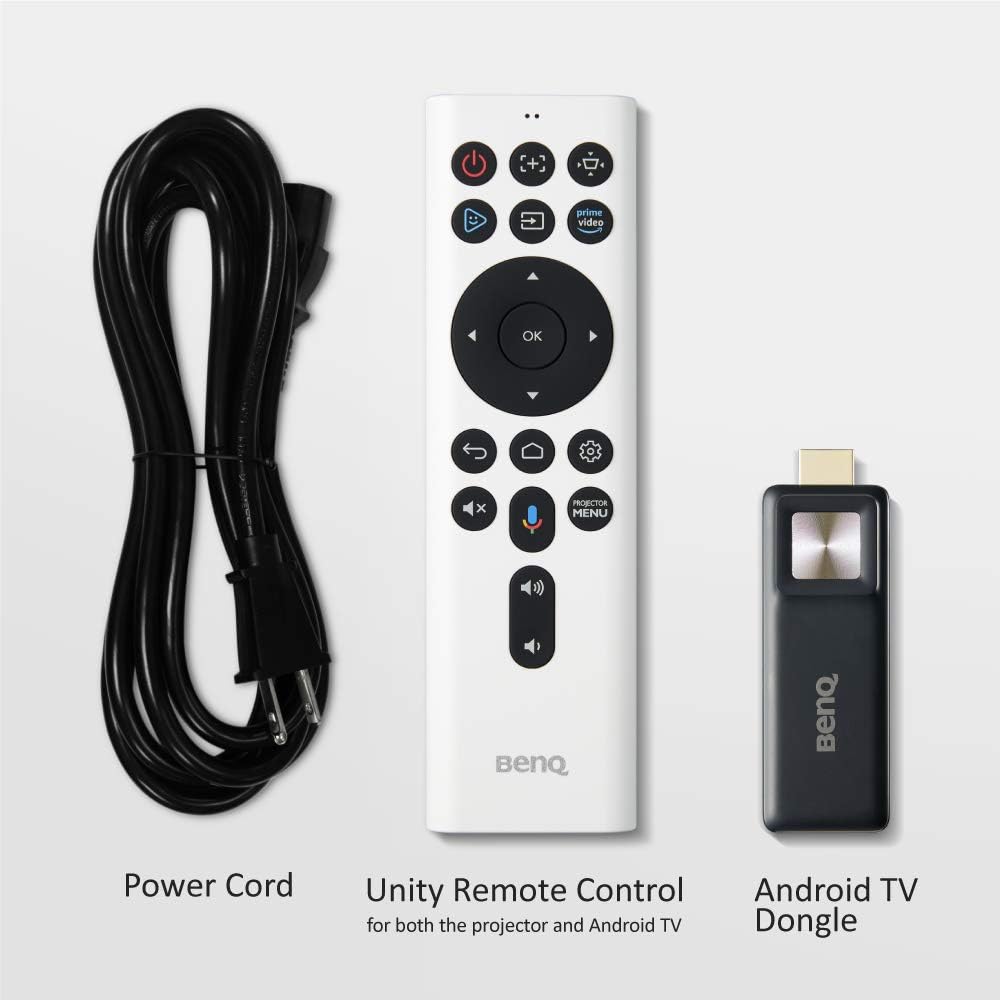
Image: BenQ TK700STi Projector, Power Cord, Unity Remote Control, and Android TV Dongle.
Connecting Devices
The projector offers multiple connectivity options. Connect your gaming console, streaming device, or other media players using the HDMI ports. The HDMI 2 port supports eARC for enhanced audio return.

Image: Rear view of the BenQ TK700STi projector showing HDMI 1 (2.0b), HDMI 2 (2.0b with HDCP 2.2 and Audio Return), RS-232, Audio Out, and USB-A 1.5A Power Delivery ports.
Placement and Image Adjustment
The TK700STi features short-throw capabilities, allowing it to project a 100-inch image from approximately 6.5 feet away. Utilize the 1.2x zoom for flexible throw distances and the 2D Auto Vertical Keystone and Picture Rotation Adjustment to square the image on your screen or wall.

Image: Diagram illustrating the 1.2x zoom capability of the BenQ TK700STi, showing various screen sizes (80", 90", 100", 120") at different projection distances (1.59m/5.2ft to 2.39m/7.8ft).

Image: Diagram showing the 2D Keystone feature of the BenQ TK700STi, allowing for correction of distorted images from angled projections.
Setup Video
Video: This video demonstrates the setup process for BenQ TK705i and TK705STi projectors, which share similar setup procedures with the TK700STi, focusing on projection alignment.
Operating Instructions
The BenQ TK700STi is designed for intuitive operation, offering various modes and features to optimize your viewing experience.
Powering On and Off
Press the power button on the projector or the remote control to turn the device on or off. Allow a few moments for the projector to warm up or cool down.
Navigating Android TV
The integrated Google-certified Android TV dongle provides access to a vast library of apps, movies, shows, and games. Use the Unity Remote Control to navigate the Android TV interface, search for content, and access Google Assistant.

Image: Screenshot of the BenQ TK700STi's Android TV interface, displaying various streaming services and content options.
Gaming Modes and Performance
The projector offers specialized Game Modes and Game Sound Modes to fine-tune audio and images for an optimal gaming experience. With a low input lag of 16ms at 4K/60Hz and as low as 4ms at 1080p/240Hz, it's compatible with major consoles like PS4, PS5, Nintendo Switch, and Xbox Series X.

Image: Table detailing the input lag performance of the BenQ TK700STi (TK700) at various resolutions and refresh rates, including 4K 60Hz (16.67ms) and 1080p 240Hz (4ms).
Operation Video
Video: This official BenQ America Corp. video provides an overview of the BenQ TK700STi 4K Short Throw Gaming Projector, highlighting its key features and operational aspects.
Maintenance
To ensure optimal performance and longevity of your BenQ TK700STi projector, regular maintenance is recommended.
Lamp Life
The projector lamp has a lifespan ranging from 4,000 to 15,000 hours, depending on the operating mode (e.g., Normal, Eco, SmartEco, LampSave). Using Eco or LampSave modes can extend the lamp's life significantly.
Cleaning
- Lens: Use a soft, lint-free cloth and a specialized lens cleaning solution. Avoid abrasive materials.
- Exterior: Wipe the projector's exterior with a soft, dry cloth. Do not use harsh chemicals or solvents.
- Air Vents: Periodically clean the air vents to prevent dust buildup, which can affect cooling and performance. Use a soft brush or compressed air.
Troubleshooting
If you encounter issues with your BenQ TK700STi projector, refer to the following common troubleshooting tips:
- No Image: Ensure all cables are securely connected and the correct input source is selected. Check power connections.
- Blurred Image: Adjust the focus ring on the lens. If the image is distorted, use the 2D Keystone correction feature.
- No Sound: Verify that the audio cables are correctly connected and the volume is not muted. If using eARC, ensure your audio system is properly configured.
- Overheating: Ensure the projector's vents are not blocked and there is adequate airflow around the device.
- Remote Not Responding: Check the remote control batteries. Ensure there are no obstructions between the remote and the projector's IR receiver.
Specifications
| Feature | Detail |
|---|---|
| Model Number | TK700STi |
| Display Resolution | 3840 x 2160 (4K UHD) |
| Brightness | 3200 Lumens |
| Input Lag (4K/60Hz) | 16ms |
| Input Lag (1080p/240Hz) | 4ms |
| Connectivity Technology | 2x HDMI 2.0b (HDMI 2 with eARC), USB-A, 3.5mm Jack |
| Special Features | 3D-Ready, Auto Focus, Built-In Speaker, Digital Keystone Correction, Short Throw, Android TV Dongle |
| Product Dimensions | 18 x 13 x 7 inches |
| Item Weight | 6.83 pounds |
| Recommended Uses | Gaming, Home Cinema |
| Lamp Life | 4,000 - 15,000 hours (depending on mode) |
Warranty
BenQ products are covered by a limited warranty. Please refer to the warranty card included with your product or visit the official BenQ website for detailed terms and conditions regarding coverage and duration.
Support
For technical assistance, product registration, or further inquiries, please visit the official BenQ support website or contact their customer service. You can find contact information and FAQs on the BenQ website.
BenQ Official Website: www.benq.com