1. Product Overview
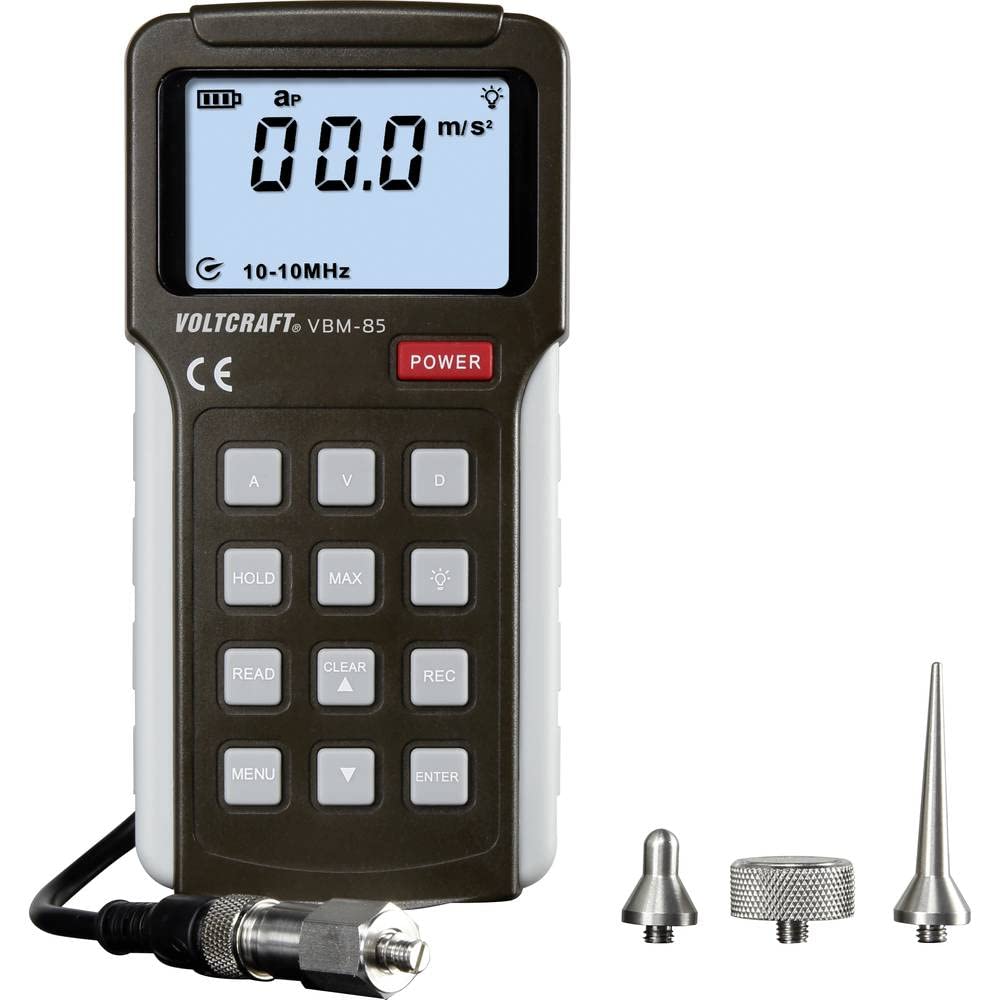
Figure 1.1: The VOLTCRAFT VBM-85 Vibration Meter, showing the main unit and its connected high-sensitivity probe.
The VOLTCRAFT VBM-85 is a versatile vibration meter designed for precise measurement of acceleration, velocity, and displacement. This device features a large LCD screen for clear display of measurements and status, multiple frequency selection options, and a high-sensitivity probe for accurate readings. It includes both long and short probes to accommodate various application environments.
Key Features:
- Three measurement modes: acceleration, velocity, and displacement.
- Large LCD display for clear readings and status indication.
- Selectable frequency ranges.
- High-sensitivity probe for accurate measurements.
- Includes long and short probes for diverse applications.
2. Safety Instructions
Please read and understand all safety instructions before operating the device. Failure to follow these instructions may result in injury or damage to the device.
- Do not attempt to open or modify the device. There are no user-serviceable parts inside.
- Keep the device away from water, moisture, and extreme temperatures.
- Avoid dropping the device or subjecting it to strong impacts.
- Use only the specified battery type and ensure correct polarity during installation.
- Do not use the device in environments with explosive gases or vapors.
- Clean the device with a soft, dry cloth. Do not use abrasive cleaners or solvents.
- Dispose of batteries and the device according to local regulations.
3. Product Components
The VOLTCRAFT VBM-85 Vibration Meter package typically includes the following items:
- VOLTCRAFT VBM-85 Vibration Meter Unit
- High-sensitivity probe (with cable)
- Short probe tip
- Long probe tip
- User Manual
Device Layout:

Figure 3.1: Front view of the VOLTCRAFT VBM-85 Vibration Meter. Shows the LCD display, control buttons (POWER, HOLD, MAX, READ, CLEAR, REC, MENU, ENTER, and measurement mode buttons A, V, D), and the probe connection port.

Figure 3.2: Rear view of the VOLTCRAFT VBM-85 Vibration Meter, showing the battery compartment cover and the integrated stand.

Figure 3.3: Rear view of the VOLTCRAFT VBM-85 Vibration Meter with the battery compartment open, revealing the battery terminals and the compartment for battery insertion.
4. Setup
4.1. Battery Installation
- Locate the battery compartment on the back of the device (refer to Figure 3.2).
- Use a small screwdriver to loosen the screw on the battery compartment cover.
- Remove the battery compartment cover (refer to Figure 3.3).
- Insert the required batteries (e.g., 4x AA batteries, not included) into the compartment, ensuring correct polarity (+/-) as indicated inside.
- Replace the battery compartment cover and tighten the screw securely.
4.2. Probe Connection
- Identify the probe connector on the top of the VBM-85 unit.
- Align the connector of the high-sensitivity probe cable with the port on the device.
- Gently push and twist the connector clockwise until it is securely fastened.
- Attach either the short or long probe tip to the end of the probe, depending on your measurement requirements.
5. Operating Instructions
5.1. Powering On/Off
- To power on the device, press the POWER button. The LCD display will illuminate.
- To power off the device, press and hold the POWER button until the display turns off.
5.2. Selecting Measurement Mode
The VBM-85 supports three measurement modes: Acceleration (A), Velocity (V), and Displacement (D).
- Press the A button to select Acceleration mode.
- Press the V button to select Velocity mode.
- Press the D button to select Displacement mode.
- The selected mode will be indicated on the LCD display.
5.3. Taking Measurements
- Ensure the probe is securely connected and the desired probe tip is attached.
- Select the appropriate measurement mode (A, V, or D).
- Carefully place the probe tip firmly against the surface of the object you wish to measure. Ensure good contact for accurate readings.
- The current measurement will be displayed on the LCD screen.
5.4. Using Advanced Functions
- HOLD: Press the HOLD button to freeze the current reading on the display. Press again to release.
- MAX: Press the MAX button to display the maximum measured value since the function was activated.
- READ/REC: These buttons are typically used for data logging or recalling stored data. Refer to the full manual for detailed instructions on data recording and retrieval.
- MENU/ENTER: These buttons are used to navigate through settings and confirm selections, such as frequency range adjustments.
6. Maintenance
6.1. Cleaning
Wipe the device and probe with a soft, dry, lint-free cloth. Do not use liquid cleaners, solvents, or abrasive materials, as these can damage the casing or internal components.
6.2. Storage
When not in use for extended periods, remove the batteries to prevent leakage. Store the device in a cool, dry place, away from direct sunlight and extreme temperatures. Keep it in its original packaging or a protective case to prevent damage.
7. Troubleshooting
| Problem | Possible Cause | Solution |
|---|---|---|
| Device does not power on. | Batteries are depleted or incorrectly installed. | Replace batteries with new ones, ensuring correct polarity. |
| Inaccurate readings. | Loose probe connection, incorrect measurement mode, or poor contact with the surface. | Ensure probe is securely connected. Verify the correct measurement mode is selected. Ensure firm and stable contact between the probe tip and the object. |
| Display shows "Err" or similar error message. | Measurement range exceeded or internal error. | Move the probe to a different location or restart the device. If the error persists, contact customer support. |
8. Technical Specifications
| Parameter | Value |
|---|---|
| Manufacturer | VOLTCRAFT |
| Model Number | VC-11339810 |
| Product Dimensions (L x W x H) | 30 x 80 x 166 mm |
| Weight | 395 Grams |
| Power Source | Battery Powered |
| Batteries Required | Yes |
| Batteries Included | No |
| Spare Parts Availability (EU) | 1 Year |
9. Warranty and Support
VOLTCRAFT products are designed for reliability and precision. This product comes with a 1-year availability for spare parts in the EU, indicating support for maintenance and repairs within this period.
For technical support, warranty claims, or service inquiries, please contact your VOLTCRAFT retailer or visit the official VOLTCRAFT website for contact information.
Please retain your proof of purchase for any warranty claims.


