1. Introduction
The Volkano Chat 2 Aux Series Stereo Headset with Boom Microphone is designed for clear communication and comfortable use. This headset offers plug-and-play simplicity, requiring no additional drivers for operation. It is compatible with most devices featuring a 3.5mm audio jack, such as computers, laptops, and switchboards.
Key features include:
- Easy connectivity for crisp, clear communication.
- Hands-free volume control for convenient audio adjustment.
- Ergonomic design for a comfortable fit.
- Microphone engineered to minimize background noise and feedback.
2. Package Contents
Please ensure all items are present:
- 1 x Volkano Chat 2 Stereo Headset with Boom Microphone (Black)
3. Setup
Setting up your Volkano Chat 2 headset is straightforward:
- Connect the Headset: Locate the 3.5mm audio jack on your computer, laptop, or compatible device. Insert the headset's 3.5mm connector firmly into the audio jack.
- Adjust Microphone Position: The boom microphone is flexible. Position it appropriately near your mouth for optimal voice capture.
- Adjust Headband: Extend or retract the headband to ensure a comfortable and secure fit over your ears.
- Verify Connection: The headset is plug-and-play and typically requires no driver installation. Your device should automatically detect the headset. You may need to select the headset as the default audio input/output device in your operating system's sound settings.
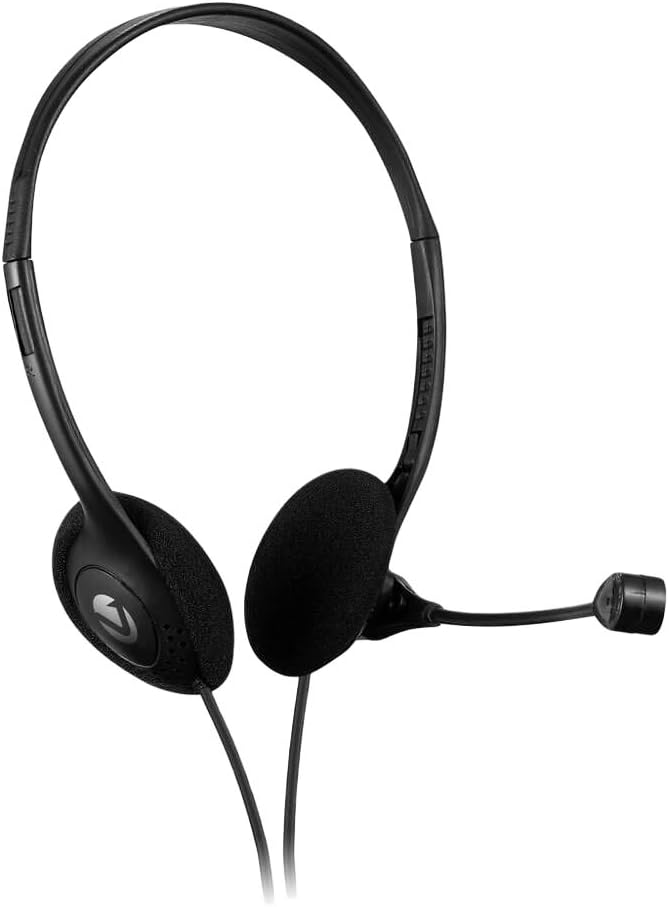
Image 1: Volkano Chat 2 Aux Series Stereo Headset. This image shows the headset with its over-ear design and adjustable boom microphone.

Image 2: Volkano Chat 2 Aux Series Stereo Headset showing the 3.5mm audio jack and the in-line volume control unit.
4. Operating Instructions
Once connected, you can begin using your headset:
- Audio Output: Sound from your device will be routed through the headset's earcups.
- Microphone Input: The boom microphone will capture your voice for calls, online meetings, or voice recording.
- Volume Control: Use the in-line volume control located on the headset cable to adjust the audio output level.
- Microphone Mute: If your in-line control includes a mute switch, use it to quickly mute or unmute your microphone.
5. Maintenance
To ensure the longevity and optimal performance of your headset, follow these maintenance guidelines:
- Cleaning: Gently wipe the earcups and headband with a soft, dry cloth. Avoid using harsh chemicals or abrasive materials.
- Storage: When not in use, store the headset in a clean, dry place, away from direct sunlight and extreme temperatures. Avoid tangling the cable.
- Cable Care: Do not pull on the cable to disconnect the headset. Always grasp the plug. Avoid bending or twisting the cable excessively.
- Microphone Care: Handle the boom microphone gently. Avoid forcing it into extreme positions.
6. Troubleshooting
If you encounter issues with your Volkano Chat 2 headset, refer to the following common solutions:
- No Sound from Headset:
- Ensure the 3.5mm jack is fully inserted into your device's audio port.
- Check the in-line volume control on the headset cable and increase the volume.
- Verify your device's master volume is not muted or set too low.
- In your device's sound settings, confirm that the headset is selected as the default playback device.
- Microphone Not Working:
- Ensure the 3.5mm jack is fully inserted.
- If your headset has a microphone mute switch, ensure it is not activated.
- In your device's sound settings, confirm that the headset microphone is selected as the default recording device and that its input volume is not muted or set too low.
- Test the microphone with another application or device if possible.
- Poor Audio Quality:
- Ensure the connection is secure and free from debris.
- Test with another audio source or device to rule out source issues.
7. Specifications
| Model Number | VK-20151-BK |
| Brand | Volkano |
| Connectivity Technology | Wired (3.5mm Jack) |
| Ear Placement | Over Ear |
| Form Factor | Over Ear |
| Impedance | 32 Ohms |
| Sensitivity | 110 dB |
| Noise Control | Active Noise Cancellation |
| Special Features | Lightweight |
| Color | Black |
8. Warranty Information
This Volkano product is covered by a 1-Year Limited Warranty from the manufacturer. For extended coverage, you may be eligible to register your product for an additional 12-month extension, totaling 24 months of coverage. Please refer to the official Volkano website or product packaging for registration details and full warranty terms and conditions.
9. Support
Your satisfaction is important to us. If you have any questions, require assistance with your Volkano Chat 2 Aux Series Stereo Headset, or need support with products or services, please message us via the official Volkano Page or visit the Volkano website for further contact options.