
1. Product Overview
The Gree H13 True HEPA Air Purifier is designed to improve indoor air quality by filtering various airborne particles. It features an H13 True HEPA filter, real-time air quality monitoring, and multiple operating modes.

Figure 1: Gree H13 True HEPA Air Purifier unit.
2. Safety Information
- Read all instructions before use.
- Do not operate the unit with a damaged cord or plug.
- Keep the unit away from water or moist environments.
- Ensure proper ventilation around the unit.
- Unplug the unit before cleaning or maintenance.
3. Setup
3.1 Unpacking
- Carefully remove the air purifier from its packaging.
- Remove any protective plastic or wrapping from the unit and the filter.
3.2 Filter Installation
The air purifier comes with an H13 True HEPA filter. Ensure it is properly installed before first use.
- Turn the unit upside down.
- Rotate the base counter-clockwise to unlock and remove it.
- Insert the H13 True HEPA filter into the unit. Ensure it is seated correctly.
- Replace the base and rotate it clockwise to lock it securely.

Figure 2: Illustration of filter replacement process.
3.3 Placement
Place the air purifier on a flat, stable surface. For optimal performance, ensure there is adequate space around the unit for air intake and output. The compact design allows for placement on tables or desks, suitable for small rooms.

Figure 3: Air purifier demonstrating 360-degree air intake in a room setting.
3.4 Power Connection
Connect the power adapter to the unit and then plug it into a standard electrical outlet.
4. Operating Instructions
4.1 Control Panel
The control panel is located on the top of the unit. It includes buttons for power, fan speed, timer, and a display for air quality.
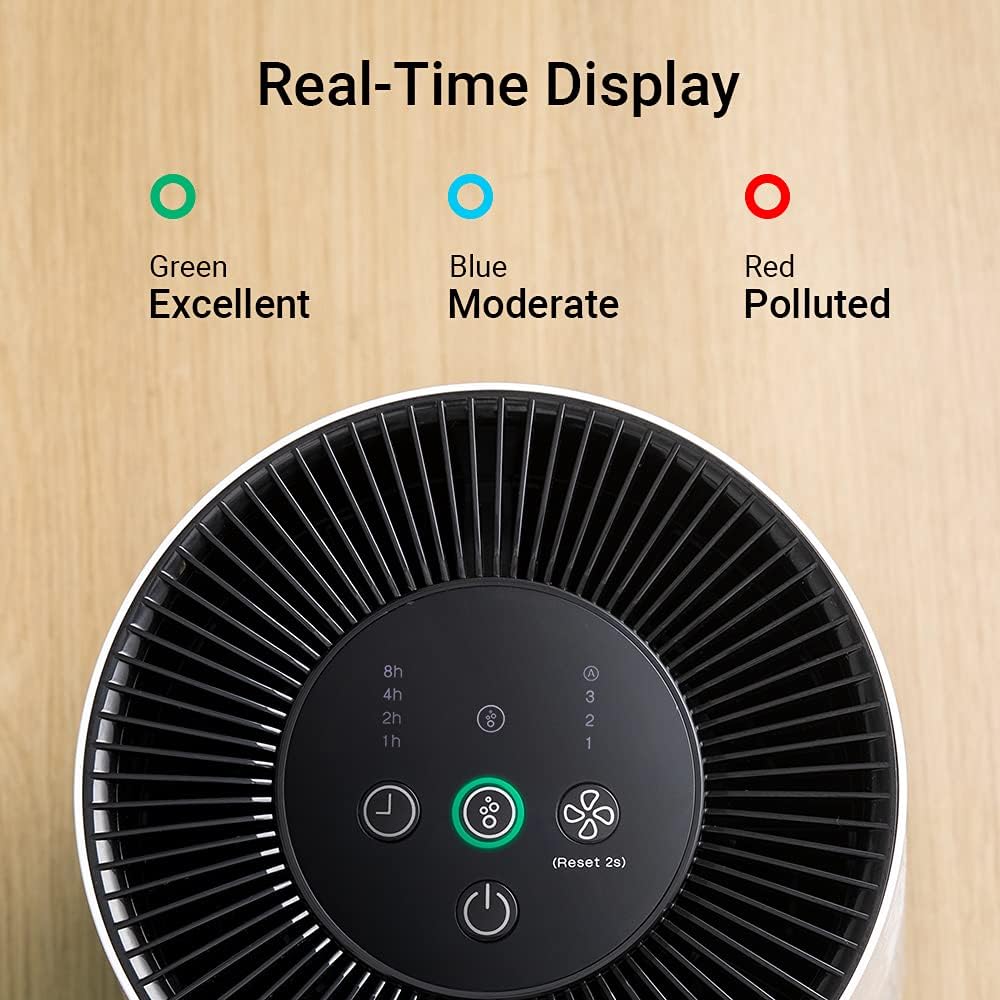
Figure 4: Top view of the control panel with air quality indicators.
4.2 Power On/Off
Press the Power button to turn the unit on or off.
4.3 Fan Speed Adjustment
Press the Fan Speed button to cycle through three available wind speeds (1, 2, 3). Speed 1 is the quietest setting, suitable for sleeping environments.
4.4 Timer Function
Press the Timer button to set the operating time to 1, 2, 4, or 8 hours. The unit will automatically turn off after the selected time.

Figure 5: Visual representation of the timer settings.
4.5 Air Quality Indicator
The unit is equipped with infrared sensors that provide real-time air quality feedback through a color-coded indicator light:
- Green: Excellent air quality
- Blue: Moderate air quality
- Red: Polluted air quality

Figure 6: Close-up of the air quality indicator lights.
4.6 Sleep Mode
To ensure undisturbed sleep, the unit operates at an ultra-low noise level (as low as 36 dB(A)) on the lowest fan speed. The indicator light can also be turned off by pressing and holding the light button (refer to control panel diagram for specific button).

Figure 7: Air purifier operating quietly in a bedroom setting.
5. Maintenance
5.1 Filter Replacement
The filter needs to be replaced approximately every 6 months, depending on usage and air quality. A dedicated indicator light on the control panel will illuminate when it's time for replacement.

Figure 8: Control panel showing the filter replacement reminder light.
To replace the filter, follow the steps outlined in Section 3.2. Ensure the unit is unplugged before performing this task. After replacing the filter, press and hold the filter reset button (usually the air quality button for 2 seconds) to reset the filter life indicator.
For replacement filters, please contact Gree customer support or visit the official Gree website to ensure compatibility and availability. The model number for the replacement filter is typically associated with the air purifier model GCF120ASDA.
5.2 Cleaning the Unit
- Unplug the air purifier before cleaning.
- Wipe the exterior of the unit with a soft, dry cloth.
- Do not use abrasive cleaners or solvents.
- Periodically clean the air intake and output vents with a soft brush or vacuum cleaner to remove dust accumulation.
6. Troubleshooting
| Problem | Possible Cause | Solution |
|---|---|---|
| Unit does not turn on | No power supply; Power cord not connected; Unit damaged | Check power outlet; Ensure power cord is securely connected; Contact customer support |
| Weak airflow | Filter clogged; Air intake/output blocked | Replace filter; Clear any obstructions |
| Unusual noise | Unit not on a flat surface; Foreign object inside; Fan issue | Place on a flat surface; Unplug and check for obstructions; Contact customer support |
| Filter replacement indicator light is on | Filter needs replacement | Replace the filter and reset the indicator (refer to Section 5.1) |
| Cannot find replacement filter | Specific filter model may have limited availability | Contact Gree customer support directly for information on purchasing compatible replacement filters. |
7. Specifications
| Feature | Detail |
|---|---|
| Model Number | GCF120ASDA |
| Product Dimensions | 9.37 x 9.37 x 13.18 inches |
| Weight | 6 Pounds |
| Filter Type | H13 True HEPA |
| Power Source | AC/DC |
| Control Method | Touch |
| Certification | CARB Certified |
8. Warranty and Support
For warranty information and customer support, please refer to the warranty card included with your product or visit the official Gree website. You can also contact Gree customer service for assistance with product inquiries, troubleshooting, or replacement parts.
Official Gree Website: Gree Store on Amazon


