
1. Introduction
The Medisana TT 200 is a versatile 3-in-1 electrotherapy device designed for TENS (Transcutaneous Electrical Nerve Stimulation), EMS (Electrical Muscle Stimulation), and massage therapies. This device offers a comprehensive solution for pain relief, muscle stimulation, and relaxation, featuring an intuitive design and a large display for optimal readability. It includes 22 pre-set programs and 40 intensity levels to customize your treatment.

Image 1.1: The Medisana TT 200 device, showcasing its compact design and clear display.
2. Important Safety Information
Please read all instructions carefully before using the Medisana TT 200 device. Retain this manual for future reference. Improper use can lead to injury or device damage.
- Consult a Doctor: Always consult your physician before using this device, especially if you have pre-existing medical conditions, are pregnant, have a pacemaker, or any electronic implants.
- Do Not Use On: Open wounds, irritated skin, cancerous lesions, or areas with reduced sensation.
- Keep Out of Reach: Store the device out of reach of children and pets.
- Power Source: Use only the provided USB cable for charging.
- Water Exposure: Do not immerse the device in water or use it in damp environments.
- Discontinue Use: If you experience any discomfort, pain, or adverse reactions, stop using the device immediately and consult a medical professional.
3. Product Components
The Medisana TT 200 package typically includes the following items:
- Medisana TT 200 Electrotherapy Device
- Electrode pads (multiple pairs)
- Connection cables for electrodes
- USB charging cable
- User Manual

Image 3.1: Contents of the Medisana TT 200 package, including the device, electrodes, and cables.
4. Setup and First Use
4.1 Charging the Device
Before first use, fully charge the device. The Medisana TT 200 is equipped with a 3.7V 500mA rechargeable lithium-ion battery.
- Connect the USB charging cable to the device's charging port.
- Connect the other end of the USB cable to a suitable USB power adapter (not included) or a computer's USB port.
- The display will indicate the charging status. Charge until the battery indicator shows full.
4.2 Attaching Electrodes
Ensure the device is turned off before attaching or detaching electrodes.
- Connect the electrode cables to the device's output ports (A and B).
- Attach the electrode pads securely to the ends of the electrode cables.
- Clean and dry the skin area where the electrodes will be placed.
- Carefully peel the protective film from the electrode pads and apply them firmly to the desired treatment area. Ensure good skin contact.
5. Operating Instructions
5.1 Powering On/Off
- To turn on: Press and hold the Power/Mode ( /M) button.
- To turn off: Press and hold the Power/Mode ( /M) button again.
5.2 Selecting Therapy Mode (TENS, EMS, Massage)
After powering on, the device will typically start in a default mode. Press the Power/Mode ( /M) button briefly to cycle through the available therapy modes: TENS, MASS (Massage), and EMS. The selected mode will be displayed on the screen.
5.3 Selecting Programs
The device offers 22 pre-set programs for TENS, EMS, and massage. Use the Program (PRO) button to select a program within the chosen therapy mode.
- Select your desired therapy mode (TENS, EMS, or Massage).
- Press the Program (PRO) button to cycle through the available programs for that mode. The program number will be displayed.
5.4 Adjusting Intensity
The intensity can be adjusted across 40 different levels for each channel (A and B) independently.
- To increase intensity for Channel A: Press the + button.
- To decrease intensity for Channel A: Press the - button.
- To increase intensity for Channel B: Press the B button.
- To decrease intensity for Channel B: Press the CH button.
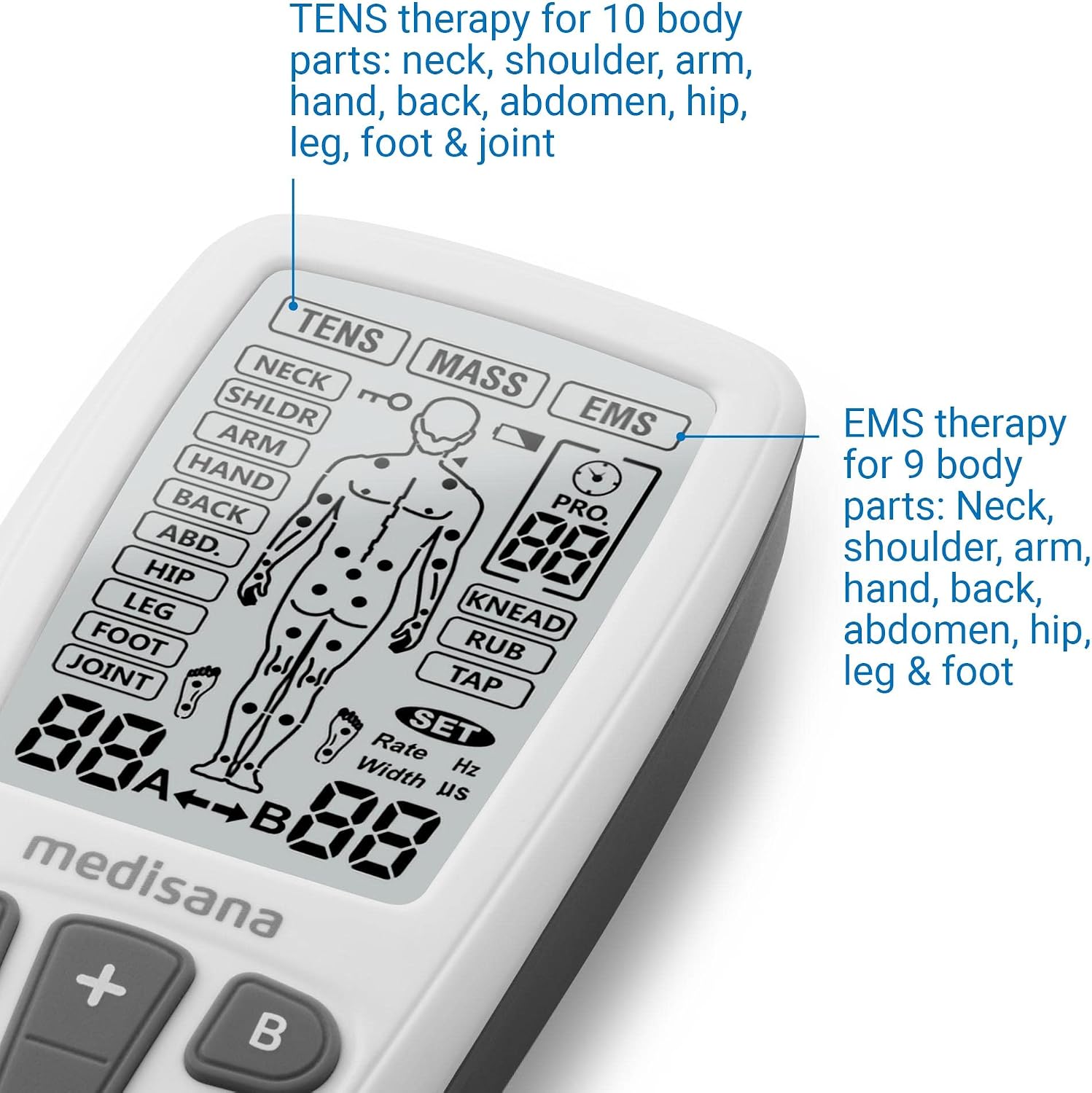
Image 5.1: The device display indicating therapy modes and body areas for TENS and EMS applications.
5.5 Application Areas
The Medisana TT 200 is designed for use on various body parts:
- TENS Therapy (10 body parts): Neck, shoulders, arms, hands, back, abdomen, hips, legs, feet, and joints.
- EMS Therapy (9 body parts): Neck, shoulders, arms, hands, back, abdomen, hips, legs, and feet.
- Massage Programs (3 types): Kneading, rubbing, and tapping, applicable to all body areas.

Image 5.2: Examples of electrode placement for back and abdominal therapy.

Image 5.3: User demonstrating comfortable use of the Medisana TT 200 device.
6. Maintenance and Care
6.1 Cleaning the Device
- Turn off the device and disconnect all cables before cleaning.
- Wipe the device surface with a soft, slightly damp cloth. Do not use abrasive cleaners or solvents.
- Ensure no liquid enters the device.
6.2 Electrode Care
- After each use, reattach the protective film to the electrode pads to preserve their adhesive quality.
- Store electrodes in a cool, dry place.
- Replace electrode pads when they lose their adhesiveness or become damaged.
6.3 Storage
Store the device and its accessories in a clean, dry place at room temperature, away from direct sunlight and extreme temperatures.
7. Troubleshooting
| Problem | Possible Cause | Solution |
|---|---|---|
| Device does not turn on. | Low battery. | Charge the device using the USB cable. |
| No sensation or weak sensation. | Electrodes not properly attached or worn out. Intensity too low. | Ensure electrodes are firmly attached to clean, dry skin. Replace old electrodes. Increase intensity gradually. |
| Device turns off unexpectedly. | Low battery. Automatic shut-off feature. | Recharge the device. This is normal behavior for some programs after a set time. |
8. Technical Specifications
| Model Number: | TT 200 |
| Dimensions (L x W x H): | 10.9 x 5.45 x 2.3 cm (4.29 x 2.16 x 0.91 inches) |
| Weight: | 0.082 kg (82 grams) |
| Power Input: | 0.74 W |
| Max Output Power (at 500 Ω load): | 0.29 W/cm² |
| Electrode Cable Length: | 109 cm |
| Display: | LCD |
| Power Supply: | Rechargeable Lithium-ion battery 3.7 V 500 mA |

Image 8.1: Dimensions of the Medisana TT 200 device.
9. Warranty and Customer Support
For warranty information, product support, or to purchase replacement parts (such as electrode pads), please refer to the official Medisana website or contact their customer service department. Keep your proof of purchase for warranty claims.
Medisana Official Website: www.medisana.com


