1. Introduction
This manual provides essential information for the safe and efficient use of your LG 65UP75006LF 4K Ultra HD Smart TV. Please read it thoroughly before operating the device and retain it for future reference.
The LG 65UP75006LF is a 65-inch 4K Ultra HD LED Smart TV featuring a Quad Core 4K processor, webOS 6.0, FILMMAKER MODE, Game Optimizer, and compatibility with Google Assistant and Alexa.
2. What's in the Box
Verify that all components are present in the packaging:
- LG 65UP75006LF Smart TV
- TV Stand
- Portable Remote Control
- Power Cable
3. Setup
3.1 Unpacking and Placement
Carefully remove the TV from its packaging. Place the TV on a stable, flat surface or mount it on a wall using a compatible VESA mount (sold separately). Ensure adequate ventilation around the TV.
3.2 Stand Assembly
If using the included stand, attach it securely to the TV following the instructions provided in the separate stand assembly guide. Ensure all screws are tightened properly.
3.3 Connecting Power
Connect the power cable to the TV's power input and then to a wall outlet. Do not plug in the TV until all other connections are made.
3.4 Connecting External Devices
Connect your antenna, cable box, gaming console, or other devices to the appropriate ports (HDMI, USB) on the TV.

Figure 3.4.1: Front view of the LG 65UP75006LF Smart TV, illustrating its slim bezel design.
3.5 Initial Setup Wizard
Upon first power-on, the TV will guide you through an initial setup process. This includes language selection, network connection (Wi-Fi), and channel scanning.

Figure 3.5.1: The LG webOS 6.0 interface displaying various streaming apps, recommended content, and smart home dashboard options.
4. Operating Instructions
4.1 Basic Operation
- Power On/Off: Press the power button on the remote control or the TV.
- Input Selection: Use the 'Input' button on the remote to switch between connected devices (HDMI, USB, TV tuner).
- Volume Control: Use the volume up/down buttons on the remote.
- Channel Navigation: Use the channel up/down buttons for TV channels.
4.2 Smart TV Features (webOS 6.0)
Your LG Smart TV runs on webOS 6.0, providing a user-friendly interface for accessing various content and features.
- Home Dashboard: Access all your apps, inputs, and connected devices from a single screen.
- App Access: Easily launch popular streaming services like Netflix, YouTube, Disney+, Apple TV, and more.
- AI ThinQ: Utilize LG's AI ThinQ for intelligent control and integration with smart home devices.
- Voice Assistants: The TV is compatible with Google Assistant and Alexa. Note that a compatible remote with a microphone may be required for full voice control functionality.
4.3 Special Features
- FILMMAKER MODE: This mode automatically adjusts picture settings, disabling motion smoothing to preserve the original aspect ratios, colors, and frame rates, delivering a cinematic viewing experience as intended by the filmmaker.
- Game Optimizer: Enhances your gaming experience by automatically adjusting picture settings for various game genres, reducing input lag, and optimizing graphics.
- Sports Alert: Receive notifications about your favorite sports teams and upcoming games, ensuring you never miss a match.
- Bluetooth Surround Ready: Connect compatible Bluetooth speakers to create an immersive surround sound experience.
This video demonstrates key features of the LG UHD TV, including 4K entertainment, Quad Core 4K processor, FILMMAKER Mode, Gaming with low latency, Sports Alert, and the webOS 6.0 Smart TV platform.
5. Connections
The LG 65UP75006LF TV offers various connectivity options:
- HDMI: 2 ports for connecting high-definition devices like Blu-ray players, gaming consoles, and set-top boxes.
- USB: 1 port for connecting USB storage devices to play media files or for software updates.
- Wireless: Built-in Wi-Fi for internet access and network connectivity.
- Bluetooth: For connecting wireless audio devices or other compatible accessories.
- Antenna/Cable Input: For connecting terrestrial or cable TV signals.

Figure 5.1: An image indicating the TV's readiness for the DVB-T2 HEVC Main 10 digital terrestrial standard.
6. Maintenance
6.1 Cleaning the Screen
Gently wipe the screen with a soft, dry, lint-free cloth. For stubborn marks, slightly dampen the cloth with water or a specialized screen cleaner. Do not use harsh chemicals or abrasive materials.
6.2 Cleaning the Cabinet
Wipe the TV cabinet with a soft, dry cloth. Avoid using water or cleaning solutions directly on the TV.
6.3 Power Cord Care
Regularly check the power cord for any damage. Do not place heavy objects on the cord or expose it to heat sources.
7. Troubleshooting
If you encounter issues with your TV, refer to the following common solutions:
- No Power: Ensure the power cable is securely connected to both the TV and the wall outlet. Check if the outlet is working by plugging in another device.
- No Picture/Sound: Verify that the correct input source is selected. Check all cable connections between the TV and external devices.
- Poor Picture Quality: Adjust picture settings (brightness, contrast, sharpness). If using an antenna, check its connection and position.
- No Internet Connection: Check your Wi-Fi router and ensure the TV is connected to the correct network. Try restarting both the TV and the router.
- Remote Control Not Working: Replace the batteries in the remote control. Ensure there are no obstructions between the remote and the TV's IR sensor.
For more complex issues, consult the full electronic manual available on the LG support website or contact LG customer service.
8. Specifications
Below are the technical specifications for the LG 65UP75006LF Smart TV:
| Feature | Specification |
|---|---|
| Manufacturer | LG |
| Model Number | 65UP75006LF.APID |
| Product Dimensions | 146.3 x 8.78 x 85 cm; 21.3 kg |
| Screen Size | 65 Inches |
| Screen Technology | LED |
| Resolution | 4K (3840 x 2160) |
| Refresh Rate | 60 Hz |
| Special Feature | Internet |
| Connectivity Technology | Bluetooth, HDMI, USB, Wireless |
| Aspect Ratio | 16:9 |
| Supported Internet Services | Netflix, YouTube |

Figure 8.1: A detailed technical specification sheet for the LG 65UP75006LF TV, outlining features, dimensions, and connectivity.
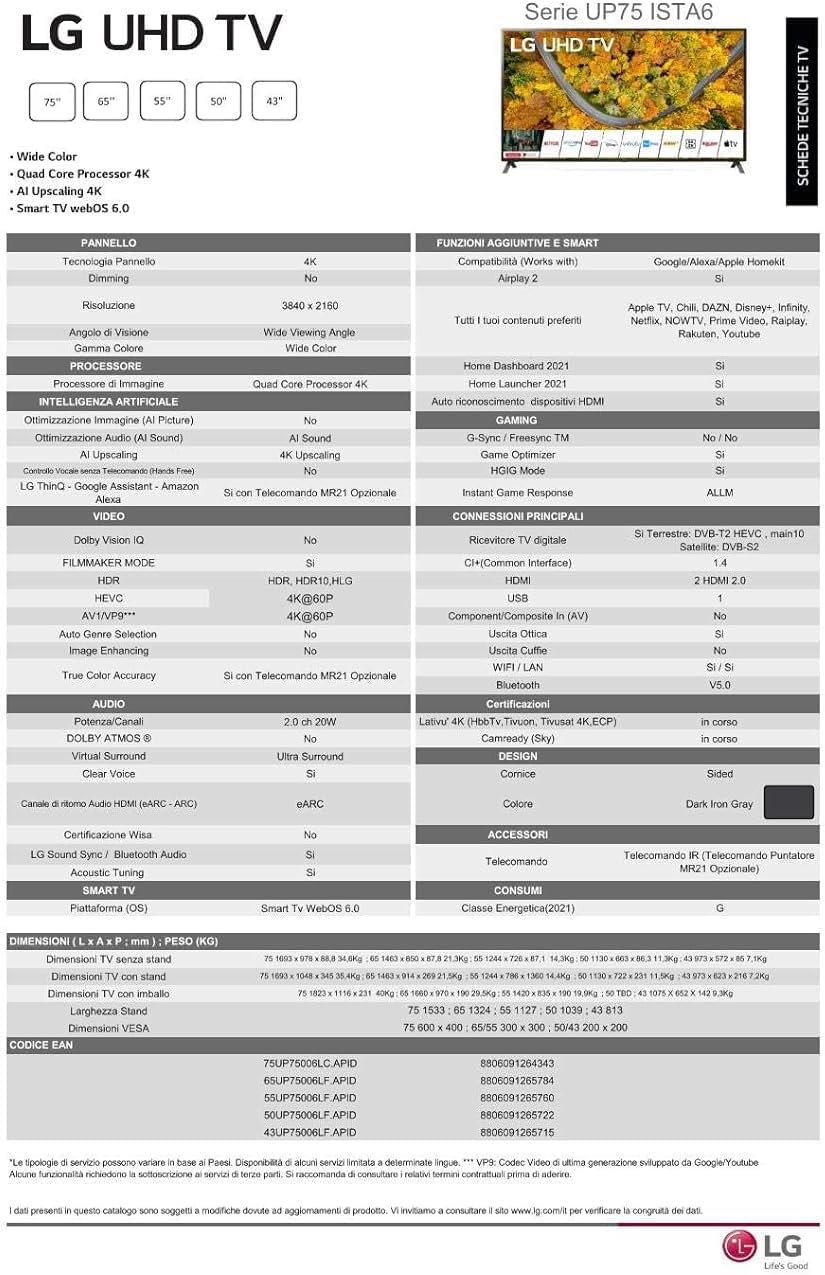
Figure 8.2: The energy efficiency label for the LG 65UP75006LF TV, showing power consumption and energy class.
9. Warranty and Support
Your LG 65UP75006LF Smart TV is covered by a manufacturer's warranty. Please refer to the warranty card included in the packaging for specific terms and conditions.
For technical support, service, or additional information, please visit the official LG website or contact LG customer service in your region. Keep your proof of purchase for warranty claims.