
1. Introduction
The JBL Live Free NC+ True Wireless earbuds are designed to provide an exceptional audio experience with active noise cancelling, smart ambient features, and convenient wireless charging. This manual provides detailed instructions for setup, operation, and maintenance to ensure optimal performance.
2. What's in the Box
- JBL Live Free NC+ True Wireless Earbuds
- Wireless Charging Case
- Ear Cushions (Multiple Sizes)
- USB-C Charging Cable
- Quick Start Guide & Safety Sheet
3. Product Overview

Figure 1: Front view of JBL Live Free NC+ True Wireless Earbuds.

Figure 2: Underside view of the earbuds, showing the charging contacts and L/R indicators.
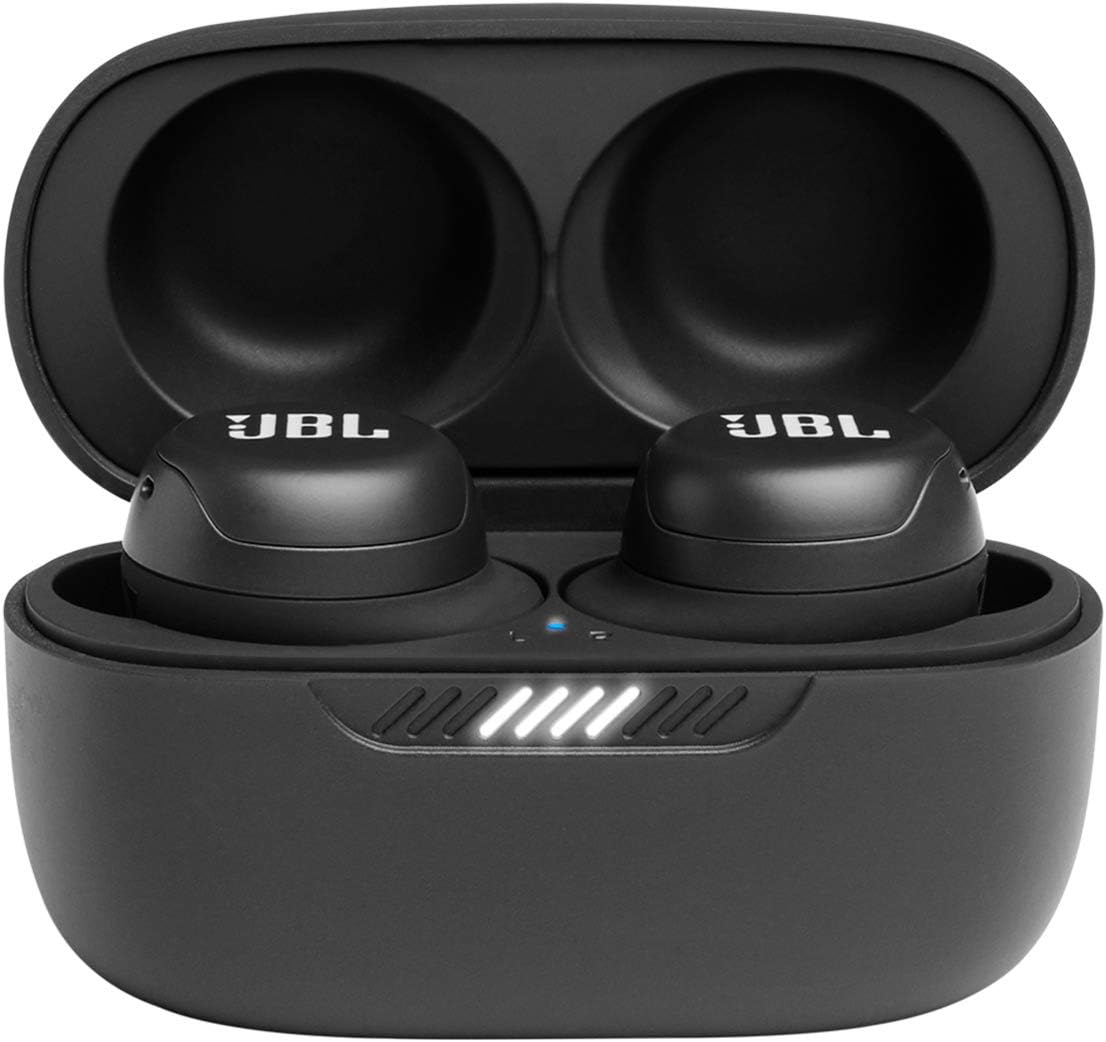
Figure 3: The charging case opened, displaying both earbuds nestled inside with LED indicators.

Figure 4: Rear view of the charging case, highlighting the USB-C charging port and a small status LED.
4. Setup
4.1 Initial Pairing
- Open the charging case. The earbuds will automatically enter pairing mode.
- On your device (smartphone, tablet, etc.), enable Bluetooth.
- Select "JBL Live Free NC+" from the list of available Bluetooth devices.
- Once connected, a confirmation tone will sound.
4.2 JBL Headphones App
For full customization and access to advanced features, download the "My JBL Headphones" app from your device's app store (Google Play Store for Android, Apple App Store for iOS). The app allows you to:
- Customize touch controls (Gestures).
- Adjust equalizer settings (EQ).
- Control Active Noise Cancelling (ANC) and Smart Ambient modes.
- Select preferred Voice Assistant (Google Assistant or Amazon Alexa).
- Access "Find My Buds" feature.
- Update firmware.
5. Operating Instructions
5.1 Touch Controls
The earbuds feature intuitive touch controls. Functions can be customized via the JBL Headphones App.
- Single Tap: Play/Pause music, Answer/End call, Noise Cancelling/Ambient Aware/Off (Left earbud default).
- Double Tap: Next track, TalkThru On/Off (Left earbud default), Answer incoming call, Hang up ongoing call.
- Triple Tap: Previous track.
- Tap & Hold: Reject incoming call, Mute/Unmute microphone during a call.
5.2 Active Noise Cancelling (ANC) & Smart Ambient
Control your audio environment with ANC and Smart Ambient modes. Toggle between modes via the touch controls or the JBL Headphones App.
- Active Noise Cancelling: Blocks out external noise for an immersive listening experience.
- Ambient Aware: Allows you to hear your surroundings while enjoying your audio, ideal for outdoor environments.
- TalkThru: Lowers music volume and amplifies speech, enabling quick conversations without removing your earbuds.
5.3 Voice Assistant
Access your preferred voice assistant (Google Assistant or Amazon Alexa) through dedicated touch control. Setup is done via the JBL Headphones App.
6. Charging
The JBL Live Free NC+ earbuds and charging case offer flexible charging options.
- Wired Charging: Use the provided USB-C cable to charge the case.
- Wireless Charging: The charging case supports Qi-compatible wireless charging. Simply place the case on a compatible wireless charging pad.
- Battery Life: Up to 21 hours total playtime (7 hours in earbuds + 14 hours from charging case).
- Speed Charge: Get up to 1 hour of playtime with just 10 minutes of charging.
7. Maintenance
To ensure the longevity and optimal performance of your JBL Live Free NC+ earbuds, follow these maintenance guidelines:
- Cleaning: Regularly clean the ear tips and charging contacts on both the earbuds and the case with a dry, soft cotton swab.
- Storage: Store the earbuds in their charging case when not in use to protect them and keep them charged.
- Water Exposure: The earbuds are IPX7 water resistant, meaning they can withstand immersion in water up to 1 meter for 30 minutes. However, the charging case is not water resistant. Ensure earbuds are dry before placing them back in the case.
- Ear Tip Fit: If the earbud tips do not match the size of your ear canals or the headset is not worn properly, you may not obtain the correct sound qualities or call performance. Change the earbud tips to ones that fit more snugly in your ears.
8. Troubleshooting
8.1 Pairing Issues
- Ensure Bluetooth is enabled on your device and the earbuds are in pairing mode (open case).
- Forget/remove "JBL Live Free NC+" from your device's Bluetooth list and attempt to re-pair.
- If only one earbud connects, try resetting the earbuds by double-clicking the reset button on the back of the case (if available) or following the app's instructions for syncing.
8.2 Sound Quality Issues
- Ensure ear tips provide a snug fit for optimal sound and noise cancellation.
- Clean ear tips and earbud grilles to remove any debris that might affect sound.
- Check equalizer settings in the JBL Headphones App.
8.3 Charging Issues
- Ensure charging contacts on earbuds and case are clean and dry.
- Verify the USB-C cable is securely connected and the power source is active.
- For wireless charging, ensure the case is correctly positioned on a Qi-compatible charging pad.
9. Specifications
- Brand: JBL
- Model Name: JBL Live Free NC+
- Connectivity Technology: Wireless (Bluetooth 5.1)
- Noise Control: Active Noise Cancellation
- Audio Driver Type: Dynamic Driver
- Audio Driver Size: 6.8 Millimeters
- Earpiece Shape: In-ear
- Battery Life: Up to 21 Hours (7 hours earbuds + 14 hours case)
- Charging Time: 2 Hours (for full charge)
- Wireless Charging: Yes (Qi-compatible case)
- Water Resistance Level: IPX7 (earbuds only)
- Control Type: Voice Control, Touch
- Item Weight: 54 Grams (total)
- Product Dimensions: 3.94 x 1.73 x 6.3 inches
- Material: Plastic
- UPC: 050036378369
10. Warranty & Support
JBL products are backed by a limited warranty. For detailed warranty information, product support, or service inquiries, please visit the official JBL website or contact customer service through the information provided in your product packaging.
Online Support: Visit www.jbl.com/support
Proposition 65 Warning: This product may contain chemicals known to the State of California to cause cancer and birth defects or other reproductive harm. For more information, visit www.P65Warnings.ca.gov.


