
1. Introduction
This manual provides detailed instructions for the setup, operation, and maintenance of your AULA H512 Wired Gaming Mouse. Please read this manual thoroughly before using the product to ensure optimal performance and longevity.

Figure 1: AULA H512 Wired Gaming Mouse
2. Package Contents
- AULA H512 Wired Gaming Mouse
- User Manual (this document)
- 3 x 4g adjustable weights (pre-installed or included separately)

Figure 2: AULA H512 Wired Gaming Mouse and its packaging.
3. Setup Instructions
- Connect the Mouse: Plug the USB connector of the AULA H512 mouse into an available USB port on your computer.
- Driver Installation: The mouse is typically plug-and-play. Your operating system (Windows 7/8/10/Vista/XP or Mac) should automatically detect and install the necessary drivers.
- Software Installation (Optional): For advanced customization, including macro programming and detailed DPI settings, download and install the official AULA H512 software from the manufacturer's website. Refer to the customization section for more details.
4. Operating Instructions
4.1 Button Functions
The AULA H512 mouse features 12 programmable buttons for enhanced control. Refer to the diagram below for button identification.

Figure 3: AULA H512 Button Layout and Functions.
- 1 - Left Button: Standard left-click function.
- 2 - Right Button: Standard right-click function.
- 3 - Scroll Wheel: Scrolls content up/down. Can also be pressed for middle-click.
- 4 - DPI+: Increases DPI sensitivity.
- 5 - DPI-: Decreases DPI sensitivity.
- 6 - Double Click Button: Performs a double-click action.
- 7 - Forward Button: Navigates forward in web browsers or file explorers.
- 8 - Backward Button: Navigates backward in web browsers or file explorers.
- 9-12 - Numeric/Macro Keys: These side buttons are programmable and can be assigned various functions, including specific gun keys (e.g., M416, AK47, M16) or other macros via software.
4.2 Adjusting DPI Sensitivity
The mouse features 6 adjustable DPI levels: 400, 800, 1600, 2400, 3200, and 5000 DPI. Use the DPI+ (4) and DPI- (5) buttons to cycle through these settings. Each DPI level may correspond to a different LED lighting color for quick identification.
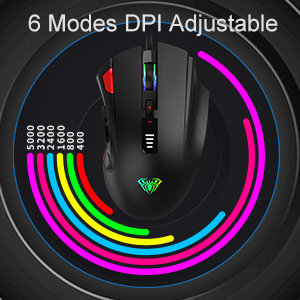
Figure 4: DPI Adjustment Modes.
4.3 RGB Lighting Effects
The AULA H512 mouse includes 6 RGB lighting effects. These effects can be changed or turned off/on using the dedicated software or specific button combinations as detailed in the software interface. The lighting often changes with DPI settings.

Figure 5: RGB Breathing Lighting Effect.
5. Customization via Software
The AULA H512 mouse supports advanced customization through its dedicated software. This software allows you to:
- Program all 12 buttons with custom functions or macros.
- Adjust DPI settings with finer control.
- Customize RGB lighting effects and colors.
- Create and save multiple profiles for different games or applications.
Please visit the official AULA website to download the latest version of the H512 customization software.
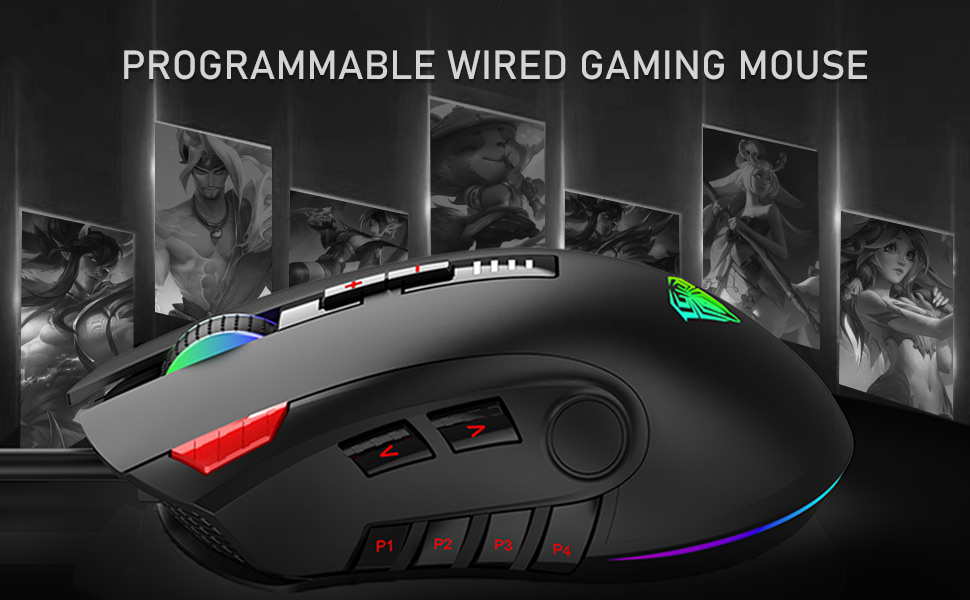
Figure 6: Software Interface for Customization.
6. Maintenance
- Cleaning: Use a soft, dry cloth to clean the mouse surface. For stubborn dirt, a slightly damp cloth can be used, ensuring no liquid enters the mouse. Avoid harsh chemicals or abrasive cleaners.
- Sensor Care: Keep the optical sensor on the underside of the mouse clean and free from dust or debris to ensure accurate tracking.
- Cable Management: Avoid sharp bends or excessive pulling on the USB cable to prevent damage.
7. Troubleshooting
| Problem | Possible Solution |
|---|---|
| Mouse not responding |
|
| Inaccurate tracking or cursor lag |
|
| Buttons not working as expected |
|
| RGB lighting not functioning |
|
8. Specifications
| Feature | Detail |
|---|---|
| Model | H512 |
| Connectivity | Wired USB |
| Number of Buttons | 12 (Programmable) |
| DPI Levels | 400 / 800 / 1600 / 2400 / 3200 / 5000 DPI |
| Sensor Type | Optical |
| Lighting | RGB Backlit (6 effects) |
| Cable Length | 1.6 meters (approx. 5.25 feet) |
| Dimensions (LxWxH) | 12.4 x 7.9 x 4.4 cm (4.88 x 3.11 x 1.73 inches) |
| Weight | 147 g (Adjustable with 3x4g weights) |
| Supported Operating Systems | Windows 7/8/10/Vista/XP, Mac |

Figure 7: Product Dimensions and Parameters.
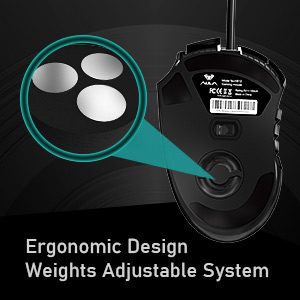
Figure 8: Adjustable Weight System.
9. Warranty and Support
The AULA H512 Wired Gaming Mouse comes with a standard warranty. For specific warranty terms and conditions, please refer to the warranty information provided at the time of purchase or contact AULA customer support.
Manufacturer Contact:
- Company: Dongguan Suoai Electronics Co., Ltd
- Email: info@aulapro.in
- Importer (India): Odio Zone Private Limited, S-4/63, 2nd Floor, Agasthya Complex, Shettihalli Main Road, Jalahalli West, Bengaluru 560015, Karnataka, India. Email: support@odiozone.com
For further assistance or technical support, please contact the manufacturer or your local distributor.


