1. Important Safety Information
Please read this manual carefully before operating your new Sharp refrigerator. Keep this manual for future reference. Failure to follow these instructions may result in electric shock, fire, or other hazards.
- Ensure the refrigerator is properly grounded to prevent electric shock.
- Do not damage the refrigerant circuit.
- Do not use electrical appliances inside the food storage compartments unless they are of the type recommended by the manufacturer.
- Keep ventilation openings clear of obstruction.
- Unplug the appliance before cleaning or performing maintenance.
- This appliance is not intended for use by persons (including children) with reduced physical, sensory or mental capabilities, or lack of experience and knowledge, unless they have been given supervision or instruction concerning use of the appliance by a person responsible for their safety.
2. Product Overview
The Sharp SJ-BG725D-SS is a 565-liter digital No Frost refrigerator with a bottom freezer and two doors, designed for efficient food preservation and user convenience.
Key Features:
- Digital touch control panel for precise temperature management.
- Bottom freezer configuration for easy access to fresh food.
- Reversible door hinges for flexible installation.
- External water dispenser with a removable internal tank.
- Stainless steel handle and anti-fingerprint finish.
- Special modes: Holiday mode, Economy mode, Child lock, Super cool, Super freeze.
- Door open alarm and LED lighting in the refrigerator compartment.
- Low noise design.
- Automatic ice maker and ice tray.
- Ethylene filter technology for enhanced freshness.
- Advanced No Frost system and gentle airflow function.
- Opti-fresh function and dedicated fruit and vegetable zone.
- Dual control function for independent temperature settings.
- Energy consumption class (A) for high efficiency.

Figure 2.1: Interior layout of the Sharp SJ-BG725D-SS refrigerator, highlighting the spacious fresh food and freezer compartments.

Figure 2.2: Front view of the Sharp SJ-BG725D-SS refrigerator, featuring the digital display and water dispenser.
3. Setup and Installation
3.1 Unpacking
Carefully remove all packaging materials. Inspect the refrigerator for any damage incurred during transit. Report any damage to your retailer immediately.
3.2 Placement
- Place the refrigerator on a firm, level surface.
- Ensure adequate ventilation around the appliance. Maintain a minimum clearance of 10 cm (4 inches) from the back and sides, and 30 cm (12 inches) from the top.
- Avoid direct sunlight and heat sources (e.g., stoves, radiators).
- Do not install in areas with extreme temperatures or high humidity.
3.3 Leveling
Adjust the leveling feet at the bottom of the refrigerator to ensure it is stable and level. This helps to reduce vibration and noise.
3.4 Door Reversal (Optional)
The door hinges are reversible, allowing the doors to open from either the right or left side. Refer to the detailed instructions in the separate installation guide for door reversal procedures. This process typically requires specific tools and should be performed by a qualified technician if you are unsure.
3.5 Power Connection
Plug the refrigerator into a dedicated, grounded electrical outlet. Do not use extension cords or adapters. Allow the refrigerator to stand for at least 2-4 hours before plugging it in to allow refrigerants to settle.
3.6 Initial Cleaning
Before first use, clean the interior and exterior of the refrigerator with a soft cloth and a mild detergent solution. Wipe dry thoroughly.
4. Operating Instructions
4.1 Digital Touch Control Panel
The refrigerator features a digital touch control panel located on the upper door. Use this panel to adjust temperatures, select operating modes, and activate special functions.
Temperature Adjustment:
Touch the temperature icons to increase or decrease the desired temperature for the refrigerator and freezer compartments independently. Recommended refrigerator temperature is 2-4°C, and freezer temperature is -18°C.
Operating Modes:
- Holiday Mode: Activates an energy-saving mode when you are away for an extended period. The freezer operates normally, while the refrigerator maintains a higher temperature to prevent odors.
- Economy Mode: Optimizes energy consumption for daily use.
- Child Lock: Locks the control panel to prevent accidental changes to settings.
- Super Cool Mode: Rapidly cools the refrigerator compartment for new groceries.
- Super Freeze Mode: Rapidly freezes items in the freezer compartment.
- Opti-Fresh Function: Maintains optimal humidity and temperature in the dedicated fruit and vegetable zone.
4.2 Water Dispenser
To use the external water dispenser, fill the removable internal water tank located inside the refrigerator door with potable water. Ensure the tank is properly seated. Press the dispenser lever with a glass to dispense water.
4.3 Automatic Ice Maker
The refrigerator is equipped with an automatic ice maker. Ensure the water tank is filled for the ice maker to function. Ice will be produced and stored in the ice collection bin in the freezer. An additional ice tray is also provided for manual ice making.
5. Maintenance
5.1 Cleaning the Interior
Unplug the refrigerator before cleaning. Remove all food items and shelves. Wash the interior surfaces with a solution of mild detergent and warm water. Rinse and dry thoroughly. Do not use abrasive cleaners or harsh chemicals.
5.2 Cleaning the Exterior
Wipe the exterior surfaces with a soft cloth dampened with mild detergent. The anti-fingerprint finish helps keep the surface clean. For the stainless steel handle, use a stainless steel cleaner if necessary. Ensure no water enters the control panel area.
5.3 Defrosting
This refrigerator features an advanced No Frost system, which automatically prevents ice buildup in both the refrigerator and freezer compartments. Manual defrosting is not required.
5.4 Ethylene Filter
The ethylene filter helps to extend the freshness of fruits and vegetables. Check the filter periodically and replace it according to the manufacturer's recommendations, typically every 6-12 months, or when you notice reduced effectiveness.
5.5 Water Tank Cleaning
Regularly remove and clean the internal water tank for the dispenser to prevent bacterial growth. Wash with warm soapy water, rinse thoroughly, and dry before refilling.
6. Troubleshooting
Before contacting service, check the following common issues and solutions:
| Problem | Possible Cause | Solution |
|---|---|---|
| Refrigerator not cooling | Power supply issue, temperature setting too high, door not closed properly, excessive food load. | Check power plug and circuit breaker. Adjust temperature settings. Ensure doors are fully closed. Reduce food load if overloaded. |
| Excessive noise | Refrigerator not level, items vibrating inside, compressor noise. | Adjust leveling feet. Rearrange items inside. Compressor noise is normal during operation. |
| Water dispenser not working | Water tank empty or not properly installed. | Fill the water tank and ensure it is correctly seated. |
| Door open alarm sounds frequently | Door not closed completely, door seal damaged, obstruction. | Ensure door is fully closed. Check door seal for damage and clean if necessary. Remove any obstructions. |
7. Specifications
Detailed technical specifications for the Sharp SJ-BG725D-SS refrigerator.
| Feature | Specification |
|---|---|
| Brand | Sharp |
| Model Information | SJ-BG725D-SS |
| Total Capacity | 565 Liters |
| Fresh Food Capacity | 400 Liters |
| Freezer Capacity | 165 Liters |
| Number of Doors | 2 |
| Color | Silver |
| Installation Type | Freestanding |
| Form Factor | Bottom Freezer |
| Special Features | Child Lock |
| Defrost System | Automatic (No Frost) |
| Door Hinges | Reversible |
| Door Material Type | Stainless Steel |
| Material Type | Metal |
| Refrigerant | R-600A |
| Energy Consumption Class | A (High Efficiency) |
| Product Dimensions (D x W x H) | 75 cm x 84 cm x 186 cm |
| Net Weight | 88.5 kg |
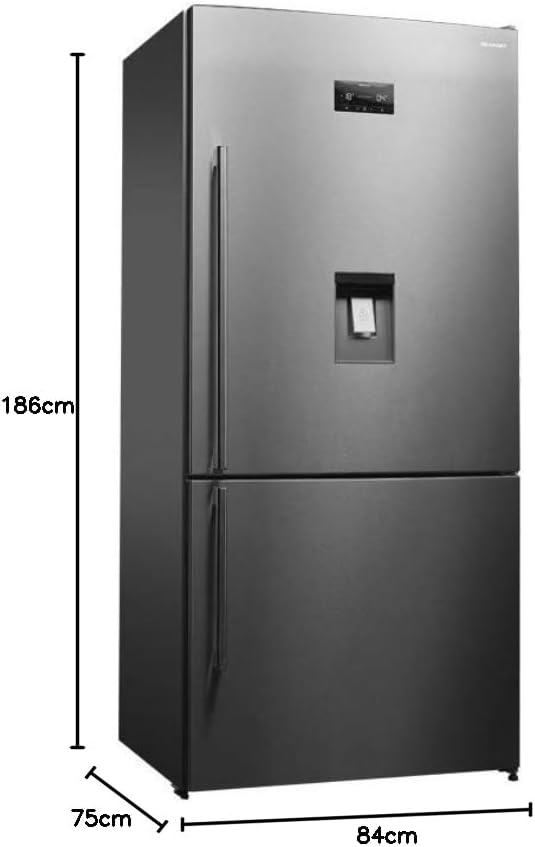
Figure 7.1: Dimensions of the Sharp SJ-BG725D-SS refrigerator.
8. Warranty and Support
This Sharp refrigerator comes with a manufacturer's warranty. Please refer to the warranty card included with your product for specific terms and conditions, including the warranty period and coverage details.
For technical assistance, troubleshooting beyond this manual, or to schedule service, please contact Sharp customer support. Contact information can typically be found on the warranty card, the Sharp official website, or your purchase receipt.


