Introduction
This manual provides essential instructions for the safe and efficient operation of your Toshiba MM-EG25P Microwave Oven with Grill Function. Please read this manual thoroughly before using the appliance and retain it for future reference.
The Toshiba MM-EG25P is a 25-liter microwave oven featuring a grill function, 11 power levels, and 9 auto programs. It includes a 255mm turntable glass, defrost and memory functions, and a child lock for safety.
Important Safety Instructions
When using electrical appliances, basic safety precautions should be followed, including the following:
- Read all instructions before using the appliance.
- Do not operate the oven if the door or door seals are damaged.
- Do not heat liquids or other foods in sealed containers as they are liable to explode.
- Only allow children to use the oven without supervision when adequate instructions have been given.
- Do not use corrosive chemicals or vapors in this appliance.
- Regularly clean the oven and remove any food deposits.
- Ensure proper ventilation around the appliance.
Product Overview
Familiarize yourself with the components of your microwave oven.
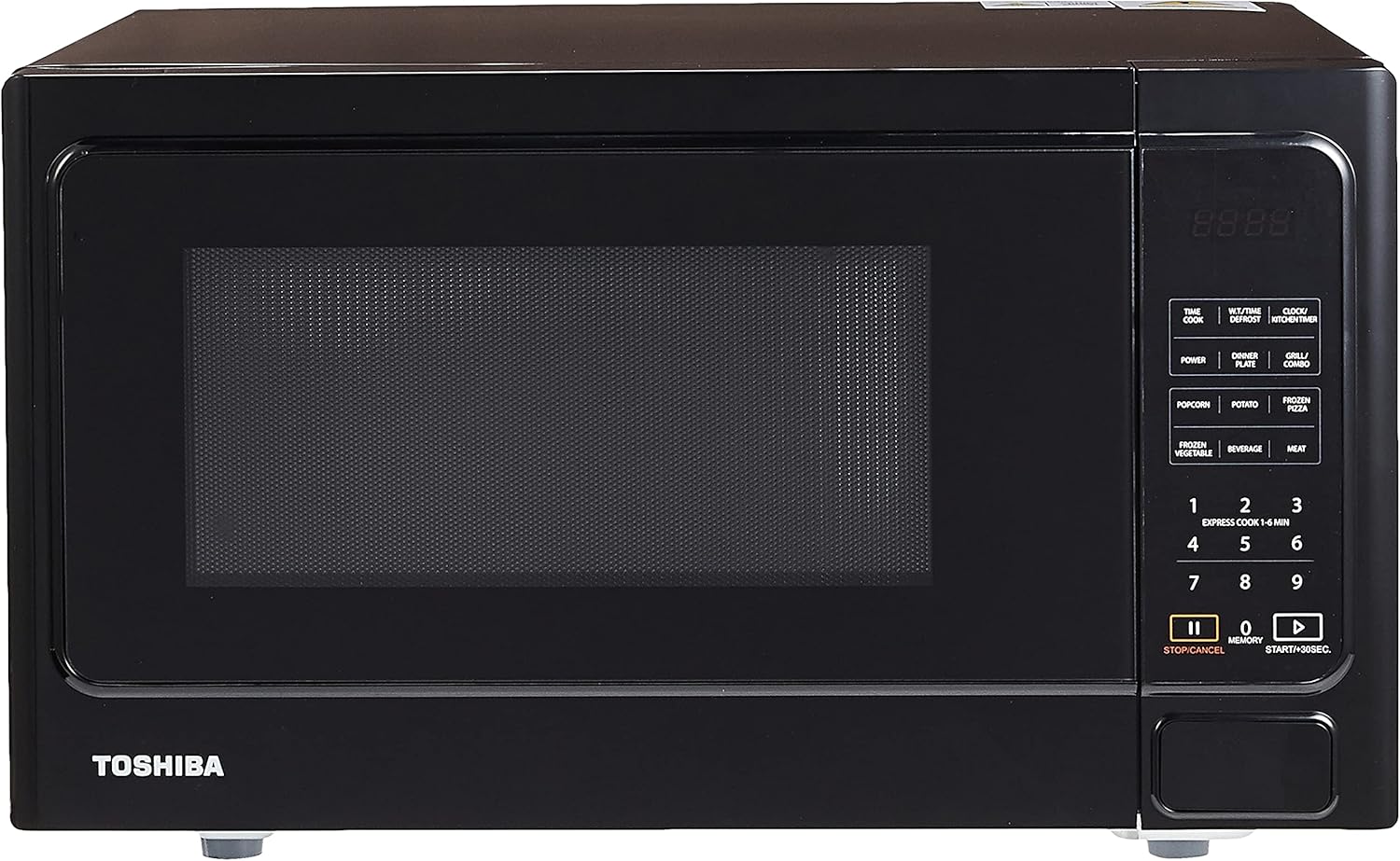
Image 1: Front view of the Toshiba MM-EG25P Microwave Oven, showcasing the control panel, door, and overall black finish.

Image 2: Close-up of the control panel, displaying the digital display, function buttons (Time Cook, Power, Grill/Combo, Auto Programs), and numerical keypad.

Image 3: Interior view of the microwave oven, showing the removable glass turntable and the oven cavity.

Image 4: Interior view with the metal grill rack placed on the glass turntable, demonstrating its use for grilling functions.
Setup and Installation
Unpacking
- Remove all packaging materials from inside and outside the oven.
- Check the oven for any damage, such as dents or a misaligned door. Do not operate if damaged.
- Ensure all accessories are present: glass turntable, turntable ring assembly, and grill rack.
Placement
- Place the oven on a flat, stable surface capable of supporting its weight.
- Maintain a minimum clearance of 20 cm (8 inches) above the oven, 10 cm (4 inches) at the rear, and 5 cm (2 inches) on the sides for proper ventilation.
- Do not block air vents.
- Keep the oven away from heat sources and strong magnetic fields.
Electrical Connection
- Ensure the voltage and frequency match the specifications on the rating label.
- Plug the oven into a properly grounded electrical outlet.
- Do not use extension cords or adapters.
Operating Instructions
Setting the Clock
- Press the CLOCK/KITCHEN TIMER button once.
- Use the number pads to enter the current time (e.g., 12:30).
- Press the CLOCK/KITCHEN TIMER button again to confirm.
Microwave Cooking
- Place food in a microwave-safe container on the glass turntable.
- Close the oven door securely.
- Press the POWER button repeatedly to select the desired power level (11 levels available).
- Use the number pads to enter the cooking time.
- Press START/+30SEC. to begin cooking.
Grill Function
- Place food on the grill rack, then place the rack on the glass turntable.
- Press the GRILL/COMBO button once for grill mode.
- Use the number pads to enter the grilling time.
- Press START/+30SEC. to begin grilling.
Auto Programs
The oven features 9 auto programs for common food items. Refer to the oven door label or internal guide for specific program codes.
- Press the relevant auto program button (e.g., POPCORN, POTATO, FROZEN PIZZA, FROZEN VEGETABLE, BEVERAGE, MEAT, DINNER PLATE).
- Select the quantity or weight using the number pads if prompted.
- Press START/+30SEC. to begin.
Defrost Function
The defrost function allows for thawing food by weight or time.
- Defrost by Weight: Press W.T./TIME DEFROST once, enter weight, then press START/+30SEC.
- Defrost by Time: Press W.T./TIME DEFROST twice, enter time, then press START/+30SEC.
Child Lock
To activate the child lock, press and hold the STOP/CANCEL button for 3 seconds until a beep sounds and "LOCK" appears on the display. To deactivate, repeat the process.
Care and Maintenance
Cleaning the Oven
- Always unplug the oven before cleaning.
- Clean the interior with a damp cloth and mild soap. Avoid abrasive cleaners.
- The glass turntable and turntable ring can be washed in warm soapy water or a dishwasher.
- Wipe the exterior with a damp cloth.
- Clean the door seals and adjacent parts regularly to ensure proper sealing.
Storage
If storing the oven for an extended period, ensure it is clean and dry. Store in a cool, dry place.
Troubleshooting Guide
| Problem | Possible Cause | Solution |
|---|---|---|
| Oven does not start. | Power cord not plugged in; Door not closed properly; Fuse blown or circuit breaker tripped. | Plug in power cord; Close door securely; Check fuse or reset circuit breaker. |
| Food not heating. | Door not closed properly; Cooking time not set; Power level too low. | Close door securely; Set appropriate cooking time; Increase power level. |
| Turntable not rotating. | Turntable not properly placed; Turntable ring dirty or damaged. | Ensure turntable is correctly seated; Clean or replace turntable ring. |
| Unusual noise during operation. | Food container touching oven walls; Turntable not centered. | Adjust food container; Re-center turntable. |
If the problem persists after attempting these solutions, please contact customer support.
Specifications
| Model: | MM-EG25P |
| Brand: | Toshiba |
| Capacity: | 25 Liters |
| Wattage: | 900 watts |
| Voltage: | 220 Volts |
| Frequency: | 50 Hz |
| Product Dimensions (W x D x H): | 51.3 x 39.5 x 30.7 cm |
| Material: | Painted Metal |
| Special Features: | Child Safety Lock, Defrost, Grill Function |
| Human Interface Input: | Dial, Push Button |

Image 5: Diagram illustrating the approximate dimensions of the microwave oven, showing a height of 12 inches (30 cm) for scale.
Warranty and Support
For warranty information and customer support, please refer to the warranty card included with your product or visit the official Toshiba website for your region. Keep your purchase receipt as proof of purchase.
For service or technical assistance, please contact Toshiba customer service.


