1. Introduction
Thank you for purchasing the Toshiba F-LSD10 Stand Fan with Remote Control. This manual provides essential information for the safe and efficient operation, maintenance, and troubleshooting of your new fan. Please read this manual thoroughly before use and retain it for future reference.
2. Important Safety Information
To reduce the risk of fire, electric shock, or injury, always follow these basic safety precautions:
- Ensure the power supply voltage matches the rating label on the fan.
- Do not operate the fan with a damaged cord or plug. If damaged, contact qualified service personnel.
- Keep fingers, pencils, or any other objects out of the fan grille when it is operating.
- Unplug the fan from the outlet when not in use, when moving it from one location to another, and before cleaning.
- Do not use the fan in wet or damp locations, such as bathrooms or laundry areas.
- Place the fan on a stable, level surface to prevent it from tipping over.
- This appliance is not intended for use by persons (including children) with reduced physical, sensory or mental capabilities, or lack of experience and knowledge, unless they have been given supervision or instruction concerning use of the appliance by a person responsible for their safety.
3. Package Contents
Verify that all items are present in the package:
- 1 x Toshiba F-LSD10 Stand Fan unit
- 1 x Remote Control
- User Manual (this document)
4. Product Overview
The Toshiba F-LSD10 is a 16-inch stand fan designed for efficient air circulation with convenient remote control operation. It features a durable motor and 9 ABS fan blades for quiet and effective performance.
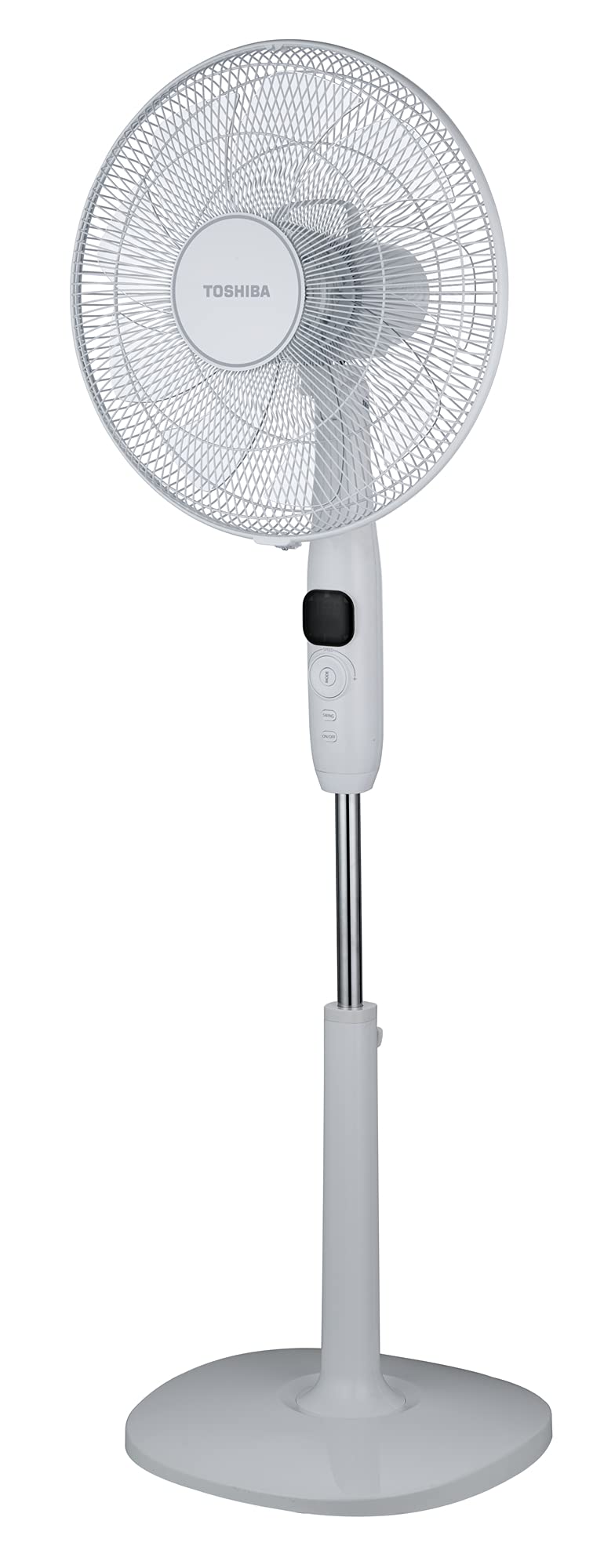
Figure 1: Toshiba F-LSD10 Stand Fan. This image shows the complete fan unit, including the base, adjustable stand, control panel, and fan head with grille and blades.
Control Panel & Remote Control
The fan features a large LED display on its main body and an infrared remote control for convenient operation from a distance. The control panel typically includes buttons for Power On/Off, Mode selection, Speed adjustment, and Oscillation.
5. Setup and Assembly
The Toshiba F-LSD10 Stand Fan requires minimal assembly. Follow these steps:
- Base Assembly: Attach the stand pole to the fan base. Ensure it is securely fastened.
- Fan Head Attachment: Secure the fan head unit to the top of the stand pole.
- Grille and Blade Assembly: Follow the instructions provided with the fan for attaching the rear grille, fan blades (9 ABS blades), and front grille. Ensure all components are correctly aligned and secured.
- Power Connection: Plug the power cord into a standard electrical outlet.
6. Operating Instructions
The fan can be operated using the control panel on the unit or the included infrared remote control.
Power On/Off
- Press the ON/OFF button on the control panel or remote to turn the fan on or off.
Speed Adjustment
- The fan offers 26 speed settings. Use the Speed buttons (often indicated by '+' and '-' or a single speed cycle button) on the control panel or remote to increase or decrease the fan speed. The current speed will be shown on the large LED display.
Mode Selection
The fan features 4 operating modes:
- Press the MODE button on the control panel or remote to cycle through the available modes.
- Normal Mode: Provides a constant airflow at the selected speed.
- Natural Mode: Simulates natural breeze by varying fan speed.
- Sleep Mode: Operates at a lower, quieter speed, often gradually decreasing over time for comfortable sleep. This mode is designed for silence care.
- ECO Mode: Adjusts fan speed based on ambient temperature for energy efficiency.
Oscillation Function
- Press the SWING or OSC button on the control panel or remote to activate or deactivate the wide-angle oscillation function, distributing air across a broader area.
Timer Function
- The fan includes a 12-hour timer. Press the TIMER button to set the desired operating duration before the fan automatically turns off. Each press typically increases the timer by one hour.
Auto Shut Off Function
- The fan is equipped with an auto shut-off function for safety and energy saving. Refer to the specific details in the full product manual for conditions that trigger this function.
7. Maintenance and Cleaning
Regular cleaning helps maintain the fan's performance and extends its lifespan. Always unplug the fan before cleaning.
- Exterior Cleaning: Wipe the exterior surfaces of the fan with a soft, damp cloth. Do not use abrasive cleaners or solvents.
- Grille and Blades: Periodically remove the front grille (refer to assembly instructions for removal) and wipe the fan blades and grilles to remove dust accumulation. Ensure all parts are dry before reassembling.
- Storage: When not in use for extended periods, store the fan in a cool, dry place, preferably in its original packaging.
8. Troubleshooting
If you encounter issues with your fan, refer to the following common problems and solutions:
| Problem | Possible Cause | Solution |
|---|---|---|
| Fan does not turn on | No power supply; Power cord not plugged in; Power button not pressed. | Check power outlet; Ensure cord is securely plugged in; Press the ON/OFF button. |
| Weak airflow | Fan speed too low; Grilles or blades are dirty. | Increase fan speed; Clean the fan grilles and blades. |
| Fan is noisy | Loose parts; Fan not on a level surface; Obstruction in blades. | Check for loose screws or components; Place fan on a stable surface; Ensure nothing is obstructing the blades. |
| Remote control not working | Batteries are dead or incorrectly inserted; Obstruction between remote and fan. | Replace batteries; Ensure clear line of sight to the fan's receiver. |
If the problem persists after trying these solutions, please contact customer support.
9. Specifications
| Feature | Detail |
|---|---|
| Brand | Toshiba |
| Model | F-LSD10 |
| Electric fan design | Floor Fan (Pedestal Fan) |
| Power source | Corded Electric |
| Product dimensions | 40D x 130W x 40H centimetres |
| Special features | Adjustable Height, Auto Shut Off Function, Remote Controlled, 26 Speeds, 4 Modes, 12 Hours Timer, Large LED Display, Silence Care, 9 ABS Fan Blade, Wide Angle Oscillation |
| Mounting type | Floor Mount |
| Color | White |
| Assembly required | No (Minimal assembly required as per product details) |
| Care instructions | Wipe and clean |
10. Warranty and Support
Warranty Information
This Toshiba F-LSD10 Stand Fan comes with a Limited Warranty. Please refer to the warranty card included with your product or contact Toshiba customer service for detailed terms and conditions regarding your warranty coverage.
Customer Support
For technical assistance, service, or any inquiries regarding your Toshiba F-LSD10 Stand Fan, please contact Toshiba customer support through their official website or the contact information provided in your product documentation.