Introduction
Thank you for choosing the ttec AirBeat Free True Wireless Earphones. This manual provides essential information for setting up, operating, and maintaining your earphones to ensure optimal performance and longevity. Please read this manual thoroughly before using the product.
Package Contents
Ensure all items are present in your package:
- ttec AirBeat Free True Wireless Earphones (Left and Right)
- Charging Case
- USB Charging Cable
- Ear Cushions
- User Manual (this document)
Product Overview
Familiarize yourself with the components of your ttec AirBeat Free earphones and charging case.

Figure 1: The compact ttec AirBeat Free charging case, shown held in a hand, highlighting its portable design.
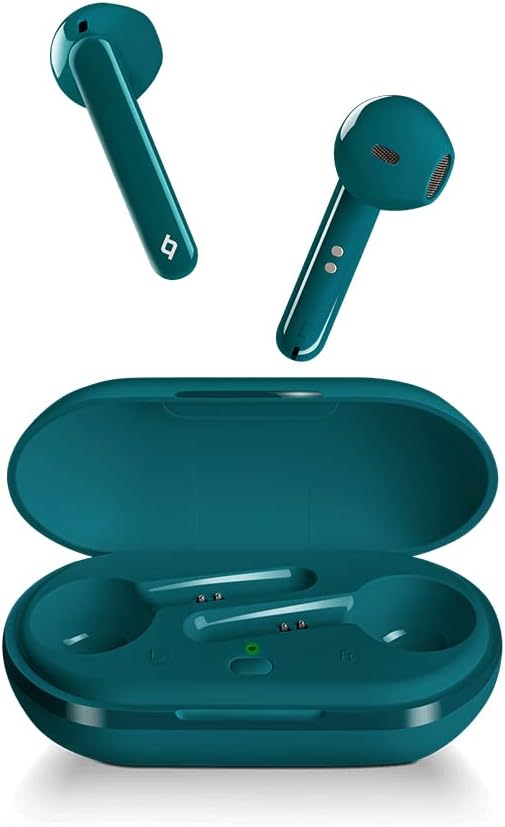
Figure 2: The ttec AirBeat Free earbuds displayed alongside their open charging case, showing the earbuds' design and the charging slots.

Figure 3: A single ttec AirBeat Free earbud positioned next to its open charging case, illustrating the earbud's form factor and the case's interior.
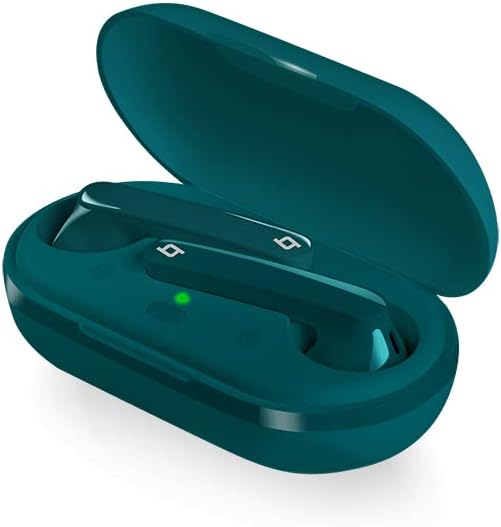
Figure 4: An angled view of the ttec AirBeat Free earbuds securely placed within their open charging case, showing the charging indicators.
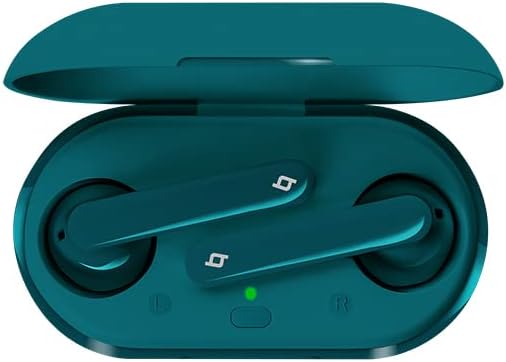
Figure 5: A top-down view of the ttec AirBeat Free earbuds nestled in their open charging case, clearly showing the left and right earbud positions and the charging status light.
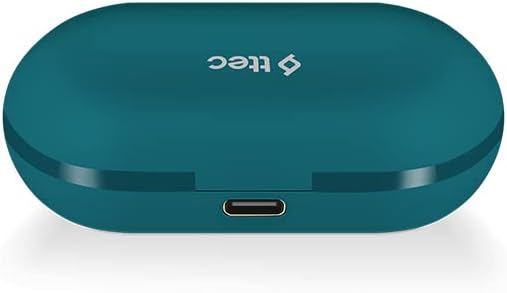
Figure 6: The closed ttec AirBeat Free charging case, viewed from the back, highlighting the USB-C charging port.
Setup
1. Charging the Earphones and Case
Before first use, fully charge the earphones and the charging case.
- Place both earphones into the charging case.
- Connect the USB charging cable to the charging port on the back of the case (refer to Figure 6) and plug the other end into a USB power source.
- The indicator light on the charging case will show charging status. A full charge provides up to 30 hours of extra battery life with the case, and up to 4 hours for the earphones on a single charge.
- The Charge & Go feature allows 1 hour of use with only 15 minutes of charging.
2. Bluetooth Pairing
Pair your ttec AirBeat Free earphones with your Bluetooth-enabled device.
- Ensure the earphones are charged and inside the charging case.
- Open the charging case lid. The earphones will automatically enter pairing mode.
- On your device (smartphone, tablet, etc.), go to Bluetooth settings and enable Bluetooth.
- Search for available devices. Select "ttec AirBeat Free" from the list.
- Once connected, you will hear a confirmation tone, and the indicator light on the earphones may change.
- The MonoSmart technology allows either earbud to be used independently. To use a single earbud, simply remove one from the case while the other remains inside or is turned off.
Operating Instructions
The ttec AirBeat Free earphones feature touch sensors for easy control of music and calls.
Music Control
- Play/Pause: Single tap on either earbud's touch sensor.
- Next Track: Double tap on the right earbud's touch sensor.
- Previous Track: Double tap on the left earbud's touch sensor.
- Volume Up: Triple tap on the right earbud's touch sensor.
- Volume Down: Triple tap on the left earbud's touch sensor.
Call Control
- Answer/End Call: Single tap on either earbud's touch sensor.
- Reject Call: Press and hold either earbud's touch sensor for 2 seconds.
- Activate Voice Assistant: Press and hold either earbud's touch sensor for 3 seconds (e.g., Siri, Google Assistant).
Power On/Off
- Power On: Open the charging case lid, or press and hold the touch sensor for 3 seconds if out of case.
- Power Off: Place earphones back into the charging case and close the lid, or press and hold the touch sensor for 5 seconds.
Maintenance and Care
Proper care will extend the life of your earphones.
- Cleaning: Use a soft, dry, lint-free cloth to clean the earphones and charging case. Do not use harsh chemicals or abrasive materials.
- Water Resistance: The earphones have an IPX4 water and dust proof rating, meaning they are resistant to splashing water from any direction. Do not submerge them in water or expose them to heavy rain. Dry them thoroughly if they get wet.
- Storage: When not in use, store the earphones in their charging case to protect them and keep them charged. Store in a cool, dry place away from extreme temperatures.
- Battery Life: To preserve battery life, charge the earphones and case regularly, even if not used for extended periods.
Troubleshooting
If you encounter issues with your ttec AirBeat Free earphones, try the following solutions:
| Problem | Possible Solution |
|---|---|
| Earphones not pairing/connecting. |
|
| Only one earbud working. |
|
| Low volume or poor sound quality. |
|
| Charging case not charging. |
|
Specifications
Key technical specifications for the ttec AirBeat Free True Wireless Earphones:
- Model Name: AirBeat Free
- Model Number: 2KM133T
- Bluetooth Version: 5.0
- Water and Dust Proof Rate: IPX4
- Earbud Weight: 3.6 grams (each)
- Charging Case Weight: 37 grams
- Earphone Battery Life (single charge): Up to 4 hours
- Total Battery Life (with charging case): Up to 30 hours
- Quick Charge: 15 minutes charge for 1 hour playback (Charge & Go)
- Noise Control: Active Noise Cancellation
- Connectivity Technology: Wireless (Bluetooth)
- Headphones Ear Placement: In Ear
- Included Components: Ear Cushions
- Color: Turquoise
Warranty and Support
For warranty information and customer support, please refer to the official ttec website or contact your local retailer.
Manufacturer: ttec
Date First Available: 9 February 2021
If you experience issues not covered in the troubleshooting section, please contact ttec customer service for further assistance.


