
1. Product Overview
The Alpine iLX-407 is a shallow chassis 7-inch multimedia receiver designed for vehicle integration. It features compatibility with Apple CarPlay and Android Auto, offering seamless smartphone integration for navigation, communication, and entertainment. The unit includes advanced audio tuning capabilities and a customizable user interface.
This manual provides essential information for the proper installation, operation, and maintenance of your iLX-407 multimedia receiver.

Figure 1.1: Front view of the Alpine iLX-407 multimedia receiver installed in a vehicle dashboard, showing the main interface.
2. Setup and Installation
2.1. Shallow Chassis Design
The iLX-407 features a shallow chassis design, measuring only 2.4 inches deep. This design allows for installation in vehicles with limited space behind the dashboard. Ensure adequate clearance and proper mounting for optimal performance.

Figure 2.1: Side view illustrating the shallow chassis and power stack capability of the iLX-407.
2.2. PowerStack Compatibility
The unit is optimized for mounting with Alpine KTA-450 4-channel or KTA-200M Mono Power Pack Amplifiers (sold separately). This allows for a compact and integrated power solution. Refer to the amplifier's manual for specific installation instructions when utilizing this feature.
2.3. Connectivity
The iLX-407 supports various connectivity options:
- Bluetooth: For wireless audio streaming and hands-free calling.
- HDMI: For high-definition video input.
- RCA: For audio input/output connections, including preamp outputs for external amplifiers.
- USB: For smartphone connection (Apple CarPlay, Android Auto) and media playback.
Ensure all connections are secure and correctly wired according to the detailed wiring diagram provided in the full installation guide (available separately or online).
3. Operation
3.1. User Interface Customization
The 7-inch touchscreen allows for customization of the home screen. You can add, remove, or rearrange over 29 available widgets using drag-and-drop gestures. This enables personalization of frequently used functions and applications.

Figure 3.1: Customizable home screen with various widgets.
3.2. Apple CarPlay
Connect your iPhone via USB to activate Apple CarPlay. This feature allows you to access iPhone functions such as making and receiving calls, sending text messages, playing music, and using navigation apps directly from the receiver's display. This integration is designed to minimize distraction while driving.

Figure 3.2: Apple CarPlay interface on the iLX-407.
3.3. Android Auto
Connect your Android smartphone via USB to enable Android Auto. This provides access to Google Assistant for voice commands, navigation, music playback, and messaging, all optimized for in-car use. Android Auto helps maintain focus on the road.

Figure 3.3: Android Auto interface on the iLX-407.
3.4. Audio Customization
Enhance your audio experience using the built-in 5-band graphic equalizer and 6-channel time correction tool. These features allow for precise tuning of sound output to match your preferences and vehicle acoustics. Access these settings through the audio menu on the touchscreen.
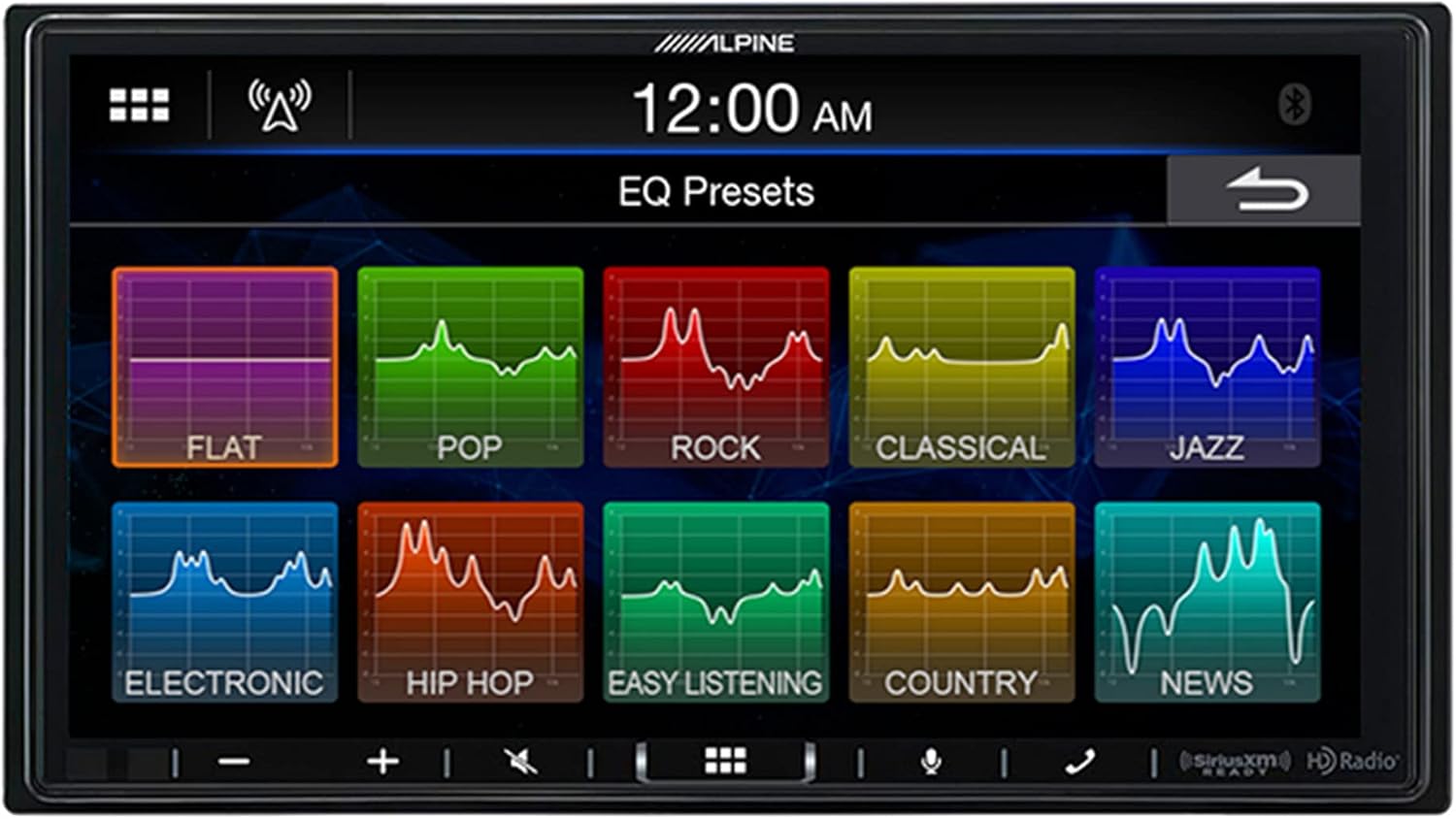
Figure 3.4: Audio Equalizer Presets screen.
3.5. Climate Control Integration (Requires iDatalink Maestro)
With an optional iDatalink Maestro module (sold separately), the iLX-407 can integrate with your vehicle's climate control system, allowing you to manage settings directly from the receiver's screen. Note that this functionality is vehicle-dependent and may not be supported in all models.

Figure 3.5: Climate control interface via iDatalink Maestro.
4. Maintenance
4.1. Screen Cleaning
To clean the touchscreen, gently wipe it with a soft, dry, lint-free cloth. For stubborn smudges, slightly dampen the cloth with water or a screen-safe cleaner. Avoid abrasive materials or harsh chemicals, as these can damage the screen surface.
4.2. Software Updates
Periodically check the Alpine website for available firmware updates. Updates can improve performance, add new features, or resolve known issues. Follow the instructions provided with the update package carefully to avoid damaging the unit.
5. Troubleshooting
This section addresses common issues you might encounter with your iLX-407 receiver. For more detailed troubleshooting, refer to the full service manual or contact Alpine customer support.
- No Power:
- Check the vehicle's fuse box for blown fuses related to the radio or accessory power.
- Ensure all power connections to the receiver are secure and correctly wired.
- No Audio Output:
- Verify that the volume is not muted or set to minimum.
- Check speaker connections and ensure they are properly seated.
- If using external amplifiers, confirm they are powered on and receiving a signal.
- Apple CarPlay/Android Auto Not Connecting:
- Ensure your smartphone is compatible and running the latest operating system.
- Use a high-quality, certified USB cable.
- Try restarting both your smartphone and the iLX-407 unit.
- Check the USB connection on the receiver and your phone.
- Touchscreen Unresponsive:
- Perform a soft reset of the unit (refer to the full manual for specific instructions).
- Ensure the screen is clean and free of debris.
6. Specifications
| Feature | Detail |
|---|---|
| Model Number | iLX-407 |
| Product Dimensions | 9.75 x 17 x 15.25 inches |
| Item Weight | 3.6 pounds |
| Connectivity Technology | Bluetooth, HDMI, RCA, USB |
| Controller Type | Android, Google Assistant |
| Compatible Devices | Smartphone, Speaker |
| Total HDMI Ports | 1 |
| Audio Output Mode | Mono |
| Surround Sound Channel Configuration | 4 Channel |
| Color | Black |
| Date First Available | February 9, 2021 |
7. Warranty and Support
7.1. Product Warranty
Alpine provides a limited warranty for the iLX-407 multimedia receiver. The specific terms and duration of the warranty may vary by region and purchase location. Please retain your proof of purchase for warranty claims. For detailed warranty information, refer to the warranty card included with your product or visit the official Alpine website.
7.2. Customer Support
For technical assistance, troubleshooting, or service inquiries, please contact Alpine customer support. You can find contact information, FAQs, and additional resources on the official Alpine website: www.alpine-usa.com.


