1. Introduction
Welcome to the Nutricook Smart Pot 2 user manual. This appliance is a versatile 9-in-1 electric pressure cooker designed to simplify your cooking experience. It functions as a pressure cooker, sauté pot, slow cooker, rice cooker, soup maker, steamer, sous vide pot, yogurt maker, and food warmer. Please read this manual thoroughly before first use to ensure safe and optimal operation.

Image 1.1: Front view of the Nutricook Smart Pot 2, showcasing its sleek black design and intuitive control panel.
2. What's in the Box
Upon unpacking your Nutricook Smart Pot 2, ensure all components are present and in good condition:
- 1000-watt Cooker Base
- Stainless Steel Cooking Pot (6 Litre capacity)
- Steam Rack
- Measuring Cup
- User Guide (this document)

Image 2.1: An exploded view illustrating the main components: the outer cooker base, the removable stainless steel inner pot, and the smart lid.
3. Safety Information
Your safety is paramount. Please adhere to the following safety guidelines:
- Always ensure the lid is properly sealed before operating under pressure.
- Do not touch hot surfaces. Use handles or oven mitts.
- Exercise extreme caution when releasing pressure. Keep hands and face clear of the steam release valve.
- Never immerse the cooker base in water or other liquids.
- Unplug from outlet when not in use and before cleaning.
- This appliance is equipped with 9 built-in safety features to minimize steam, noise, and odor during cooking.

Image 3.1: Detail of the Smart Lid's automatic pressure release button, designed for safe and convenient steam release with a single push.
4. Product Overview
Familiarize yourself with the key components and controls of your Nutricook Smart Pot 2.
4.1 Components
- Smart Lid: Automatically seals for pressure cooking and releases pressure with a push.
- Ergonomic Handles: Designed for safe and easy handling of the cooker.
- LED Display: Provides clear cooking status and time information.
- Control Panel: Features 9 one-touch pre-sets and manual controls.
- Stainless Steel Inner Pot: 6-liter capacity, food-grade, and dishwasher safe.
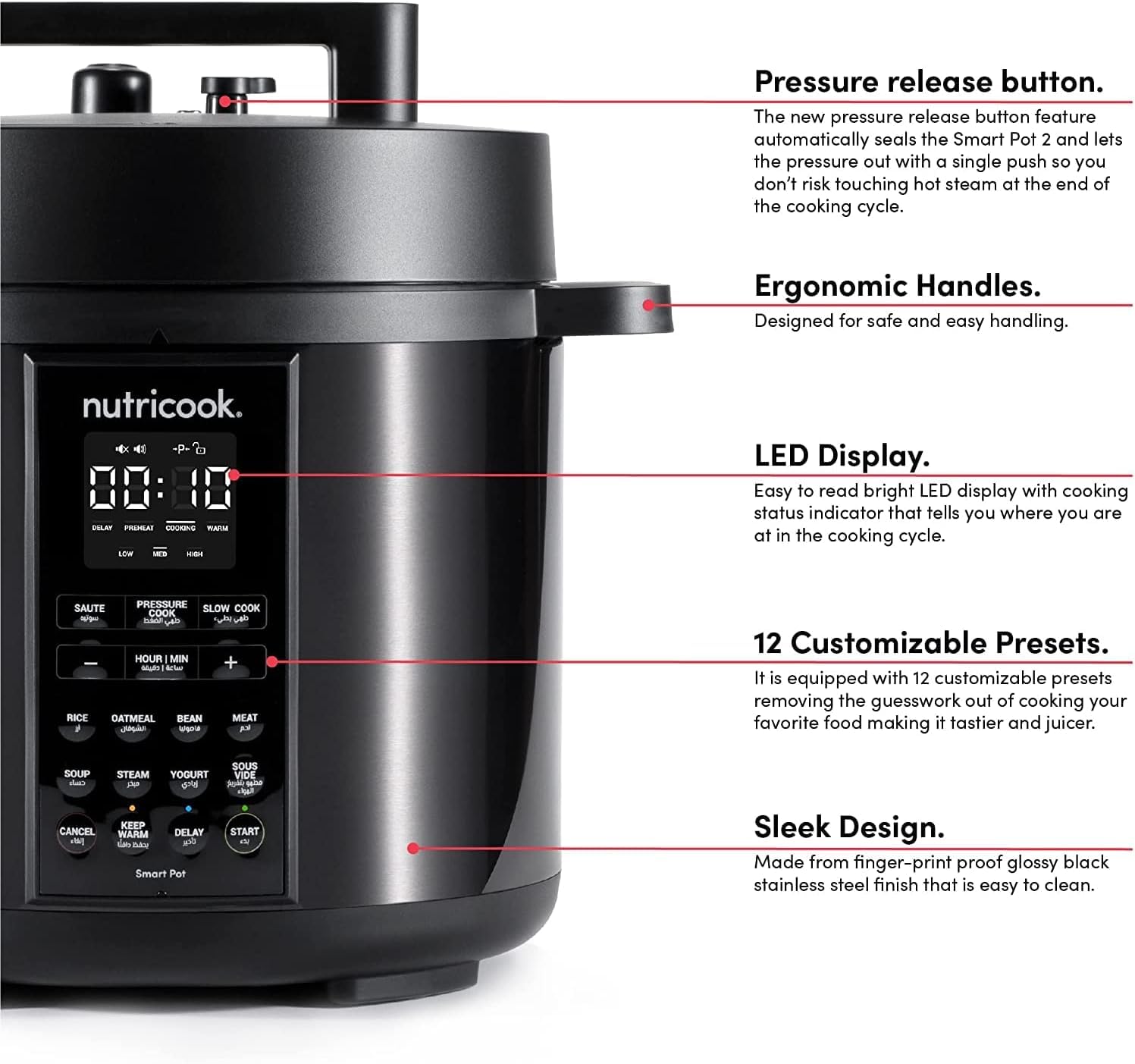
Image 4.1: An annotated image pointing out the Smart Pot 2's key features, including the pressure release button, ergonomic handles, LED display, and the array of customizable presets.

Image 4.2: A close-up of the clear LED display, which shows the remaining cooking time and current status (e.g., Delay, Preheat, Cooking, Warm).
5. Setup
Before using your Smart Pot 2 for the first time, follow these setup steps:
- Unpack: Remove all packaging materials and accessories.
- Clean: Wash the stainless steel inner pot, steam rack, and lid thoroughly with warm, soapy water. Rinse and dry completely. The cooker base should be wiped with a damp cloth.
- Placement: Place the cooker base on a stable, level surface away from heat sources and water. Ensure adequate space around the unit for ventilation.
- Insert Inner Pot: Place the cleaned stainless steel inner pot into the cooker base. Ensure it sits correctly and is not tilted.
- Lid Placement: Align the lid with the cooker base, ensuring the arrow on the lid points to the unlock symbol on the base. Rotate clockwise until the arrow aligns with the lock symbol.
6. Operating Instructions
The Nutricook Smart Pot 2 offers 9 cooking functions and 9 one-touch pre-sets for ease of use. Here's a general guide to operation:
6.1 Basic Operation
- Add Ingredients: Place your food and liquids into the stainless steel inner pot. Do not exceed the MAX fill line.
- Secure Lid: Place and lock the Smart Lid. Ensure the steam release handle is in the 'Sealing' position for pressure cooking.
- Select Function: Choose your desired cooking function (e.g., Pressure Cook, Slow Cook, Rice, Sauté) using the control panel.
- Adjust Settings: If necessary, adjust cooking time and pressure level using the '+' and '-' buttons.
- Start Cooking: Press the 'Start' button. The cooker will begin preheating, then cook according to your selection.
- Pressure Release: Once cooking is complete, the cooker will beep. For pressure cooking, you can use the automatic pressure release button on the Smart Lid to safely release steam.

Image 6.1: Visual representation of the 9-in-1 functionality of the Smart Pot 2, showing examples of meals prepared using each mode.
6.2 Cooking Programs
The Smart Pot 2 features various cooking programs to cater to diverse culinary needs. These programs are designed to cook meals up to 70% faster than traditional methods.
- Pressure Cook: Ideal for fast cooking of meats, stews, and grains.
- Sauté: For browning ingredients before pressure cooking or for stir-frying.
- Slow Cook: Perfect for tenderizing meats and developing rich flavors over extended periods.
- Rice: Optimized settings for various types of rice.
- Steamer: For healthy steaming of vegetables, fish, and more.
- Sous Vide: Precision cooking for perfectly tender results.
- Yogurt: For making homemade yogurt.
- Warm Food: Keeps cooked food at an optimal serving temperature.

Image 6.2: Examples of dishes prepared in the Smart Pot 2, demonstrating quick cooking times for beans, meat, pressure-cooked chicken, and steamed vegetables.

Image 6.3: A visual guide to some of the 13 cooking programs available, featuring dishes like biryani (pressure cook), roasted meat (slow cook), asparagus (steam), and a mixed vegetable salad (sauté).
7. Maintenance and Cleaning
Regular cleaning and maintenance will ensure the longevity and optimal performance of your Smart Pot 2.
- Unplug: Always unplug the appliance and allow it to cool completely before cleaning.
- Inner Pot: The stainless steel inner pot is dishwasher safe. For hand washing, use warm, soapy water and a non-abrasive sponge.
- Lid: Wash the lid with warm, soapy water. Pay attention to the sealing ring and steam release valve, ensuring no food particles are lodged. The sealing ring can be removed for thorough cleaning.
- Cooker Base: Wipe the exterior of the cooker base with a damp cloth. Never immerse the base in water.
- Storage: Store the Smart Pot 2 in a dry place.

Image 7.1: The dishwasher-safe stainless steel inner pot, highlighting its food-grade material and ease of cleaning.
8. Troubleshooting
If you encounter any issues with your Nutricook Smart Pot 2, refer to the table below for common problems and solutions.
| Problem | Possible Cause | Solution |
|---|---|---|
| Cooker not turning on | Not plugged in; power outlet issue | Ensure power cord is securely plugged into a working outlet. |
| Steam leaking from lid during pressure cooking | Lid not properly sealed; sealing ring dirty/damaged; food debris on rim | Ensure lid is locked correctly. Check sealing ring for proper placement and cleanliness. Clean rim of inner pot. |
| Food not cooking properly | Insufficient liquid; incorrect cooking time/setting | Add required liquid. Verify selected program and adjust time if needed. |
| Error code displayed | Specific internal issue | Refer to the full user manual for specific error code meanings or contact customer support. |
9. Specifications
Technical details for the Nutricook Smart Pot 2 (Model: NC-SP204K):
- Brand: NUTRICOOK
- Model Number: NC-SP204K
- Capacity: 6 Litres (5.7 Litre)
- Material: Stainless Steel Inner Pot
- Colour: Black
- Product Dimensions: 10D x 10W x 10H Centimeters (approximate)
- Special Features: Keep Warm Setting, Locking Lid
- Wattage: 1000 Watts
- Item Weight: 5.6 Kilograms
- Control Method: Touch
- Operation Mode: Manual
- Dishwasher Safe: Yes (Inner Pot)
- Voltage: 220 Volts
- Country of Origin: China

Image 9.1: The Nutricook Smart Pot 2, illustrating its 6-liter capacity and key dimensions for reference.
10. Warranty and Support
Nutricook stands behind the quality of its products.
10.1 Warranty
Your Nutricook Smart Pot 2 comes with a 2-year warranty from the date of purchase. Please retain your proof of purchase for warranty claims.
10.2 Customer Support
For any assistance, including demonstrations, installations, or service requirements, Nutricook offers comprehensive customer support across India. We provide door-step service and free installation.
Toll-Free Number: 1800 572 6035
Operating Hours: Monday to Saturday, 10 AM to 6 PM

Image 10.1: A map indicating the widespread presence of Nutricook India offices, emphasizing support availability and the toll-free contact number for customer service.


