
Hasbro Gaming F1662102
Monopoly: Jurassic Park Edition
Official Instruction Manual

Image: The game box for Monopoly: Jurassic Park Edition, featuring a T. Rex and a character holding a flare.
Introduction
Welcome to Monopoly: Jurassic Park Edition! This game combines the classic property trading gameplay of Monopoly with the thrilling world of Jurassic Park. Players will secure dinosaur paddocks, build fences, and navigate the dangers of a rampaging T. Rex. The electronic gate adds an exciting element with sounds from the film. The last player with money, or the one who survives the T. Rex's destruction, wins the game.
Safety Information
- Recommended Age: Suitable for players aged 8 years and above.
- Number of Players: Designed for 2 to 6 players.
- Battery Requirements: The electronic Jurassic Park gate requires 2 x 1.5V AAA Alkaline Batteries. Demo batteries are included.
- Small Parts Warning: This game contains small parts which may pose a choking hazard for young children. Keep out of reach of children under 3 years.
What's in the Box
Before you begin, ensure all components are present:
- Gameboard
- 6 Character pieces
- 1 T. Rex piece
- Jurassic Park electronic gate
- 28 Title Deed cards
- 16 Cold Storage cards
- 16 Impact Tremor cards
- 24 cardboard fences
- 2 Dice
- Money pack
- Game guide (this manual)

Image: All game components for Monopoly: Jurassic Park Edition, including the game board, character tokens, T. Rex token, electronic gate, cards, money, and dice, spread out on a surface.
Setup
- Place the Gameboard: Unfold the gameboard and place it on a flat surface.
- Assemble the Electronic Gate: Place the Jurassic Park electronic gate on the "GO" space. Ensure batteries are installed (2 x AAA).
- Separate Cards: Shuffle the Title Deed cards, Cold Storage cards, and Impact Tremor cards separately. Place the Cold Storage and Impact Tremor cards face down on their designated spaces on the board.
- Distribute Money: Each player receives a starting amount of money as specified in the game guide (refer to the included game guide for exact amounts).
- Choose Character Pieces: Each player selects one of the 6 character pieces. Place your chosen piece on the "GO" space.
- Place T. Rex Piece: Place the T. Rex piece on its designated starting space, typically the "GO" space or a specific T. Rex starting space if indicated on the board.
- Fences: Keep the 24 cardboard fences nearby, ready for use.
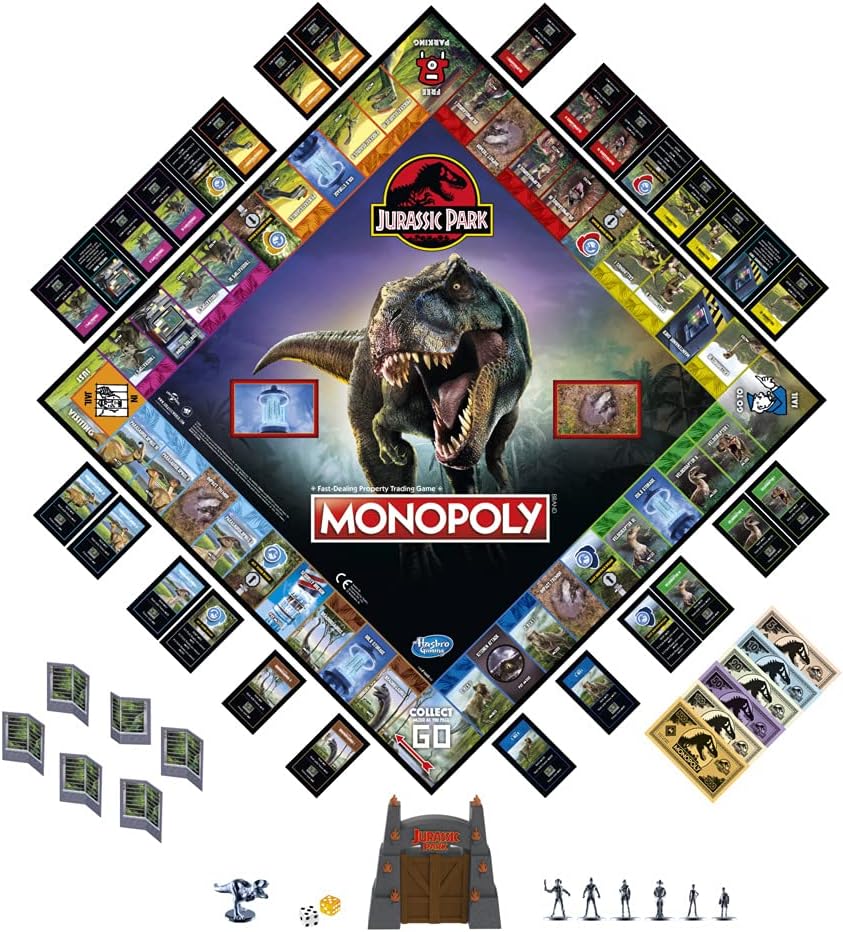
Image: An overhead view of the Monopoly: Jurassic Park Edition game board, showing all game pieces, cards, and the electronic gate in their starting positions, ready for play.
Operating Instructions: How to Play
Game Objective
The primary objective is to be the last player with money when all other players have gone bankrupt. Alternatively, the game can end if the T. Rex damages all properties before they can be protected with fences or repaired, in which case all players lose.
Player Turn Sequence
- Roll the Dice: On your turn, roll both standard dice and the special amber die (if applicable, the product description mentions an amber die in some reviews, but the main description only mentions 2 dice). Move your character piece the total number of spaces indicated by the standard dice.
- Move the T. Rex: After moving your character, move the T. Rex piece one space forward for each "T. Rex" symbol rolled on the dice (or as indicated by the special die if present). The T. Rex's movement is crucial as it can damage properties.
- Action on Space: Perform the action corresponding to the space your character piece landed on (e.g., buy property, draw a card, pay rent).
Key Game Mechanics
- Electronic Jurassic Park Gate:
When any player passes or lands on the "GO" space, activate the electronic Jurassic Park gate by pressing the button. The gate will play either the Jurassic Park film theme song or a dinosaur roar. The sound determines the amount of money you collect from the bank. Refer to the game guide for specific amounts associated with each sound.
- Property Acquisition and Rent:
Land on an unowned dinosaur paddock or other property space to purchase it. If you land on an owned property, you must pay rent to the owner. Rent amounts are listed on the Title Deed cards.
- Building Fences:
Once you own all properties in a color set (a dinosaur paddock group), you can begin building fences. Fences increase the rent collected from other players who land on your properties and provide protection against the T. Rex. Place cardboard fences on the designated spaces on your properties.
- T. Rex Attacks:
If the T. Rex lands on or passes over an unprotected property, it can damage it. When a property is damaged, its owner must pay a fee to the bank to repair it. Damaged properties cannot collect rent until repaired. Fences protect properties from T. Rex damage.
- Cold Storage & Impact Tremor Cards:
When you land on a Cold Storage or Impact Tremor space, draw the top card from the respective pile and follow its instructions. These cards can provide benefits or impose penalties.
- Bankruptcy:
If you owe more money than you can pay, you are bankrupt and out of the game. All your properties are returned to the bank or transferred to the player you owe money to.
Winning the Game
The game concludes when only one player remains with money, or if the T. Rex successfully damages all properties on the board before they can be protected or repaired. In the latter scenario, all players lose.
Maintenance
- Storage: Store all game components in their original box in a cool, dry place to prevent damage to the board, cards, and electronic gate.
- Cleaning: Wipe game pieces and the board with a dry, soft cloth if necessary. Do not use liquid cleaners, as they may damage the materials.
- Battery Care: Remove batteries from the electronic gate if the game will not be used for an extended period to prevent leakage and corrosion.
Troubleshooting
- Electronic Gate Not Working:
- Check if the batteries are correctly inserted with the correct polarity.
- Replace old batteries with new 1.5V AAA Alkaline Batteries.
- Ensure the gate is properly seated on the gameboard.
- Missing Components:
If any components are missing upon opening the box, please contact Hasbro Gaming customer support (see "Support" section).
- Game Rules Confusion:
Refer to the detailed game guide included in the box for comprehensive rules and clarifications. Online resources and FAQs may also be available on the Hasbro Gaming website.
Specifications
| Feature | Detail |
|---|---|
| Product Dimensions | 3.19 x 11.5 x 11.5 inches |
| Item Weight | 2.2 pounds |
| Model Number | F1662102 |
| Recommended Age | 8 years and up |
| Batteries Required | 2 x 1.5V AAA Alkaline Batteries (included for demo) |
| Number of Players | 2-6 |
| Release Date | April 27, 2021 |
| Manufacturer | Hasbro |
Warranty and Support
For information regarding product warranty, replacement parts, or further assistance, please visit the official Hasbro Gaming website or contact their customer support directly. Warranty terms and conditions may vary by region.
Hasbro Gaming Official Website: www.hasbro.com/en-us/brands/hasbro-gaming
Ask a question about this manual
Ask about setup, troubleshooting, compatibility, parts, safety, or missing instructions. Manuals+ will review the question and use this page’s manual context to help answer it.