
1. Introduction
Thank you for choosing the Heiden Nova Single Watch Winder. This device is designed to keep your automatic watches wound and ready to wear, preserving their intricate mechanisms. The Nova series features a direct-drive brushless motor for extended lifespan and quiet operation, along with advanced LCD controls for precise winding customization. Its hand-painted high gloss black finish and beveled glass display make it a sophisticated addition to any space.

This image shows the Heiden Nova Single Watch Winder from the front, featuring its sleek black exterior and the clear glass panel through which an automatic watch is visible, rotating on its cushion. The control panel is located below the watch compartment.
2. Package Contents
- Heiden Nova Single Watch Winder Unit
- Power Adapter
- Adjustable Soft Watch Pillow
- Instruction Manual (this document)
3. Setup
- Unpack the Winder: Carefully remove all components from the packaging.
- Place the Winder: Position the watch winder on a stable, flat surface away from direct sunlight, extreme temperatures, and moisture.
- Connect Power: Insert the provided power adapter into the DC 5V port located at the back of the winder. Plug the other end into a suitable electrical outlet.
- Prepare Your Watch: Gently place your automatic watch onto the adjustable soft watch pillow. Ensure the watch is securely fitted and the strap is not overly tight or loose.
- Insert Watch into Winder: Open the winder's front display. Carefully insert the watch pillow with your watch into the rotating mechanism. Close the display securely.
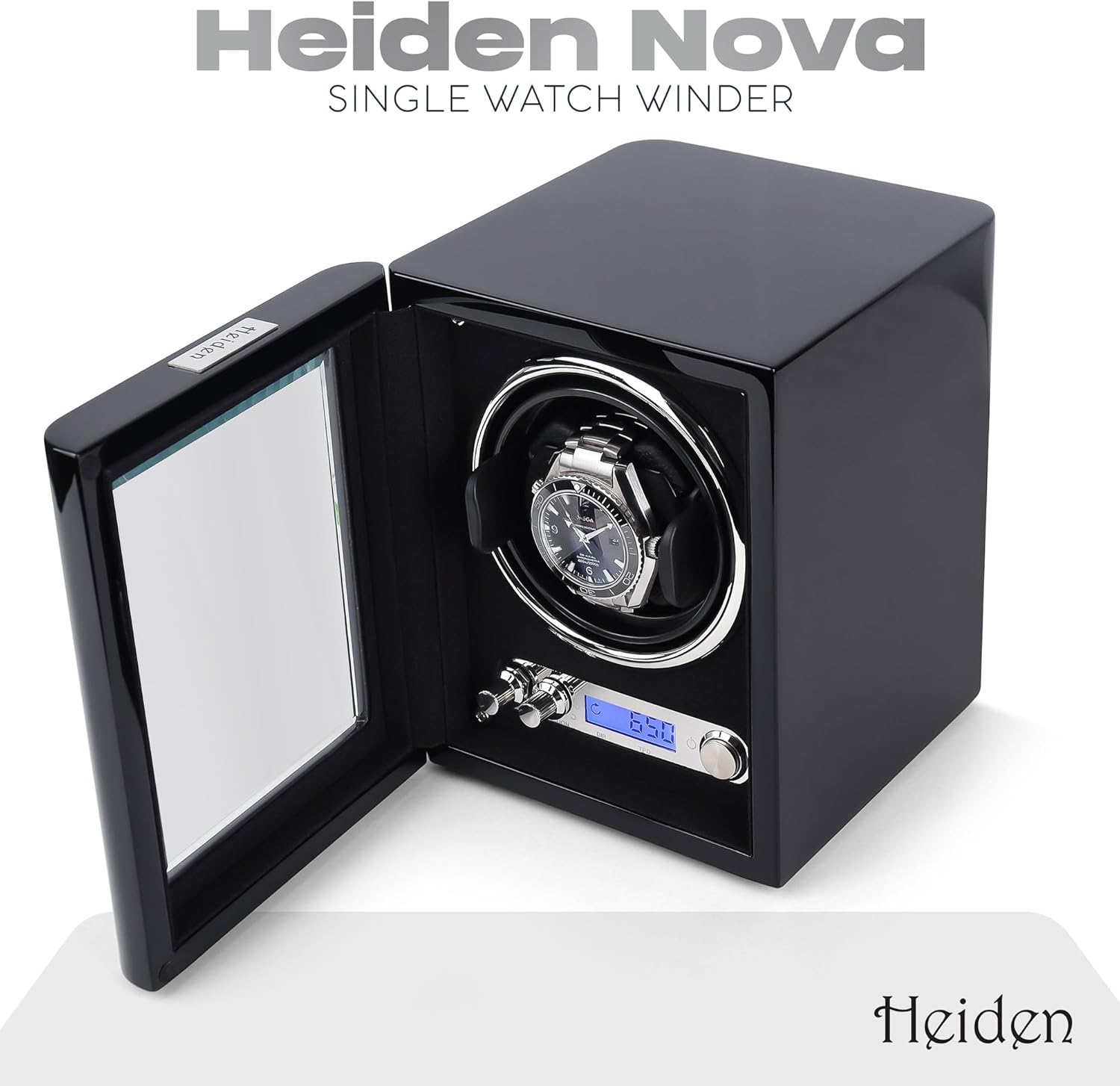
This image displays the watch winder with its front door ajar, revealing the interior. An automatic watch is positioned on the soft cushion within the winding mechanism, ready for operation.
4. Operating Instructions
The Heiden Nova Watch Winder features a back-lit LCD control panel allowing for precise customization of winding settings. The winder automatically orients the watch vertically during rest periods for optimal display.
4.1. Control Panel Overview

This close-up image highlights the winder's LCD control panel, showing buttons for adjusting TPD and rotation direction, along with the digital display.
- Power Button: Turns the winder ON/OFF.
- TPD (Turns Per Day) Control: Use the '+' and '-' buttons to adjust the Turns Per Day from 300 to 2000 in increments of 50.
- Direction Control: Use the 'DIRECTION' knob to select the rotation mode:
- Clockwise: Rotates only in a clockwise direction.
- Counter-clockwise: Rotates only in a counter-clockwise direction.
- Bi-directional: Alternates between clockwise and counter-clockwise rotation.
4.2. Recommended Settings
The optimal TPD and rotation direction depend on your specific watch movement. Consult your watch's manufacturer manual for recommended settings. If unknown, the bi-directional mode with a moderate TPD (e.g., 650-850) is a common starting point.
5. Maintenance
- Cleaning: Wipe the exterior of the winder with a soft, dry cloth. For glass surfaces, use a glass cleaner sparingly on the cloth, not directly on the winder.
- Avoid Liquids: Do not expose the winder to water or other liquids.
- Watch Pillow Care: The soft velvet watch pillow can be gently brushed to remove dust.
- Placement: Ensure adequate ventilation around the winder.
6. Troubleshooting
- Winder Not Turning:
- Check if the power adapter is securely plugged into both the winder and the electrical outlet.
- Ensure the power button on the control panel is in the 'ON' position.
- Watch Not Winding:
- Verify that the watch is properly seated on the watch pillow and the pillow is correctly inserted into the rotating mechanism.
- Confirm that the selected TPD and rotation direction are appropriate for your specific watch model. Refer to your watch's manual.
- Ensure the watch is not fully wound before placing it in the winder, as some watches have overwinding protection.
- Unusual Noise:
- While the direct-drive brushless motor is ultra-quiet, ensure the winder is on a stable, level surface to prevent vibrations.
- Check that no foreign objects are obstructing the rotating mechanism.
7. Specifications
| Feature | Detail |
|---|---|
| Model Number | HD23-BLACK |
| Motor Type | Direct Drive Brushless Motor |
| Control Type | Back-lit LCD Digital Controls |
| Turns Per Day (TPD) Range | 300-2000 (increments of 50) |
| Rotation Modes | Clockwise, Counter-clockwise, Bi-directional |
| Exterior Finish | Hand-painted High Gloss Black |
| Display | Beveled Glass |
| Interior Material | Soft Black Linen with Chrome Accents |
| Watch Pillow | Adjustable Soft Velvet |
| Automatic Orientation | Vertical during rest periods |
| Power Source | Corded Electric (Power adapter included) |
| Package Dimensions | 9.49 x 8.43 x 7.72 inches |
| Item Weight | 4.72 Pounds |
8. Warranty & Support
The Heiden Nova Single Watch Winder comes with a 2-year warranty. For any questions, technical assistance, or warranty claims, please contact our US-based customer support. We are committed to providing lifetime support for your product.
For further assistance, please visit the Heiden Store on Amazon.

