
Paw Patrol 6063582
Paw Patrol Mighty Lookout Tower Instruction Manual
Brand: Paw Patrol | Model: 6063582
1. Introduction
The Paw Patrol Mighty Lookout Tower is an interactive playset designed for children aged 3 and up. This impressive 2 and 3/4-feet tall tower serves as the ultimate headquarters for the Mighty Pups, featuring lights, sounds, and various play mechanisms to recreate exciting rescue missions from Adventure Bay. This manual provides essential information for the setup, operation, and maintenance of your Mighty Lookout Tower.
2. Package Contents
Please ensure all items listed below are present in your package before beginning assembly:
- 1 Mighty Lookout Tower
- 1 Mighty Pups Vehicle (Chase's Cruiser)
- 1 Chase Figure
- 1 Marshall Figure
- 1 Rubble Figure
- 1 Skye Figure
- 6 Zipline Clips
- 1 Sticker Sheet
- 1 Instruction Sheet

Image: The complete Paw Patrol Mighty Lookout Tower playset, including its packaging and the four exclusive bonus action figures and vehicle.
3. Setup
- Assembly: Refer to the included Instruction Sheet for detailed step-by-step assembly instructions. Ensure all pieces are securely connected.
- Battery Installation: The Mighty Lookout Tower requires 3 AAA batteries (not included). Locate the battery compartment, typically on the base or control panel, and insert the batteries according to the polarity indicators (+/-). Secure the compartment cover.
- Sticker Application: Apply the provided stickers to the designated areas on the tower as shown in the Instruction Sheet to enhance the playset's appearance.
4. Features
The Mighty Lookout Tower is packed with interactive features for endless adventure:
- Impressive Height: Standing at approximately 33 inches (2 and 3/4 feet) tall, the tower provides a commanding presence for imaginative play.

Image: The Mighty Lookout Tower with an indicator showing its impressive 33-inch height.
- Working Elevator: Transport your Mighty Pup figures to the top of the tower using the functional elevator. As the elevator lifts, it activates sounds and reveals a badge and megaphone on the side of the tower.

Image: Two children interacting with the playset, highlighting the working elevator and zipline features.
- Lights and Sounds: The mission control panel at the top of the tower features buttons that activate various lights and sounds, including Ryder's mission commands. The platform lights blink to indicate the pup chosen for the mission.

Image: A close-up of the tower's top section, illustrating the lights and sound activation from the control panel.
- Zipline Action: Attach the included zipline clip to Chase and send him soaring around the tower, through the badge, and down the mighty zipline for a quick descent.
- Vehicle Launcher: Open the trap door at the base of the tower to drop Chase into his vehicle, then push the lever to launch him straight into action.

Image: A close-up of the tower's base, demonstrating the vehicle launcher with Chase's cruiser.
- Functional Trap Door: The trap door at the bottom of the tower allows for quick deployment of vehicles.

Image: A child's hand activating the functional trap door at the base of the tower.
- Exclusive Action Figures: The set includes four exclusive Mighty Pups figures: Chase, Marshall, Rubble, and Skye, ready for any mission.
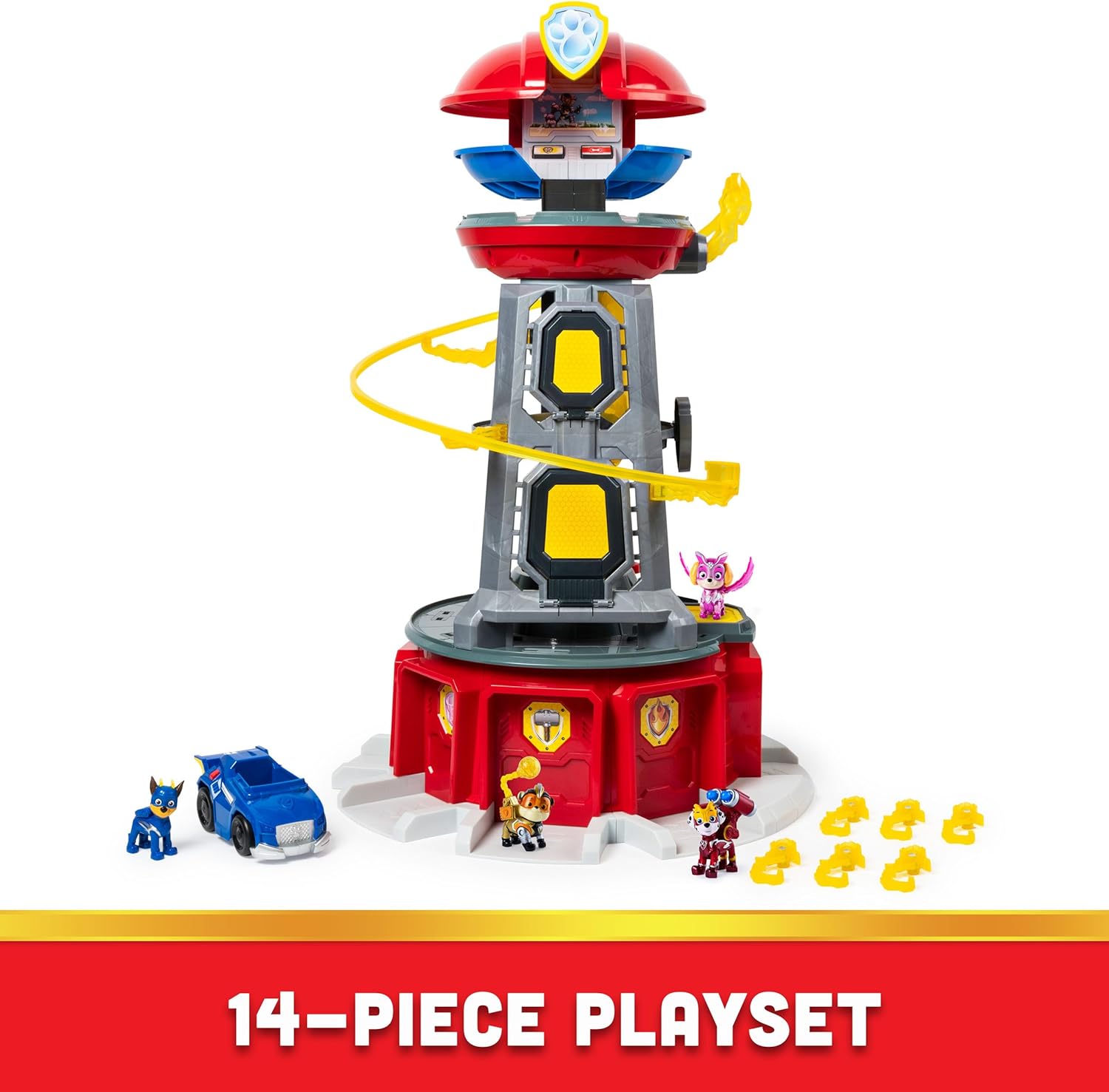
Image: The four exclusive Mighty Pups action figures included with the playset.
5. Operating Instructions
- Elevator Operation: Place a Mighty Pup figure onto the elevator platform. Gently push the elevator upwards to activate sounds and reveal the tower's side features.
- Mission Control Panel: Press the buttons on the mission control panel at the top of the tower to hear Ryder's commands and activate flashing lights on the pup platform.
- Zipline Launch: Attach the zipline clip to Chase's figure. Position Chase at the top of the zipline track and release him to send him down.
- Vehicle Launch: Place Chase's vehicle into the garage at the base of the tower. Open the trap door and push the lever to launch the vehicle forward.
- Pup Placement: Place other Mighty Pups figures on their designated light-up spots on the platform at the top of the tower.
6. Maintenance
- Cleaning: Wipe the playset surfaces with a soft, damp cloth. Do not immerse the toy in water. Avoid using harsh chemicals or abrasive cleaners.
- Battery Replacement: When lights and sounds become faint or stop working, it's time to replace the batteries. Follow the battery installation steps in Section 3. Always use new batteries of the specified type (3 AAA).
- Storage: Store the playset in a cool, dry place away from direct sunlight when not in use.
7. Troubleshooting
| Problem | Possible Cause | Solution |
|---|---|---|
| Lights and sounds not working. | Batteries are dead or incorrectly installed. | Check battery polarity and replace with fresh AAA batteries. |
| Elevator gets stuck or figures fall. | Obstruction in the elevator shaft or figures not positioned correctly. | Ensure no foreign objects are in the shaft. Place figures firmly on the platform. |
| Zipline not smooth. | Zipline clip not properly attached or track obstructed. | Ensure the zipline clip is securely attached to Chase. Check the track for any debris. |
| Vehicle not launching properly. | Vehicle not fully seated in the garage or trap door mechanism obstructed. | Push the vehicle fully into the garage. Clear any obstructions from the trap door area. |
8. Specifications
- Product Dimensions: 27.13 x 9.13 x 15.13 inches
- Item Weight: 11.2 pounds
- Item Model Number: 6063582
- Manufacturer Recommended Age: 36 months - 9 years
- Batteries: 3 AAA batteries required (not included)
- Release Date: July 15, 2021
- Manufacturer: Spin Master
9. Warranty and Support
This product is covered by the Spin Master Care Commitment. For detailed warranty information, product support, or to inquire about replacement parts, please refer to the manufacturer's official website or contact their customer service directly. Keep your proof of purchase for warranty claims.
Manufacturer Website: www.spinmaster.com
Related documents6063582

Ask a question about this manual
Ask about setup, troubleshooting, compatibility, parts, safety, or missing instructions. Manuals+ will review the question and use this page’s manual context to help answer it.