
GREE 775099070158
Gree Portable Air Conditioner User Manual
Model: 775099070158 (GPC06AK-A3NNA2C)
Your guide to efficient cooling and comfort.
Product Overview
The Gree Portable Air Conditioner is a versatile 3-in-1 unit designed to provide fast, efficient cooling, dehumidification, and fan functions for rooms up to 250 sq.ft. It features advanced self-evaporating technology for hassle-free operation and an XFAN function to prevent mold growth. With its 360-degree pulleys, it offers easy mobility and can be installed in various window types.

Figure 1: Front view of the Gree Portable Air Conditioner, showcasing its sleek white and black design.
Setup and Installation
The Gree Portable Air Conditioner is designed for easy installation. No external unit is required, and it can be installed in any horizontal or vertical opening window. An exhaust hose and window kit are included, eliminating the need for extra tools.
Unboxing and Components
Video 1: Official Gree Portable AC Installation Guide. This video demonstrates the unboxing process and identifies all included components necessary for setup.
Upon unboxing, ensure all components are present: the main unit, exhaust hose, window kit (panels and adapters), remote control, and drain hose. The unit comes with 360-degree pulleys for easy movement.
Window Kit Assembly
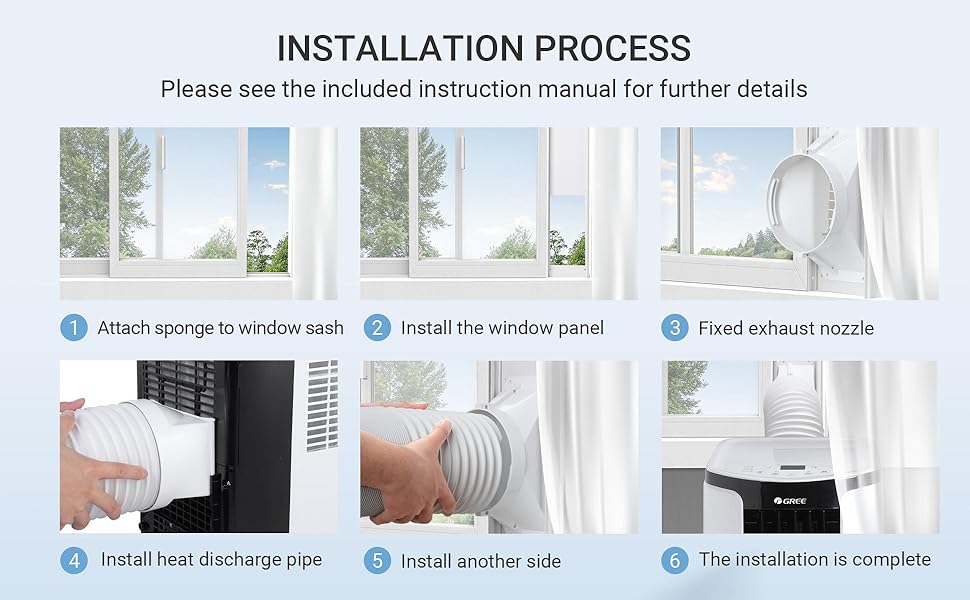
Figure 2: Step-by-step visual guide for installing the window kit, including attaching the sponge, installing panels, fixing the exhaust nozzle, and connecting the heat discharge pipe.
Assemble the window kit by connecting the adjustable panels to fit your window opening. Attach the exhaust hose adapter to the window kit. Secure the window kit in your window frame, ensuring a tight seal to prevent air leakage. The exhaust hose connects to the back of the unit and then to the window kit adapter.
Operating Instructions
The Gree Portable Air Conditioner offers three primary functions: Cool, Dry (dehumidification), and Fan only. It features an intuitive LED control panel and comes with a remote control for convenient operation.
Control Panel and Remote

Figure 3: Close-up view of the unit's LED control panel and the included remote control, highlighting various function buttons.
The control panel on top of the unit allows you to power on/off, select modes (Cool, Dry, Fan), adjust temperature, and set fan speeds (Low, Medium, High, Auto). The remote control provides full functionality from a distance, including setting the XFAN function, sleep mode, and timer.
Modes and Settings
- Cool Mode: Provides fast, efficient cooling for spaces up to 250 sq.ft. Adjust the desired temperature using the +/- buttons.
- Dry Mode (Dehumidification): Reduces humidity in the room. The dehumidification capacity is 68.4 Pint/D. For continuous drainage in this mode, connect the provided drain hose to the unit's drainage port.
- Fan Mode: Circulates air without cooling. Choose from Low, Medium, High, or Auto fan speeds.
- Sleep Mode: Adjusts temperature and fan speed for comfortable sleep.
- Timer Function: Set the unit to turn on or off automatically after a specified period.
Maintenance
Regular maintenance ensures optimal performance and longevity of your Gree Portable Air Conditioner.
Self-Evaporating Technology and Drainage
The unit features self-evaporating technology, which means you typically do not need to manually drain water when using the normal cooling function. The condensate is reused to improve efficiency. However, when using the dehumidification function, you can plug in the hose for continuous drainage.
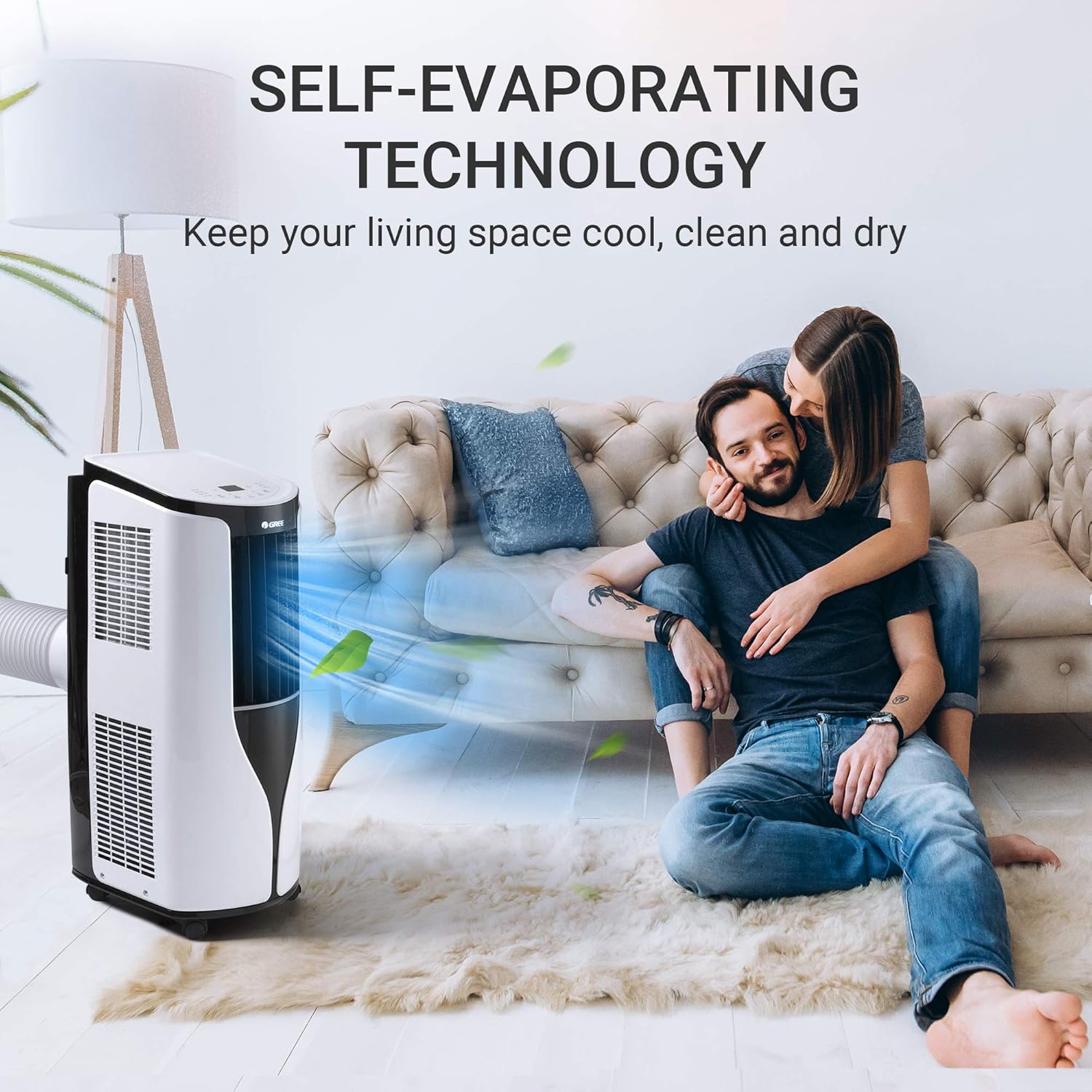
Figure 4: Illustration of the self-evaporating technology, showing how it keeps the living space cool, clean, and dry without frequent manual drainage.
XFAN Function
The XFAN function helps dry any residual water in the air ducts when the air conditioner is turned off, preventing the growth of mold and mildew. It is recommended to keep this function enabled.

Figure 5: Close-up of the unit's top panel, highlighting the X-FAN technology which dries residual water and prevents mold growth.
Filter Cleaning
Regularly clean the air filters to maintain cooling efficiency. Refer to the manual for specific instructions on how to remove and clean the filters. It is generally recommended to clean them every two weeks, or more often if the unit is used frequently or in dusty environments.
Troubleshooting
If you encounter issues with your Gree Portable Air Conditioner, refer to the following common troubleshooting tips:
- Unit not cooling: Check if the air filter is clean, ensure the exhaust hose is properly installed and not blocked, and verify that the room size is within the unit's capacity (up to 250 sq.ft.).
- Water leakage: Ensure the unit is level. If using dehumidification mode, verify the continuous drainage hose is properly connected and not kinked.
- Unit is noisy: Some operating noise is normal. Ensure the unit is on a flat, stable surface and not vibrating against other objects.
- Remote control not working: Check the batteries and ensure there are no obstructions between the remote and the unit.
For more detailed troubleshooting steps or persistent issues, please contact Gree customer support.
Specifications
| Feature | Specification |
|---|---|
| Brand | GREE |
| Model Number | 775099070158 (GPC06AK-A3NNA2C) |
| Cooling Power (ASHRAE) | 10,000 BTU |
| Cooling Power (SACC) | 6,000 BTU |
| Coverage Area | Up to 250 sq.ft. |
| Dehumidification Capacity | 68.4 Pints/Day |
| Functions | Cool, Dry, Fan |
| Fan Speeds | 3 (Low, Medium, High) + Auto |
| Noise Level | 52 dB |
| Item Weight | 55 pounds |
| Product Dimensions | 12"D x 30"W x 15"H |
| Control Console | Remote |
| Batteries (Remote) | 2 AAA batteries (included) |
| Refrigerant | R 410A |
Warranty and Support
Warranty Information
Gree provides a 12-month worry-free warranty for this product. Please retain your proof of purchase for warranty claims.
Customer Support
For any questions, technical assistance, or warranty claims, please contact Gree customer support. Refer to the contact information provided in your product packaging or visit the official Gree website for the most up-to-date support details.
You can also visit the GREE Store on Amazon for more product information and resources.
Related documents775099070158


Ask a question about this manual
Ask about setup, troubleshooting, compatibility, parts, safety, or missing instructions. Manuals+ will review the question and use this page’s manual context to help answer it.