1. Introduction and Overview
This manual provides comprehensive instructions for the National Geographic 9070710 Radio Weather Station. This device offers a clear color display for monitoring indoor and outdoor environmental conditions. It includes three remote thermo/hygro sensors, allowing for temperature and humidity measurements across up to four distinct zones. Key features include DCF radio-controlled time, date, and weekday display, a weather forecast function, atmospheric pressure display, and an alarm with snooze capability.
The weather station is designed for both indoor and outdoor use, providing essential climate data for various locations within your home or garden.
2. Package Contents
Please verify that all items are present in your package:
- 1x Base Station
- 3x Thermo/Hygro Remote Sensors
- 1x Power Adapter for Base Station
- 1x User Manual
3. Safety Information
Please read and understand all safety instructions before using the device. Keep this manual for future reference.
- Do not expose the base station to extreme temperatures, direct sunlight, or high humidity.
- The remote sensors are splash-proof (IP44) but should not be submerged in water.
- Use only the provided power adapter for the base station.
- Ensure correct battery polarity when inserting batteries into the remote sensors.
- Keep batteries out of reach of children.
4. Setup
4.1. Powering the Base Station
- Connect the included power adapter to the base station's power input.
- Plug the power adapter into a standard electrical outlet. The display will illuminate.
4.2. Installing Batteries in Remote Sensors
Each remote sensor requires 2x AAA batteries (not included).
- Open the battery compartment cover on the back of each remote sensor.
- Insert 2x AAA batteries, observing the correct polarity (+/-).
- Close the battery compartment cover securely.
4.3. Initial Pairing and DCF Signal Reception
Upon powering on, the base station will automatically search for the remote sensors and attempt to receive the DCF radio time signal. This process may take several minutes.
- Place the base station and sensors close to each other during initial setup.
- For optimal DCF signal reception, place the base station away from electronic interference and near a window.

Figure 1: National Geographic 9070710 Weather Station base unit and three remote sensors. The base unit features a color display, while the three white remote sensors are shown to the left.

Figure 2: Three individual National Geographic remote thermo-hygro sensors, each displaying temperature and humidity.
4.4. Sensor Placement
The remote sensors are suitable for both indoor and outdoor use. For outdoor placement, choose a location protected from direct rain and sunlight to ensure accurate readings. The sensors have an IP44 rating, indicating splash resistance.

Figure 3: The National Geographic Weather Station base unit displayed on a wall in a modern room setting.

Figure 4: A single remote sensor positioned on a wooden shelf next to a potted plant, demonstrating indoor placement.
5. Operating Instructions
5.1. Display Overview
The color display provides various information:
- Time, Date, Day of Week: Synchronized via DCF radio signal.
- Indoor Temperature and Humidity: Measured by the base station's integrated sensor.
- Outdoor/Remote Sensor Temperature and Humidity: Displays data from up to three remote sensors (Channels 1, 2, 3).
- Weather Forecast: Graphical representation of upcoming weather conditions.
- Atmospheric Pressure: Displayed in hPa.
- Alarm Status: Indication if an alarm is set.
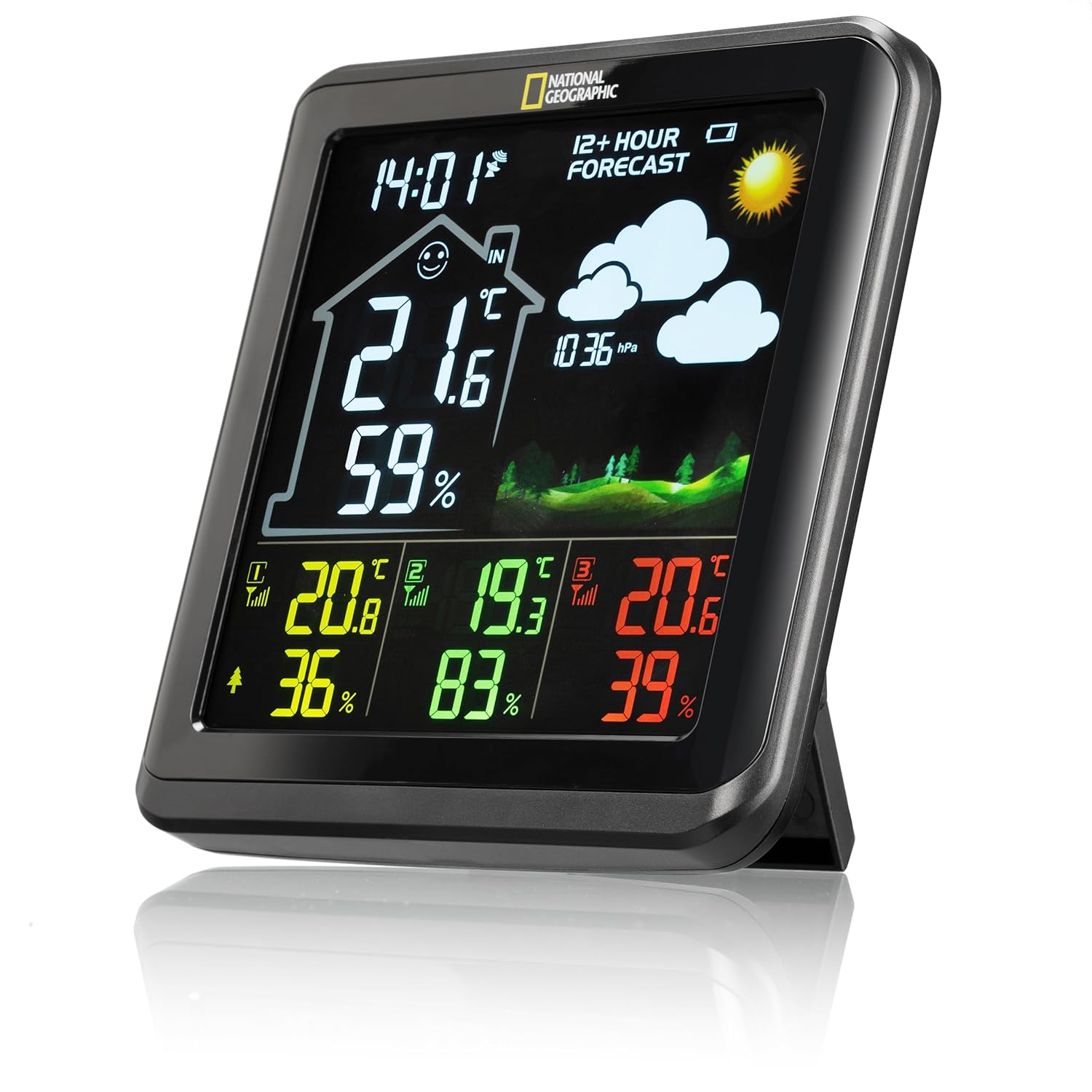
Figure 5: Detailed view of the weather station's color display, showing current time, indoor temperature and humidity, and readings from three remote sensors, along with a weather forecast icon.

Figure 6: The weather station display highlighting the 12+ hour weather forecast section with cloud and sun icons, and atmospheric pressure.
5.2. Button Functions
The base station features several buttons, typically located on the back or top, for configuration and operation.

Figure 7: Rear view of the base station, illustrating the 'DOWN', 'UP', 'ALARM', 'MEM', 'CH', and 'SET' buttons, along with the integrated stand.
- SET: Enters setup mode for time, date, and other settings.
- UP/DOWN: Adjusts values in setup mode, or scrolls through historical data.
- ALARM: Activates/deactivates the alarm or enters alarm setting mode.
- MEM: Displays maximum/minimum temperature and humidity records.
- CH (Channel): Cycles through the remote sensor channels (1, 2, 3) or activates auto-scroll.
5.3. Setting Time and Date
Press and hold the SET button to enter time/date setting mode. Use UP/DOWN to adjust values and SET to confirm and move to the next setting.
5.4. Alarm and Snooze Function
Press the ALARM button to view or set the alarm time. When the alarm sounds, press any button (except ALARM) to activate the snooze function, or press ALARM to turn it off.
6. Maintenance
6.1. Cleaning
Wipe the base station and sensors with a soft, damp cloth. Do not use abrasive cleaners or solvents. Ensure no liquid enters the device openings.
6.2. Battery Replacement
When the low battery indicator appears on the display for a remote sensor, replace its AAA batteries promptly. For the base station, if it uses backup batteries (not specified in product details, but common), replace them when necessary.
6.3. Sensor Care
While remote sensors are IP44 splash-proof, prolonged exposure to heavy rain or direct water jets should be avoided to ensure longevity.

Figure 8: An illustration highlighting the IP44 water resistance and splash-proof capabilities of the remote sensor.
7. Troubleshooting
| Problem | Possible Cause | Solution |
|---|---|---|
| No display on base station | Power adapter not connected or faulty. | Check power adapter connection and outlet. Ensure adapter is functional. |
| Remote sensor data not displayed | Batteries in sensor are low or depleted. Sensor out of range. Interference. | Replace sensor batteries. Move sensor closer to base station. Relocate base station/sensor away from electronic devices. Press CH button to re-scan. |
| Incorrect time displayed | DCF signal not received. | Ensure base station is in an area with good signal reception (e.g., near a window). Manual time setting is also possible. |
| Inaccurate temperature/humidity readings | Sensor exposed to direct sunlight, rain, or heat sources. | Relocate sensor to a shaded, protected area. Allow time for readings to stabilize. |
8. Specifications
- Model Number: 9070710
- Base Station Dimensions (L x W x H): 14.4 x 2.6 x 14.0 cm (approximately 5.67 x 1.02 x 5.51 inches)
- Base Station Weight: 425 g (approximately 0.94 lbs)
- Power Source (Base Station): AC Power Adapter (included)
- Power Source (Remote Sensors): 6x AAA batteries (2 per sensor, not included)
- Connectivity Technology: 433 MHz wireless
- Number of Measurement Zones: 4 (1 integrated, 3 remote)
- Special Features: DCF Radio Time Signal, Weather Forecast, Atmospheric Pressure Display, Alarm with Snooze Function
- Remote Sensor Protection: IP44 Water Resistance (Splash-proof)
9. Warranty and Support
For warranty information and technical support, please refer to the documentation provided with your purchase or contact National Geographic customer service. Details can typically be found on the manufacturer's official website or through your retailer.


