
1. Introduction and Overview
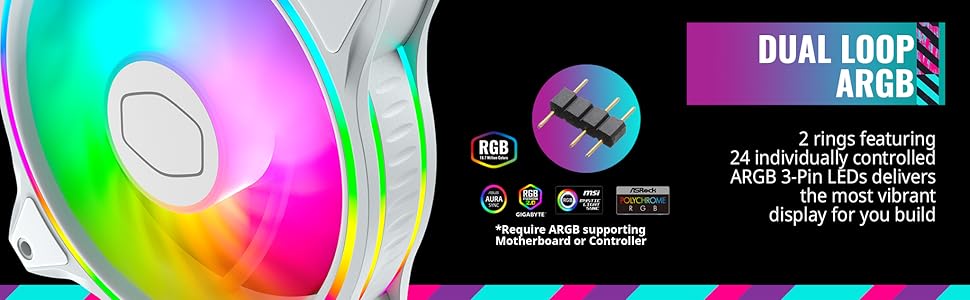
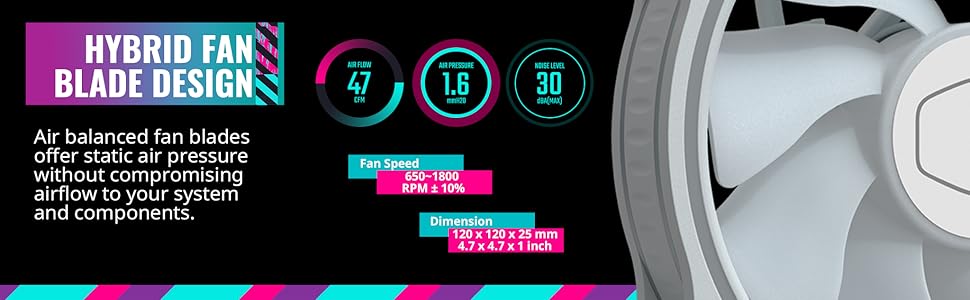
This instruction manual provides detailed guidance for the Cooler Master MasterFan MF120 Halo White 3-in-1 ARGB fan kit. This kit offers an air cooling solution for CPU liquid radiators and chassis intake, featuring Duo-Ring Addressable RGB Lighting with 24 individually controlled ARGB LEDs for visual effects. The MF120 Halo fans incorporate noise reduction technologies and sound-absorbing materials for quiet operation. Their hybrid fan blade design combines Air Balance with a Wave Shape for static pressure airflow, suitable for CPU liquid radiators, low-noise, or mesh chassis ventilation, while enhancing overall airflow.
2. Product Features
- Duo-Ring Addressable RGB Lighting: Features 24 individually controlled ARGB 3-Pin LEDs for customizable visual effects.
- Performance Engineered: Hybrid Static Pressure blade design optimizes airflow for CPU liquid radiators and chassis ventilation.
- Silent Cooling Technology: Incorporates noise reduction and sound-absorbing materials for quiet operation and extended lifespan.
- PWM Fan Control: Dynamic speed adjustment from 650 RPM to 1,800 RPM for balancing noise and airflow.
- Certified Compatibility: Compatible with most Addressable RGB capable motherboards, including Aura Sync, Mystic Light, and Polychrome Sync.
3. What's in the Box
- 3x MasterFan MF120 Halo White Fans
- 1x ARGB Controller (Gen 2)
- 1x PWM Splitter Cable
- 1x ARGB Header Extender Cable
- 1x USB Cable for Controller
- 1x SATA Power Cable for Controller
- Mounting Screws
- Documentation
4. Safety Information
- Ensure your system is powered off and unplugged before installation.
- Handle components with care to avoid damage.
- Refer to your motherboard manual for specific fan and ARGB header locations.
- Do not force connectors; ensure correct orientation.
- Keep out of reach of children.
5. Setup and Installation
5.1 Fan Mounting
- Identify desired mounting locations within your PC case (e.g., front, top, rear, bottom).
- Secure each MasterFan MF120 Halo fan to the case using the provided mounting screws. Ensure the fan is oriented correctly for desired airflow (intake or exhaust).
5.2 Power and ARGB Connections
- Connect Fans to PWM Splitter: Connect the 4-pin PWM cable from each fan to the included PWM splitter cable. This splitter will then connect to a single 4-pin fan header on your motherboard.
- Connect Fans to ARGB Controller: Connect the 3-pin ARGB cable from each fan to the ARGB controller. Use the included ARGB header extender cable if needed for daisy-chaining multiple fans. Secure connections with cable clips to prevent accidental disconnections.
- Power the ARGB Controller: Connect the SATA power cable from your power supply to the ARGB controller.
- Connect Controller to Motherboard (Optional for Software Control): For software control via your motherboard's ARGB software (e.g., ASUS Aura Sync, MSI Mystic Light, Gigabyte RGB Fusion, ASRock Polychrome Sync), connect the USB cable from the ARGB controller to an available 9-pin USB 2.0 header on your motherboard.
Note: If your motherboard does not have a compatible 3-pin ARGB header, you can use the included ARGB controller to manage lighting effects directly.
6. Operating Instructions
6.1 Fan Speed Control (PWM)
Fan speed is controlled via the 4-pin PWM connection to your motherboard. You can adjust fan curves and speeds through your motherboard's BIOS settings or dedicated fan control software provided by your motherboard manufacturer. This allows for dynamic adjustment between 650 RPM and 1,800 RPM to optimize for noise or airflow.
6.2 ARGB Lighting Control
- Via Motherboard Software: If the ARGB controller is connected to your motherboard via USB, download and install your motherboard's ARGB control software (e.g., ASUS Aura Sync, MSI Mystic Light, Gigabyte RGB Fusion, ASRock Polychrome Sync). This software will allow you to synchronize and customize the lighting effects of your MasterFan MF120 Halo fans with other compatible components.
- Via Cooler Master MasterPlus+ Software: If using the Cooler Master ARGB controller, download and install the MasterPlus+ software from the Cooler Master official website. This software provides extensive customization options for lighting modes, colors, brightness, and effects. Ensure the controller firmware is up to date for optimal functionality.
- Via Physical Controller (if applicable): Some kits may include a physical button on the controller for cycling through preset lighting modes if not connected to software.
7. Maintenance
- Cleaning: Periodically clean fan blades and frames to prevent dust buildup, which can reduce cooling performance and increase noise. Use compressed air or a soft, dry cloth.
- Inspection: Regularly check all cable connections to ensure they are secure.
- Bearing Care: The fans feature sealed bearings for dust and lubricant leakage prevention, requiring no user maintenance.
8. Troubleshooting
- Fans Not Spinning:
- Check if the 4-pin PWM cables are securely connected to the splitter and motherboard header.
- Ensure the motherboard fan header is enabled in BIOS.
- Verify power supply connections.
- ARGB Lighting Not Working/Incorrect:
- Ensure 3-pin ARGB cables are correctly connected to the controller and secured with clips.
- Verify the SATA power cable is connected to the ARGB controller and power supply.
- If using motherboard software, ensure the USB cable from the controller is connected to the motherboard and the software is installed and updated.
- Check for firmware updates for the ARGB controller via MasterPlus+ software.
- Confirm that the ARGB header on your motherboard is enabled in BIOS/software.
- Excessive Noise:
- Check for any obstructions to the fan blades.
- Adjust fan speed settings in BIOS or software to a lower RPM.
- Ensure fans are securely mounted to prevent vibration.
9. Specifications
| Feature | Specification |
|---|---|
| Product Dimensions | 4.72"L x 0.98"W x 4.72"H (120 x 120 x 25 mm) |
| Brand | Cooler Master |
| Power Connector Type | 3-Pin (ARGB), 4-Pin (PWM) |
| Voltage | 12 Volts |
| Wattage | 18 watts |
| Cooling Method | Fan |
| Compatible Devices | Desktop PC Cases, CPU Liquid Radiators, Air Coolers |
| Noise Level | 30 Decibels (Max) |
| Material | Plastic |
| Maximum Rotational Speed | 1800 RPM |
| Air Flow Capacity | 47.2 Cubic Feet Per Minute (CFM) |
| Item Model Number | MFL-B2DW-183PA-R1 |
| Color | White |
10. Warranty and Support
Cooler Master products are backed by a limited warranty. For detailed warranty information, technical support, or service inquiries, please visit the official Cooler Master website or contact their customer support. Keep your purchase receipt for warranty claims.
- Online Support: Visit www.coolermaster.com for FAQs, drivers, and support resources.
- Contact: Refer to the Cooler Master website for regional contact information.
11. Visual Guide




Product Video: Cooler Master Halo Series
This video showcases the Cooler Master Halo series fans, demonstrating their vibrant ARGB lighting effects and overall aesthetic within a PC build. It highlights the dynamic color transitions and the visual appeal of the dual-loop lighting design.


