
Product Overview
The AcuRite Color Weather Station provides comprehensive weather information at a glance. It features a vibrant color LCD display and a wireless outdoor sensor to monitor indoor and outdoor conditions. This station offers an accurate, personalized forecast based on patented Self-Calibrating technology.
Key features include:
- Monitor indoor and outdoor temperature with daily high and low records and trend arrow that indicates whether temperature is rising or falling.
- Daily high and low records for temperature and indoor humidity.
- Wireless all-weather outdoor sensor features wireless range of up to 165 feet (50 meters).
- 12 to 24-hour weather forecast; sunny, partly cloudy, cloudy, rain, snow and rain/snow mix.
- Illuminated color display with adjustable dimmer; electric-powered with optional battery backup.
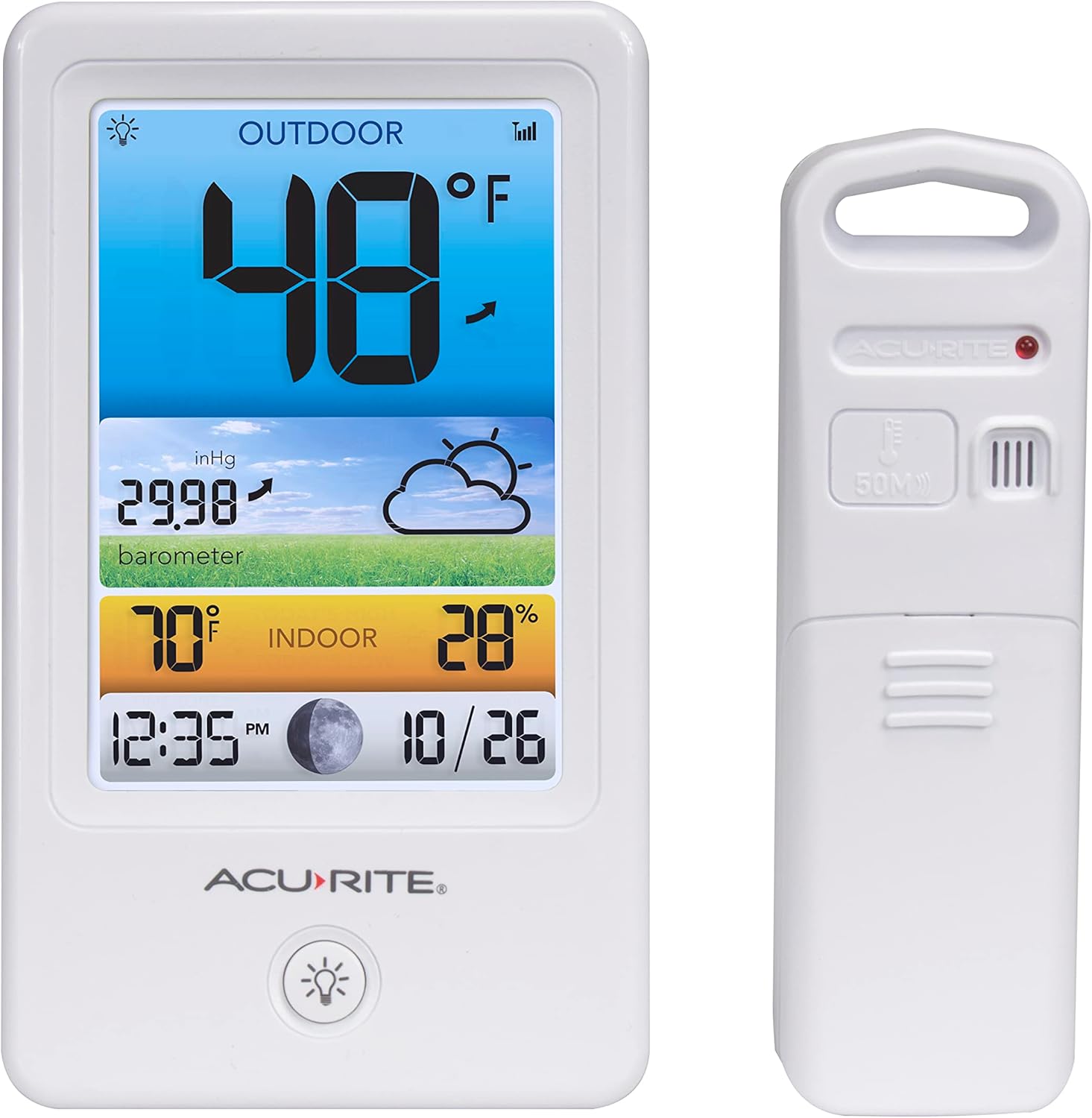
Image: The main display unit (left) and the compact wireless outdoor sensor (right).
Setup Guide
1. Unpacking and Initial Setup
Carefully remove all components from the packaging. Ensure you have the display unit, wireless outdoor sensor, and power adapter.
2. Powering the Display Unit
The display unit is primarily electric-powered. Connect the included power adapter to the display unit and plug it into a standard electrical outlet. For optional battery backup, insert 3 x AAA alkaline batteries (not included) into the battery compartment on the back of the display unit. This ensures continuous operation during power outages.

Image: Rear view of the display unit, highlighting the power adapter input and battery compartment.
3. Installing the Wireless Outdoor Sensor
The wireless outdoor sensor requires 2 x AA alkaline or lithium batteries (not included). Lithium batteries are recommended for temperatures below -4°F (-20°C).
- Remove the battery compartment cover on the sensor.
- Insert the batteries, observing the polarity markings (+/-).
- Replace the battery compartment cover.
4. Sensor Placement
For optimal performance, place the outdoor sensor in a location that is:
- At least 4-6 feet (1.2-1.8 meters) off the ground.
- Away from direct sunlight and heat sources.
- Protected from direct precipitation.
- Within 165 feet (50 meters) of the display unit.
The sensor features an integrated hanger for easy mounting on a wall or post.

Image: The wireless outdoor sensor shown hanging from a tree branch, demonstrating suitable placement.
5. Synchronization
Once both units are powered, they should automatically synchronize. Allow a few minutes for the outdoor temperature and humidity readings to appear on the display. If readings do not appear, refer to the Troubleshooting section.
6. Intelli-Time Clock
The built-in Intelli-Time clock is pre-programmed with the correct time and date and automatically updates itself for Daylight Saving Time, ensuring accurate timekeeping without manual adjustment.
Operating Instructions
The AcuRite Color Weather Station display provides a wealth of information organized for easy readability.

Image: A detailed view of the weather station's color display, showing various data points.
Display Sections:
- Outdoor Temperature: Displays the current outdoor temperature in Fahrenheit, along with a trend arrow indicating rising or falling temperatures.
- Barometric Pressure & Weather Forecast: Shows the current barometric pressure and a 12 to 24-hour weather forecast (sunny, partly cloudy, cloudy, rain, snow, rain/snow mix).
- Indoor Temperature & Humidity: Provides the current indoor temperature in Fahrenheit and indoor humidity percentage.
- Time & Date: Displays the current time and date, automatically adjusted by Intelli-Time technology.
- Moon Phase: Indicates the current phase of the moon.
Adjusting Display Brightness:
The display features an adjustable dimmer. Use the light bulb button on the front of the unit to cycle through brightness settings or turn the backlight off.
Maintenance
Cleaning the Display Unit:
Wipe the display with a soft, damp cloth. Do not use abrasive cleaners or chemicals that may damage the display or casing.
Battery Replacement:
Replace batteries in the outdoor sensor and display unit (if using battery backup) annually or when the low battery indicator appears on the display. Always use fresh, high-quality batteries.
Sensor Care:
Periodically check the outdoor sensor for debris or obstructions that might affect its readings. Ensure it remains in a location protected from extreme weather conditions.
Troubleshooting
| Problem | Possible Cause | Solution |
|---|---|---|
| No outdoor temperature/humidity reading |
|
|
| Inaccurate temperature/humidity readings |
|
|
| Display screen not working |
|
|
Specifications
| Feature | Detail |
|---|---|
| Brand | AcuRite |
| Model Number | 00512SB |
| Power Source | Corded Electric (Display), Battery (Sensor) |
| Connectivity Technology | 433 MHz Wireless |
| Outdoor Sensor Range | Up to 165 feet (50 meters) |
| Temperature Accuracy | +/- 2 degrees Fahrenheit |
| Display Type | Color LCD |
| Material | Plastic |
| Item Weight | 13.1 ounces (Display Unit) |
| Included Components | Power Adapter |
Warranty and Support
The AcuRite Color Weather Station is backed by a limited one-year warranty. For detailed warranty information, product registration, or technical support, please visit the official AcuRite website or contact their customer service.
For further assistance, you may visit the AcuRite Store on Amazon.