
1. Introduction
Thank you for purchasing the ANXONIT Cylinder X2 Mini Projector. This manual provides essential information for the safe and efficient operation of your device. Please read it thoroughly before use and retain it for future reference.

Image 1.1: The ANXONIT Cylinder X2 Mini Projector, a compact device designed for portability and ease of use.
Package Contents
- ANXONIT Cylinder X2 Mini Projector
- Remote Control
- Power Adapter
- USB Cable
- User Manual

Image 1.2: Included accessories with the ANXONIT Cylinder X2 Mini Projector.
2. Setup
2.1 Powering On
- Connect the power adapter to the projector's power input port.
- Plug the power adapter into an electrical outlet.
- Press and hold the power button on the projector or remote control for a few seconds until the device powers on.
2.2 Placement and Focus Adjustment
Place the projector on a stable, flat surface. For optimal viewing, position the projector perpendicular to the projection surface. Adjust the focus wheel located on the side of the projector until the image appears clear and sharp.

Image 2.1: The compact design of the projector allows for easy portability.
2.3 Network Connection (Wi-Fi)
- From the home screen, navigate to 'Settings'.
- Select 'Wi-Fi' and turn it on.
- Choose your desired Wi-Fi network from the list.
- Enter the network password using the on-screen keyboard and confirm.
3. Operating Instructions
3.1 Navigating the Android 8.1 Interface
The projector runs on Android 8.1, providing access to various applications. Use the remote control to navigate through menus, select apps, and input text. The interface is similar to a standard Android tablet or smartphone.

Image 3.1: The Android 8.1 operating system interface on the projector.
3.2 Using Applications
Pre-installed applications like YouTube and Netflix are available. You can download additional applications from the Google Play Store after connecting to Wi-Fi.
3.3 Wireless Display (Screen Mirroring)
The projector supports AirPlay for iOS devices and Miracast for Android devices, allowing you to mirror your smartphone or tablet screen wirelessly.
- Ensure both your mobile device and the projector are connected to the same Wi-Fi network.
- On the projector, select the 'AirPlay' or 'Miracast' application.
- On your mobile device, activate screen mirroring (e.g., 'Screen Mirroring' on iOS, 'Cast' on Android) and select the projector from the list of available devices.

Image 3.2: Wireless screen mirroring in action.
3.4 Bluetooth Connectivity
Connect Bluetooth speakers or headphones for enhanced audio experience.
- Go to 'Settings' and select 'Bluetooth'.
- Turn on Bluetooth and scan for devices.
- Select your desired Bluetooth device from the list to pair.
4. Maintenance
4.1 Cleaning the Projector Lens
Use a soft, lint-free cloth specifically designed for optical lenses to gently wipe the projector lens. Avoid using abrasive materials or chemical cleaners, as these can damage the lens coating.
4.2 General Cleaning
Wipe the exterior of the projector with a soft, dry cloth. Do not use liquid cleaners directly on the device. Ensure ventilation ports are free from dust and obstructions.
4.3 Battery Care
The projector includes a built-in 4400mAh Lithium-Ion battery. For optimal battery life, avoid fully discharging the battery frequently and store the projector in a cool, dry place when not in use for extended periods.

Image 4.1: The projector features a 4400mAh built-in lithium battery.
5. Troubleshooting
| Problem | Possible Cause | Solution |
|---|---|---|
| No image projected | Projector not powered on; Lens cap on; Input source not selected. | Ensure power is connected and unit is on; Remove lens cap; Verify correct input source. |
| Blurry image | Focus not adjusted; Projector too far/close to screen. | Adjust the focus wheel; Reposition the projector. |
| No Wi-Fi connection | Incorrect password; Out of range; Router issue. | Re-enter password; Move closer to router; Restart router. |
| Bluetooth device won't connect | Device not in pairing mode; Out of range; Interference. | Ensure Bluetooth device is in pairing mode; Move devices closer; Restart both devices. |
| Apps (e.g., Netflix) not working | Poor internet connection; App requires update; App data corrupted. | Check Wi-Fi stability; Update the app via Google Play Store; Clear app cache/data in settings. |
6. Specifications
| Feature | Detail |
|---|---|
| Brand | ANXONIT |
| Model Number | Cylinder X2 |
| Display Technology | DLP |
| Display Resolution | 854 x 480 pixels |
| Brightness | 100 ANSI Lumens |
| Visible Screen Diagonal | Up to 120 inches / 305 cm |
| Operating System | Android 8.1 |
| Connectivity | USB2.0, Bluetooth 4.0, 802.11 ac/b/g/n Wi-Fi |
| Special Features | Internet Built-In, Pico, Short Throw, Stereo Speakers |
| Battery | 4400mAh Lithium Ion (included) |
| Item Weight | 10.6 ounces |
| Product Dimensions | 4.33 x 2.36 x 2.36 inches |
| Certifications | CE, FCC, ROHS |
7. Warranty and Support
7.1 Warranty Information
Please refer to the warranty card included in your product packaging for detailed warranty terms and conditions. Keep your proof of purchase for warranty claims.
7.2 Customer Support
For technical assistance, troubleshooting, or service inquiries, please contact ANXONIT customer support through the contact information provided on the official ANXONIT website or your purchase platform.
8. Additional Information
8.1 Diffuse Reflection Technology
The ANXONIT Cylinder X2 utilizes diffuse reflection technology, which projects light indirectly onto the screen. This method is designed to be gentler on the eyes compared to direct light emission from traditional displays, potentially reducing eye strain during prolonged viewing.
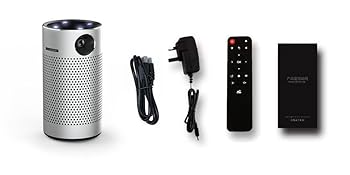
Image 8.1: Diffuse Reflection technology for eye comfort.
8.2 Advanced DLP Technology
This projector incorporates advanced DLP (Digital Light Processing) technology, which contributes to clear and vibrant image reproduction. DLP technology is known for its high contrast and color accuracy.

Image 8.2: Enhanced color reproduction with Advanced DLP Technology.
8.3 Usage Scenarios
The portable design and built-in battery make the Cylinder X2 suitable for various environments, including home theater setups, outdoor movie nights, and presentations.

Image 8.3: The projector is suitable for outdoor movie experiences.