
Introduction
The GardePro E6 Trail Camera is designed for capturing high-quality images and videos of wildlife or for property security. It features advanced Wi-Fi and Bluetooth connectivity, 48MP still image resolution, 1296P HD video recording, and enhanced no-glow night vision. This manual provides detailed instructions for setting up, operating, and maintaining your camera.
What's in the Box
- GardePro E6 Trail Camera
- Antenna
- Mounting Strap
- Instruction Manual (this document)
- Mini-USB Cord
Setup
1. Battery Installation
The E6 camera requires 8 AA batteries (not included). Ensure batteries are inserted with correct polarity. For optimal performance, especially in cold weather or with frequent night vision use, high-quality alkaline or lithium batteries are recommended.
2. SD Card Installation
Insert a standard SD card (up to 256GB, Class 10 or higher recommended) into the designated slot. Ensure the card is formatted before first use via the camera's menu or the mobile app for best compatibility.
3. Mounting the Camera
Use the included mounting strap to secure the camera to a tree or pole. The camera can also be mounted to a wall using appropriate screws (not included). Position the camera to capture the desired area, ensuring a clear line of sight for motion detection.

The GardePro E6 Trail Camera securely mounted to a tree using the provided strap, demonstrating its outdoor placement capability.
4. App Installation and Initial Connection
Download the 'GardePro Mobile' app from your device's app store. Enable Bluetooth and Wi-Fi on your smartphone. Open the app and follow the on-screen instructions to connect to your E6 camera. The camera utilizes a low-power Wi-Fi signal for direct connection to your phone, allowing for live view, settings adjustment, and gallery access within Wi-Fi range.

The GardePro E6 Trail Camera highlighting its innovative Wi-Fi and app control features for convenient remote management.
Operating Instructions
1. Capture Modes
The E6 offers three capture modes: Photo, Video, and Photo + Video. Select your preferred mode via the camera's internal menu or through the GardePro Mobile app settings.
- Photo Mode: Captures still images up to 48MP resolution.
- Video Mode: Records high-definition videos up to 1296P.
- Photo + Video Mode: Captures a still image followed by a video recording.

An example of the 48MP ultra-clear still images captured by the GardePro E6, showcasing its cutting-edge image sensor.

A still from a 1296P HD video captured by the GardePro E6, featuring a squirrel and indicating clear audio recording.
2. No Glow Night Vision
The E6 is equipped with 940nm no-glow infrared LEDs, providing stealthy night vision up to 75 feet. Adaptive illumination technology prevents overexposure or under-dimming, ensuring clear nighttime captures without disturbing wildlife.

Demonstration of the GardePro E6's enhanced night vision, showing a deer clearly visible in a dark forest environment.
3. App Control and Features
The GardePro Mobile app allows for comprehensive control and monitoring of your camera:
- Live View: See what your camera sees in real-time.
- Status Check: Monitor battery level, SD card usage, temperature, and number of photos/videos.
- Settings Adjustment: Change camera name, password, capture mode, photo quality, video resolution, detection delay, PIR sensitivity, operation hours, and more.
- Gallery Access: Browse and download captured photos and videos directly to your phone. The H.264 video encoding technology allows for quick previews without full download.

Screenshots illustrating the user interface of the GardePro Mobile app, displaying options for camera view, status, settings, and media gallery.
4. Additional Features
- Time Stamp: Records date, time, and temperature on images/videos.
- Time Lapse: Capture images at set intervals.
- Sound Recording: Videos include audio.
- Loop Recording: Overwrites oldest files when the SD card is full.
- Password Protected: Secure your camera settings.
Maintenance
To ensure the longevity and optimal performance of your GardePro E6 camera, follow these maintenance guidelines:
- Cleaning: Gently wipe the lens and PIR sensor window with a soft, dry cloth. Avoid abrasive cleaners.
- Battery Replacement: Replace all batteries simultaneously when the battery indicator is low. Do not mix old and new batteries or different battery types.
- SD Card Management: Regularly back up and format your SD card to prevent data corruption and ensure smooth operation.
- Weather Protection: While the camera is IP66 waterproof and dustproof, ensure the battery compartment and USB port covers are securely closed to prevent water ingress, especially during heavy rain or snow.
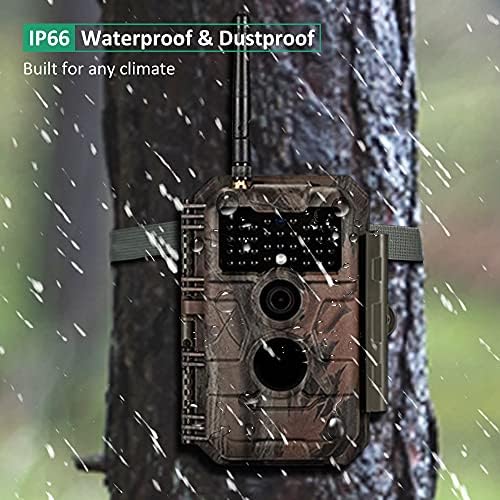
The GardePro E6 Trail Camera operating effectively in rainy conditions, highlighting its IP66 waterproof and dustproof design for all climates.
Troubleshooting
- Camera not turning on: Check battery polarity and ensure batteries are fully charged.
- Poor image/video quality: Ensure the lens is clean. Check settings for photo quality and video resolution. Ensure sufficient lighting for night vision.
- Wi-Fi connection issues: Ensure you are within the camera's Wi-Fi signal range. Restart both the camera and your smartphone. Re-pair the devices via Bluetooth first if necessary.
- App sluggish or stuck during transfer: This can occur with a large number of files. Try transferring fewer files at a time. Ensure your SD card is a high-quality, standard size (not micro SD with adapter) and formatted correctly.
- Videos have pauses/freezes: Ensure you are using a high-quality, reliable SD card. This can sometimes be caused by the SD card's write speed.
- App drains phone battery: Manually close the GardePro Mobile app when not in use to prevent background battery drain.
- Time gaps between video clips: This is normal as the camera writes data to the SD card. Ensure your SD card has sufficient write speed.
Specifications
| Feature | Specification |
|---|---|
| Still Image Resolution | Up to 48 MP |
| Video Resolution | 1296P HD |
| Night Vision Range | Up to 75 feet (940nm No Glow IR) |
| Field of View | 110 Degrees |
| Connectivity | Wi-Fi, Bluetooth (via GardePro Mobile App) |
| Power Source | 8 x AA Batteries (DC 12V) |
| Storage | SD Card (up to 256GB) |
| Water Resistance | IP66 Waterproof |
| Dimensions | 4.2 x 2.4 x 5.6 inches |
| Weight | 10.6 ounces |
| Included Components | Trail Camera, Antenna, Mounting Strap, Instruction Manual, Mini-USB Cord |
Warranty and Support
GardePro products come with a manufacturer's warranty. For specific warranty details, technical support, or service inquiries, please refer to the official GardePro website or contact their customer service directly. You can also find additional resources and FAQs on the GardePro Brand Store on Amazon.


