
1. Introduction
This manual provides essential information for the safe and effective operation of your Dpofirs AC 110V-230V 10000W SCR Voltage Regulator. Please read these instructions thoroughly before installation and use, and retain them for future reference.
Product Overview
The Dpofirs AC Voltage Regulator is a high-power electronic thyristor device designed for precise voltage regulation. It can be used for dimming, motor speed control, and temperature regulation in various applications, supporting resistive loads up to 10000W.

Figure 1: Dpofirs 10000W SCR Voltage Regulator. This image shows the overall unit with its perforated metal casing, input/output terminals, and control knob.
2. Features
- Accurate Voltage Regulation: Unique circuit design ensures precise voltage control without hysteresis. Adjusts from 10V after turn-on to near input voltage for resistive loads.
- Enhanced Protection: Incorporates an RC absorption circuit for thyristor protection.
- Efficient Cooling: Features an upgraded fan with intelligent switch control for effective heat dissipation and extended service life.
- Durable Construction: Housed in a standard high-grade aluminum shell for safety and practicality.
- High Current Capacity: Equipped with brand full copper 75A ultra-high current binding posts.
3. Safety Information
WARNING: Improper use of this device can result in electric shock, fire, or damage to equipment. Always follow these safety guidelines:
- Ensure the load connected does not exceed the specified maximum power of 10000W (for resistive loads).
- For inductive or capacitive loads, which have a large starting current (2-4 times the usual operating current), the power should be significantly reduced during use. It is recommended to leave at least half of the margin for such loads.
- Monitor the temperature rise during initial use. If the temperature exceeds 80 degrees Celsius, strengthen heat dissipation immediately to prevent damage to the module and connected appliances.
- All electrical connections should be made by a qualified professional and comply with local electrical codes.
- Do not operate the device in wet or damp conditions.
- Ensure proper ventilation around the unit.
4. Specifications
| Parameter | Value |
|---|---|
| Use Voltage | AC 110V-230V |
| Maximum Power | 10000W (Resistive Load) |
| Voltage Regulation | AC 0V - adjustable between proximity input voltages |
| Material | Aluminum |
| Item Weight | 240 g |
| Product Dimensions | 1 x 1 x 1 cm (Note: This dimension seems generic, refer to actual product for precise measurements) |
| Model Number | Dilwe1qdt8av9c46861 |
5. Setup Instructions
Follow these steps to properly connect your voltage regulator:
- Power Off: Ensure the main power supply to the circuit is turned off before making any connections.
- Identify Terminals: Locate the "AC Input" and "Voltage Output" terminals on the regulator.
- Connect Input: Connect the AC power source (110V-230V) to the "AC Input" terminals. Ensure correct polarity if applicable, though for AC, typically live and neutral can be interchanged unless specified.
- Connect Output: Connect the electrical circuit of the consumer device (e.g., electric furnace, water heater, lamp, motor) to the "Voltage Output" terminals.
- Wiring Note: The regulator should be connected in series with the live wire of the electrical circuit. It is not necessary to connect the neutral wire through the regulator.
- Secure Connections: Ensure all wire connections are tight and secure to prevent arcing or overheating.
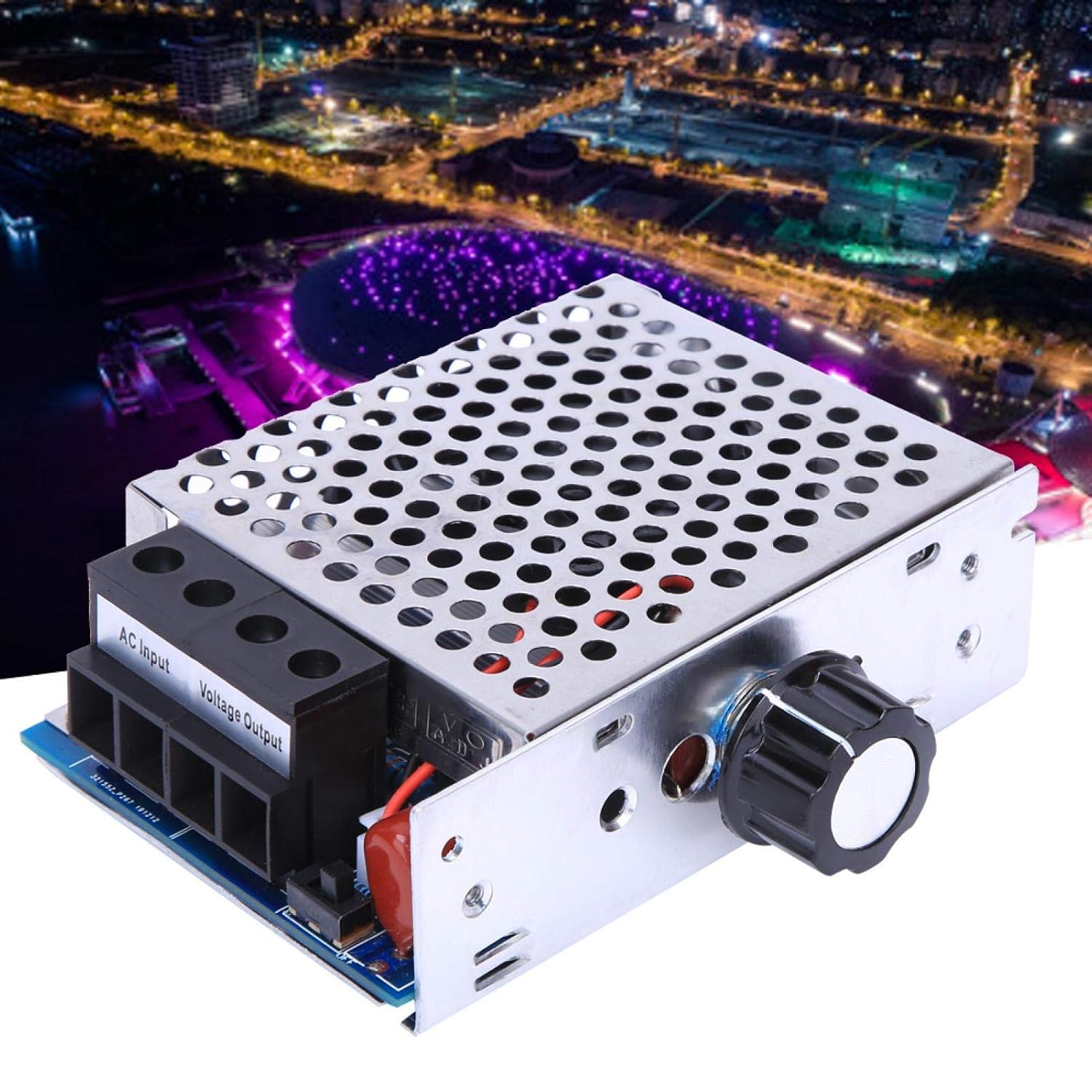
Figure 2: Terminal connections for AC Input and Voltage Output on the regulator.
6. Operating Instructions
Once the regulator is correctly installed and connected, follow these steps for operation:
- Power On: Restore power to the circuit.
- Adjust Voltage: Rotate the potentiometer knob on the regulator to adjust the output voltage.
- Turning the knob will vary the voltage supplied to the connected device.
- This adjustment can be used for dimming lights, controlling motor speed, or regulating temperature in heating elements.
- Monitor Performance: Observe the connected device's behavior and ensure it operates within its safe limits.
- Heat Management: Continuously monitor the regulator's temperature, especially during high-power operation. If the unit becomes excessively hot, reduce the load or improve ventilation.

Figure 3: Potentiometer knob for adjusting output voltage.
Application Examples
This voltage regulator is suitable for a wide range of applications, including:
- Electric furnaces and water heaters
- Lamps and lighting systems (dimming)
- Large motors and power tools (speed control)
Note: For inductive or capacitive loads, ensure the operating power is significantly below the 10000W maximum to account for high starting currents.
Demonstration Videos
Gugxiom AC Motor Speed Controller Demonstration
Video 1: This video demonstrates the functionality of an AC motor speed controller, similar to the Dpofirs voltage regulator, showing how to adjust motor speed. (Source: Sosher-US)
Variable Speed Controller, Fan Speed Controller Demonstration
Video 2: This video illustrates the use of a variable speed controller for fan speed adjustment and brightness control for a light bulb, showcasing the versatility of such devices. (Source: SENSTREE)
7. Maintenance
To ensure optimal performance and longevity of your Dpofirs AC Voltage Regulator, consider the following maintenance points:
- Cleaning: Keep the unit clean and free from dust and debris, especially around the ventilation openings and fan. Use a soft, dry cloth for cleaning. Do not use liquid cleaners.
- Ventilation: Ensure the fan and ventilation holes are not obstructed to allow for proper airflow and heat dissipation.
- Connection Checks: Periodically inspect all electrical connections for tightness and signs of wear or corrosion. Tighten any loose connections.
- Environmental Conditions: Operate the device within its specified environmental conditions (temperature, humidity) to prevent premature failure.
There are no user-serviceable parts inside the unit. Do not attempt to open or repair the regulator yourself.
8. Troubleshooting
This section provides solutions to common issues you might encounter. If the problem persists, contact customer support.
- Device Not Responding:
- Check if the power supply is active.
- Verify all input and output connections are secure.
- Ensure the load is within the specified power limits.
- Overheating:
- Reduce the connected load.
- Ensure adequate ventilation around the unit.
- Clean any dust or obstructions from the fan and vents.
- Inconsistent Voltage Output:
- Check for loose connections.
- Ensure the load type is resistive or appropriately derated for inductive/capacitive loads.
9. Warranty and Support
Specific warranty information for this product is not provided in the available data. Please refer to the product packaging or contact your retailer/manufacturer directly for warranty details and customer support.
For technical assistance or inquiries, please visit the Dpofirs store on Amazon or contact their customer service through the provided channels.