
Introduction
The Muzen OTR Wood Vintage Portable Bluetooth Speaker (Model 11021010472) combines classic aesthetics with modern audio technology. This device functions as a Bluetooth speaker, FM radio, and supports AUX input, offering versatile audio playback options. Its compact design and durable wood construction make it suitable for various environments.
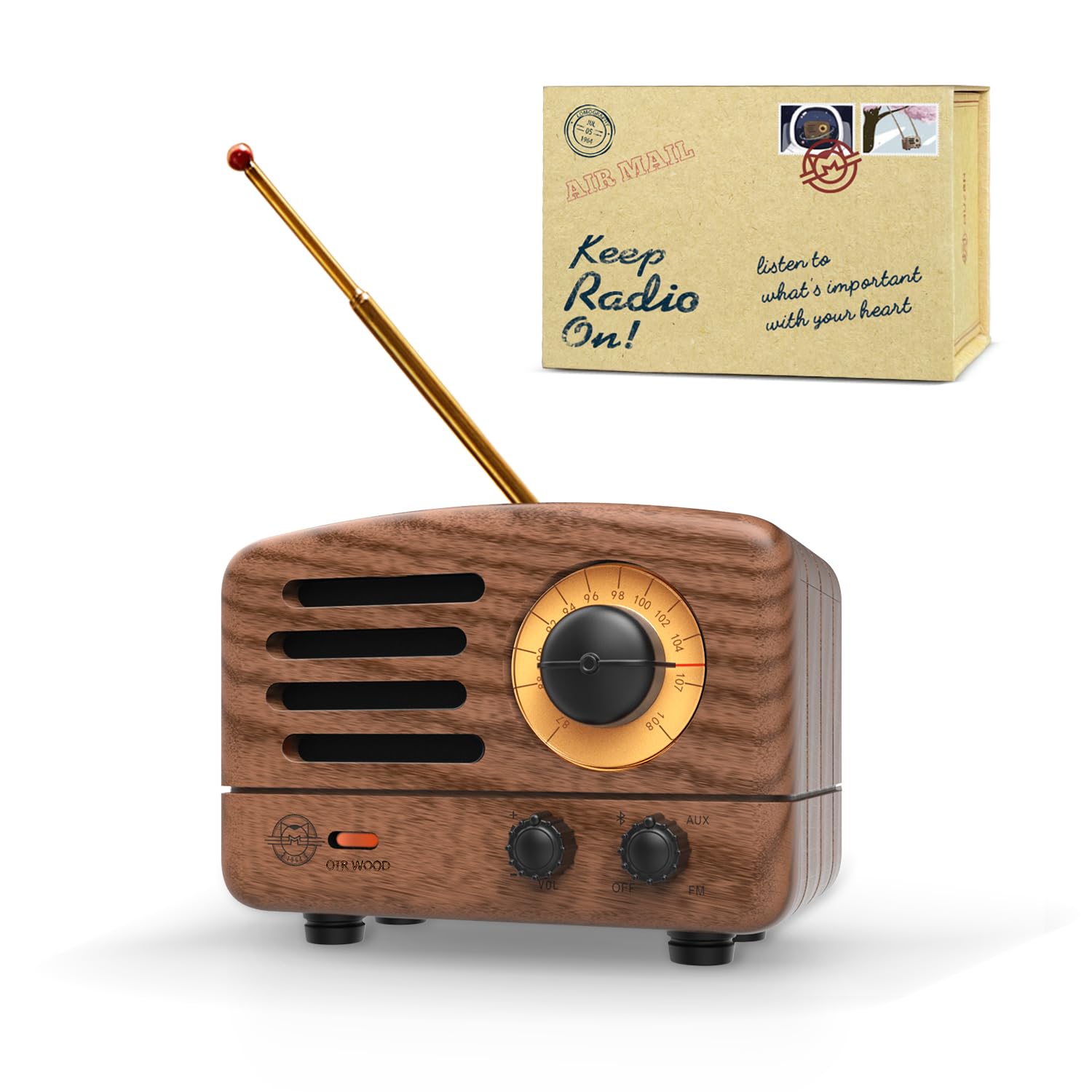
Image: Front view of the Muzen OTR Wood Vintage Portable Bluetooth Speaker, showcasing its retro design and controls.
Product Features
- 3-in-1 Design: Functions as an FM radio, Bluetooth speaker, and supports AUX input.
- FM Radio: Supports frequency range of FM 87-108 MHz with good reception.
- Clear Audio: High-quality amplifier delivers warm and full sound with 5-watt high-power output for lossless wireless audio.
- Extended Playtime: Built-in 1000mAh rechargeable battery provides up to 10 hours of Bluetooth playback or 20 hours in FM mode.
- Portable: Compact size allows for easy transport. Recharges in approximately 4 hours via micro USB.
- Vintage Wood Style: Classic wood surface and retro appearance, paying tribute to 1960s design.
- Bluetooth 5.0: High-speed connection for mobile phones, tablets, and computers, with a transmission distance of up to 33 feet.
Package Contents
The package for your Muzen OTR Wood speaker includes the following items:
- Muzen OTR Wood Portable Bluetooth Speaker
- Micro USB Charging Cable
- AUX Cable
- Removable FM Antenna
- User Manual
- Brand Leaflet
- Decorative Stickers
- Postcards
- Carrying Case (often a leather-style travel bag)

Image: The Muzen OTR Wood speaker displayed with its various accessories, including the charging cable, AUX cable, antenna, user manual, and decorative items.
Setup
- Charging the Speaker: Connect the provided Micro USB charging cable to the speaker's charging port and to a USB power source (e.g., computer, wall adapter). The charging indicator light will illuminate. A full charge typically takes about 4 hours.
- Attaching FM Antenna: For optimal FM radio reception, gently insert the removable FM antenna into the designated port on the speaker.
Operating Instructions
Power On/Off
- Locate the power switch/knob on the speaker. Turn it to the "ON" position to power on the device.
- To power off, turn the switch/knob to the "OFF" position.
Bluetooth Mode
- Ensure the speaker is powered on.
- Switch the mode selector to "BT" (Bluetooth). The Bluetooth indicator light will blink, indicating it's in pairing mode.
- On your mobile device (smartphone, tablet, laptop), enable Bluetooth and search for available devices.
- Select "Muzen OTR Wood" from the list of devices. Once connected, the indicator light will become solid.
- You can now play audio from your device through the speaker.

Image: The Muzen OTR Wood speaker displaying its Bluetooth connection to a smartphone, illustrating wireless audio streaming.
FM Radio Mode
- Ensure the FM antenna is properly attached.
- Switch the mode selector to "FM".
- Use the tuning knob to scan for and select FM radio stations. The frequency dial will indicate the selected station.
- Adjust the volume using the dedicated volume knob.

Image: The Muzen OTR Wood speaker with its telescopic FM antenna extended, showing the illuminated frequency dial while playing radio.
AUX Input Mode
- Connect one end of the provided AUX cable to the speaker's AUX input port.
- Connect the other end of the AUX cable to the audio output jack of your external device.
- Switch the mode selector to "AUX".
- Play audio from your external device. The speaker will output the sound.
Volume and Tone Control
- Use the dedicated volume knob to increase or decrease the audio output.
- Some models may feature separate bass and treble control knobs for tone adjustment.
Maintenance
- Cleaning: Use a soft, dry cloth to clean the speaker's exterior. Avoid using harsh chemicals or abrasive materials.
- Storage: Store the speaker in a cool, dry place away from direct sunlight and extreme temperatures.
- Battery Care: To prolong battery life, avoid fully discharging the battery frequently. Charge the speaker regularly, even if not in use for extended periods.
- Antenna Care: Handle the FM antenna gently to prevent bending or breaking. Retract it when not in use or during transport.
Troubleshooting
| Problem | Possible Cause | Solution |
|---|---|---|
| No power | Battery is discharged. | Charge the speaker fully. |
| Cannot pair Bluetooth | Speaker is not in pairing mode or too far from device. | Ensure speaker is in BT mode (blinking light). Move device closer to speaker. Forget device on your phone and try pairing again. |
| Poor FM reception | Antenna not extended or weak signal. | Extend the FM antenna fully. Try repositioning the speaker for better signal. |
| No sound in AUX mode | Incorrect mode selected or cable issue. | Ensure "AUX" mode is selected. Check if the AUX cable is securely connected at both ends. Verify volume levels on both the speaker and the external device. |
Specifications
- Model Name: MW-2
- Item Model Number: 11021010472
- Material: Wood
- Color: Walnut Wood
- Product Dimensions: 2.6"D x 3.5"W x 2.2"H
- Item Weight: 6.3 ounces (180 Grams)
- Power Source: Battery Powered
- Battery Capacity: 1000 Milliamp Hours
- Charging Time: Approximately 3-4 Hours
- Bluetooth Version: 5.0
- Bluetooth Range: Up to 33 Feet (10 Meters)
- Speaker Maximum Output Power: 5 Watts
- Frequency Response: 20 KHz
- FM Radio Frequency: 87-108 MHz
- Connectivity Technology: Bluetooth, AUX
- Audio Output Mode: Stereo
- Control Method: Knobs/Switches
- Manufacturer: Muzen
Warranty and Support
The Muzen OTR Wood Portable Bluetooth Speaker comes with a limited warranty. For specific details regarding warranty coverage, please refer to the warranty information included in your product packaging or contact Muzen customer support.
Return Policy: This product is eligible for a refund/replacement within 30 days of purchase, subject to the retailer's return policy.
For further assistance, technical support, or inquiries, please visit the official Muzen website or contact their customer service department.