
wolf guard LB-12WF

Wolf Guard LB-12WF Home Alarm System User Manual
Model: LB-12WF
Introduction
The Wolf Guard LB-12WF is a comprehensive home alarm system designed to provide robust security for your property. This system features a powerful 105 dB outdoor siren, Wi-Fi connectivity for remote control via the Smartlife application, and supports a wide range of wireless and wired sensors. This manual provides detailed instructions for setting up, operating, and maintaining your alarm system to ensure optimal performance and peace of mind.

Image: Overview of the Wolf Guard LB-12WF Home Alarm System, including the main siren unit, door/window sensors, PIR motion detector, and remote control, alongside a smartphone displaying the Smartlife app interface.
Package Contents
Before beginning installation, please verify that all components listed below are present in your package:
- 1 x WiFi + 433 MHz Hub (Outdoor Siren with 105 dB alarm)
- 4 x 433 MHz Door Sensors
- 1 x 433 MHz PIR Infrared Detector
- 1 x 433 MHz Remote Control
- 1 x Power Adapter (DC 5V/500mA, UK/EU plug)
- 1 x English User Manual
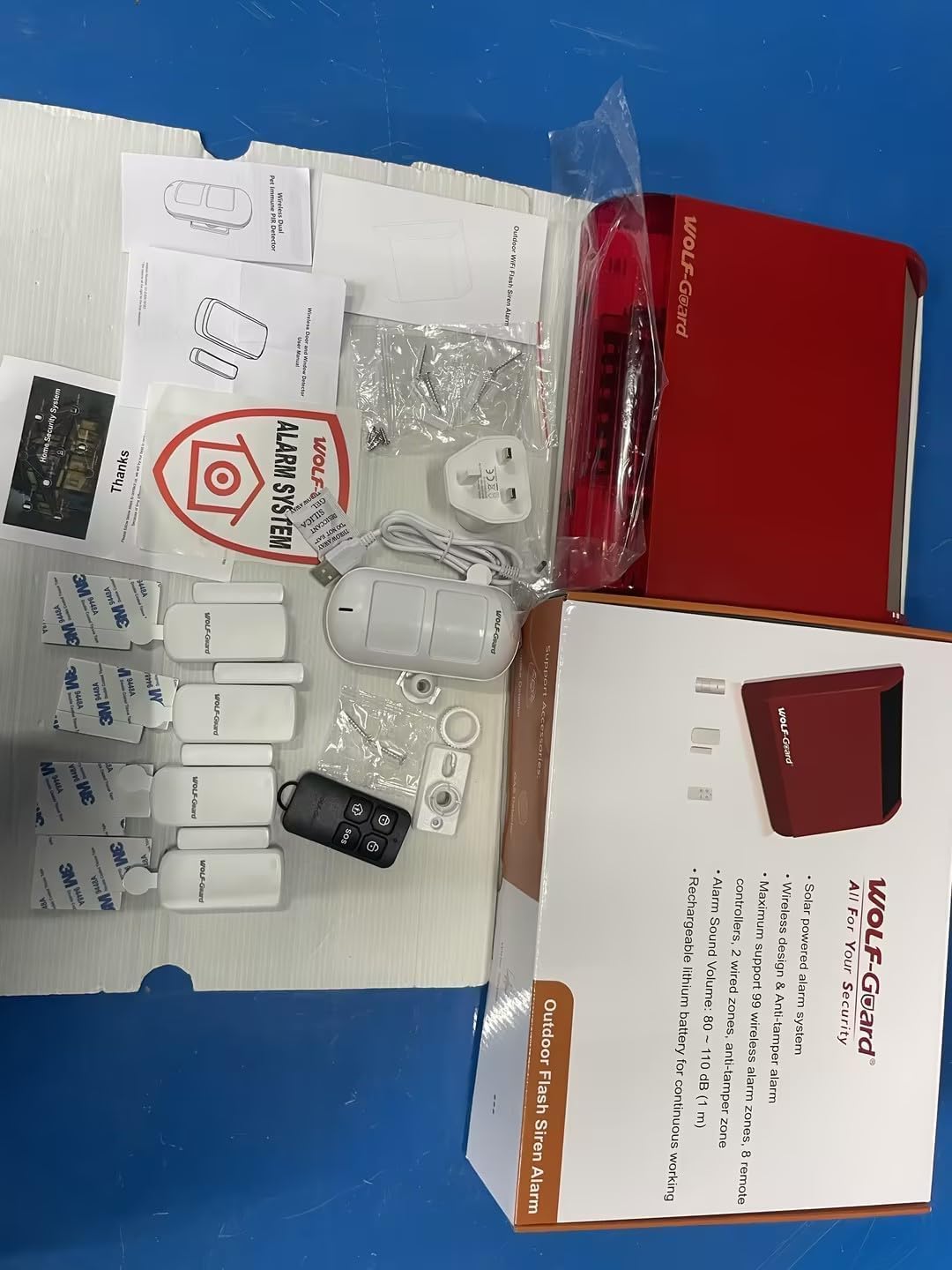
Image: All components of the Wolf Guard LB-12WF Home Alarm System laid out, including the main siren unit, door/window sensors, PIR motion detector, remote control, power adapter, and documentation.
Setup and Installation
1. Powering the Siren Hub
Connect the provided DC 5V/500mA power adapter to the siren hub. The siren has a built-in 3.7V 2200mAh rechargeable battery, allowing it to continue functioning for up to 12 hours in case of a power outage.

Image: Detailed view of the Wolf Guard LB-12WF siren unit, highlighting the external power interface, mounting brackets, speaker, and digital display.
2. Wi-Fi Connection and App Setup
The siren hub connects to a 2.4 GHz Wi-Fi network. It does not support 5 GHz networks. Follow these steps to connect and set up the app:
- Download the "Smartlife" application from your device's app store (Apple App Store or Google Play Store). Alternatively, scan the QR code provided in the physical manual.
- Ensure your smartphone is connected to the same 2.4 GHz Wi-Fi network that the alarm system will use.
- Open the Smartlife app and follow the on-screen instructions to add a new device.
- When prompted, enter your Wi-Fi network name (SSID) and password.
- Once connected, the system will be accessible via the app. Even if offline, the siren functions as a standalone alarm.

Image: Screenshots illustrating the Smartlife and Tuya Smart app interfaces, showing options for device settings, alarm logs, and third-party voice service integration.
3. Sensor Placement
Strategically place the door sensors and PIR detector for optimal coverage:
- Door Sensors: Install on doors and windows. Ensure the two parts of the sensor are aligned and close to each other when the door/window is closed.
- PIR Infrared Detector: Place in areas where intruders are likely to pass, such as hallways or living rooms. The detector is designed with pet immunity to minimize false alarms from small animals.

Image: A door/window sensor installed on a window frame, showing the two magnetic parts that trigger an alarm when separated.

Image: A PIR motion detector positioned in a room, with a beagle dog in the foreground, illustrating the pet immunity feature.
Operating the System
Arming and Disarming
The system can be armed and disarmed using the Smartlife app or the included remote control.
- App Control: Use the Smartlife app to arm (away or home mode) and disarm the system from anywhere. You can also set schedules for automatic arming and disarming.
- Remote Control: The remote control allows for quick arming (lock icon), disarming (unlocked icon), and an SOS function (SOS button) for emergencies.

Image: An illustration depicting an intruder being detected by the alarm system, with the siren sounding and sensors triggering.

Image: A hand holding the remote control, highlighting the SOS button, with a person sleeping in the background, indicating its use for emergency alerts.

Image: A timeline illustrating scheduled arming and disarming times for the alarm system, such as "Go to work Arm" and "Go to bed Arm".
Alarm Recording and Notifications
The Smartlife app keeps a record of alarm events for up to 7 days, ensuring you don't miss any critical alerts. You can also adjust the alarm volume (4 levels) directly from the app.
System Extensibility
The Wolf Guard LB-12WF system is highly extensible. It supports the addition of up to 99 wireless sensors, 2 wired sensors, and 8 remote controls. You can purchase additional compatible sensors from the Wolf Guard store to customize your security setup.
Maintenance
Battery Management
The main siren unit has a built-in rechargeable battery that provides backup power. Ensure the unit is regularly connected to power to keep the battery charged. For wireless sensors, the Smartlife app will provide low battery alerts, prompting you to replace batteries as needed.

Image: A visual representation of a door sensor displaying a low battery alert, indicating the need for battery replacement.
General Care
Keep the alarm components clean and free from dust. Avoid exposing the outdoor siren to extreme weather conditions beyond its intended design. Do not attempt to disassemble or repair the unit yourself, as this may void the warranty and cause damage.
Troubleshooting
If you encounter issues with your Wolf Guard LB-12WF alarm system, refer to the following common problems and solutions:
| Problem | Possible Cause | Solution |
|---|---|---|
| System not connecting to Wi-Fi | Incorrect Wi-Fi password; connecting to 5 GHz network; weak signal. | Ensure correct 2.4 GHz Wi-Fi network and password. Move the siren closer to the router. Restart the router and the siren. |
| Sensors not triggering alarm | Low sensor battery; sensor out of range; improper installation. | Check sensor battery status in the app and replace if low. Ensure sensors are within range of the hub. Verify correct alignment for door sensors. |
| False alarms | PIR detector placed in high-traffic area; pet immunity not effective for large pets; environmental factors. | Adjust PIR placement. Ensure pet immunity settings are correct. Check for drafts or direct sunlight affecting PIR. |
| Remote control not working | Remote battery low; out of range. | Replace remote control battery. Ensure you are within effective range of the siren hub. |
Specifications
| Feature | Detail |
|---|---|
| Brand | Wolf Guard |
| Model Number | LB-12WF |
| Manufacturer | Wolf Guard |
| Dimensions (L x W x H) | 25.4 x 8.2 x 33 cm; 1.54 kilograms |
| Color | White |
| Power Source | AC/DC |
| Voltage | 5 Volts |
| Siren Sound Level | 105 dB (Outdoor Siren), 120 dB (General) |
| Battery (Siren) | 3.7V 2200mAh rechargeable (built-in) |
| Battery Life (Siren) | 12 hours (backup) |
| Connectivity Technology | Wi-Fi (2.4 GHz only) |
| Control Method | Application (Smartlife) |
| Installation Type | Wireless DIY |
| Max Wireless Sensors | 99 |
| Max Wired Sensors | 2 |
| Max Remote Controls | 8 |
| Alarm Log Storage | 7 days (in app) |
Warranty and Support
Warranty information for the Wolf Guard LB-12WF Home Alarm System is typically provided with your purchase documentation. Please refer to the warranty card or contact your retailer for specific terms and conditions.
For further assistance, technical support, or to purchase additional sensors and accessories, please visit the official Wolf Guard store or contact their customer service:
Wolf Guard Official Store: Visit Store
No official product videos were available in the provided data for this manual.
Related documentsLB-12WF


Ask a question about this manual
Ask about setup, troubleshooting, compatibility, parts, safety, or missing instructions. Manuals+ will review the question and use this page’s manual context to help answer it.