
EVERCROSS H5
EVERCROSS H5 Electric Scooter User Manual
Model: H5 | Brand: EVERCROSS
1. Introduction
Welcome to the EVERCROSS H5 Electric Scooter user manual. This guide provides essential information for the safe assembly, operation, maintenance, and troubleshooting of your new electric scooter. Please read this manual thoroughly before your first ride to ensure optimal performance and safety.

The EVERCROSS H5 is designed for adults and teens, featuring an 800W peak power motor, dual braking system, and a comfortable ride with its dual suspension and detachable seat. Its foldable design makes it convenient for commuting and storage.
2. Product Features
- Powerful Motor: Equipped with an 800W (peak power) brushless hub motor, capable of reaching speeds up to 28 mph.
- Extended Range: Offers a cruising range of 18-28 miles on a single charge, depending on riding conditions and rider weight.
- Dual Braking System: Features a responsive dual braking system for enhanced safety.
- Solid Tires: 10-inch solid tires provide a smooth ride and are puncture-resistant.
- Comfort & Convenience: Includes a detachable seat, dual shock absorption, and a one-step portable folding design.
- Advanced Display & Lighting: Functional LCD display, LED headlights, safety taillights, cruise control system, fault self-detection, and electric horn.
- High Load Capacity: Supports a maximum load of 330 pounds.


3. Setup and Assembly
Your EVERCROSS H5 Electric Scooter comes partially assembled. Follow these steps to complete the setup:
- Unboxing: Carefully remove all components from the packaging. Ensure all parts listed in the packing list are present.
- Handlebar Installation: Lift the handlebar stem to its upright position until it locks securely. Remove any packing material from the handlebars.
- Handlebar Adjustment: Pull out the quick-release lever on the handlebar stem to adjust the height to your preference. Push the lever back in to secure.
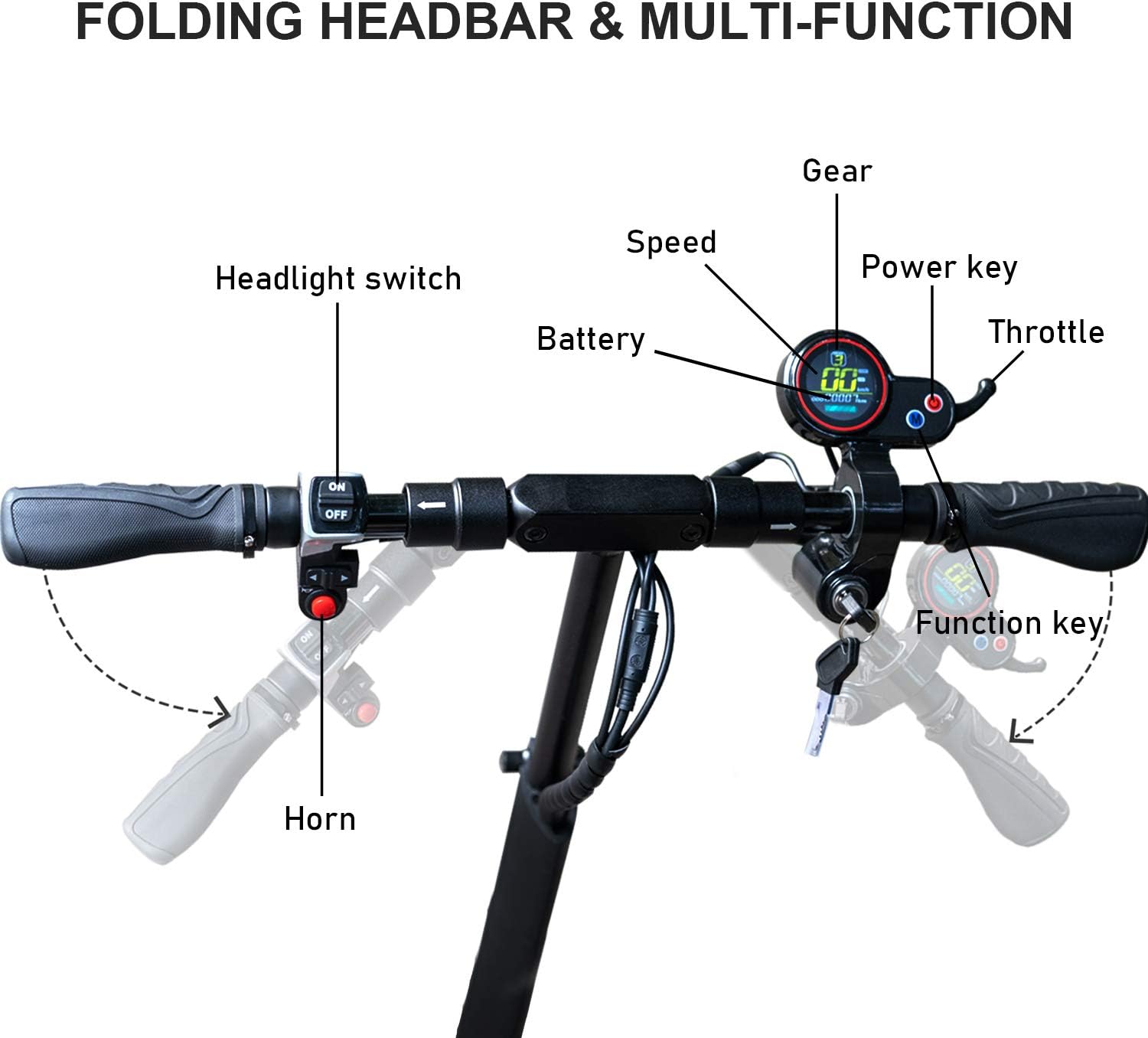
- Control Panel and Brake Lever Adjustment: Adjust the horn, headlight switch, dashboard, and brake levers to a comfortable and accessible angle. Use the provided Allen wrenches (S3, S4, S5) to tighten the screws on the back of these components.
- Seat Installation (Optional): If using the seat, insert the seat post into the designated slot on the scooter deck. Adjust the seat height using the quick-release mechanism and tighten securely.
- Initial Charge: Before first use, fully charge the scooter's battery. Connect the charging cable to the charging port located on the side of the deck. The indicator light on the charger will change when fully charged.

Assembly Video Guide
For a visual guide on unpacking and assembly, please watch the official video below:
4. Operating Instructions
Familiarize yourself with the controls before riding.
- Power On/Off: Insert the key into the ignition and turn it to the ON position. Press and hold the power button on the display to turn the scooter on or off.
- Speed Modes: The scooter features 3 speed modes. Press the mode button (M) on the display to cycle through the different gears (1, 2, 3).
- Acceleration: Use the thumb throttle on the right handlebar to accelerate. Gradually apply pressure for smooth acceleration.
- Braking: Squeeze the brake levers on both handlebars to engage the dual braking system. Apply even pressure for controlled stops.
- Headlight & Taillight: Use the dedicated switch on the left handlebar to turn the LED headlight and safety taillight on or off.
- Turn Signals: Use the arrow buttons on the left handlebar to activate the left or right turn signals.
- Electric Horn: Press the red button on the left handlebar to sound the electric horn.
- Cruise Control: Activate cruise control by maintaining a consistent speed for a few seconds. The scooter will maintain this speed until you apply the brakes or throttle.

5. Maintenance
Regular maintenance ensures the longevity and safe operation of your scooter.
- Cleaning: Wipe down the scooter with a damp cloth after each use. Avoid using high-pressure water jets or harsh chemicals.
- Battery Care: Charge the battery regularly, even if not in use, to maintain its health. Avoid completely draining the battery. Store in a cool, dry place.
- Brake Inspection: Periodically check the brake levers and cables for proper tension and function. Ensure the brake pads are not excessively worn.
- Tire Inspection: Although solid tires, regularly inspect them for cuts, cracks, or embedded debris.
- Fastener Check: Regularly check all screws and bolts, especially on the handlebars, folding mechanism, and wheels, to ensure they are tight.
- Storage: When not in use for extended periods, store the scooter in a dry, temperate environment.
6. Troubleshooting
If you encounter issues with your EVERCROSS H5, refer to the following common troubleshooting tips:
- Scooter Not Turning On: Ensure the key is fully inserted and turned to the ON position. Check if the battery has sufficient charge.
- Loss of Power/Reduced Speed: This could indicate a low battery. Charge the scooter fully. Performance can also be affected by rider weight, terrain, and extreme temperatures.
- Brakes Not Responsive: Check the brake levers and cables for proper adjustment. Ensure no debris is obstructing the brake calipers.
- Display Issues: If the display flickers or turns off, ensure all connections are secure. If issues persist, contact customer support.
- Unusual Noises: Inspect for loose components or debris caught in moving parts. Check suspension springs for any damage.
For persistent issues not covered here, please contact EVERCROSS customer support.
7. Specifications
| Feature | Specification |
|---|---|
| Model Number | H5 |
| Product Dimensions | 125.98 x 32 x 115.82 cm |
| Item Weight | 28.58 kg |
| Age Range | Adult |
| Brake Type | Dual Braking System |
| Color | Black |
| Frame Material | Alloy Steel |
| Special Features | Portable, Seat, Foldable |
| Suspension | Dual Suspension |
| Wheel Size | 10 Inches |
| Maximum Weight Capacity | 330 Pounds |
| Manufacturer | Yongkang Sumeide Industry and Trade Co., Ltd. |
8. Warranty and Support
For warranty information, technical support, or replacement parts, please contact EVERCROSS customer service through the retailer where you purchased the product or visit the official EVERCROSS website. Please have your model number (H5) and purchase date available when contacting support.
Related documentsH5


Ask a question about this manual
Ask about setup, troubleshooting, compatibility, parts, safety, or missing instructions. Manuals+ will review the question and use this page’s manual context to help answer it.