
1. Introduction and Key Features
The Potensic Dreamer 4K Drone is an advanced quadcopter designed for both beginners and experienced pilots, offering high-quality aerial photography and stable flight performance.
- 4K Camera with Sony Sensor: Equipped with a powerful 1/3 CMO Sony sensor and auto-exposure, capturing 3840 x 2160 photos and smooth 4K video. An anti-shake ball reduces vibration for clear footage.
- Extended Flight Time: Features a 3000 mAh 4S smart battery and brushless motors, providing up to 31 minutes of flight time on a two-hour fast charge.
- Stable Flight Performance: Utilizes the exclusive PowerAC dynamic system for instant triple power bursts (within 0.1 second) and stable flight at speeds up to 10m/s. Capable of withstanding up to level 3 wind conditions.
- User-Friendly Design: All-in-one design allows for quick propeller installation (approx. 10 seconds). No calibration needed within a 300km (186.4 miles) range. The intuitive Potensicpro app and ergonomic remote control simplify piloting.
- Multi-functional Flight Modes: Includes intelligent features such as Follow Me, Circle Flight, Waypoint Flight, Precise Altitude Flight, Auto Return, One Key Take-off/Landing, Headless Mode, Emergency Stop, FPV (First Person View), and APP control.
2. Package Contents
Verify that all items listed below are included in your package:
- Potensic Dreamer Drone
- Remote Control
- Intelligent Flight Battery (1 included)
- Propellers (Main set + 1 extra set of counter-clockwise and 1 extra clockwise propeller)
- USB Charger
- User Manual (this document)

Image: The Potensic Dreamer drone, remote control, battery, and charging accessories neatly arranged, illustrating the package contents.
3. Setup Guide
3.1 Battery Charging
Before first use, fully charge the intelligent flight battery and the remote control. The drone battery is a 3000 mAh 4S smart battery, requiring approximately two hours for a full charge.

Image: A close-up of the drone's intelligent flight battery being inserted into its compartment, highlighting the ease of installation and battery indicators.
3.2 Propeller Installation
The propellers are designed for quick and simple installation, typically within 10 seconds. Ensure correct orientation (CW for clockwise, CCW for counter-clockwise) as indicated on the propellers and drone arms.
3.3 App Installation and Connection
Download the "Potensicpro" piloting app from your device's app store. Follow the in-app instructions to connect your smartphone to the drone's Wi-Fi network. The app provides an intuitive interface for flight control and access to advanced features.
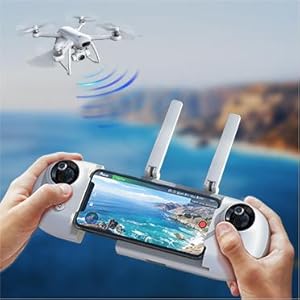
Image: A user holding the remote control with a smartphone mounted, showing the First Person View (FPV) from the drone's camera, demonstrating real-time image transmission.
4. Operating Instructions
4.1 Basic Flight Controls
Familiarize yourself with the ergonomic remote control. The Potensic Dreamer supports one-key take-off and landing, simplifying initial flights for beginners.
Video: An official product video demonstrating the Potensic Dreamer 4K Drone in flight, showcasing its stability and various features, including one-key take-off and landing.
4.2 Intelligent Flight Modes
The drone offers several intelligent flight modes accessible via the Potensicpro app:
- Follow Me: The drone automatically follows the remote controller, capturing dynamic footage of your movement.
- Circle Flight: The drone flies in a circular path around a designated point, ideal for capturing panoramic views.
- Waypoint Flight: Plan a custom flight path by setting multiple waypoints on the app's map, and the drone will automatically follow the route.
- Auto Return: The drone can automatically return to its take-off point, especially useful in low battery or signal loss situations.
- Headless Mode: Simplifies controls by eliminating the need to adjust the drone's orientation relative to the pilot.

Image: An illustration detailing the GPS+GLONASS Auto-Return Home function, showing the drone returning due to signal loss, low battery, or one-key command.
4.3 Camera Operation
The integrated 4K camera with Sony sensor allows for high-resolution photos and smooth video recording. Control camera functions directly from the remote or via the Potensicpro app.

Image: An exploded view of the drone's 4K camera, highlighting the Sony sensor and lens components responsible for high-quality image capture.
5. Maintenance
- Regularly inspect propellers for damage and replace as needed.
- Keep the camera lens clean for optimal image quality.
- Store the drone and batteries in a cool, dry place away from direct sunlight.
- Ensure batteries are charged periodically even when not in use to maintain battery health.
6. Troubleshooting
| Issue | Possible Cause | Solution |
|---|---|---|
| Drone does not power on | Low battery or incorrect battery insertion. | Ensure battery is fully charged and correctly inserted. |
| Unstable flight/Drifting | Improper calibration or strong wind conditions. | Perform IMU calibration. Avoid flying in winds stronger than Level 3. |
| No FPV image on app | Wi-Fi connection issue or app malfunction. | Reconnect Wi-Fi, restart app, or restart drone/remote. |
| Drone does not respond to remote | Remote not paired or out of range. | Ensure remote is paired with drone. Fly within specified control range. |
7. Specifications
| Feature | Detail |
|---|---|
| Brand | Potensic |
| Model Name | Potensic Dreamer |
| Age Range (Description) | Adult |
| Color | white |
| Video Capture Resolution | 1080p (Note: Product title states 4K, specification lists 1080p. Refer to product packaging for definitive resolution.) |
| Connectivity Technology | Wi-Fi |
| Skill Level | Beginner, Professional |
| Item Weight | 1900 Grams (4.19 pounds) |
| Battery Capacity | 3000 Milliamp Hours |
| Video Capture Format | MP4 |
| Control Type | Remote Control |
| Media Type | SD (MicroSD card required for recording) |
| Material | Plastic |
| Battery Cell Composition | Lithium Ion |
| Remote Control Included? | Yes |
| Optical Sensor Technology | CMOS |
| Manufacturer | Potensic |
| UPC | 884017738671, 884017761365 |
8. Warranty and Support
For warranty information, technical support, or service inquiries, please refer to the official Potensic website or contact their customer service directly. Keep your proof of purchase for warranty claims.
Visit the official Potensic Store: Potensic Store on Amazon


