1. Introduction
This manual provides comprehensive instructions for the Club 3D CSV-1564W100 USB Gen1 Type-C Triple Display DP1.2 Alt Mode Smart PD3.0 Charging Dock. This versatile docking station is designed to expand the connectivity of your USB-C enabled device, offering triple display support, multiple USB ports, Ethernet, and power delivery.
2. Package Contents
Verify that all items listed below are included in your package:
- CSV-1564W100 Docking Station
- CAC-1903 Power Supply
- 2 x USB Type-C Cable (1x Connection to Host (27cm / 0.886ft), 1x RED Cable USB type C for charging to PowerSupply 1 m / 3.28 ft)
- Quick Install Guide
3. Product Overview
The Club 3D CSV-1564W100 docking station integrates various ports to enhance your workstation's capabilities. Below is an overview of the device and its connections.

Figure 1: Main view of the Club 3D CSV-1564W100 Docking Station, showcasing its sleek black design and various ports along the side.

Figure 2: Detailed view of the docking station with labels indicating the various ports, including USB Type-C, USB Type-A, power button, LED indicators, card readers, wired network, VGA, HDMI, DisplayPort, and K-Lock slot.
Key Features:
- Triple Display Support: Connect up to three external displays simultaneously via 1x HDMI 4K30Hz, 1x DP 4K30Hz, and 1x VGA 1920x1080@60Hz.
- Versatile Connectivity: Features multiple USB Type-A and USB Type-C data ports for connecting various peripherals.
- Dynamic Power Delivery: Smart PD3.0 charging with 100 Watt Power Supply, dynamically adjusting power based on device consumption.
- High-Speed Ethernet: Integrated Gigabit Ethernet port for stable and fast wired network connections.
- Compact Design: Lightweight and integrated solution ideal for frequent travelers.
4. Setup Instructions
Follow these steps to set up your docking station:
- Connect Power: Plug the provided CAC-1903 Power Supply into the docking station's power input and then into a wall outlet.
- Connect to Host Device: Use the included 27cm USB Type-C cable to connect the docking station to your laptop or compatible host device's USB-C port.
- Connect Displays: Connect your external monitors to the docking station using HDMI, DisplayPort (DP), or VGA cables. Refer to the Operating Instructions for display mode configurations.
- Connect Peripherals: Plug in your USB devices (keyboard, mouse, external drives), Ethernet cable, and audio devices into the respective ports on the docking station.
5. Operating Instructions
The CSV-1564W100 supports various display configurations and efficient power delivery.
Display Modes: SST vs. MST
The docking station supports both Single Stream Transport (SST) and Multi-Stream Transport (MST) modes for display output. The resolution and number of supported displays vary based on the mode and ports used.
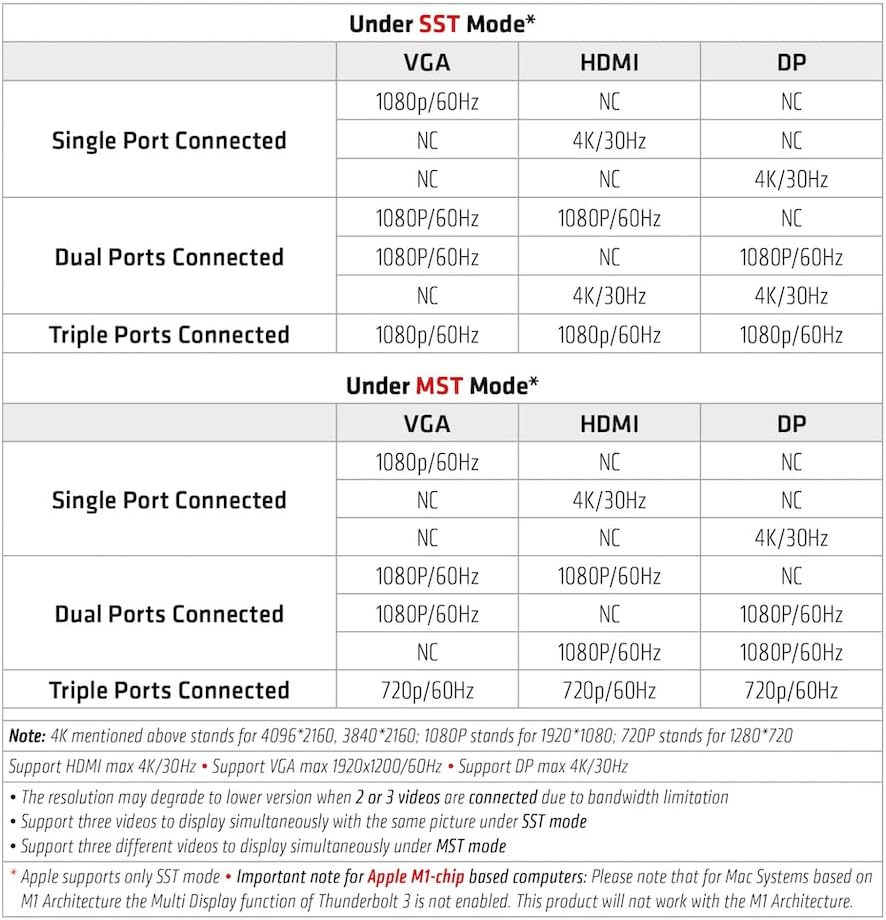
Figure 3: Table illustrating supported resolutions and configurations for single, dual, and triple port connections under SST and MST modes. Note: 4K stands for 4096x2160/3840x2160, 1080p for 1920x1080, and 720p for 1280x720.
- SST Mode: Supports up to three different videos simultaneously with the same picture.
- MST Mode: Supports up to three different videos to display simultaneously.
- Apple Mac Systems: Based on M1 Architecture, only SST mode is supported. The Multi Display function of Thunderbolt 3 is not enabled, and this product will not work with M1 Architecture for multi-stream displays.

Figure 4: Visual representation of a triple display setup, showing a laptop connected to three external monitors, each displaying different content.
Power Delivery:
The docking station features Dynamic Current Detection and Power Distribution. It can intelligently manage power consumption, ensuring your PC receives optimal charging while connected.

Figure 5: The included 100W PD Power Charger and a red USB Type-C charging cable with E-marker support for 5A, indicating the device's charging capabilities.
6. Maintenance
To ensure the longevity and optimal performance of your Club 3D CSV-1564W100 docking station, follow these maintenance guidelines:
- Keep the device clean by wiping it with a soft, dry cloth. Avoid liquid cleaners.
- Ensure proper ventilation around the docking station to prevent overheating.
- Avoid exposing the device to extreme temperatures, humidity, or direct sunlight.
- Handle cables and connectors gently to prevent damage.
7. Troubleshooting
If you encounter issues with your docking station, refer to the following common troubleshooting steps:
- No Display Output:
- Ensure all display cables (HDMI, DP, VGA) are securely connected to both the docking station and the monitors.
- Verify that the docking station is properly connected to your host device via the USB-C cable.
- Check your host device's display settings to ensure external monitors are detected and configured correctly (e.g., extended or mirror mode).
- For Mac systems, remember that only SST mode is supported, limiting multi-stream display functionality.
- No Power Delivery/Charging:
- Confirm the power supply is securely connected to the docking station and a working power outlet.
- Ensure the USB Type-C cable connecting the dock to your host device supports power delivery. Use the provided red USB-C cable for charging.
- USB Devices Not Recognized:
- Try connecting the USB device to a different port on the docking station.
- Ensure the device drivers are installed on your host system.
- Ethernet Connectivity Issues:
- Check the Ethernet cable connection between the dock and your network router/modem.
- Verify network settings on your host device.
8. Specifications
| Feature | Specification |
|---|---|
| Brand | Club 3D |
| Model Number | CSV-1564W100 |
| Item Weight | 1.56 pounds |
| Product Dimensions | 14.25 x 4.25 x 3 inches |
| Power Source | Corded Electric |
| Voltage | 20 Volts |
| Hardware Interface | DisplayPort, Multimedia Card, Secure Digital Card, TransFlash, USB 2.0, USB 3.0, USB Docking Station |
| Compatible Devices | Notebook/Desktop PC/Smartphone |
| Total USB Ports | 5 |
| Total HDMI Ports | 1 |
| Wattage | 1564 watts (Note: This appears to be a misprint in the source data, likely referring to power delivery capabilities or a different metric. The product title specifies 100 Watt Power Supply.) |
| UPC | 841615101849 |
9. Warranty and Support
For warranty information and technical support, please refer to the official Club 3D website or contact their customer service directly. Keep your purchase receipt for warranty claims.


