
1. Introduction
Welcome to the Oraimo Tempo-W2 Smart Watch user manual. This guide provides detailed instructions on how to set up, operate, and maintain your new smart watch. The Oraimo Tempo-W2 is designed to help you track your fitness, monitor your health, and stay connected.
Please read this manual thoroughly before using your device to ensure proper function and to maximize your user experience.
2. Product Overview
The Oraimo Tempo-W2 Smart Watch is a versatile wearable device featuring a round display and a comfortable black silicone strap. It is equipped with advanced sensors for health and fitness tracking.

Figure 2.1: The Oraimo Tempo-W2 Smart Watch, featuring a round display and a black silicone strap.
Key Features:
- 24/7 Heart Rate Tracking: Continuous heart rate monitoring for exercise and daily activities.
- 24 Training Modes: Track various sports and exercises with real-time statistics.
- IP67 Waterproof: Splash, water, and dust resistant for everyday use.
- Long Battery Life: Up to 20 days of battery life on a single charge.
What's in the Box:
- Oraimo Tempo-W2 Smart Watch
- Charging Cable
- User Manual
3. Setup
3.1 Initial Charging
Before first use, fully charge your Oraimo Tempo-W2 Smart Watch. Connect the charging cable to the charging contacts on the back of the watch and plug the USB end into a power adapter (not included) or a computer's USB port. The watch display will indicate charging status.
3.2 App Installation
To unlock the full functionality of your smart watch, download and install the companion Oraimo Health app on your smartphone. Search for "Oraimo Health" in your device's app store (Google Play Store for Android or Apple App Store for iOS).
3.3 Device Pairing
- Ensure your smart watch is charged and powered on.
- Enable Bluetooth on your smartphone.
- Open the Oraimo Health app and follow the on-screen instructions to create an account or log in.
- In the app, navigate to the device pairing section and select your Oraimo Tempo-W2 from the list of available devices.
- Confirm the pairing request on both your smartphone and the watch if prompted.

Figure 3.1: The Oraimo Tempo-W2 Smart Watch worn on a wrist, displaying activity tracking data.
4. Operating Instructions
4.1 Basic Navigation
- Touchscreen: Swipe up, down, left, or right to navigate through menus and screens. Tap to select an item.
- Side Button: Press the side button to return to the home screen or to wake the display.
4.2 Watch Faces
To change the watch face, press and hold the current watch face on the display. Swipe left or right to browse available watch faces and tap to select your preferred design.

Figure 4.1: A close-up of the watch display, showing the digital time (12:32), battery level, and heart rate (100 BPM).
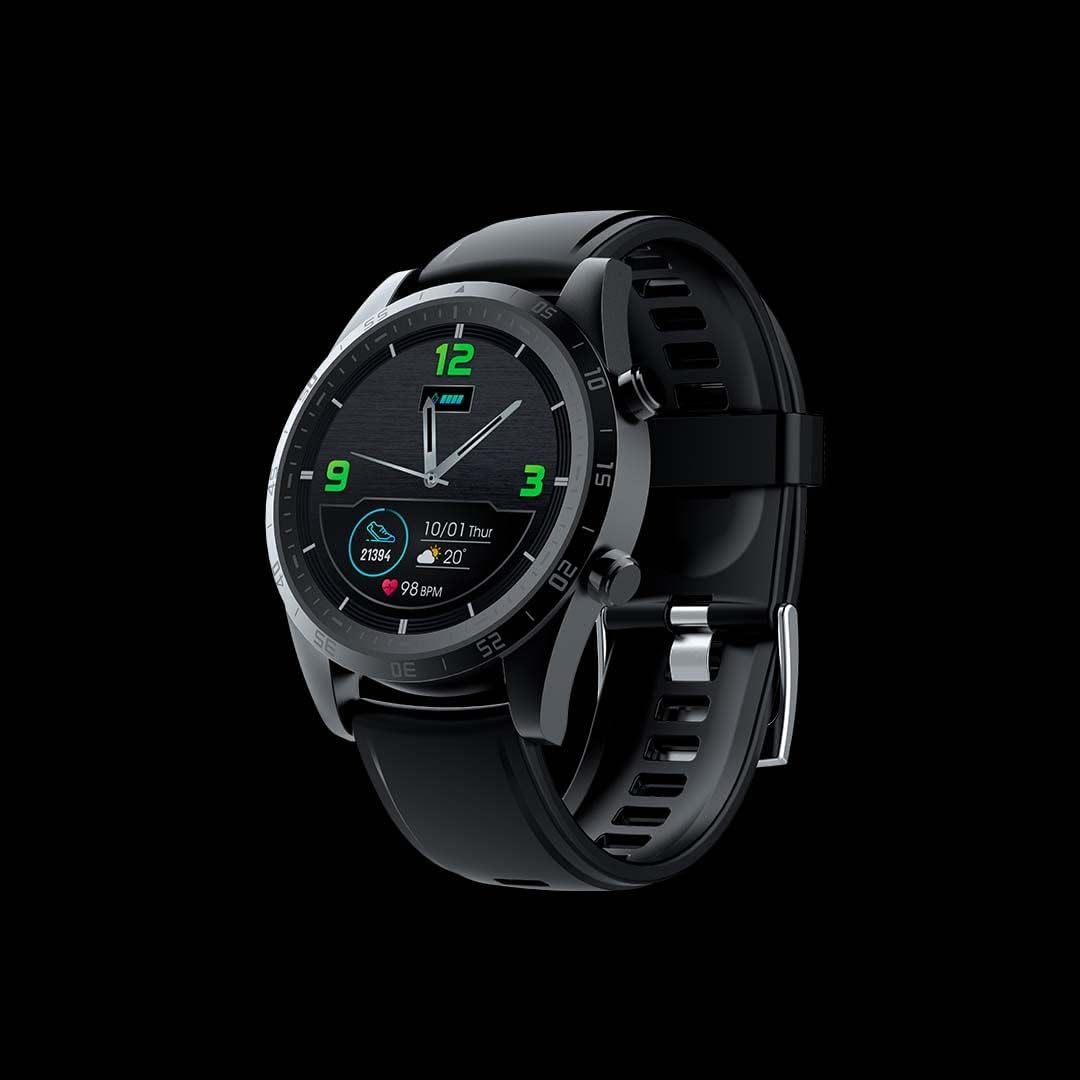
Figure 4.2: The Oraimo Tempo-W2 Smart Watch displaying an analog-style watch face with green accents, showing time, date, and heart rate.
4.3 Activity Tracking
The watch automatically tracks your daily steps, distance, and calories burned. View your progress directly on the watch or in the Oraimo Health app for more detailed insights.
4.4 Heart Rate Monitoring
The Oraimo Tempo-W2 provides continuous 24/7 heart rate monitoring. To view your current heart rate, swipe to the heart rate screen on your watch. For accurate readings, ensure the watch is worn snugly on your wrist.

Figure 4.3: A person's arm with the Oraimo Tempo-W2 Smart Watch on the wrist, showing a heart rate reading of 86 BPM.
4.5 Training Modes
Access the training modes menu on your watch to select from up to 24 different sports activities. Choose your activity to start tracking real-time stats such as duration, heart rate, and calories burned during your workout.
4.6 Notifications and Music Control
Once paired with your smartphone, the watch can display notifications for calls, messages, and app alerts. You can also control music playback on your phone directly from the watch.

Figure 4.4: A person's wrist with the Oraimo Tempo-W2 Smart Watch, displaying music playback controls on the screen.
5. Maintenance
5.1 Water Resistance (IP67)
The Oraimo Tempo-W2 Smart Watch is IP67 rated, meaning it is splash, water, and dust resistant. It can withstand splashes, rain, and brief immersion in shallow water. It is not suitable for swimming, diving, or high-pressure water activities.
5.2 Cleaning
To clean your watch, wipe the screen and strap with a soft, damp cloth. Avoid using harsh chemicals or abrasive materials. Ensure the charging contacts are clean and dry before charging.
5.3 Battery Care
To prolong battery life, avoid exposing the watch to extreme temperatures. Charge the watch regularly, but avoid leaving it fully discharged for extended periods.
6. Troubleshooting
- Watch not turning on or charging: Ensure the charging cable is securely connected to both the watch and a working power source. Try a different USB port or power adapter.
- Connection issues with smartphone: Check that Bluetooth is enabled on your phone and the watch. Restart both devices and attempt to re-pair through the Oraimo Health app.
- Inaccurate activity or heart rate data: Ensure the watch is worn snugly on your wrist, not too loose or too tight. Update the Oraimo Health app to the latest version.
- Screen unresponsive: Try restarting the watch by pressing and holding the side button until it powers off, then press it again to power on.
- Notifications not appearing: Verify that notification permissions are granted for the Oraimo Health app in your phone's settings. Ensure the app is running in the background.
7. Specifications
| Model Name | OSW-20 (Tempo-W2) |
| Brand | Oraimo |
| Screen Size | 1.28 Inches |
| Shape | Oval (Round Display) |
| GPS | GPS Via Smartphone |
| Battery Type | Lithium Polymer (1 required, included) |
| Wireless Communication | Bluetooth, Wi-Fi, Wireless |
| Special Features | Distance Tracker, Heart Rate Monitor, Activity Tracker |
| Operating System | Proprietary (unisex adults) |
| Product Dimensions | 25 x 4 x 1 cm; 28 g |
| ASIN | B08VJDN6CJ |
8. Warranty and Support
For warranty information and technical support, please refer to the warranty card included with your product or visit the official Oraimo website. Contact their customer service for assistance with any issues not covered in this manual.