1. Introduction
This manual provides detailed instructions for the XDUOO XA-10 MQA Full Balanced DAC Decoder and Class-A Headphone Amplifier. Please read this manual thoroughly before operating the device to ensure proper use and optimal performance. The XA-10 is designed to deliver high-fidelity audio playback for discerning listeners.
2. Product Overview
The XDUOO XA-10 is a high-performance audio device combining a Digital-to-Analog Converter (DAC) and a powerful Class-A headphone amplifier. It features a fully balanced circuit design, supporting various high-resolution audio formats and offering multiple input and output options for versatile connectivity.
2.1 Key Features
- Fully Balanced Circuit: Utilizes dual DAC (AK4493*2) and double amplifier chips for enhanced separation and reduced background noise.
- High Output Power: Delivers up to 4000mW (balanced) and 3000mW (single-ended) to drive a wide range of headphones.
- Full Format Decoding: Supports DSD512, DXD 32bit/384KHz, MQA 32bit/384KHz (8x expansion), and PCM 32bit/768KHz.
- Multiple Input Interfaces: Includes USB, Coaxial, Optical, and Bluetooth for diverse audio sources.
- Balance Class A Buffer: Employs transistors in a Class A buffer configuration for powerful output and robust load capacity.
2.2 Front Panel Components
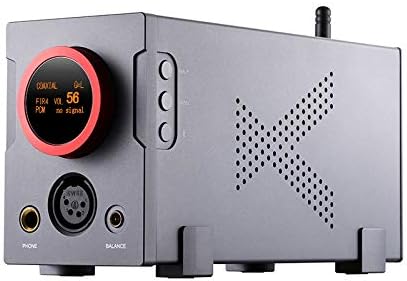
Image: Front view of the XDUOO XA-10, showcasing the large volume knob with OLED display, headphone outputs, and control buttons.
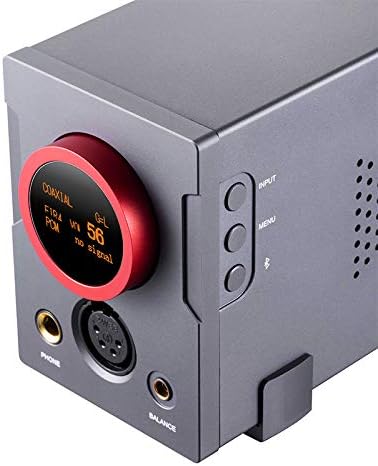
Image: Close-up of the XDUOO XA-10 front panel, highlighting the OLED screen displaying input and volume, along with the 6.35mm, 4-pin XLR, and 4.4mm headphone jacks.
- Volume/Input Selector Knob: Large rotary knob for volume adjustment and input selection. Integrated OLED display shows current status.
- Headphone Outputs: Includes 6.35mm single-ended, 4-pin XLR balanced, and 4.4mm balanced jacks.
- Control Buttons: Buttons for Input selection, Menu navigation, and Bluetooth functions.
2.3 Rear Panel Components
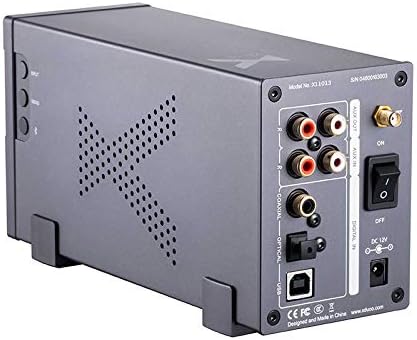
Image: Rear view of the XDUOO XA-10, showing all input and output ports, the power switch, and DC power input.

Image: Close-up of the XDUOO XA-10 rear panel, detailing the RCA AUX IN/OUT, Coaxial, Optical, USB inputs, Bluetooth antenna connector, and power connections.
- Analog Outputs (AUX OUT): RCA jacks for connecting to external amplifiers or active speakers.
- Analog Inputs (AUX IN): RCA jacks for connecting analog audio sources.
- Digital Inputs: Coaxial, Optical, and USB ports for digital audio sources.
- Bluetooth Antenna Connector: For attaching the external Bluetooth antenna.
- Power Switch: Toggles the device power on or off.
- DC 12V Power Input: Connection for the external DC 12V/3A power adapter.
3. Setup Instructions
Follow these steps to set up your XDUOO XA-10 for operation:
- Power Connection: Connect the provided DC 12V/3A power adapter to the "DC 12V" input on the rear panel of the XA-10. Plug the adapter into a suitable power outlet.
- Bluetooth Antenna: Screw the included Bluetooth antenna firmly onto the designated connector on the rear panel. Ensure it is securely attached for optimal wireless performance.
- Input Source Connection:
- USB Input: Connect a USB cable from your computer or digital audio player to the "USB" input port on the rear panel.
- Optical Input: Use an optical cable to connect your audio source (e.g., TV, game console) to the "OPTICAL" input.
- Coaxial Input: Connect a coaxial cable from your audio source to the "COAXIAL" input.
- Analog Input (AUX IN): Connect an analog audio source (e.g., CD player, turntable with pre-amp) using RCA cables to the "AUX IN" jacks.
- Output Connection:
- Headphones: Connect your headphones to one of the available output jacks on the front panel: 6.35mm single-ended, 4-pin XLR balanced, or 4.4mm balanced.
- Analog Output (AUX OUT): If using the XA-10 as a DAC/pre-amplifier with external speakers or an amplifier, connect RCA cables from the "AUX OUT" jacks to your external audio system.
4. Operating Instructions
Once the XA-10 is set up, follow these steps for operation:
- Power On/Off: Flip the "ON/OFF" switch located on the rear panel to the "ON" position. The OLED screen on the front panel will illuminate, indicating the device is powered on. To turn off, flip the switch to "OFF".
- Input Selection: Press the "INPUT" button on the front panel to cycle through the available input sources: USB, Optical, Coaxial, Bluetooth, and AUX IN. The currently selected input will be displayed on the OLED screen.
- Volume Control: Rotate the large knob on the front panel to adjust the volume. Turn clockwise to increase volume and counter-clockwise to decrease it. The volume level (0-100) is shown on the OLED screen. Start with a low volume and gradually increase to a comfortable listening level.
- Bluetooth Pairing:
- Select "Bluetooth" as the input source using the "INPUT" button.
- The XA-10 will automatically enter pairing mode.
- On your mobile device or Bluetooth audio source, search for "XDUOO XA-10" in the Bluetooth settings and select it to pair.
- Once successfully paired, the OLED screen will indicate a connected status.
- Audio Playback: Begin playing audio from your selected source. Ensure the volume is set appropriately on both the XA-10 and your source device.
- Menu Navigation: The "MENU" button may provide access to additional settings or display options. Refer to the on-screen prompts for specific functions.
5. Maintenance
Proper care and maintenance will ensure the longevity and optimal performance of your XDUOO XA-10.
- Cleaning: Use a soft, dry, and lint-free cloth to clean the exterior surfaces of the device. Avoid using liquid cleaners, abrasive materials, or solvents, as these can damage the finish or internal components.
- Placement: Position the XA-10 on a stable, flat surface with adequate ventilation to prevent overheating. Avoid placing it in direct sunlight, near heat sources, or in areas with high humidity or excessive dust.
- Handling: Handle the device with care. Do not drop it or subject it to strong impacts, which can cause internal damage.
- Power Disconnection: If the device will not be used for an extended period, disconnect the power adapter from both the XA-10 and the power outlet.
6. Troubleshooting
If you encounter issues with your XDUOO XA-10, refer to the following common troubleshooting steps:
- No Sound Output:
- Ensure the XA-10 is powered on and the OLED screen is active.
- Verify that the correct input source is selected on the XA-10.
- Check that your headphones or external speakers are properly connected to the correct output jacks.
- Confirm the volume level on the XA-10 is not set to zero or too low. Also, check the volume on your audio source device.
- Ensure all audio cables (USB, Optical, Coaxial, RCA) are securely connected at both ends.
- Poor Sound Quality (Distortion, Noise):
- Inspect audio cables for any damage or loose connections. Try replacing cables if suspected faulty.
- Check the quality of the audio source file or streaming service.
- If using Bluetooth, ensure your source device is within optimal range and there are no significant obstructions or interference sources.
- Reduce the volume if distortion occurs at high levels.
- Bluetooth Connection Issues:
- Ensure the XA-10 is set to Bluetooth input mode and is in pairing mode.
- Turn off and then turn on Bluetooth on your source device.
- Try unpairing "XDUOO XA-10" from your source device's Bluetooth list and then re-pairing.
- Ensure no other devices are actively connected to the XA-10 via Bluetooth.
- Device Not Responding:
- Turn off the XA-10 using the rear power switch, wait a few seconds, and then turn it back on.
- Ensure the power adapter is securely connected and the power outlet is functional.
7. Specifications
Detailed technical specifications for the XDUOO XA-10:

Image: Diagram illustrating key features and supported audio formats of the XDUOO XA-10.

Image: Diagram showcasing the refined material selection and internal component design, including dual AK4493EQ DAC chips and high-end capacitors.
| Parameter | Value |
|---|---|
| Power Supply | DC12V/3A |
| Screen | 0.96 inch OLED |
| Volume Control | 100 levels |
| Gain | +18dB |
| THD (Total Harmonic Distortion) | 0.0008% |
| Dimensions (L x W x H) | 22cm x 7cm x 10cm (8.66"L x 2.76"W) |
| S/N Ratio (Balanced) | 120dB |
| S/N Ratio (Phone) | 115dB |
| Crosstalk (Balanced) | 108dB |
| Crosstalk (Phone) | 73dB |
| Output Power (Balanced) | 4000mW (32Ω@1KHz) |
| Output Power (Phone) | 3000mW (32Ω@1KHz) |
| Suitable Headphone Impedance | 16-600Ω |
| Weight | 0.9KG |
| USB Input PCM Support | 16-32 Bit/44.1K-768KHz |
| USB Input DSD Support | DSD64-512 |
| USB Input DXD Support | 24-32 Bit/352.8K-384KHz |
| USB Input MQA Support | 16-32 Bit/44.1K-384KHz |
| Optical/Coaxial PCM Support | 16-24Bit/44.1-192KHz |
| Optical/Coaxial DSD Support | DSD64 |
| Bluetooth Format Support | SBC, AAC, aptX, aptX HD, aptX LL, LDAC |
| Material | Aluminum or high-quality plastic |
| Manufacturer | XDUOO |
| Date First Available | February 1, 2021 |
| UPC | 791270538460 |
8. Warranty and Support
For warranty information and technical support regarding your XDUOO XA-10, please refer to the documentation provided with your original purchase. It is recommended to keep your proof of purchase for any warranty claims. For further assistance, please contact xDuoo customer service directly through their official channels.