
ASHATA eboxer-14rd09afu1c552
User Manual: Universal Electric Cooling Fan Remote Control
Model: eboxer-14rd09afu1c552 | Brand: ASHATA
1. Introduction
This manual provides detailed instructions for the ASHATA Universal Electric Cooling Fan Remote Control, model eboxer-14rd09afu1c552. Designed for use with ELMARK electric cooling fans, this remote offers convenient control over various fan functions. Please read this manual thoroughly before use to ensure proper operation and longevity of your device.
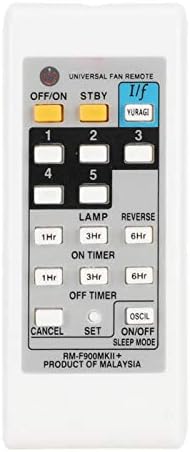
Figure 1: Front view of the ASHATA Universal Fan Remote Control, showing all buttons and labels.
2. Specifications
| Feature | Description |
|---|---|
| Item Type | Electric Fan Remote Control |
| Shell Material | ABS |
| Color | White |
| Quantity | 1 Piece |
| Battery Type | 2 x AAA Battery (Not Included) |
| Compatibility | Designed for ELMARK electric cooling fans |
| Weight | Approx. 49g (1.78 ounces) |
| Product Dimensions | 0.39 x 0.39 x 0.39 inches |
Note: Due to product updates, you may receive either the new or old type of this remote control. Both versions offer the same core functionality.

Figure 2: Visual comparison between the new and old types of the remote control, highlighting minor cosmetic differences.
3. Setup
3.1 Battery Installation
The remote control requires two (2) AAA batteries (not included) for operation. Follow these steps to install the batteries:
- Locate the battery compartment cover on the back of the remote control.
- Gently slide the battery compartment cover downwards or outwards to open it.
- Insert two AAA batteries, ensuring the positive (+) and negative (-) terminals align correctly with the markings inside the compartment.
- Slide the battery compartment cover back into place until it clicks securely.
Important: Ensure batteries are inserted with correct polarity. Incorrect installation may prevent the remote from functioning or cause damage.

Figure 3: View of the remote control with the battery compartment open, showing the slots for two AAA batteries.
4. Operating Instructions
This universal remote control provides various functions for your ELMARK electric cooling fan. Familiarize yourself with the button layout and their corresponding actions:
Figure 4: Close-up of the remote control's button layout for easy reference.
- OFF/ON: Powers the fan on or off.
- STBY (Standby): Puts the fan into a low-power standby mode.
- I/f (YURAGI): Activates the "Yuragi" or natural breeze mode, simulating irregular airflow.
- Number Buttons (1, 2, 3, 4, 5): Typically control fan speed settings. Refer to your fan's manual for specific speed assignments.
- LAMP: Controls the fan's integrated light (if applicable). Press to toggle the light on/off.
- REVERSE: Changes the direction of fan blade rotation (useful for ceiling fans to circulate air differently in summer/winter).
- ON TIMER (1Hr, 3Hr, 6Hr): Sets the fan to turn on after a specified duration (1, 3, or 6 hours).
- OFF TIMER (1Hr, 3Hr, 6Hr): Sets the fan to turn off after a specified duration (1, 3, or 6 hours).
- CANCEL: Cancels any active timer settings.
- SET: Used for programming or confirming settings (refer to your fan's manual if specific programming is required).
- OSCIL (Oscillation): Controls the oscillation function of the fan (if applicable), allowing it to swing from side to side.
- ON/OFF SLEEP MODE: Activates or deactivates a sleep mode, which may adjust fan speed or noise level for comfortable sleep.
Note: The specific functions and their exact behavior may vary slightly depending on the ELMARK fan model you are using. Always refer to your fan's original instruction manual for detailed compatibility and function descriptions.
5. Maintenance
To ensure the longevity and proper functioning of your remote control, follow these maintenance guidelines:
- Cleaning: Wipe the remote control with a soft, dry cloth. Do not use abrasive cleaners, solvents, or harsh chemicals, as these can damage the surface or internal components.
- Battery Replacement: Replace batteries when the remote's range decreases or it stops responding. Always replace both batteries at the same time with new ones of the same type (AAA).
- Storage: If the remote control will not be used for an extended period, remove the batteries to prevent leakage and potential damage to the device. Store in a cool, dry place away from direct sunlight.
- Avoid Moisture: Keep the remote control away from water and high humidity.
- Avoid Drops: Protect the remote from physical shocks and drops, which can damage internal circuitry.
6. Troubleshooting
If you experience issues with your remote control, try the following troubleshooting steps:
- Remote Not Responding:
- Check if the batteries are inserted correctly with the correct polarity.
- Replace old batteries with new AAA batteries.
- Ensure there are no obstructions between the remote control and the fan's receiver.
- Verify that you are within the effective operating range of the fan's receiver.
- Limited Range:
- Replace batteries with new ones.
- Ensure there is a clear line of sight to the fan's receiver.
- Minimize interference from other electronic devices.
- Buttons Not Working:
- Ensure the remote is powered on (if applicable).
- Check for physical damage to the buttons.
- If only some buttons are not working, the remote may be faulty and require replacement.
- Fan Not Responding to Specific Functions:
- Confirm that your specific ELMARK fan model supports the function you are trying to use (e.g., LAMP, REVERSE, OSCIL). Not all fans have all features.
- Refer to your fan's original manual for compatibility.
If the problem persists after trying these steps, contact customer support for further assistance.
7. Warranty and Support
This product is manufactured with high-quality materials and undergoes strict quality control. While specific warranty details are not provided in this manual, most electronic products come with a standard manufacturer's warranty against defects in materials and workmanship.
For warranty claims, technical support, or any inquiries regarding the product, please contact the seller or the manufacturer, ASHATA, through their official channels. Keep your purchase receipt as proof of purchase.
Contact Information: Refer to your purchase platform or the ASHATA brand store for the most current support contact details.
Ask a question about this manual
Ask about setup, troubleshooting, compatibility, parts, safety, or missing instructions. Manuals+ will review the question and use this page’s manual context to help answer it.