
Introduction
Thank you for choosing the Nivada Swiss Watch Chivas Collection NP17312GDL. This manual provides essential information for the proper setup, operation, and maintenance of your new timepiece. Please read it thoroughly to ensure optimal performance and longevity of your watch.
Product Overview
Familiarize yourself with the components of your Nivada Swiss Watch.
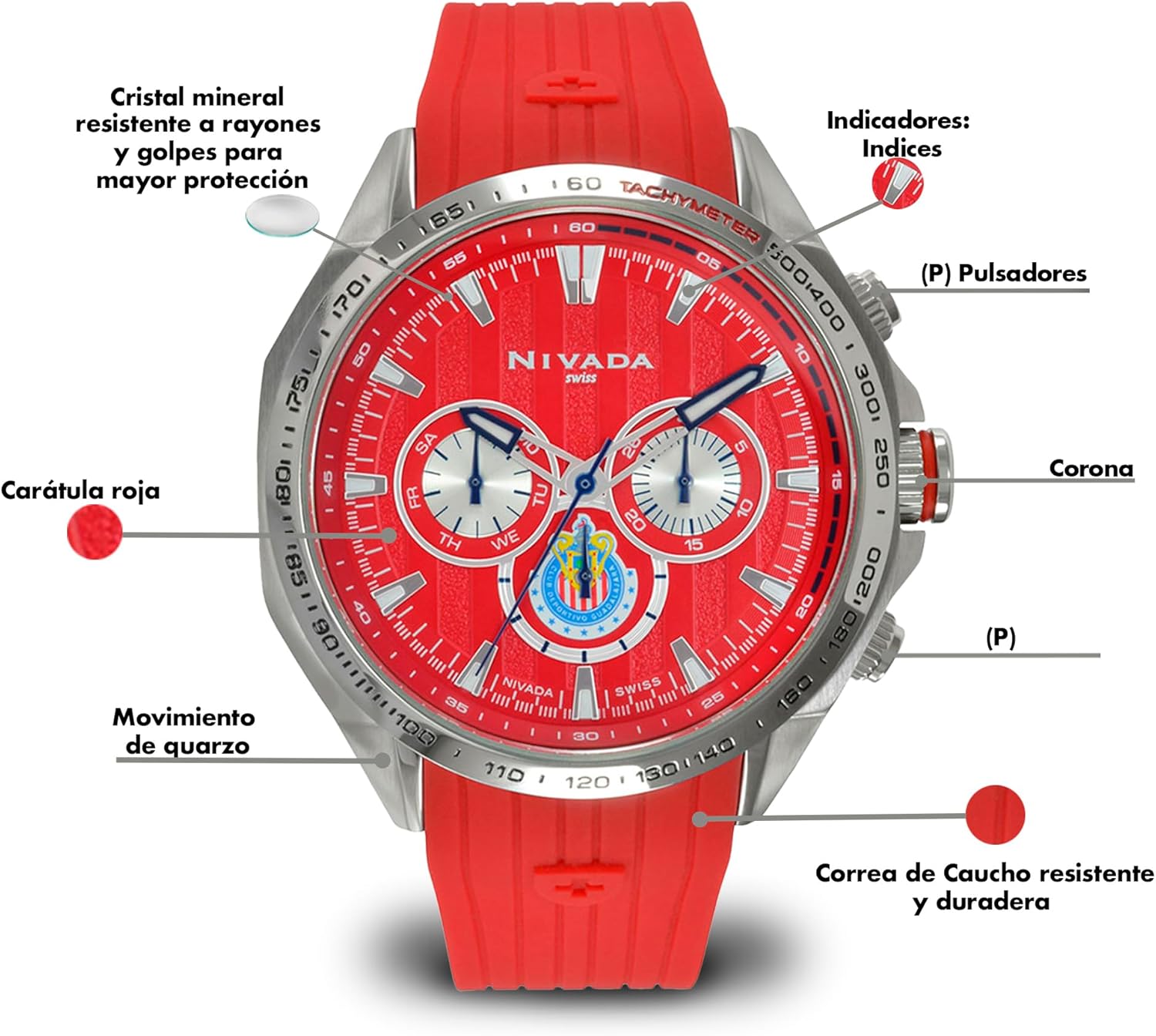
Front View Components:
- Mineral Crystal: Resistant to scratches and impacts, providing enhanced protection for the dial.
- Indices: Hour markers on the dial.
- Pushers (P): Buttons used to operate the chronograph functions.
- Crown: Used for setting time and date.
- Red Dial: The main face of the watch, featuring the Chivas Collection design.
- Quartz Movement: The internal mechanism that powers the watch, known for accuracy.
- Durable Rubber Strap: A resistant and long-lasting strap for comfortable wear.

Side View Components:
- Chronograph: A stopwatch function integrated into the watch. The term "chronograph" literally means "time writer" and refers to a wristwatch with a stop function.
- Bezel: The ring surrounding the watch crystal.
- Pushers (P): Buttons for chronograph operation.
- Crown: For time and date adjustments.
- Durable Rubber Strap: The resistant and long-lasting strap.

Back View Components:
- Water Resistance 5 ATM: Indicates the watch is water resistant up to 50 meters.
- Chivas Logo: Engraved logo of the Chivas football club.
- Model Number NP17312GDL: Unique identifier for your watch model.
- Durable Rubber Strap: The resistant and long-lasting strap.
Setup
Setting the Time
- Pull the crown out to the second click position.
- Turn the crown to set the hour and minute hands to the desired time.
- Push the crown back into the normal position.
Setting the Date (if applicable)
If your watch features a date display:
- Pull the crown out to the first click position.
- Turn the crown clockwise or counter-clockwise (depending on the model) to set the date.
- Push the crown back into the normal position. Avoid setting the date between 9 PM and 3 AM, as this can interfere with the automatic date change mechanism.
Strap Adjustment
The rubber strap can be adjusted for a comfortable fit. If professional adjustment is required, please consult a qualified watch technician.
Operating Instructions
Using the Chronograph Function
Your watch is equipped with a chronograph (stopwatch) function.
- Start: Press the upper pusher (P) to start the chronograph. The chronograph second hand will begin to move.
- Stop: Press the upper pusher (P) again to stop the chronograph. The elapsed time will be indicated by the chronograph hands.
- Reset: After stopping the chronograph, press the lower pusher (P) to reset all chronograph hands to their zero positions.
Note: Do not operate the pushers or crown while the watch is submerged in water to maintain water resistance.
Maintenance
Cleaning Your Watch
Wipe the watch case and crystal with a soft, dry cloth. For the rubber strap, you can use a mild soap solution and a soft brush, then rinse thoroughly with clean water and dry completely. Avoid harsh chemicals or abrasive materials.
Water Resistance
Your watch is water resistant up to 50 meters (5 ATM). This means it is suitable for short periods of recreational swimming, but not for diving or snorkeling. Ensure the crown is fully pushed in before any contact with water. Water resistance is not a permanent condition and may decrease over time due to wear and tear or accidental impact. It is recommended to have the water resistance checked periodically by an authorized service center.
Battery Replacement
This watch is powered by a lithium metal battery. When the battery runs low, the watch may stop or the second hand may jump in irregular intervals (End-of-Life indicator). Battery replacement should be performed by a qualified watch technician to ensure proper sealing and maintain water resistance.
Troubleshooting
- Watch not running: Check if the crown is fully pushed in. If the watch still does not run, the battery may need replacement.
- Time inaccuracy: Ensure the crown is fully pushed in. Extreme temperatures or strong magnetic fields can affect accuracy. If the issue persists, professional inspection is recommended.
- Chronograph hands not resetting to zero: This may indicate a need for chronograph hand calibration. Consult a professional watch technician.
Specifications
| Model Number | NP17312GDL |
| Brand | Nivada |
| Movement | Quartz |
| Display Type | Analog |
| Additional Features | Chronograph |
| Water Resistance Depth | 50 Meters (5 ATM) |
| Case Thickness | 6 Millimeters |
| Case Diameter | 2 Centimeters |
| Band Material Type | Rubber |
| Band Width | 2 Centimeters |
| Clasp Type | Tang Buckle |
| Dial Color | Red |
| Band Color | Red |
| Battery Type | 1 Lithium Metal battery (included) |
Warranty and Support
Your Nivada Swiss Watch is covered by a manufacturer's warranty. Please refer to the warranty card included with your purchase for specific terms and conditions. For technical support, service, or warranty claims, please contact Nivada customer service or visit the official Nivada website. Keep your proof of purchase for warranty validation.
Nivada Official Website: Visit the Nivada Store on Amazon


