
CV VCU86
Cerwin-Vega VCU86 6 Channel Bridgeable Amplifier
User Manual
1. Introduction and Safety Information
This manual provides detailed instructions for the proper installation, operation, and maintenance of your Cerwin-Vega VCU86 6 Channel Bridgeable Amplifier. Please read this manual thoroughly before attempting to install or operate the amplifier to ensure optimal performance and safety.
Important Safety Precautions:
- Always disconnect the vehicle's battery negative terminal before any installation or wiring.
- Ensure proper grounding to prevent electrical hazards.
- Install a fuse/circuit breaker within 18 inches of the car battery for the main power wire.
- Do not expose the amplifier to moisture or extreme temperatures.
- Consult a professional if you are unsure about any installation steps.
2. Product Overview
The Cerwin-Vega VCU86 is a high-efficiency 6-channel full-range digital amplifier designed to deliver powerful and clear audio. Its compact and sleek design allows for seamless installation, while its bridgeable capability offers flexibility for various audio system configurations, including 3-way systems.

Figure 2.1: Top view of the Cerwin-Vega VCU86 amplifier, showcasing its black casing with red accents and the Cerwin-Vega logo.

Figure 2.2: Angled view of the Cerwin-Vega VCU86 amplifier, highlighting its compact form factor and ribbed top surface.
3. Setup and Installation
Proper installation is crucial for the performance and longevity of your amplifier. Ensure all connections are secure and correctly polarized.
3.1 Power Connections

Figure 3.1: Rear panel of the VCU86 amplifier, displaying the power input terminals (+12V, REMOTE, GND) and speaker output terminals (CH1-CH6).
- +12V (Power): Connect this terminal directly to the positive (+) terminal of the car battery using a heavy gauge power cable. As indicated on the amplifier, you MUST install a fuse/fuse holder within 18 inches of the car battery.
- REMOTE (Remote Turn-On): Connect this terminal to the remote turn-on output of your head unit. This signal turns the amplifier on and off with your car's audio system.
- GND (Ground): Connect this terminal to a clean, unpainted metal surface of the vehicle's chassis. Ensure a solid, low-resistance connection.
3.2 Speaker Connections
Connect your speakers to the appropriate channel outputs (CH1-CH6). Pay attention to polarity (+ and -) for each speaker. The VCU86 is bridgeable, allowing you to combine channels for higher power output to specific speakers (e.g., subwoofers). Refer to the wiring diagram for bridging configurations (not provided, but implied by "bridgeable").
3.3 Input Connections
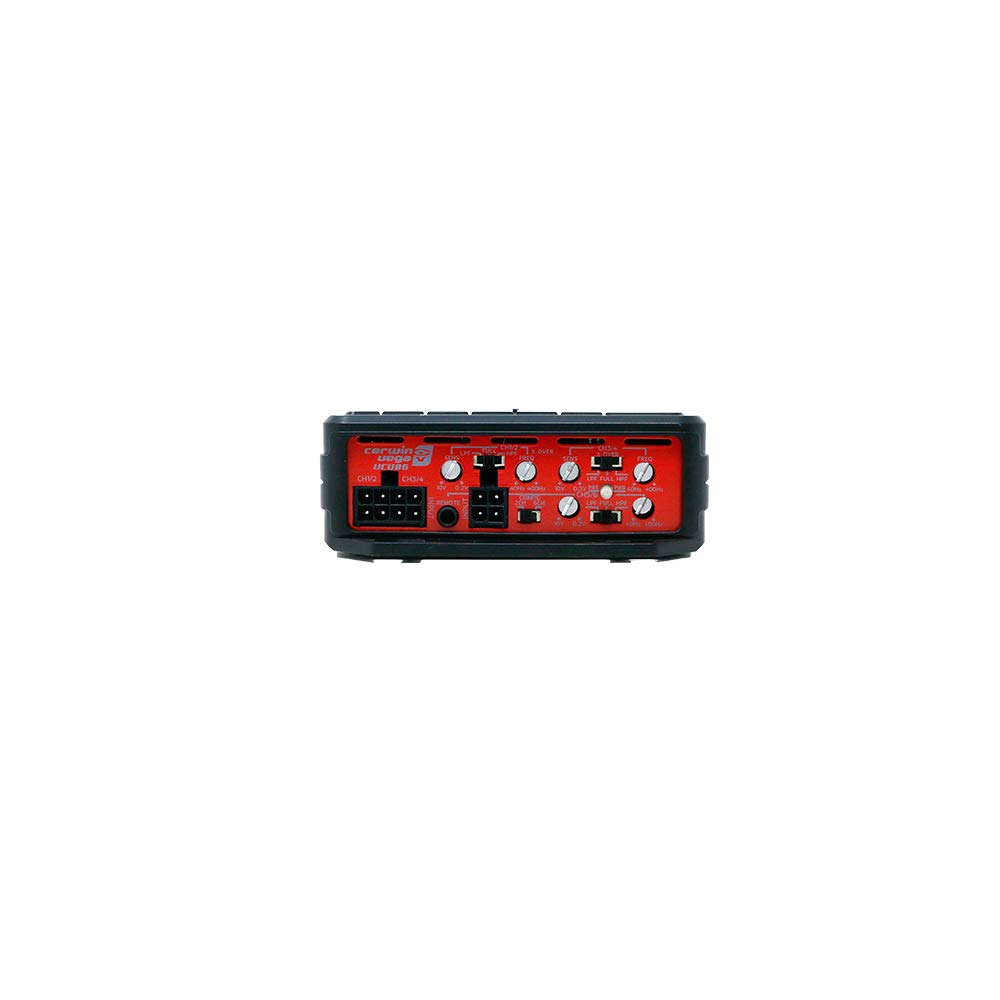
Figure 3.2: Front panel of the VCU86 amplifier, showing RCA input jacks, gain controls, crossover switches, and other audio adjustments.
Connect your head unit's RCA outputs to the amplifier's RCA input jacks (CH1-CH6). Ensure correct channel assignment for your audio setup.
4. Operating the Amplifier
Once installed, the amplifier can be fine-tuned for optimal audio performance.
4.1 Gain Adjustment
The gain controls (visible in Figure 3.2) match the amplifier's input sensitivity to the output voltage of your head unit. Start with the gain set to minimum and slowly increase it until you achieve clear, undistorted sound at your desired maximum volume level from the head unit.
4.2 Crossover Settings
The VCU86 features built-in crossover filters (e.g., Low Pass Filter (LPF), High Pass Filter (HPF), Full Range). Adjust these settings based on the type of speakers connected to each channel to ensure they only reproduce the frequencies they are designed for. This improves sound quality and protects your speakers.
4.3 Remote Bass Control (Optional)

Figure 4.1: Example of a remote bass control knob, which may be included or compatible with the VCU86 amplifier for convenient bass level adjustment.
If your amplifier package includes a remote bass control knob, connect it to the designated port on the amplifier. This allows for convenient adjustment of the bass level from the driver's seat.
5. Maintenance
Your Cerwin-Vega VCU86 amplifier requires minimal maintenance to ensure long-term performance.
- Keep the amplifier clean and free from dust and debris. Use a soft, dry cloth for cleaning.
- Ensure adequate ventilation around the amplifier to prevent overheating. Do not block cooling fins.
- Regularly check all wiring connections for tightness and corrosion.
6. Troubleshooting
If you experience issues with your amplifier, refer to the following common troubleshooting steps:
| Problem | Possible Cause | Solution |
|---|---|---|
| No Power / Amplifier Not Turning On | Blown fuse, loose power/ground/remote wire, faulty remote turn-on signal. | Check fuse near battery. Verify all power, ground, and remote connections are secure and receiving proper voltage. |
| No Sound Output | Loose RCA cables, incorrect gain settings, speaker wires disconnected, amplifier in protection mode. | Check RCA connections. Adjust gain. Verify speaker wire connections. Check amplifier status indicator (if available). |
| Distorted Sound | Gain set too high, incorrect crossover settings, poor speaker connection, damaged speaker. | Reduce gain. Adjust crossover settings. Inspect speaker wiring and speakers for damage. |
| Amplifier Overheating | Insufficient ventilation, impedance too low, prolonged high volume use. | Ensure proper airflow around the amplifier. Check speaker impedance. Reduce volume or allow amplifier to cool. |
7. Specifications
Key technical specifications for the Cerwin-Vega VCU86 amplifier:
- Model Number: VCU86
- Brand: CV
- Number of Channels: 6
- Topology: Full-Range Digital
- Voltage: 10 Volts (DC) (Operating Voltage Range)
- Mounting Type: Surface Mount
- Bridgeable: Yes
- First Available: January 29, 2021
8. Warranty and Support
For warranty information and technical support, please refer to the official Cerwin-Vega Mobile website or contact their customer service department. Keep your proof of purchase for warranty claims.
For further assistance, you may visit the CV Store on Amazon.
Related documentsVCU86


Ask a question about this manual
Ask about setup, troubleshooting, compatibility, parts, safety, or missing instructions. Manuals+ will review the question and use this page’s manual context to help answer it.